This thread has been locked.

If you have a related question, please click the "Ask a related question" button in the top right corner. The newly created question will be automatically linked to this question.

XDS560V2 STM LAN Emulator, Target T1814x. Connection issues.

Good morning,

I wondered if anyone could please help me with the following issue, when pressing the "Test Connection" button on the new target configuration screen I get the following output:

[Start]

Execute the command:

%ccs_base%/common/uscif/dbgjtag.exe -f %boarddatafile% -rv -F inform,logfile=yes -S pathlength -S integrity

[Result]


The [-d/-f] or [-X] options were not used.
This utility requires an emulator program or adapter file.
The board configuration file either did not name it at all,
or the named file was not found or lacked read permission.

The features of this utility are explained in the
[-h] option's brief help and the documentation.

[End]

I've tried searching the forum to no avail. Anyone got any leads?

Thanks a lot,


Mark

  • Mark,

    Quite interesting. It seems the parameter %boarddatafile% was either not created nor being properly recognized by the tool.

    Can you make sure a valid IP address for the emulator was properly set in the target configuration editor? If no address is specified, it is possible the tool is unable to create a test board file.

    Also, can you check if the board data file has proper permissions and is accessible by the tool? Browse to its location (as indicated in this section) and see if the file exists and is writeable or user-accessible.

    At last, I would inspect if the emulator can be properly accessed via Spectrum Digital's Sd560v2Cnfg utility. It will not only help finding the correct IP address of the emulator, but also verify if it can be accessed from the host computer.

    Hope this helps,

    Rafael

  • Thank you for the response,

    It is indeed a valid IP address and the Sd560v2Cnfg utility does see the probe. So I took your advice and searched in my .TI folder for the board file. There is a testBoard.dat  but I can not find the ccBoard0.dat the help files mention.

    This certainly seems like the cause of the issue, how would I go about getting these board files back?

    Best Regards,

    Mark

  • desouza,

    I tried a full reinstall and still no victory.

    Thanks,

    Mark

  • Mark,

    I am not sure why the Test Connection button is not working for you. Let me ask, though: are you able to launch the debugger even with the Test Connection utility not working?

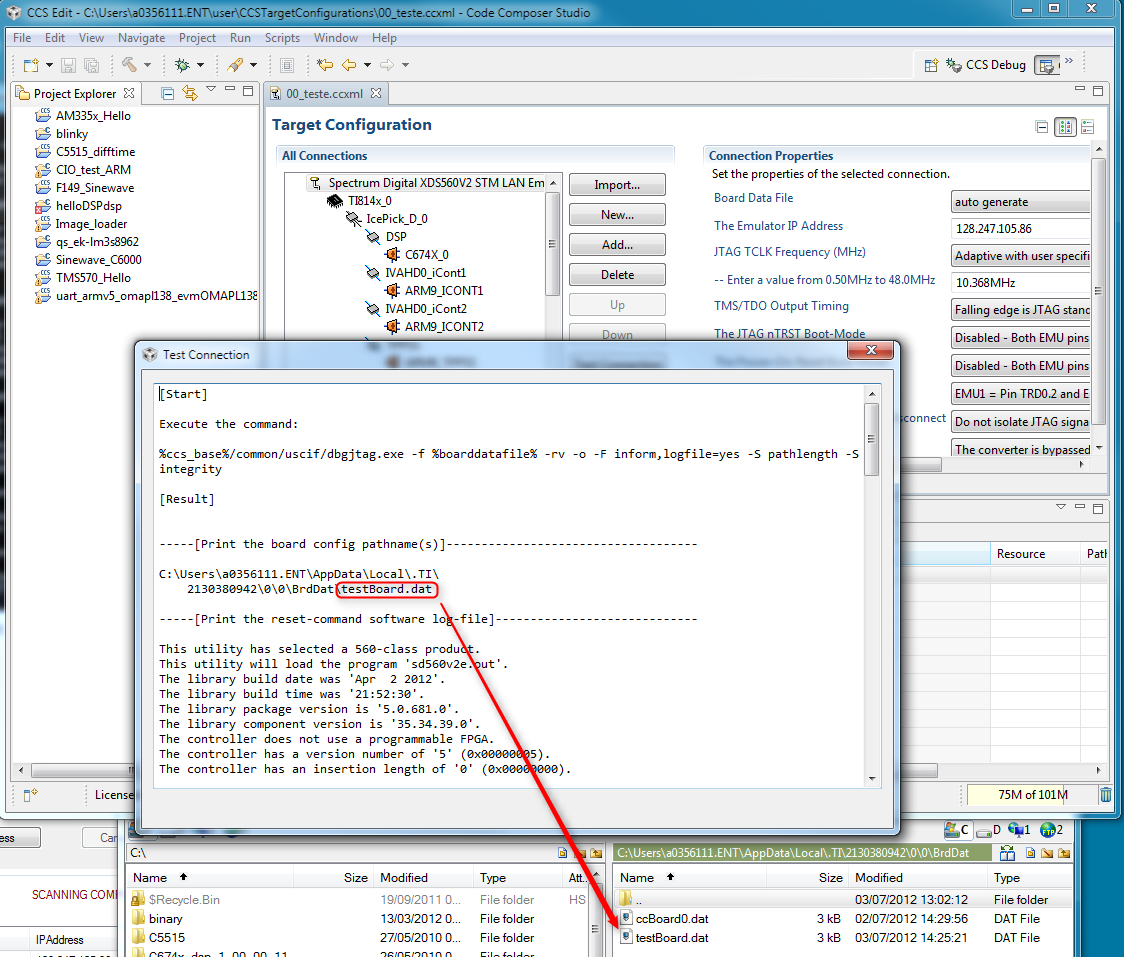
    The reason is because I noticed the file <testboard.dat> is in fact the one used by the Test Connection utility (check the screen below). The <ccBoard0.dat> is used by the debugger and is created when it is launched from inside CCS. If you see the former but not the latter, then can you try to launch the debugger and see if the file is created?

    If the debugger fails to launch as well, I would suspect the directory is somehow locked/corrupted... Can you try to move (not delete) the CCS temporary directory starting at the .TI? All the temporary data will be re-created at the next launch of CCS, thus allowing a cleaner startup.

    Another less probable scenario is the workspace influencing this; you can always create a new workspace, since some of the debugger information is stored on its internal files.

    Apart from this, I really do not have much more ideas on what may be happening... What is the OS and CCS version used?

    Regards,

    Rafael

  • Rafael,

    Thanks for the brilliant response.

    For future readers, the issue was my "C:\Documents and Settings\<USERNAME>\Local Settings\Application Data\.TI" directory, it was broken or otherwise not working. So I backed up the folder, deleted it and restarted CCS.

    Upon restarting the Debug probe then worked.

    Mark