This thread has been locked.

If you have a related question, please click the "Ask a related question" button in the top right corner. The newly created question will be automatically linked to this question.

CCS 5.2 Documentation


Is there, anywhere, a consolidated list of documents that may help me understand and use the CCS 5.2 IDE?  It seems like a great platform, but there are literally hundreds of set-up parameters and switches available with if and I've not been able to find any docs that explain what each switch/parameter is for and where it's located in the menu tree.  

I found SLAU131E document only by accident while trolling though the postings here.

An example:  in order to do an MSP430 assembly using CCS 5.2, I have to change one parameter from "elf" to "coff" -- but I have no idea what "elf" is, or "coff" are -- nor any document that tells me where to find this critical parameter in the menu tree. 

I suspect that the documentation is there somewhere, and I just haven't been able to find it.  But in the meantime, setting up CCS is largely a matter of trial-and-error.

Without a little more documentation, the instructions in the assembler manual (discovered while trolling this site) for generating (for example) an absolute listing file might as well be written in Navaho for me.  No idea where to put all those commands and option keys.  And I dearly would like to have a listing of my codes showing absolute addresses!  (PS:  the help system is no help on generating such a listing).

Sorry for the whine.  Any pointers to docs would be hugely appreciated.

  • I would suggest reviewing the material found on the processor wiki site.

    http://processors.wiki.ti.com/index.php/Category:Code_Composer_Studio_v5

    The code generation tools information is hosted here.

    The specific manuals for the code generation tools are found here.

  • Thanks for the helpful reply.  I think I've scanned most of the documents you kindly provided links to, but I've not been able to find anything that will guide me to produce an absolute listing file, for example.  I see the explanation in the Assembly Language User's Guide (SLAU131g) -- but no guidance as to where the commands involved are supposed to be inserted into the CCS IDE. 

    But that's my problem, and I do thank you for your prompt and helpful reply.

  • Hi Curt,

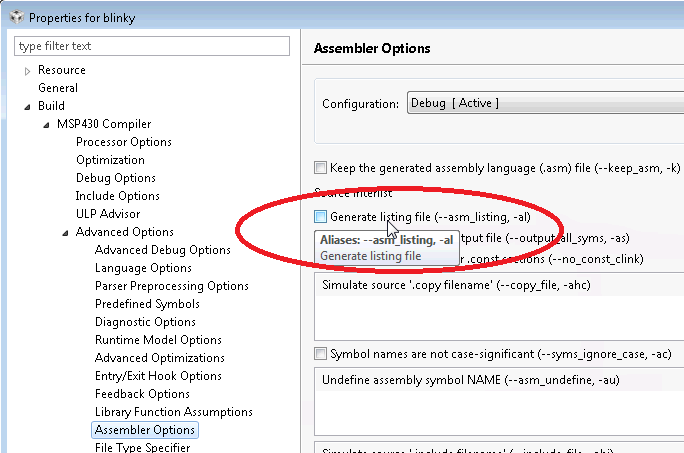
    The options are available in the project build properties (right-click on project and select 'properties' in the context menu). From there you will have to dig a bit to find the option you want. Initially it takes some time to get used to where the option you are looking is. For the option to generate a listing file with CCS:

    Note that there is tooptip help when you hover over a option. It should give you a description of the option, some with some pretty good descriptions.

    Hope this helps,

    ki

  • Thanks for the help Ki-Soo.

    I'm able to generate a listing OK -- the problem is that it's not an "absolute listing" as described in the section of that name in the Assembly Language Users Guide (SLAU131G).   The absolute listing should show absolute addresses after the link step, where the listing created by the option in the Properties > Advanced Options > Assembler Options menu shows relative addresses (before linking).

    I can get by without the absolute listing -- but I hate being unable to follow the instructions provided in SLAU131G!   It's a pride thing, I think :-)

    Thanks again for the help.  I'll revisit the Properties menu and see if I've been missing anything.


  • The assembler cannot show "absolute" addresses because it produces relocatable object code.  The linker normally produces a map of the load- and run-time addresses (which may be different) for all external symbols, which is usually sufficient for practical purposes such as debugging.

  • Douglas Gwyn said:
    The assembler cannot show "absolute" addresses

    Yes, I know that Douglas -- I've been doing this stuff since the TMS1000 days and have some basic understanding.  But if you look in the Assembly Language Users Guide (SLAU131g) you'll find a chapter devoted to generating an absolute assembly listing.  So it seems that such a listing can be generated -- after linking and during during the post-build step. 

    To accomplish this though, you need to enter some commands as described in the guide, and I've not been able to find any documentation that explains how one enters these commands.   Perhaps you can explain how to go about this to me?

    Thanks

  • Curt,

    Although I have also searched through the CCS options, I haven't found yet the magic buttons to produce the absolute assembly listing. Probably these options have been 'forgotten' in the evolution of the CCS versions.  Nevertheless you can produce the requested absolute assembly listings in the old fashioned command line sequences. I have done this for the C2000 but it should also be possible for the MSP 430.

    The steps are:  

    1. Set the assembler option to "keep the generated assembly language files"

    2. Compile, assemble and link the project as usual  to produce a *.out file

    3. use a command line prompt and start the program "abs2000.exe" (or, in your case abs430.exe) with the options explained in the user guide, e.g.: abs2000.exe name.out

    (This step will produce a series of  *.abs - files, one for each of the source (*.asm) files)

    4. at the DOS-prompt, enter:  cl2000 -v28 --float_support=fpu32 --absolute_listing name.abs  (name and parameter options will be different for the MSP430)

    ("name.abs" stands for each of the abs-files from step3)

    As a result you get a file "name.lst" which is the absolute assembly listing file.

    Regards

    Frank Bormann


    @TI:  any chance to add these functions into CCS in the future?


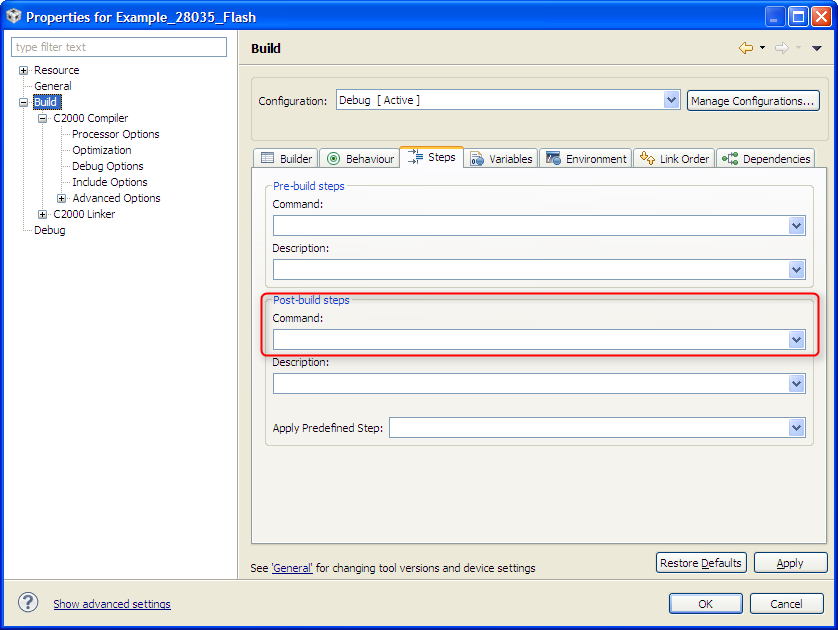
  • As Frank mentioned, these steps can still be run, although not currently integrated into CCS.  However, there is a way to add these steps into the build flow without forcing you to "remember" to do them.

    CCS has a provision to perform "Pre-build steps" and "Post-build steps".  You could add the above commands into a batch file and then have CCS call that batch file in the "Post-build steps" section.  You can access this by going to Project->Properties, selecting the Build category on the left window pane and then select the "Steps" tab on the right window pane.


    Frank Bormann said:

    @TI:  any chance to add these functions into CCS in the future?

    I''m not on the CCS development team, therefore I can't comment.

  • Frank:

    Thanks -- that's very helpful.  I haven't had a chance to try it in detail yet -- but you've given me a starting point and I think I can find my way from there.

    I can certainly imagine that it's a HUGE job to try to keep all the documentation synchronized!

    For anyone that should happen to follow this struggle later:  the abs.exe program that Frank refers to in his step-by-step guide can be found in the  folder                           ccsV5\tools\compiler\_4.1.0\bin

  • Thank you Brandon.  I'll give putting the commands in the post-build steps a try once I have the basic process working.