This thread has been locked.

If you have a related question, please click the "Ask a related question" button in the top right corner. The newly created question will be automatically linked to this question.

DSP/BIOS memory map


I can't figure out how to replace/override the default memory map created when building a simple DSP/BIOS project.  I'm using my own c6678 board and I can only seem to get the EVM memory map.  I've tried creating my own RTSC(many times) but I can never seem to link to it.  Is there a tutorial that actually works using CCS5?  I found a couple demos:  http://rtsc.eclipse.org/docs-3.16/Demo_of_Customizing_Memory_Sections but they aren't quite the same.  I have to play around quite a bit to find the same options and think I'm properly creating my own platform. But now I can never seem to figure out how to use that platform in my project.

  • Ideally I'd like to convert my generic project to SYS/BIOS if that is possible but I'd be happy to create a fresh project as well as long as I can get a different memory map setup.

  • Hi Robert,

    I didn't found a tutorial on how to this in CCS 5, but it's quiet similar to CCSV 4. And based on the TI's tutorial you can do it like this:

    File -> New -> Other or type Ctrl + N


    Then choose RTSC -> New RTSC Platform

    You can also do that  while you're in the Debug perspective in the Tools menu:

    Tools -> RTSC Tools -> Platform ->New

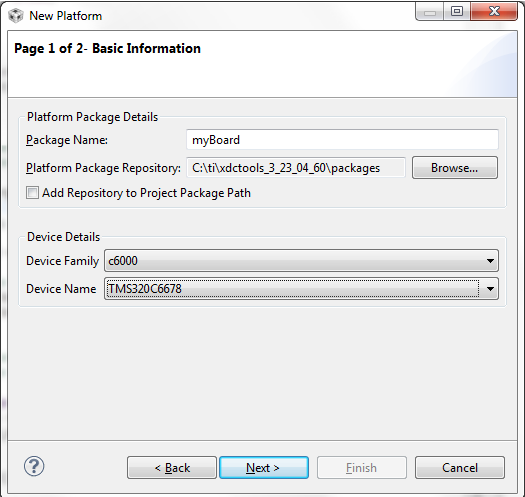
    Click Next and you will see the window like this

    Choose the Package Name, the Platform Repository and Device Family and Name, in this case it's 6678.

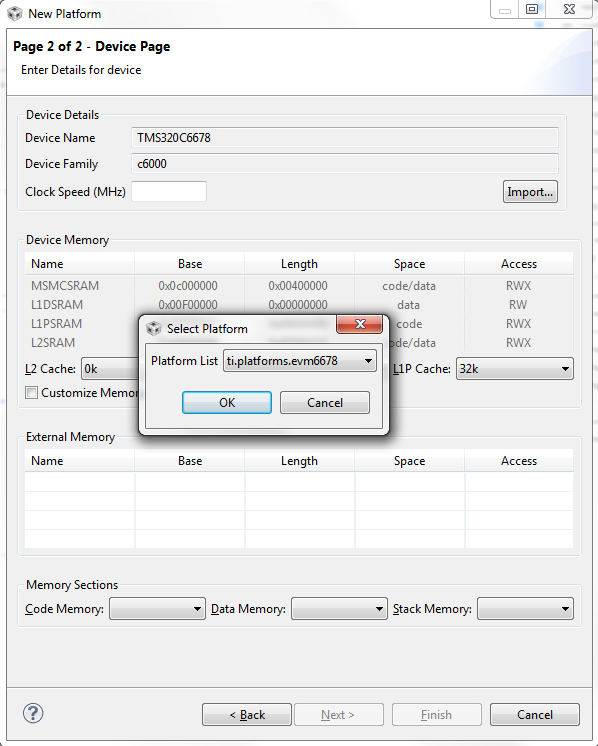
    In the second window I suggest that you import the default platform

    Customize the new platform as you want.


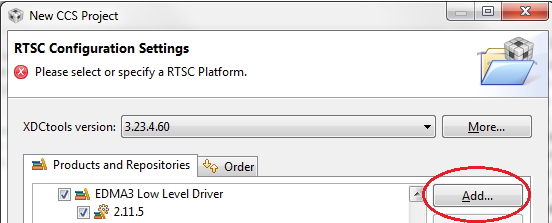
    When you create a new CCS project or if you edit a project that already exists go to the RTSC configuration tab and in 'Product and Repositories' click' Add'

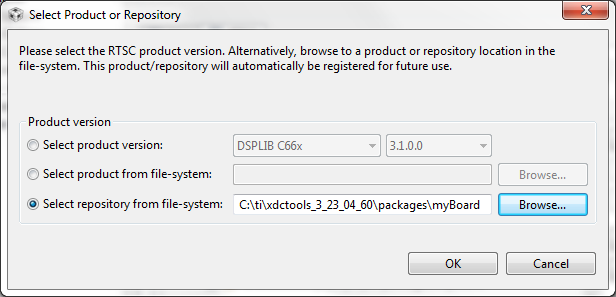
    Choose 'Select repository from file-system' it should be in somewhere like this:


    C:\ti\xdctools_3_23_04_60\packages\myBoard, depending where your XDC tools directory is

    When you click OK and go back to the RTSC configuration you see it in 'Other Repositories' and can choose it in the 'Platform' below

    Click OK and go on with your project normally.

    Hope this is what you're looking for.

    Regards

  • Thanks.  That does indeed work.  In addition I was also trying to replace the entire memory map and it doesn't seem to like that.  I had to remove all but L2SRAM.  I then moved the location and changed the size as well as rename all my cmd file regions to L2SRAM.  Trying to replace it with the naming convention in place was getting weird results.  The old sections kept returning and my new section was somehow moved to external memory.  Now I just need to figure out how to set the boot section.  The compiler is ignoring my boot section directive now that I've added the cfg file to my project.

    boot { -lrts*.lib<boot.obj>(.text) } > 0x10800000 

    now gets me a warning of - "No matching section"

    It also keeps my DSP from booting properly so this must be an important warning.  The boot section is no longer starting at my base address and all the sections have been reordered.

  • Specifically I think the problem is my entry point symbol is moved to an offset that is not the base of my memory region. 

    boot { -lrts*.lib<boot.obj>(.text) } > 0x10800000 is no longer recognized and my entry point is randomly placed.  Anyone know how to specify the entry point when migrating a normal project to sys/bios?

  • I found this post: http://e2e.ti.com/support/embedded/bios/f/355/p/169249/618113.aspx

    In combination with looking at the amp file now generated I found _c_int00 now labeled boot.ae66 : boot.oe66

    Changed my section label to :


    boot > 0x10800000

    { -l boot.ae66<boot.oe66>(.text)}


    And it now works.