This thread has been locked.

If you have a related question, please click the "Ask a related question" button in the top right corner. The newly created question will be automatically linked to this question.

CCSv4 hangs (clandestinely)

Other Parts Discussed in Thread: TMS320F2812

I am trying to use CCSv4.2.4.00033 on a workstation running
Windows 7 Pro, V6.1 (Build 7600). I am experiencing a unique
problem with increasing frequency.

My application is running out of flash on the hardware
target when I have to make changes to the source, and when I
am done I click on 'Project' >> 'Build Active Project' from
the drop-down menu. If there are no build-time errors I get
a dialog box, asking if I want to re-load, to which I
respond with [Yes].

This gives rise to a dialog box:
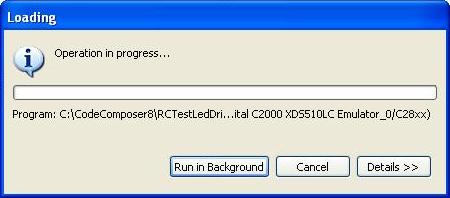
which looks much like the dialog I got when launching the
debug session, except I cannot give it input focus, I cannot
push any of the buttons visible on the screen, I cannot grab
the title bar & move it around; I can only wait until it
goes away and resume my debug session; which is what I did
this time. We wind up with the 'Debug' tab visible and the
green 'Run' arrow is not dimmed, suggesting the debugger is
ready:

I want to stop my application 14 seconds after boot time and
have created an instruction just for this purpose, which is
where I plant my cursor in the source file and enter <Ctl>-R
from the keyboard.  Only when, 14 seconds later, I don't hit the
breakpoint, do I realize something is wrong. I then notice
that the 'Run' arrow is still green, suggesting that <Ctl>-R
did not start it running after all.  I try again and nothing
happens. I click on the 'Terminate All' button to no avail.

Finally I decide to shut down Code Composer completely,
which gives way to a dialog box that winds up looking like
this:
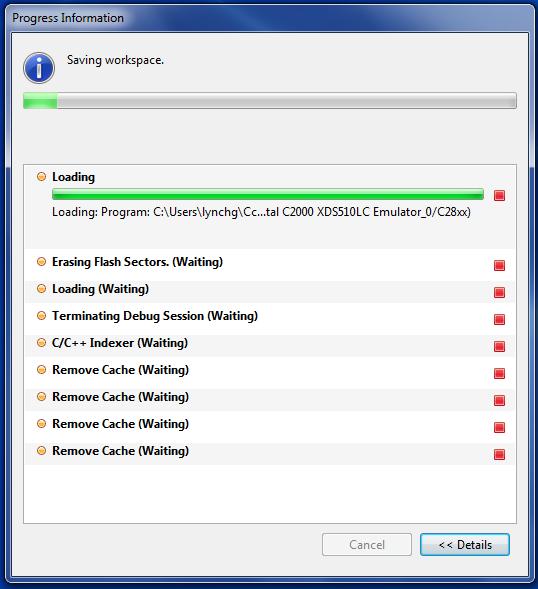
The pattern of red rectangles suggests that we never made it
to debug mode at all, and much of my recent effort was
meaningless.  I want to know:
- Is there a way to force this 'Progress Information' dialog
  box on-screen immediately: not after I terminate the
  application?
- Failing that, is there a way to prevent CCS from
  presenting me with a bogus indication that we are in debug
  mode?
- If anyone is bold enough to propose a solution so this
  never happens at all, that would be ideal.

  • Hi Gary,

    just a thought/one thing I noticed.  In your screenshot it looks like there is a yellow warning/exclamation mark by device.  Is this correct?  What target are you using/do you have selected? How have you set this up.  I am wondering if CCS is having trouble finding the device/specific device as normally in debug mode you will see the target type.

    Best Regards,
    Lisa

  • I can't tell where you're seeing this mark. My original post
    has 3 screenshots, and the second contains the word 'Device'
    with a yellow symbol beside it that is below human
    resolution, even on my original screen. I blew that up to
    see the following:

    which I would never interpret to mean a warning.

    Please elaborate.

  • Hi Gary,

    as a next step I would try to get rid of that as that is certainly a potential cause of your issue.  Could you provide more details on your target and setup/configuration?

    Best Regards,
    Lisa


  • I don't know of a standard way to declare that, but:
    - Target is TMS320F2812. I started development on an ezDsp
      board and copied its memory map when designing my own
      target board (which I have been using since about April). 
      I am not using the off-chip RAM (yet); and my board has
      some different SPI peripherals, some of which I have
      working in test suites, but are not part of this
      application.
    - I am debugging with a Spectrum Digital XDS510LC USB JTAG
      emulator, plugged into my JTAG port.
    - I generated my configuration file with the wizard built
      into CCS.  The server will not let me upload it, so I am
      embedding the content herewith:
      >
      > <?xml version="1.0" encoding="UTF-8" standalone="no"?>
      > <configurations XML_version="1.2" id="configurations_0">
      >
      > <configuration XML_version="1.2" id="Spectrum Digital C2000 XDS510LC Emulator_0">
      >         <instance XML_version="1.2" desc="Spectrum Digital C2000 XDS510LC Emulator_0" href="connections\SD2000USB_Connection.xml" id="Spectrum Digital C2000 XDS510LC Emulator_0" xml="SD2000USB_Connection.xml" xmlpath="connections"/>
      >         <connection XML_version="1.2" id="Spectrum Digital C2000 XDS510LC Emulator_0">
      >             <instance XML_version="1.2" href="drivers\sdgo28xusb_xds510lc.xml" id="drivers" xml="sdgo28xusb_xds510lc.xml" xmlpath="drivers"/>
      >             <platform XML_version="1.2" id="platform_0">
      >                 <instance XML_version="1.2" desc="EZDSPF2812_0" href="boards\eZdspF2812.xml" id="EZDSPF2812_0" xml="eZdspF2812.xml" xmlpath="boards"/>
      >             </platform>
      >         </connection>
      >     </configuration>
      > </configurations>
      >

    Did I miss anything?

  • Just to catch me up, what is the "that" which we are getting
    rid of?

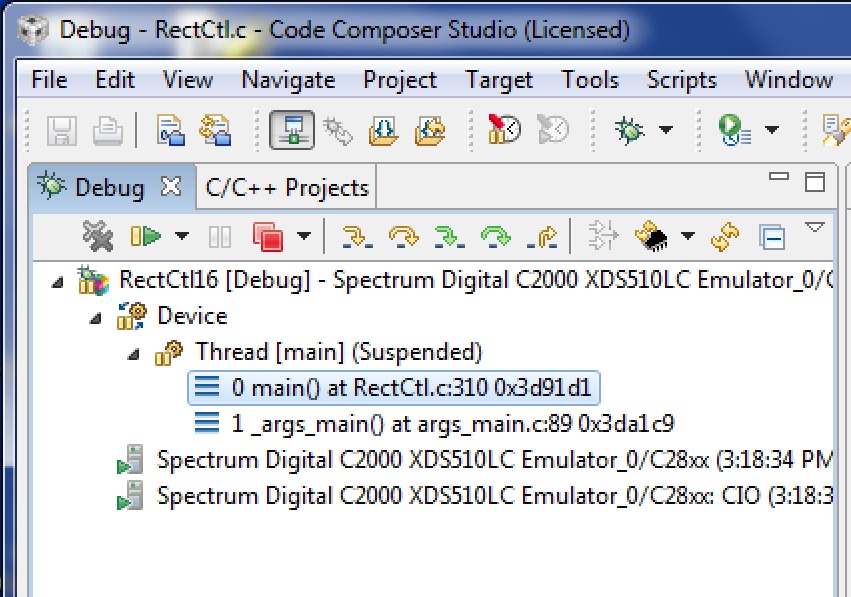
  • Code Composer is going out to lunch often enough now I was
    able to capture a screen shot of it in the state where the
    debugger looks alive, but isn't:

    I then shut the whole app down and started over until I got
    it back in the ready-to-debug state:

    Doing a pixel-by-pixel compare the only difference I see is
    that under the
      "Thread [main](Suspended)"

    string there is only one line instead of two and the legend:
      "0 main() at RectCtl.c:310 0x3d91d1"

    has changed to:
      "0 <symbol is not available> 0x3ffc02"

    I looked those numbers up and according to my .map file
    0x3d91d1 represents the starting address of _main, whereas
    --according to SPRU095C, "TMS320x281x DSP Boot ROM Reference
    Guide", p. 12--0x3ffc02 is an address inside the CPU vector
    table that is never used.

    This difference is significant enough I can avoid making
    this mistake again.

    It still wouldn't hurt to know what is going on in there,
    however, and how to stop it from wasting my time several
    times a day.