This thread has been locked.

If you have a related question, please click the "Ask a related question" button in the top right corner. The newly created question will be automatically linked to this question.

CCSv5 - .tcf Compile Problem


Hi,

I installed CCSv5.2.1.00018 on two computers. PC1: Win7 - 32 bit, PC2: WinXP - 64 bit. To test CCS, I created a BIOS - Hello World example. Compilation was successful on PC2. However, compilation failed on PC1. At the beggining, .tcf fail didn't compiled correctly.

According to attached logs, I think that CCS doesn't call tconf correctly. It calls tconf in batch mode but doesn't supply .tcf file as a parameter.

tconf call by CCS on PC1:

"D:/ti/xdctools_3_23_03_53/tconf" -b -Dconfig.importPath="D:/ti/bios_5_41_13_42/packages;"

tconf call by CCS on PC2:

"D:/ti/xdctools_3_23_03_53/tconf" -b -Dconfig.importPath="D:/ti/bios_5_41_13_42/packages;" "../hello.tcf"

Apparently, CCS on PC1 forgets to say which .tcf file will be compiled. When I run complete command called by CCS - PC2, on PC1 using Windows Command Shell, I don't get any error.

Thank you.

Best Regards

Alper

PS: I didn't change any settings of CCS after fresh install on both computers. After that problem, I tried to uninstall/install CCS on PC1 but it didn't work.

**** Build of configuration Debug for project hello_world_bios ****

D:\ti\ccsv5\utils\bin\gmake -k all 
'Building file: ../hello.tcf'
'Invoking: TConf'
"D:/ti/xdctools_3_23_03_53/tconf" -b -Dconfig.importPath="D:/ti/bios_5_41_13_42/packages;"
D:\ti\xdctools_3_23_03_53\D:/ti/xdctools_3_23_03_53/tconf: batch mode specified but no script file was supplied.
usage: tconf [-b] [-g[=<opts>]] [-p <dir>] [-D<name>=<value>] [-js <js options ...>] [script [args ...]]
    Options:
	-D<name>=<val>	define the symbol <name> with the string value <val>
	-g[=<opts>]	use graphical debugger to run script, and 
			optionally pass <opts> to debugger
	-h		display this message
	-js		pass all subsequent options to Configuration Shell
	-p <dir>	add <dir> to tconf search path

	Configuration Shell Options:
	    -f <file>	execute <file> prior to executing script
	    -w		enable warning messages

	Graphical Debugger Options:
		-i	break at the first line of the startup script
gmake: *** [hellocfg.cmd] Error 1
gmake: Target `all' not remade because of errors.

**** Build Finished ****

**** Build of configuration Debug for project hello_world_BIOS ****

D:\ti\ccsv5\utils\bin\gmake -k all 
'Building file: ../hello.tcf'
'Invoking: TConf'
"D:/ti/xdctools_3_23_03_53/tconf" -b -Dconfig.importPath="D:/ti/bios_5_41_13_42/packages;" "../hello.tcf"
'Finished building: ../hello.tcf'
' '
'Building file: ../hello.c'

  • Alper,

    What target device did you select when creating the project? I haven't seen this error before and couldn't reproduce it either.
    Can you attach the project that has problems on PC1 here so I can check if teh build error is reproducible at my end?

  • Hi AartiG,

    I attached the project that has problems on PC1. I am using OMAPL137 EVM Board.

    4353.pc1_not_working_project.zip

    Regards,

    Alper

  • Alper,

    Thank you for attaching the project. First I imported the project into my CCS 5.2.1 and built it without any errors. Looking at the command line output you sent earlier I noticed that the hello.tcf was not being passed to the tconf command. I opened the file subdir_rules.mk in the \Debug directory of the project you sent and confirmed that indeed the parameter to tconf was indeed not getting passed.

    hellocfg.cmd: ../hello.tcf
     @echo 'Building file: $<'
     @echo 'Invoking: TConf'
     "D:/ti/xdctools_3_23_03_53/tconf" -b -Dconfig.importPath="D:/ti/bios_5_41_13_42/packages;"
     @echo 'Finished building: $<'
     @echo ' '

    In the correct version it should look like this:

    "D:/ti/xdctools_3_23_03_53/tconf" -b -Dconfig.importPath="D:/ti/bios_5_41_13_42/packages;" " "$<"

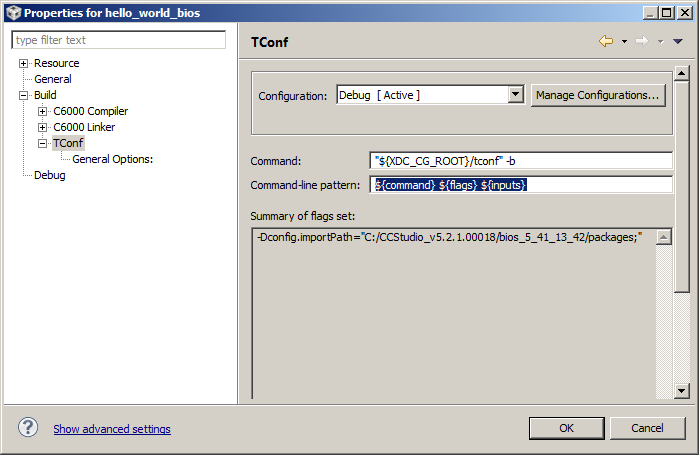
    Go into Project Proerties->Build->Tconf and make sure the Command-line pattern says:
    ${command} ${flags} ${inputs}

    I suspect the ${inputs} is missing in your case, but I'm not sure how it could have happened.

    Let us know if this helps.


  • Hi AartiG,

    Thank you for your interest.

    I checked the TConf settings and there is no difference between your settings and mine. Also there is no difference between settings of PC1 and PC2.

    Somehow CCS insists on not passing .tcf file as parameter. Thereofre, I can't compile any project that uses BIOS.

    How should I proceed?

    Thanks...

    Regards,

    Alper

  • Any other suggestions?

  • Hi,

    I figured out the problem. tconf doesn't work properly when regional settings of PC are different than US. Lanugage of my computer is set to Turkish and "," is used as decimal point. Most probably, CCS can't correctly parse parameters since they have ", . ;" characters.

    I encountered problems due to language settings when using CCS3.3. CCSv4 is fine with Turkish. It is surprising to encounter problems due to language after CCSv4 which works fine.

    Regards,

    Alper