This thread has been locked.

If you have a related question, please click the "Ask a related question" button in the top right corner. The newly created question will be automatically linked to this question.

GEL files in CCS v5.2


Hi,

I am reading through Chassaing's book about using the C6713 and it talks about CCS v3.1. Many of the examples talk about writing GEL files. The CCS v5.2 UI does not have the menu options necessary for me to follow along with the book.

Are GEL files still relevant in CCS v5.2?

If yes, where can I learn about writing GEL files for CCS v5.2 ?

Thanks,

John

  • John,

    This is not a device question, so instead of being in the C67x Single Core DSP Forum, this will be moved to the Code Composer Forum where it will get the best quality of answer.

    Honestly, I always have a hard time remembering how to get to the GEL files access window in CCSv5.2. And the interface with the box where you can write individual commands is gone. But you can still write any GEL files and use menuitem and hotmenu for putting commands under the Scripts menu item in CCSv5.2. I think you try to find Control Panel, under View or Window->View, and that Control Panel has the Memory Map and GEL Files and some debugger configuration settings.

    The same GEL files from CCS 3.1 will work with CCSv5.2, so there is nothing additional to learn about writing the files themselves. CCSv5 has some good Help files that you can reference for some specific functions.

    Regards,
    RandyP

  • To add some details to Randy's post:

    RandyP said:

    But you can still write any GEL files and use menuitem and hotmenu for putting commands under the Scripts menu item in CCSv5.2. I think you try to find Control Panel, under View or Window->View, and that Control Panel has the Memory Map and GEL Files and some debugger configuration settings.

    The same GEL files from CCS 3.1 will work with CCSv5.2, so there is nothing additional to learn about writing the files themselves. CCSv5 has some good Help files that you can reference for some specific functions.

    Randy is correct. There is a wiki topic on GEL in CCSv4&5 that cover this:

    http://processors.wiki.ti.com/index.php/GEL

    RandyP said:
    And the interface with the box where you can write individual commands is gone.

    You can call GEL commands from the CCS Scripting Console:

    http://processors.wiki.ti.com/index.php/Scripting_Console

    You have to use a DSS API called expression.evaluate (if memory serves me correctly)

    js:> activeDS.express.evaluate("GEL_Halt()");

    Hope this helps

    ki

  • Gents,

    Thanks for the tips. You gave me a lot of sources to read. I appreciate it a lot.

    However, I am still struggling to find out how to execute a UI action from the Chassaing book. I believe I am very close, but after a lot of reading, I still do not understand how to use the scripting console to accomplish what was apparently a menu click action in CCS v3.1.

    How do I accomplish the equivalent of the following instructions?
    Select GEL -> Sine Gain -> Gain

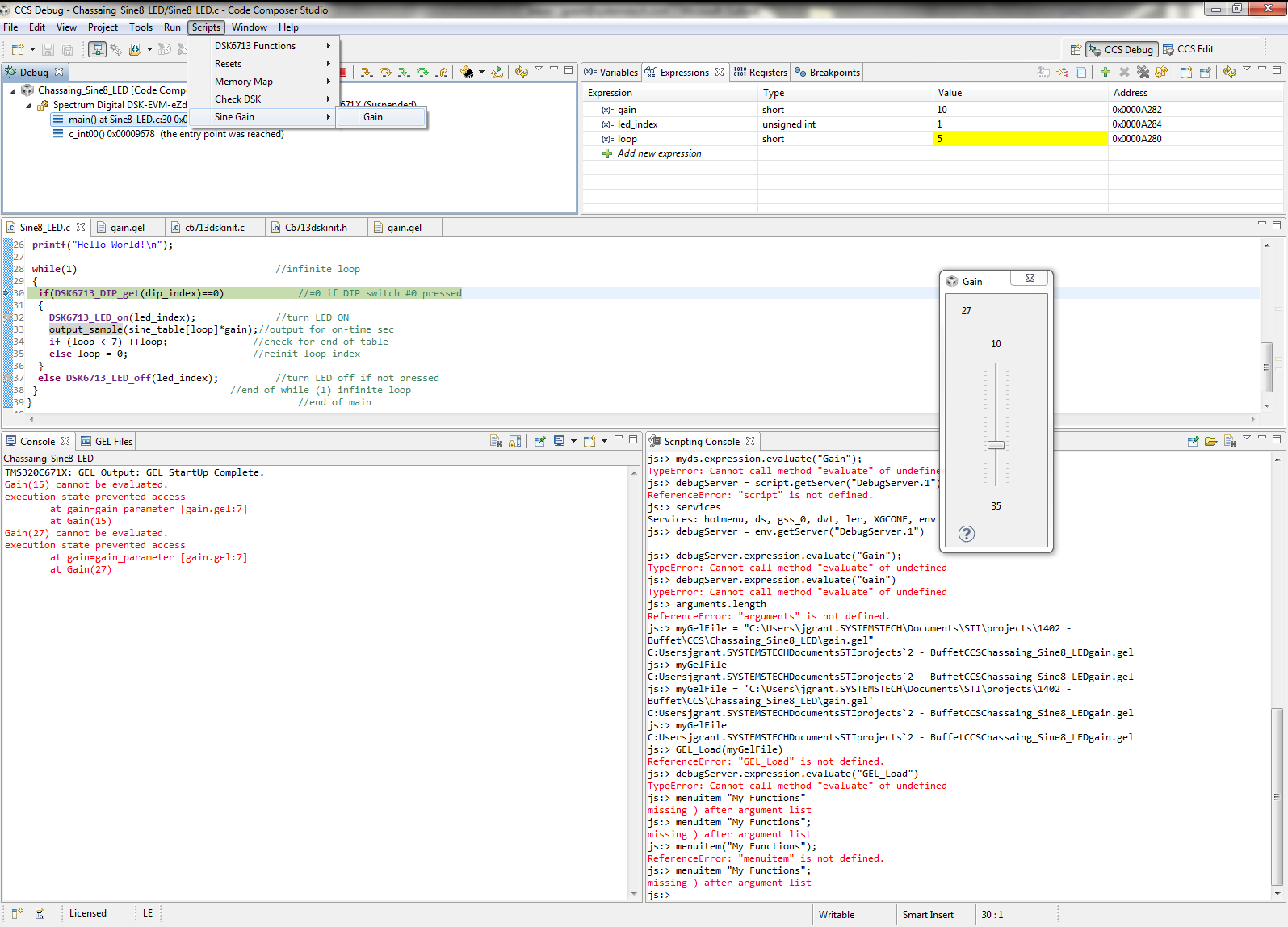
    Below is a screenshot of my debugging session, with the GEL file successfully loaded in the control panel, and the Scripting Console open with some terrible attempts to follow what you suggested. Thank you for any more help.

  • John Grant1 said:
    How do I accomplish the equivalent of the following instructions?
    Select GEL -> Sine Gain -> Gain

    It should appear under the 'Scripts' menu in CCSv5. 'Scripts->Gain'.

    John Grant1 said:
    Below is a screenshot of my debugging session, with the GEL file successfully loaded in the control panel, and the Scripting Console open with some terrible attempts to follow what you suggested.

    To call it from the scripting console, you need to call the actual name of the function, not the name of the hotmenu item. If you open the gel file, you can file the function names.

    Thanks

    ki

  • Amazingly, I found the answer after posting. The GEL wiki page shows the menu item that can be clicked (under Scripts menu on CCS's top toolbar).

    I used the slider to change the value (shown as 27). Then I paused the debug session to see if the slider affected the variable.

    I have a new screenshot of my debugging session. If you look at the value of "gain" (in the Expressions window at the top of the screenshot), gain has a value of 10. Interestingly, when the debug session is paused, interaction with the slider actually affects the value shown, like I would expect.

    Also, when I closed the debug session, I saw an error message. Do you know why I have this error?

  • Hi ki,

    What do you mean by,

    Ki-Soo Lee said:

    If you open the gel file, you can file the function names.

    In my screenshot, I show the opened GEL file. What code will do what you say? I also showed my attempt at scripting, which used the ds.expression.evaluate syntax like you suggested earlier.

    Thank you for your help,
    John

  • John Grant1 said:
    Interestingly, when the debug session is paused, interaction with the slider actually affects the value shown, like I would expect.

    Most target memory accesses (like GEL memory accesses) require the target halted before the memory access can take place.

    John Grant1 said:
    Also, when I closed the debug session, I saw an error message. Do you know why I have this error?

    Could you provide the error log? I think you can get to it from the Window->View->Other->Error (sorry I don't know for sure, I'm out of the office so I don't have CCS install handy)

    Thanks

    ki

  • John Grant1 said:

    "If you open the gel file, you can file the function names."

    In my screenshot, I show the opened GEL file. What code will do what you say?

    Oh I missed that. Sorry. The function is indeed called Gain. But the issue is:

    John Grant1 said:
    I also showed my attempt at scripting, which used the ds.expression.evaluate syntax like you suggested earlier.

    ds is for debug server. Try using activeDS. That is for the active debug session. You need to call that API for the active debug session

    Thanks

    ki

  • Hi ki,

    Thanks for working with me on this. I'll try the 'activeDS' in a minute.

    Here are the "details" from the pop-up error message dialog,
    "An error has occurred. See error log for more details. The function "getGelFiles" returned an error condition  (0x80780001)"

    ...and here is a screenshot of the Window->Show View->Error Log:

  • I have high lighted (in blue) my attempt to use the 'activeDS' as you suggest to launch the GEL slider. I do not understand where this magic variable (activeDS) comes from. Also, the error in the Scripting Console is different than when I tried to use the 'ds' service, which means I am closer to a solution by using 'activeDS'.

    Thank you for the suggestion. Do you know how I can finish the script command to launch the GEL slider? As demonstrated in the screenshot below, this is not working:
    js:> activeDS.expression.evaluate("Gain")
    Error evaluating "Gain": identifier not found: Gain

  • John Grant1 said:
    I do not understand where this magic variable (activeDS) comes from.

    activeDS stands for the current debug session. It is "hidden" because its use was previous discouraged though I feel that should not be the case.

    ds stands for debug server.

    You normally create a debug session instance from a debug server. It is the debug session that you need to communicate to your target. When you start the debugger, ot creates a debug session.

    John Grant1 said:
    Thank you for the suggestion. Do you know how I can finish the script command to launch the GEL slider? As demonstrated in the screenshot below, this is not working:
    js:> activeDS.expression.evaluate("Gain")

    Did you try passing in a parameter for Gain?

  • Ki-Soo Lee said:
    Did you try passing in a parameter for Gain?

    No, I have no idea what the code would look like to do this.

  • Try passing in a parameter to Gain. Like:

    js:> activeDS.expression.evaluate("Gain(5)")

  • I tried a value of '22'.

    js:> activeDS.expression.evaluate("Gain(22)")
    Error evaluating "Gain(22)": identifier not found: gain
        at gain=gain_parameter [gain.gel:7]
        at Gain(22)

    js:> activeDS.expression.evaluate("Gain(10,35,5,1,22)")
    Error evaluating "Gain(10,35,5,1,22)": identifier not found: gain
        at gain=gain_parameter [gain.gel:7]
        at Gain(10, 35, 5, 1, 22)


    Also, the Console window shows this when I physically move the GEL slider:

    Gain(16) cannot be evaluated.
    identifier not found: gain
        at gain=gain_parameter [gain.gel:7]
        at Gain(16)
    Gain(15) cannot be evaluated.
    identifier not found: gain
        at gain=gain_parameter [gain.gel:7]
        at Gain(15)
    Gain(29) cannot be evaluated.
    identifier not found: gain
        at gain=gain_parameter [gain.gel:7]
        at Gain(29)