This thread has been locked.

If you have a related question, please click the "Ask a related question" button in the top right corner. The newly created question will be automatically linked to this question.

CCS 5.3.0: Updates do not work: "confilcting dependency" and " no repository found"

I tried to update the Code Composer Studio v5.3.0.00090 by using the "Check for Updates" menu but this did not work.

My OS: Windows 7 Professional 64 bit.

CCS 5.3.0 is the only CCS version installed on this PC (I uninstalled the previously installed CCS 5.2.0 version before installing CCS 5.3.0).

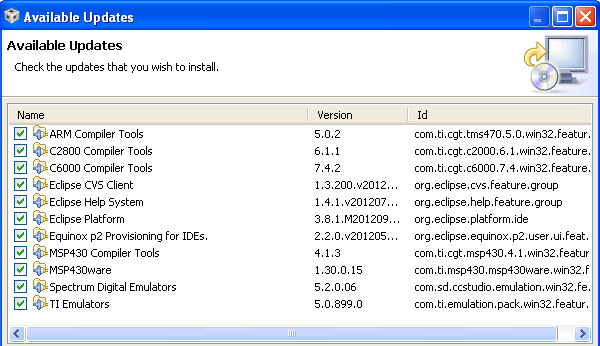
First error was, that the available updates were shown (see the figure below) with the conflict "Cannot complete the install because of a conflicting dependency" because of some conflicting components (here the "Eclipse Help System v 1.4.1" and "Eclipse Platform 3.8.1"). In my opinion this is an error since the automatic update should not select conflicting components.

The problem of conflicting dependency occured also for some other components, e.g. for "Remote System Explorer End-User Runtime" and "Target Management Terminal":

Trying to select the first one produces following conflicting dependency:
Software being installed: Remote System Explorer End-User Runtime 3.4.1........
Software currently installed: Target Management Terminal 3.3.0.....
 
Trying to select the second one produces following conflicting dependency:
Software being installed:  Target Management Terminal 3.3.1........
Software currently installed: Remote System Explorer End-User Runtime 3.4.0.....


Then, I just deselected all components but one ("Autotools support for CDT") and started the update. After a few seconds, I got the following "No repository found containing" error message (see also the figure below):
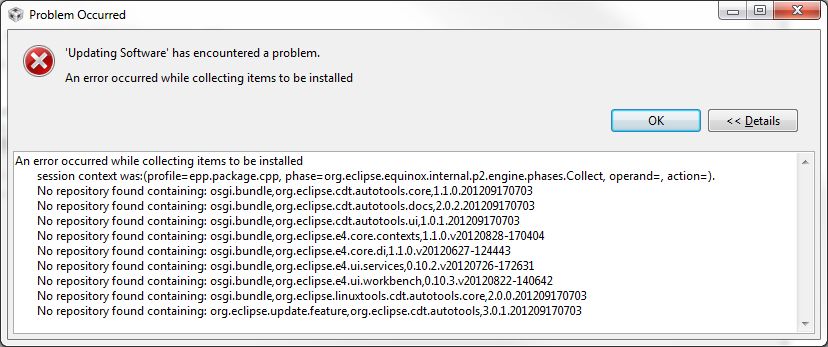
'Updating Software' has encountered a problem.
An error occurred while collecting items to be installed
session context was:(profile=epp.package.cpp, phase=org.eclipse.equinox.internal.p2.engine.phases.Collect, operand=, action=).
No repository found containing: osgi.bundle,org.eclipse.cdt.autotools.core,1.1.0.201209170703
No repository found containing: osgi.bundle,org.eclipse.cdt.autotools.docs,2.0.2.201209170703
No repository found containing: osgi.bundle,org.eclipse.cdt.autotools.ui,1.0.1.201209170703
No repository found containing: osgi.bundle,org.eclipse.e4.core.contexts,1.1.0.v20120828-170404
No repository found containing: osgi.bundle,org.eclipse.e4.core.di,1.1.0.v20120627-124443
No repository found containing: osgi.bundle,org.eclipse.e4.ui.services,0.10.2.v20120726-172631
No repository found containing: osgi.bundle,org.eclipse.e4.ui.workbench,0.10.3.v20120822-140642
No repository found containing: osgi.bundle,org.eclipse.linuxtools.cdt.autotools.core,2.0.0.201209170703
No repository found containing: org.eclipse.update.feature,org.eclipse.cdt.autotools,3.0.1.201209170703

After that I tried some other components to update. Only "Spectrum Digital Emulator" update was working. The other updates (I did not test all components but some of them) were always failing with the "No repository found containing...." error.

Are some Eclipse repositories down or not working properly?

  • Hi Arkadium,

    sorry to hear about the issues you are seeing.  Is there a specific update you wanted/needed?   Do you happen to know if you installed v5.3 from the version posted before it was temporarily removed and reposted? 

    I am going to see if I can get a development colleague to look at these and verify which updates may be temporarily down.

    Best Regards,
    Lisa

  • Hi Lisa,

    actually I did not want to install/update any specific component, I just wanted to use the standard update in order to be up-to-date.

    As far as I can remember the CCS installation sequence on my computer was as follows:

    • I first installed the CCS v5.2.0.00069.
    • Then I tried to install CCS v5.3.0.00083 (this is the version that was temporarily removed or available on Nov 19 and 20 only) to the same directory without uninstalling 5.2.0. That failed (during the installation of v5.3.0.00083 the uninstallation of 5.2.0 failed).
    • After that failure I uninstalled the 5.2.0 and tried to install v5.3.0.00083 again (that time the installation worked).
    • Then I uninstalled v5.3.0.00083 and installed the CCS v5.3.0.00090. It could be that in between I also tested the 5.2.0 again because of another problem but I always uninstalled the "old" version before installing the new one.

    Best regards,

    Arkadius

  • Arkadius,

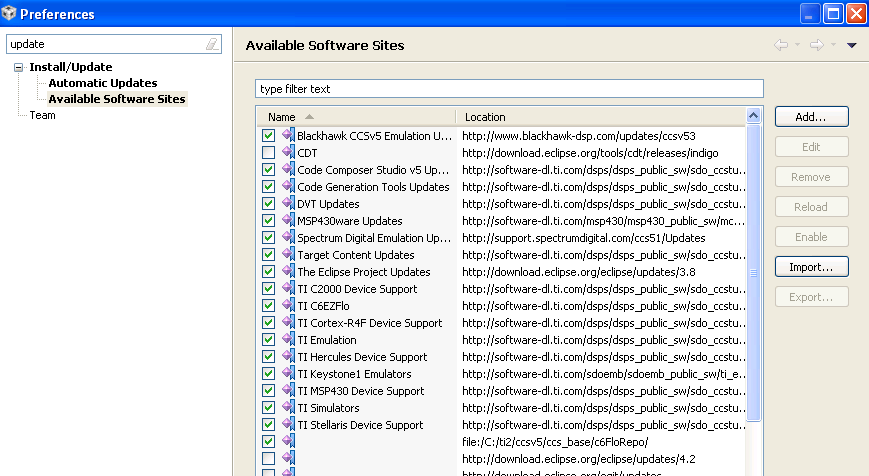
    I don't know how this came about, but some of the update sites in your list of update sites that are normally disabled have become enabled. The disabled sites are for eclipse projects that you wouldn't normally want to apply updates for.  It is also likely you have acquired additional update sites as an indirect result of using the normally disable sites.

    I suggest disabling the non required sites to leave only the ones shown in the screenshot below enabled. You can find the list of update sites in the Windows->Preferences menu. With this list of update sites, you would see the list of updates in the following screenshot and these should install without issues.

  • Hi Andy,


    thank you for your response.

    According to your post I changed my '"Available Software Sites" preferences by disabling the features/site "Juno" (what is it?) and it looked like this (note: CDT was already disabled):

    Then I selected "Check for Updates" and got the following updates:

    The updates did work. Thanks a lot for your help.

    I do not know what is "Juno" and why it was enabled but this was the reason for the update failure. I did not enable Juno intentionally, I "only" accepted some additional features (but I cannot remember what it was) when I was asked by CCS. I also installed the TI DSPLIB for C66x (dsplib_c66x_3_1_1_1) but this is probably not the reason for enabling Juno.

    Best regards,

    Arkadius

  • "Juno" is the Eclipse code name for the 4.2 release. With that enabled, there were likely a bunch of Eclipse feature updates being detected that might have had conflicts with other installer features.  I don't know how it came to be there or became enabled though.

  • Hi.

    I have similar problem with CCS update. Changes in update sites doesn't help.

  • Hi Dmitry,

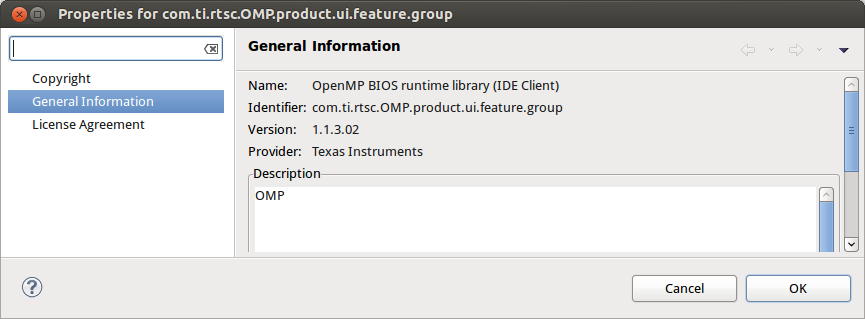
    you can try unchecking the "OpenMP BIOS runtime Library (IDE Client)" feature and things should go well.  We are not sure where it is coming from but please keep us informed.

    Best Regards,
    Lisa

  • Hi Lisa.

    No, this doesn't help, sorry.

    I also tried to uncheck all except one. No luck though.

    I can try to reinstall CCS v5.3 if this may help. Can you please provide some instructions how to clean the system.

    Best regards.

    Dmitry.

  • HI Dmitry,

    first I would try deselecting only OpenMP.  keep the rest selected.  Then, if you still have issues, yes, please try a fresh installation.  You are best to simply manually remove the previous installation and start fresh in a new folder.

    Best Regards,
    Lisa

  • Hi Lisa.

    > first I would try deselecting only OpenMP.  keep the rest selected.

    Yes, I started from this, please look at the first screenshot.

    I tried to reinstall CCS 5.3, deleting previous installation directory, but this didn't fix the update issue.

    Should I try to install 5.2 first and then install 5.3 over it?

    Regards

    Dmitry

  • Hi Dmitry,

    I would not recommend installing over.   So you see the same behaviour with 5.3?  Do you get an identical update error from a fresh 5.3 installation in a new directory? 

    Best Regards,

    Lisa

  • Hi Lisa.

    I reinstalled CCS 5.3 yesterday. As you suggested, I'd deleted ccsv5 directory and than install CCS5.3.0.00090_linux again.

    Installation went smooth without any errors. But I've got the same issue when I tried to update newly installed CCS.

    What I noticed that for all software packages which cause update error the same versions already installed!

    Regards

    Dmitry

  • Hi Dmitry,

    I am glad the you have 5.3 running.  Are you looking for a specific update/version of a tool?  Would you be able to send us the log files?  These will be in your installjammer folders which for linux are as follows:

    If you're installing as a non-root user, it goes in ~/.installjammerinfo/. If you're root, it goes in /var/lib/installjammer/

    You should see a ccsv5 folder.

    Best Regards,
    Lisa

  • Dmitry,

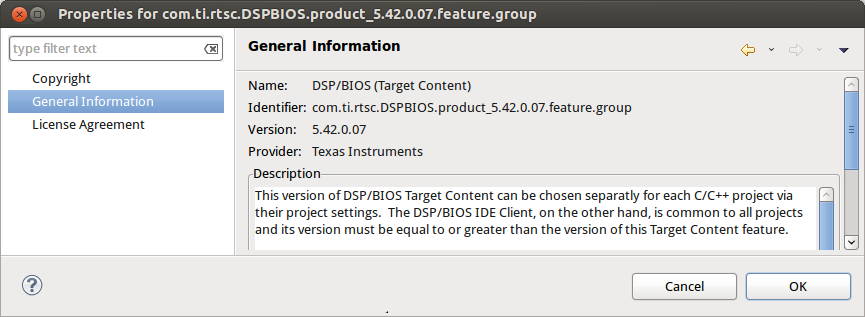
    The problem you are seeing seems to be related to other products you have installed in the same folder as CCSv5. From the screenshots you posted, it looks like you have a version of the BIOS -MCSDK installed in the same folder. Is that correct?

    Could you tell me what other folders exist at the same level as "ccsv5" in your installation environment?

    I've tried to recreate this problem by installing the latest version of the BIOS-MCSDK along side CCSv5.3, but I don't see the same issue. It would be helpful to know what other product you have installed.

  • Dear Lisa and Andy.

    Thank you for your attention to this problem.

    I'm attaching here the directory list, inside which CCS was installed.

    Also I'm attaching the contents of .installjammerinfo directory as archive (7z).

    http://e2e.ti.com/cfs-file.ashx/__key/communityserver-discussions-components-files/81/0474.installjammerinfo.7z

    Thank you again.

    Best regards.

    Dmitry.

  • Dimitry

    Finding the source of this conflict is going to take some time due to the number of products involved. I am assuming this isn't blocking you from doing anything.

  • Hi Andy

    Finding the source of this conflict is going to take some time due to the number of products involved. I am assuming this isn't blocking you from doing anything.

    Definitely not. After last clean reinstall BIOS graphical configuration tool works properly.

    Thank you.

    Best regards.

    Dmitry.