This thread has been locked.

If you have a related question, please click the "Ask a related question" button in the top right corner. The newly created question will be automatically linked to this question.

Error updating to Code Composer 4.25

Other Parts Discussed in Thread: CONTROLSUITE

I need to use CCSv4, and wants to update to the lates 4.x version. During installation of DSP/BIOS 5 I get the errors listed below. How can I avoid this? I am using Windows 7 x64. 

Error in action ExecuteAction

Error in action ExecuteAction

Error in action ExecuteAction

Error in action ExecuteScript

missing close-bracket
while executing
"::InstallJammer::actions::$component $this"
while executing
"$obj execute"
(procedure "::InstallJammer::ExecuteActions" line 62)
invoked from within
"::InstallJammer::ExecuteActions $action -parent $id -conditions $eval"
(procedure "::InstallJammer::actions::ExecuteAction" line 35)
invoked from within
"::InstallJammer::actions::$component $this"
while executing
"$obj execute"
(procedure "::InstallJammer::ExecuteActions" line 62)
invoked from within
"::InstallJammer::ExecuteActions $action -parent $id -conditions $eval"
(procedure "::InstallJammer::actions::ExecuteAction" line 35)
invoked from within
"::InstallJammer::actions::$component $this"
while executing
"$obj execute"
(procedure "::InstallJammer::ExecuteActions" line 62)
invoked from within
"::InstallJammer::ExecuteActions $action -parent $id -conditions $eval"
(procedure "::InstallJammer::actions::ExecuteAction" line 35)
invoked from within
"::InstallJammer::actions::$component $this"
Error in action ExecuteAction

Error in action ExecuteAction

Error in action ExecuteAction

Error in action ExecuteScript

missing close-bracket
while executing
"::InstallJammer::actions::$component $this"
while executing
"$obj execute"
(procedure "::InstallJammer::ExecuteActions" line 62)
invoked from within
"::InstallJammer::ExecuteActions $action -parent $id -conditions $eval"
(procedure "::InstallJammer::actions::ExecuteAction" line 35)
invoked from within
"::InstallJammer::actions::$component $this"
while executing
"$obj execute"
(procedure "::InstallJammer::ExecuteActions" line 62)
invoked from within
"::InstallJammer::ExecuteActions $action -parent $id -conditions $eval"
(procedure "::InstallJammer::actions::ExecuteAction" line 35)
invoked from within
"::InstallJammer::actions::$component $this"
while executing
"$obj execute"
(procedure "::InstallJammer::ExecuteActions" line 62)
invoked from within
"::InstallJammer::ExecuteActions $action -parent $id -conditions $eval"
(procedure "::InstallJammer::actions::ExecuteAction" line 35)
invoked from within
"::InstallJammer::actions::$component $this"
while executing
"$obj execute"
(procedure "::InstallJammer::ExecuteActions" line 62)
invoked from within
"::InstallJammer::ExecuteActions $id -when $when"
(procedure "::InstallJammer::RaiseEventHandler" line 79)
invoked from within
"::InstallJammer::RaiseEventHandler .wizard"
(command bound to event)

  • Hi,

    is this through a check for updates?  Have you tried a clean install of 4.2.5?  Would you be able to provide a few further details and the contents of your installjammer registry folder?  (This is a potentially hidden folder under program files or program files(x86)).

    Best Regards,
    Lisa

  • I can't find the installjammer folder, what is it anyway? 

    This was not via check for updates, I went to http://processors.wiki.ti.com/index.php/Download_CCS#Code_Composer_Studio_Version_4_Downloads and downloaded 4.2.4 and then the patch for 4.2.5. Where can I find a full installation file for 4.2.5 ? 

  • Hi Christian,

    the full download of 4.2.5 should be there as well.  I would recommend installing this in a fresh directory with no spaces or accented/special characters.  The installjammer registry folder, as mentioned may be a hidden folder.  It is under program files or program files(x86) depending on windows version.

    Please keep us informed.
    Best Regards,
    Lisa

  • Ehm, please have a look at http://processors.wiki.ti.com/index.php/Download_CCS#Code_Composer_Studio_Version_4_Downloads and guide me to the full download for 4.2.5. Maybe its because I'm a guy, but I just can't seem to find it. 

    Installjammer folder

    Directory of C:\Program Files (x86)\InstallJammer Registry

    04.12.2012 11:32 <DIR> 286EA45-12CF-C74C-BF50-A5D20DEC3322
    04.12.2012 15:39 <DIR> 3843459C-5C60-416E-A007-F85163AE0373
    04.12.2012 15:40 <DIR> 38BD146B-AC25-487F-A876-C712FC9C5278
    04.12.2012 11:32 <DIR> 3EB90A6-FDB8-C177-453E-BD4D15D7D3D0
    04.12.2012 15:40 <DIR> 3FA5CC28-4F94-49a8-A60C-68018006A238
    04.12.2012 15:40 <DIR> 42BDAAEB-C88C-443F-BEBE-EEC9A46FD000
    04.12.2012 11:31 <DIR> 4E8D058-8E0A-2148-12E8-2550A2D76652
    04.12.2012 11:35 <DIR> 5D407E8-970F-3C52-A239-73974E373816
    04.12.2012 16:01 <DIR> 64C86D0F-D63F-4231-850A-CC174D92ECF3
    25.11.2012 18:12 <DIR> 6FB2A0F-6221-089D-769D-562B138A744D
    27.11.2012 11:52 <DIR> 8061EC0-5803-3776-C143-32C8CFCE1A69
    27.11.2012 12:12 <DIR> BA59329F-6C76-8BC5-0BEE-E2A6106260CE
    25.11.2012 18:15 <DIR> bh_emupack
    04.12.2012 11:22 <DIR> ccsv4
    25.11.2012 18:03 <DIR> ccsv5
    04.12.2012 11:38 <DIR> DB2A203E-6409-4E5F-87EE-1B7C76772886
    25.11.2012 18:09 <DIR> DebugServer
    25.11.2012 18:18 <DIR> Emu_Logfiles
    04.12.2012 11:37 <DIR> IDE
    27.11.2012 12:11 <DIR> sd_emupack
    27.11.2012 12:02 <DIR> Simulation
    25.11.2012 18:19 <DIR> ti_c2000support
    25.11.2012 18:19 <DIR> ti_c2000_flash
    25.11.2012 18:19 <DIR> ti_ccsnowflash
    04.12.2012 11:28 <DIR> ti_hercules
    0 File(s) 0 bytes
    25 Dir(s) 39 860 215 808 bytes free

    How can I go forth to "check for updates"?

  • Hi Christian,

    ok, please zip and send the actual contents of the folder.  These are the install and update logs which would help us.  

    Ok, download and try the latest dvd image and do a check for updates to go to 4.2.5.


    Please keep us informed.
    Best Regards,
    Lisa

  • To what address should I send the zip, and again, how do I go forth to "check for updates" in eclipse/ccs? 

    EDIT: Found it under help. Still need to know where I should send the zip though

  • Hi Christian,

    you can attach the zip file here or offline via a converstaion request on the forum here (you will notice the user ids here are links).

    Best Regards,
    Lisa

  • I couldn't figure out how to do that, so here you go : https://dl.dropbox.com/u/5090287/InstallJammerRegistry.zip

  • Hi Christian,

    I had a quick look at your logs and one thing I recommend is when you do the fresh install please do not use directories with a space.  I see the program files directory as part of your path.


    Please try installing and updating into c:/ti for example.

    Keep us informed how that works for you.

    Best Regards,
    Lisa

  • Yes, I tried with c:/ti at first, but the same errors occurred. After that I tried several others, including the default option which is under program files, but still no luck. 

  • Hi Christian,

    I would remove v4 and start fresh using the C:/ti directory.  Manually remove all folders as well as the installjammer registry logs you sent me.  Please try that and keep us informed. Also when upgrading only select from items you require.

    Best Regards,

    Lisa

  • I deleted all instances of CCS and tried installing directly under C:\, same behaviour... 

    Please see this folder for error log and install jammer folder : https://www.dropbox.com/sh/6hvzdovj2ofcmtd/gu1-u8RWRL

  • I unchecked installation of BIOS and the installation succeded. Obviously something wrong with that step of the installation. 

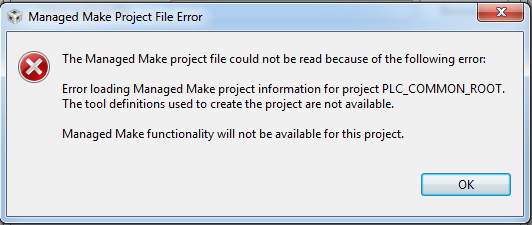
    EDIT: Trying to avoid to many posts: I tried a clean install with upgrade from CCS, now it looks like it is working, but when opening my G3 PHY project example provided by TI, I get this error: 

    Any ideas? 

  • Hi Christian,

    from you logs I suspect you are seeing an issue with your unzip utility and the installer.

    Are you installing v4 or v5 or what exactly are you trying here?  The new logs are for v4.   My best suggestion, rather than trying multiple things or updatng etc here is to take it one step at a time.

    Please do the following

    - completely uninstall all installations manually, including the installjammer registry contents

    - download the latest full v5.3 installer

    - fully unzip the installer and install new.  Use directories only with no spaces or accented/special characters.

    Let us know how that goes.
    Best Regards,
    Lisa

  • I said in my first post that I need to use CCSv4 for this, please read this post to get the details. I have CCS5 for other things, and I don't want to uninstall it, just install CCS4 side by side. The thread title is : Error updating to Code Composer 4.25, so what I am trying to do here is to install v.4.2.5 of CCS to get one of your PLC examples to work. I am starting to get desperate, since my deadline is soon and your PLC team have failed to come up with a working PLC PHY example for CCS5, so I need to see if some of the examples will work with version 4.

    I am beginning to think that CCS4 is somehow faulty with Windows 7. 

    All of my problems would go away if I could get a working code example of PLC PHY written for my 600$ tmdsplckit-v3 :\ In the mean time, I am trying every other possibility to get something working. 

  • Hi Christian,

    ok, then I would follow the above steps for the old v4 installation.   Before updating make sure this goes well.   If you have problems, send the installjammer logs again.  We would then be able to confirm if it is an unzip issue and there are work arounds.  One reason I suggest v5.3 is simply for various fixes (which ironically include a fix for the installers incompatibility with some unzip settings).   You can check to ensure 

    - your unzip utility (espeically if the built in one) is not creating a doulbed path that might be problematic or using a temp directory with spaces/accented characters

    Please keep us informed.
    Best Regards,
    Lisa

  • You already have that information, because that is exactly what I did last time.

    Yes, I really wish I could get your PLC examples working with CCS5.3, since the installation is a breeze and all code examples from controlSUITE works excellent

  • 2806.InstallJammerRegistry_xp.zip

    Now I tried to install it on a Windows XP computer which has never had any previous CCS installations. Could you look over the InstallJammer I have attached to this post? 

    Thank you for your patience Lisa, very much appreciated! 

    EDIT: I am using Winrar, and as far as I can see it is not creating any doubled paths or using temp dir with spaces (C:\temp\)

  • Hi Christian,

    we are trying to reproduce this and go through the logs.  Can you confirm the steps you take.  The logs seem to indicate that you had a v4 installation that fails on the BIOS install as even you pointed out.  However the second log shows an attempt to install using 4.2.5 patch into a different directory.  The patch is a patch only and is therefore expected not to work.   If you could confirm that would be great as we have development on this now as well.

    Best Regards,
    Lisa

  • First I install v4, successfully.

    Then I start the CCS_Update_4.2.5.00005.exe and get information that this is not allowed to install in the same folder, so yes, I choose a different folder. I tfails on DPS/BIOS installation, either 5 or 6 depending on what I choose.
    Have I misunderstood, and this Update executable and files are supposed to be applied in another way?  

  • Hi Christian,

    you actually should normally only be able to move to 4.2.5 via an update.  Installing what is simply a patch into another directory unfortunately won't get you 4.2.5 properly as you discovered and it seems either way you try the BIOS installation is failing.  We are trying to work on determining why.

    Have/are you able to try on another machine?

    Best Regards,
    Lisa

  • Yes, I have tried on a Windows XP computer which have never had any installation of CCS before. Same problem occurs. 

  • Hi Christian,

    just to let you know we have not forgetten the case.  However we have not been able to reproduce or trace this yet.  At least three of us have tried and I myself have sucessfully be able to run the update with the platinum 4.2.4, microcontroller 4.2.4 and either one with no DSP/BIOS initial installation as well. 

    Are you using BIOS?  If you do not need it, and deslect it from the updates ... are you able to get to 4.2.5? 

    As soon as there is any further feedback we will of course let you know.

    Best Regards,

    LIsa

  • Yes, deselecting BIOS works, but "unfortunately" I need it for my project

  • Hi Christian,

    have you tried installed DSP/BIOS separately?  You can get it below.  Then point CCS to is using Window->PReferences->CCS->RTSC->Products

    http://software-dl.ti.com/dsps/dsps_public_sw/sdo_sb/targetcontent/bios/dspbios/index.html

    Please let us know how this goes. 

    Best Regards,

    Lisa

  • Thank you, I will try that. 

  • Hi Christian,

    please keep us informed how that goes.

    Best Regards,

    LIsa

  • Lisa,

    I'm having the same problem, for the most part. I am running the PLC example software and PLC drivers on the C28. I have had numerous problems when I moved to my Win7 machine. CCS 4 was running OK for awhile when it suddenly failed to compile my C28 code, saying that it couldn't locate the platform.tci file, which appeared to be bogus.

    So I tried to upgrade BIOS and  XDCtools, etc. to no avail. So, I determined that my only option was to reload 4.2.4 and then upgrade to 4.2.5.0005. 4.2.4 loaded fine, but when I tried to run my program, it appeared that it needed something from 4.2.5. So I tried to upgrade by executing the downloaded 425 executable ( no "setup_CCS_4.2.5.xxxxxx.exe " as indicated in the Release Notes. I was instructed that I could not load this program into my V4.2.4 folder and must create a new one, which I did. Running this version and trying to load my app, I am told that Managed Make information is not available.

    From the information, it appears that I must be able to overlay this patch onto V4.2.4 but cannot. I did not have this problem on my XP machine as I have been running 4.2.5 successfully for a long time.

     I have also been instructed not to run the PLC firmware on CCS V5. I have previously tried to run PLC C28 code with V5 on Win7 and have never been able to get my problems resolved. I have received no responses from emailing the PLC guys.

    There appears to be a number of complications. Please help me get this sorted out.

    Thanks,

    Pat


  • Hi Pat,

    sorry to hear about the issues and actually that exe is not really meant to be run.

    A few comments here

    - it is good that I managed to catch this as it is not usually best to post to an old thread

    Having said that please connect with me offline (friend or conversation request) and I will see whether we can get you a link to a 4.2.5 installer (no update necessary)

    Best Regards,
    Lisa

  • Why make this "secret"? Please post link and solution back to this thread as a lot of people will e.g. google for the same problem and land on this thread. I feel that making private conversations about common problems are really bad practice when you have a forum available 

  • Hi Christian 

    I have the same problem. I can not open PRIME PLC example with both CCS4 v4.2.5.0000 and CCS5 V5.3.0.00090. When I import ti_plc_prime_llc_example example it reports that the managed make project file is missing. When importing with CCS5 v5.3 it reports the meta-data cannot be interpreted.

    Can you tell me how to solve the problem?

    Thank you very much.

  • Hi Bin Rua,

    Unfortunately no. TI never came up with a solution for my part. I had some contact with their PLC support line per e-mail, but they failed to figure this out. Several others have the same issues, so it looks to me like their PLC solution is a bit immature at the moment. Although, older versions of the PLC framework seems to be working, but something is wrong with their updated ones. I don't know where you could get a working older version.

    Good luck either way, and please report back.