This thread has been locked.

If you have a related question, please click the "Ask a related question" button in the top right corner. The newly created question will be automatically linked to this question.

Viewing UART output in console

Other Parts Discussed in Thread: MSP430G2553, MSP430FG439

I'm running a simple UART programme on my launchpad having MSP430G2553.The code echoes a received character,RX ISR is used. I don't want to use a terminal software like hyperterminal to view the output.So where can I input my character? and where I can see the echoed output? In one of the videos I saw the output displaying in the console window.How exactly to do that?

Moreover I'm not able to wrie anything to the TX bufer in the UART register window.Why is that?

Hope to receive some help.

Thanks.

  • You can enable the Terminal window within CCS through the steps in the below wiki article.

    http://processors.wiki.ti.com/index.php/How_to_install_the_terminal_plugin_in_CCSv5


    However, you mention issues with not writing anything to the TX buffer of the UART register which is a different matter.  Would you desribe your steps in more detail?

  • Hi BrandonAzbell,

    I have installed terminal by the steps mentioned on the wiki link you gave me.It got installed fine but I'm still able to see any output on my terminal window after i run a serial port echo code on MSP430g2553 on my Launchpad.I didn't miss the terminal  settings part too.

    It doesn't seems to work at the moment.

    let me know if I'm missing out on something.

    Thanks.

  • I'm looking back at your original post and you mention the following.

    NIKET AGRAWAL said:

    I'm running a simple UART programme on my launchpad having MSP430G2553.The code echoes a received character,RX ISR is used. I don't want to use a terminal software like hyperterminal to view the output

    I've been operating under the premise that you actually have a simple UART program running successfully that echoes a received character and transmits it back.  However, you don't want to use Hyperterminal, but rather something else.

    Do you actually have this program working with Hyperterminal?

    If so, then we need to just focus on an alternative terminal program, of which I suggested the plug-in for CCS.

    However, if this is not working, then we need to focus on that side and use a known working terminal program like Hyperterminal so that we are only manipulating one variable at a time.


    If you are not able to successfully run a simple echo program on the target, then please consider using an example code for the MSP430G2553 such as msp430g2xx3_uscia0_uart_01_9600 found in the Code Examples (or MSP430Ware) on the MSP430G2553 Product Folder in the Software section.

  • I have the necessary sample codes to test for UART.The issue is that  after running the code when I write something(type on my keyboard),the UART Receive buffer doesn't gets updated.I am running the echo character code on MSP430G2553 on CCS version 5.

    Please let me know if I'm going wrong?

    Thanks.

  • How do you have the Launchpad hardware configured, specifically the jumpers for J3?  The diagram just to the left of J3 (when the USB connector is on the top) indicates how the TXD and RXD jumpers need to be configured for using the Hardware UART.  They should be going left to right.

  • Thanks Brandon,that works...

    But I'm still not able able to view the output on the terminal window of CCS.I can't figure out the reason why?

  • Does the status bar of the Terminal window inside CCS indicate it is "CONNECTED"?

    Do you have CCS Terminal plug-in setup for 9600 8N1?

  • Hi Brandon,

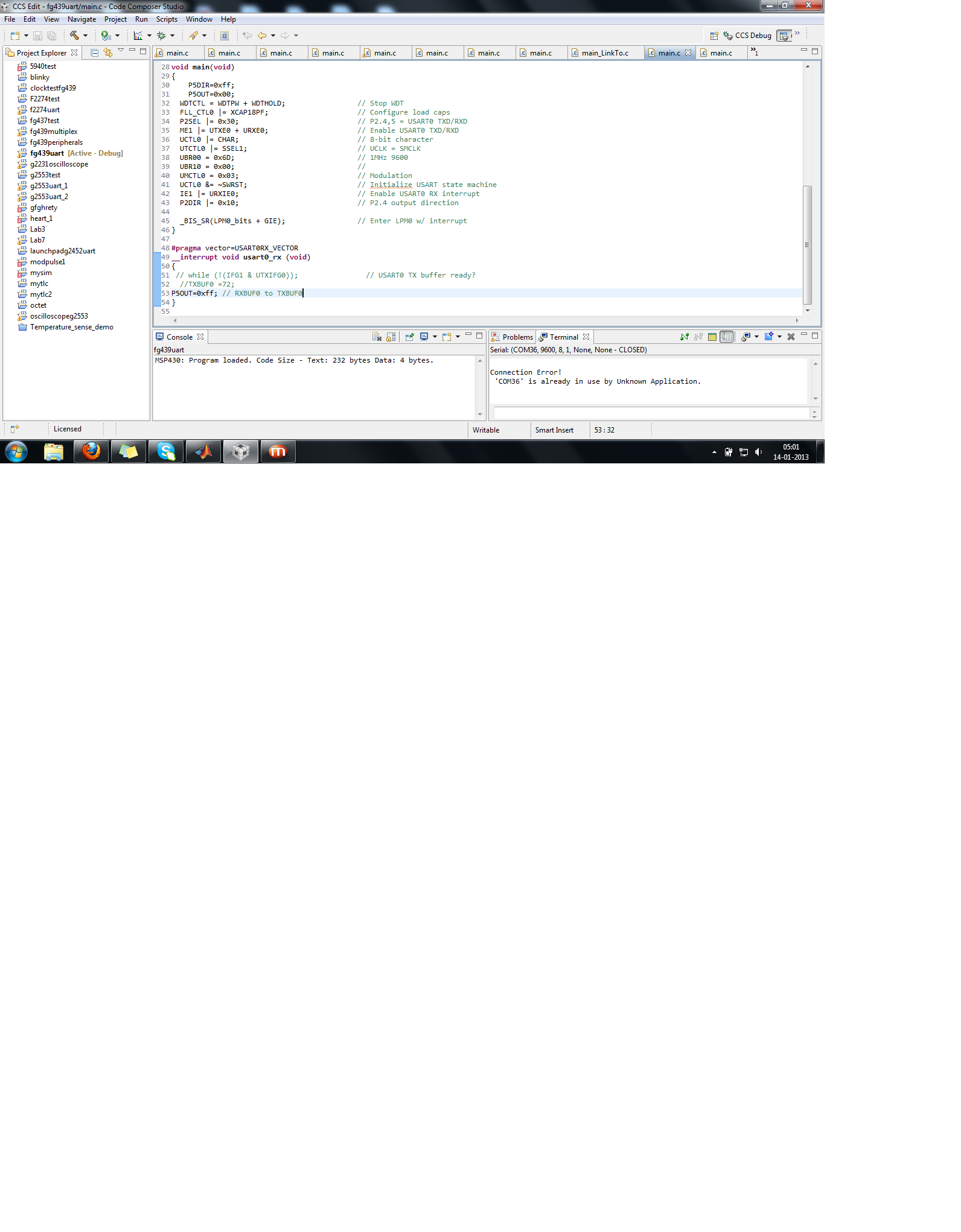
    At present I'm using the MSP-TS430PN80 target board with MSP430FETUIF Debugger on CCSv5.When I try to connect to the terminal window of CCS it shows me

    'COM36' is already in use by Unknown Application.

    But I ensured that there is no other terminal/application running which is trying to access the COM PORT at that moment.

    What do you exactly mean by CCS Terminal plug-in setup for 9600 8N1?Hearing it for the first time,I guess I might not have that.Can you tell me how to install that?

    Niket

    CCS Terminal plug-in setup for 9600 8N1?

  • The CCS Terminal plug-in is the "Terminal Window" within CCS and not the be confused with the "Console" window.

  • This is the screenshot of my CCS edit perspective,It seems I have the required plugin,its just some other thing that I'm missing.

    Niket

  • NIKET AGRAWAL said:

    At present I'm using the MSP-TS430PN80 target board with MSP430FETUIF Debugger on CCSv5.

    I just more closely looked at your post indicating the use of the MSP-FET430UIF tool.  Unfortunately, that particular tool does not support the Application UART back channel over the USB interface.  This is indicated in Table 1-1 of the MSP430 Hardware Tool User's Guide.

  • I am trying to establish UART communication between my Launchpad(MSP430G2553) and MSP430FG439.I'm  attaching codes for the two
    MCU's where one is made to transmit a character and based on Rxinterrupt another one is made to toggle a LED on board.
    But the code is not working as desired.I made the following arrangements for my code to work
    1.I made the 2 Rx Tx jumpers on the launchpad board horizontal since I'm using hardware UART on
    MSP430G2553.
    2.Tried removing both the jumpers before downloading the code and then placing back after that.
    3.Ignoring the character ('a') which the transmitter is sending,and only commanded the Launchpad LED to toggle if there is any Rxinterrupt
    no matter what is the exact character coming.This change was able to toggled the LED!
    4.Now I change back the code in the receiver such that it checks if there is 'a' received then only toggle the LED.Now the LED was not toggling
    .Means the launchpad is not able to detect the character value.

    Conections between the two boards is as follows:
    Rx and Tx of launchpad to Rx and Tx of MSP430FG439(MSP-TS430PN80 target board),common ground and VCC

    Are there any other settings which needs to be taken care of?
    -Niket

  • Hey guys,

    although this is an older post I'm having the same issues. I'm running the MSP430G2553 on the MSP-EXP430G2 Rev 1.4 launchpad in CCS 6.0. I've already installed the terminal plugin. I've loaded the msp430g2xx3_uscia0_uart_01_9600 example project on the controller and I can connect to the target in the terminal window (9600baud, 8 data bits, 1 stop bit, no parity, no flow control, timeout 5sec).

    I've read about "horizontal" and "vertical" placement of RXD and TXD jumpers on J3. How can that be?! I see only one way to put these jumpers on there, and that is connecting BTXD with P1.2 and BRXD with P1.1. Is that correct?

    This example project is supposed to echo the received characters. But how can I even send one? When I try to type in the terminal window nothing happens.

    - Andreas

  • Hi!

    I'm having a similar problem: I can communicate with my board though Realterm software, but I can't with the Terminal integrated in CCS6:

    I see the bar with "CONNECTED" and I have checked the communications' configuration, but I can't write in the terminal screen, do you know what's going on? Thanks!