This thread has been locked.

If you have a related question, please click the "Ask a related question" button in the top right corner. The newly created question will be automatically linked to this question.

Gui composer don´t show devices at deploy

Other Parts Discussed in Thread: TMS320F28335, CONTROLSUITE

Hi,

I´m working with a TMS320F28335 and CCS 5.3.0.00090 trying to make a gui with GUI composer.

I made simple one and try to deploy it, but "Export project" window don't show any device (see attached picture)

The Gui works, but i can't export it.

Any ideas?

  • Hi,

    The list of devices displayed in the GUI Composer Designer window is provided by CCS.  This tells me there might be something wrong with your CCS installation.  To confirm, I created an example GUI Composer project and exported it, everything worked just fine.  My recomendation would be to close the GUI Composer window and restart CCS.  Afterwards verify if you have any pending CCS updates regarding GUI Composer.

    I have also attached the small example GUI that I created, while it is a dummy GUI and has no particular function, it does have all of the files that any GUI Composer project requires and is a good reference.  There is another good example GUI you can use as a referenc can be found within the TMDSHVMTRKIT5X folder in controlSUITE.

    2625.NewProjectE2E.zip 

    Unfortunately, this is not a C2000 issue.  This issue is regarding CCS and should be posted in the Code Composer Studio forum (I will move this post).  They will be able to provide better support in case you have any further problems.

    Best Regards,

    -- Emmanuel 

  • Hi TCRobotics,

    Can you let me know whether there are other deivces in the list if you select a different connection? From my install, I was able to see the list of devices for the same connection. I think you might not have the device xml files for the connection that you have selected? 

    How did you run the 28335 target that you have within CCS? Did you create the ccxml file using the Setup editor or you use your own ccxml file? 

    You can also try to see whether you can create a ccxml file for your target within the Setup editor, this can help figuring out whether this is GUI Composer issue or an installation issue.

    thanks,
    Patrick 

  • That was my first thought.

    I have not any updates.

    I tested your dummy Gui and it doesn´t show any device too:(

  • Hi Patch,

    I checked other connections and all of them doesn´t show any device.And my target device is configured with the Setup editor.

    This installation is an upgrade from 5.3. I think i need to install CCS again but uninstalling it first:( 

  • Hi Patrick, TCRobotics

    I am experiencing the same issue. Even with fresh installation of CCS.

    Mitja

  • Thanks Mitja!

     Right before making a fresh install ;)

     What device are you working with?

    Patrick, Patch:

    Where Gui Composer look for devices or XML files?

    I made my Target configuration files with 5.3.

    I just make new ones with "shared location" checked to store them at /ti/CCSTargetConfigurations, but it doesn´t show any devices at GC neither :(

  • Hi TCRobotics,

    GUI Composer look up the device xml files from the same location as CCS Setup editor. When you export your application, the export dialog prompt you to select the connection and device, then compose a new ccxml file for you. If you want to use the same ccxml file (self composed) that you have created, you can replace the one that is generated by GUI Composer, it is call appConfig.ccxml. When exporting your GUI app, you can pick any connection and device. When the GUI app is exported, replace the appConfig.ccxml file with the one that you have.

    Regards,
    Patrick 

  • Thanks Patch,

    I follow this steps:

    1. At Gui Composer i export using "Texas Instruments Simulator" as connection, and "F283x CPU Cycle Accurate Simulator" as device because is the only connection that shows devices.

    2. Select Location, .out and export

    3. Move and extract files to webapps/guiapp/ folder from my guiapp.zip file (there is no appConfig.ccxml!)

    4. Move my created appConfig.ccxml to the webapps/guiapp/ folder

    5. Launch the launcher.exe (nothing happens)

    6. At launcher.exe compatibility properties (Win 7 pro) i select run as administrator and win XP. Launch, accept security warning and nothing.

    7. Go back to Gui Composer. Now (SURPRISE!) at export if i select any connection IT SHOWS DEVICES!!! Yaaaay! Select XDS100v2 and TMS320F28335, export.

    8. Unzip (now appConfig.ccxml is there!). And Run... Nothing again. Compatibility set and neither.

    I thinking that Gui Composer only works at XP... :(

    One cuestion. I don´t understand why you can export as an app, but you need to run in your eclipse ccs5 webapps folder.

    If i want to run the gui in a clean computer of my clients they must install ccs5.

    Is posible to run it without any install??

    Thanks a lot for your patience! 

  • I forgot,

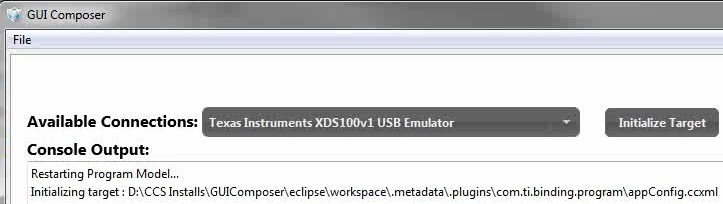
    Watching the deploy video it shows when the app is starting:

    I searched this path and i have not any com.ti.binding.program folder.

    If this helps...

  • TCRobotics said:

    1. At Gui Composer i export using "Texas Instruments Simulator" as connection, and "F283x CPU Cycle Accurate Simulator" as device because is the only connection that shows devices.

    Exporting using a simulator connection doesn't work for CCS5.3, this is a known issue. If you like to use a simulator, add the ccxml file that you have created and add it to the app manually. Name the ccxml file appConfig.ccxml.

    TCRobotics said:

    3. Move and extract files to webapps/guiapp/ folder from my guiapp.zip file (there is no appConfig.ccxml!)

    4. Move my created appConfig.ccxml to the webapps/guiapp/ folder

    Are you putting your app into the webapp folder under your User home directory? This folder is reserved for app that is use within CCS (i.e install app feature).

    TCRobotics said:

    5. Launch the launcher.exe (nothing happens)

    6. At launcher.exe compatibility properties (Win 7 pro) i select run as administrator and win XP. Launch, accept security warning and nothing.

    Launcher.exe should work with Window7 and WindowXP. I am running on windows7 and the launcher.exe works for me. However I am not using the latest GUI Composer runtime, it is possible that it has a bug. The launcher.exe is used to launch the app that you created using GUI Composer runtime. The GUI Composer runtime contains all the necessary binaries to run the app without CCS.

    TCRobotics said:

    One cuestion. I don´t understand why you can export as an app, but you need to run in your eclipse ccs5 webapps folder.

    If i want to run the gui in a clean computer of my clients they must install ccs5.

    Is posible to run it without any install??

    No, you don't need CCS to run the app that you have created, you need the GUI Composer runtime. You can get more information about GUI Composer and download the runtime from this link http://processors.wiki.ti.com/index.php/Category:Gui_Composer. This link is also available from the welcome page within GUI Composer designer.

    Installing an app and exporting an app works differently. Install is for app to be run within CCS, export allows you to run the app outside of CCS, using the GUI Composer runtime.

    Regards,
    Patrick 

  • I have been able to run my Gui in another computer installing the runtime.

    I wish the "projects don´t appear" bug will be solved in the next version. I hate to create new one to see the existing ones every time;)

    Thanks a lot!