This thread has been locked.

If you have a related question, please click the "Ask a related question" button in the top right corner. The newly created question will be automatically linked to this question.

ccs5 check for updates reports an error:


Hi,

When I run"check for updates" in CCS v5.1.0.06000 I get the error message: 

" Contacting Software Sites" has encountered a problem, and the details shows:

Some sites could not be found.  See the error log for more detail.
No repository found at http://software-dl.ti.com/dsps/dsps_public_sw/sdo_sb/targetcontent/xdais.
No repository found at http://www.blackhawk.com.

How can I fix this?

Thanks,

Jim

  • Hi Jim

    first of all I would strongly recommend just installing the latest version (v5.3) into a fresh directory.   There are known issues upgrading from such an old version.

    If you do wish to try an update again, one thing I can recommend is to determine which are failing and disable those sites.  This can be done by

    Window->Preferences->Install/Update->List of Available Sites

    Best Regards,
    Lisa

  • Hi.

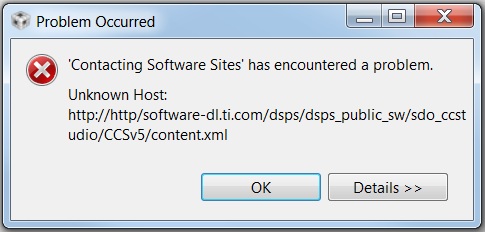
    I desperately need to upgrade to CCS v5.3, But I currently have the same issue with a freshly installed CCS v5.2.1.00018. Here is a screen capture of the error:

    It seems to be a script error since 'http://' is entered two times above. I believe there is an xml file somewhere that I can edit to fix this?

    Also:

    The Window->Preferences->Install/Update does not contain a List of Available Sites link. See screen capture below:

    So, Where exactly do I disable/edit those sites? 

    Regards.

    Estian.

  • Sorry, here is the second screen capture from above:

    The Window->Preferences->Install/Update does not contain a List of Available Sites link.


    So, Where exactly do I disable/edit those sites?

    Estian

  • Hi Estian,

    two things here

    -> I would very very very strongly recommend just doing a fresh installation.  It will be worth the time (which will be almost the same)

    -> If you click on the little arrow to the left of Install/Update .... this is where you will be able to expand to see the list of available sites

    Best Regards,
    Lisa