This thread has been locked.

If you have a related question, please click the "Ask a related question" button in the top right corner. The newly created question will be automatically linked to this question.

MCSDK Image processing OpenMP demo fails to run when System Analyzer is enabled

Other Parts Discussed in Thread: SYSBIOS, TMS320C6678

Hi, a customer reported having some issues when System Analyzer is enabled in a modified MCSDK Image processing demo. They have been developing their own code which works OK. However, now they want to get some profiling data. The code is very much like the MCSDK openMP image processing demo, except that they have added more capabilities. 

In order to gauge the system performance, they have added a few System Analyzer commands to the code, and have enabled "system Analyzer" in the .cfg file, activated system Analyzer (UIA target) in RTSC in project properties.

For compiling they use CGT v7.4.0. Project build OK and generates .out file. However, when .out is loaded into the core and run, it failed to perform the same way as before. Before enabling analyzer, running the program generate an web IP address that we can talk to the CPUs, then perform the image processing. This happens regardless of whether or not we activate  "System Analyzer > Live" in Tools. (when enabled, they noticed that core_0 is "instrumented")

They also have tried ccsv5.3. But ccsv5.3.0 failed to run even their original code where none of the System Analyzer actions were taken. When the .out file is loaded into the core through ccsv5.3 and "run" is activated, We did not get an IP-address as we did with ccsv5.2.1, Instead, we get the following message:

PA successfully initialized

Unable to create configuration

   0:48              0:96              0:128             0:256         

   0:512             0:1536            0:3072        

(0/0 mmAlloc: 0/0/0, mmBulk: 0/0/0)

Also, as a additional note they try to enable SA in the original Image processing demo without luck. Please note below steps they did:

* Copied relevent files and folders from mcsdk openMP demo into my working directory ( ...\mcsdkopenMPdemo_testSA\

* run ccsv5.2.1 : load orig .out file, to verify everything works. It does.

* recompiled to get a new .out file, load this file into core0,  

* load .out file to core0; click green arrow to run: gest web ipAddress, process image succesfully.

  ---

* next step; updated .cfg & mcip_process.c (added SA include files & a couple Log_info0 command) ;  RTSC: enabled System analyzer;

* compile : Build was successful, no warning, no error

* Load the .out(with SA) file to core0: SA welcome page appeared; console page: no error shown

* Tools > system Analyzer > Live: core0 instrumented;

* click green arrow to run; core0 says "(running)"; console has nothing new, no web ipAddress; neither does Live Session Log;

* repeat and reload the new .out file several times, same result, no web ipAddress

* switch back to the original .out file from TI. Everything works.

* switched to the compiled .out file (without system Analyzer), load ok; can do edge processing.

The questions would be how is the right way to enabled and test using System Analyzer? In order to get Image processing OpenMP + System Analyzer do we need to have a specific CCS and CGT versions? is any known issues about Image processing OpenMP demo + SA that we should be aware of?

Thanks a lot for your help,

Paula

  • Hi Paula,

         You need to use UIA 1.2.1.8_eng or later  (we’ve made this engineering publicly available at http://software-dl.ti.com/dsps/dsps_public_sw/sdo_ccstudio/UIA/OpenMP/uia_1_02_01_08_eng.zip  - since it’s an eng release, we’re not publishing it widely, but just to E2E forum users that need it). 

    This fixes a race condition that is present in single image programs where cores try to register their loggers in a linked list headed by a global variable pointer.  The behavior you discussed is consistent with this bug, since it can cause cores to get stuck in a loop in the registration code. 

    I've verified that, with UIA 1.2.1.8_eng, you can use JTAG run mode as a transport to upload events from the Main application code using this UIA release and the mcsdk openMP image processing demo from MCSDK 2.1.2.6, CCSv5.2.1.00018 and v7.4.0 C6000 compiler, using the same steps you described.

    Here's the .cfg script you need to add:

    var Log = xdc.useModule('xdc.runtime.Log');

    var UIABenchmark  = xdc.useModule('ti.uia.events.UIABenchmark');

    var LoggingSetup = xdc.useModule('ti.uia.sysbios.LoggingSetup');
    LoggingSetup.loadLogging = false;
    LoggingSetup.mainLoggerSize = 8192;
    LoggingSetup.sysbiosTaskLogging = false;
    LoggingSetup.eventUploadMode = LoggingSetup.UploadMode_JTAGRUNMODE

    var Main = xdc.useModule('xdc.runtime.Main');
    var Diags = xdc.useModule('xdc.runtime.Diags');

    Main.common$.diags_STATUS = Diags.ALWAYS_ON;
    Main.common$.diags_ANALYSIS = Diags.ALWAYS_ON;
    Main.common$.diags_INFO = Diags.ALWAYS_ON;
    Main.common$.diags_USER1 = Diags.RUNTIME_ON;
    Main.common$.diags_USER2 = Diags.RUNTIME_ON;
    Main.common$.diags_USER3 = Diags.RUNTIME_ON;
    Main.common$.diags_USER4 = Diags.RUNTIME_ON;
    Main.common$.diags_USER5 = Diags.RUNTIME_ON;
    Main.common$.diags_USER6 = Diags.RUNTIME_ON;

    I've attached the master_main.c file with some UIABenchmark events logged at the start and end of the image processing - these can be viewed in the Duration analysis view for comparisons of the amount of time it takes to process an image with N cores.

    /*
     * Copyright (C) 2011 Texas Instruments Incorporated - http://www.ti.com/
     *
     *  Redistribution and use in source and binary forms, with or without
     *  modification, are permitted provided that the following conditions
     *  are met:
     *
     *    Redistributions of source code must retain the above copyright
     *    notice, this list of conditions and the following disclaimer.
     *
     *    Redistributions in binary form must reproduce the above copyright
     *    notice, this list of conditions and the following disclaimer in the
     *    documentation and/or other materials provided with the
     *    distribution.
     *
     *    Neither the name of Texas Instruments Incorporated nor the names of
     *    its contributors may be used to endorse or promote products derived
     *    from this software without specific prior written permission.
     *
     *  THIS SOFTWARE IS PROVIDED BY THE COPYRIGHT HOLDERS AND CONTRIBUTORS
     *  "AS IS" AND ANY EXPRESS OR IMPLIED WARRANTIES, INCLUDING, BUT NOT
     *  LIMITED TO, THE IMPLIED WARRANTIES OF MERCHANTABILITY AND FITNESS FOR
     *  A PARTICULAR PURPOSE ARE DISCLAIMED. IN NO EVENT SHALL THE COPYRIGHT
     *  OWNER OR CONTRIBUTORS BE LIABLE FOR ANY DIRECT, INDIRECT, INCIDENTAL,
     *  SPECIAL, EXEMPLARY, OR CONSEQUENTIAL DAMAGES (INCLUDING, BUT NOT
     *  LIMITED TO, PROCUREMENT OF SUBSTITUTE GOODS OR SERVICES; LOSS OF USE,
     *  DATA, OR PROFITS; OR BUSINESS INTERRUPTION) HOWEVER CAUSED AND ON ANY
     *  THEORY OF LIABILITY, WHETHER IN CONTRACT, STRICT LIABILITY, OR TORT
     *  (INCLUDING NEGLIGENCE OR OTHERWISE) ARISING IN ANY WAY OUT OF THE USE
     *  OF THIS SOFTWARE, EVEN IF ADVISED OF THE POSSIBILITY OF SUCH DAMAGE.
     *
     */
    
    #include <c6x.h>
    #include <stdio.h>
    #include <stdint.h>
    #include <stdlib.h>
    #include <string.h>
    
    #include <ti/ndk/inc/netmain.h>
    #include <ti/ndk/inc/_stack.h>
    #include <ti/ndk/inc/tools/console.h>
    #include <ti/ndk/inc/tools/servers.h>
    
    #include <xdc/std.h>
    #include <xdc/runtime/Error.h>
    #include <xdc/runtime/System.h>
    #include <xdc/runtime/IHeap.h>
    #include <ti/sysbios/BIOS.h>
    #include <ti/sysbios/knl/Task.h>
    #include <xdc/runtime/knl/Thread.h>
    #include <xdc/cfg/global.h>
    
    #include "ti/platform/platform.h"
    #include "ti/platform/resource_mgr.h"
    #include "../../inc/mcip_process.h"
    #include "../../inc/mcip_webpage.h"
    #include <xdc/runtime/Log.h>
    #include <ti/uia/events/UIABenchmark.h>
    
    Mailbox_Handle master_mbox_receive = 0;
    Mailbox_Handle master_mbox_send    = 0;
    
    extern  int32_t res_mgr_init_qmss_global(uint32_t max_num_desc);
    
    /**************************************************************************
     ** NDK static configuration
     ****************************************************************************/
    
    char HostName[CFG_HOSTNAME_MAX] = {0};
    char *LocalIPAddr = "0.0.0.0";          /* Set to "0.0.0.0" for DHCP client option */
    char *PCStaticIP  = "192.168.2.101";    /* Static IP address for host PC */
    char *EVMStaticIP = "192.168.2.100";    /*    "   IP     "   for EVM */
    char *LocalIPMask = "255.255.254.0";    /* Mask for DHCP Server option */
    char *GatewayIP   = "192.168.2.101";    /* Not used when using DHCP */
    char *DomainName  = "demo.net";         /* Not used when using DHCP */
    char *DNSServer   = "0.0.0.0";          /* Used when set to anything but zero */
    
    /**************************************************************************
     ** IP Stack - NDK Routines
     ***************************************************************************/
    
    /* Our NETCTRL callback functions */
    static void   NetworkOpen();
    static void   NetworkClose();
    static void   NetworkIPAddr( IPN IPAddr, uint IfIdx, uint fAdd );
    
    /*  Reporting function - IP stack calls it to give us updates */
    static void   ServiceReport( uint Item, uint Status, uint Report, HANDLE hCfgEntry );
    
    #define MAX_NUM_DESC_OTHER 1024
    
    void lld_init(void)
    {
        QMSS_CFG_T      qmss_cfg;
        
        /* Initialize QMSS */
        if (platform_get_coreid() == 0)
        {
            qmss_cfg.master_core        = 1;
        }
        else
        {
            return;
        }
    
        res_mgr_init_qmss_global (MAX_NUM_DESC_OTHER + MAX_NUM_DESC);
        
        qmss_cfg.max_num_desc       = MAX_NUM_DESC;
        qmss_cfg.desc_size          = MAX_DESC_SIZE;
        qmss_cfg.mem_region         = Qmss_MemRegion_MEMORY_REGION_NOT_SPECIFIED;
        if (res_mgr_init_qmss (&qmss_cfg) != 0)
        {
            goto close_n_exit;
        }
    
    close_n_exit:
        return;
    }
    
    int master_main(void)
    {
        HANDLE hCfg;
        CI_SERVICE_HTTP   http;            /* Configuration data for http including handle */
        CI_SERVICE_DHCPC dhcpservice;    /* Configuration data for dhcp client including handle */
        uint8_t dhcp_options[] = {DHCPOPT_SERVER_IDENTIFIER, DHCPOPT_ROUTER};
        Int              status;
        //QMSS_CFG_T      qmss_cfg;
        CPPI_CFG_T      cppi_cfg;
    
        platform_uart_init();
        platform_uart_set_baudrate(115200);
        platform_write_configure(PLATFORM_WRITE_ALL);
    
        platform_write("\n\nMCSDK IMAGE PROCESSING DEMONSTRATION\n\n");
    
        /* Initialize the components required to run this application:
        *  (1) CPPI
        *  (2) Packet Accelerator
        */
    
        /* Initialize CPPI */
        if (platform_get_coreid() == 0)
        {
            cppi_cfg.master_core        = 1;
        } else {
            cppi_cfg.master_core        = 0;
        }
        cppi_cfg.dma_num            = Cppi_CpDma_PASS_CPDMA;
        cppi_cfg.num_tx_queues      = NUM_PA_TX_QUEUES;
        cppi_cfg.num_rx_channels    = NUM_PA_RX_CHANNELS;
        if (res_mgr_init_cppi (&cppi_cfg) != 0)
        {
            goto close_n_exit;
        }
    
        if (res_mgr_init_pass()!= 0) {
            platform_write ("Failed to initialize the Packet Accelerator \n");
            goto close_n_exit;
        } else {
            platform_write ("PA successfully initialized \n");
        }
    
        status = NC_SystemOpen( NC_PRIORITY_LOW, NC_OPMODE_INTERRUPT );
        if(status != NC_OPEN_SUCCESS)
        {
            platform_write("NC_SystemOpen Failed (%d)\n",status);
            goto close_n_exit;
        }
    
        /* Create a new configuration */
        hCfg = CfgNew();
        if( !hCfg )
        {
            platform_write("Unable to create configuration\n");
            goto close_n_exit;
        }
    
        /* Validate the length of the supplied names */
        if( strlen( DomainName ) >= CFG_DOMAIN_MAX ||
                strlen( HostName ) >= CFG_HOSTNAME_MAX )
        {
            platform_write("Domain or Host Name too long\n");
            goto close_n_exit;
        }
    
        /* Add our global hostname to hCfg (to be claimed in all connected domains) */
        CfgAddEntry( hCfg, CFGTAG_SYSINFO, CFGITEM_DHCP_HOSTNAME, 0,
                strlen(HostName), (UINT8 *)HostName, 0 );
    
        /*
         ** Read User SW 1
         ** If user SW 1 = OFF position: static IP mode (default), SW 1 = ON: client mode
         */
        if (!platform_get_switch_state(1)) {
            CI_IPNET NA;
            CI_ROUTE RT;
            IPN      IPTmp;
    
            /* Setup an IP address to this EVM */
            bzero( &NA, sizeof(NA) );
            NA.IPAddr  = inet_addr(EVMStaticIP);
            NA.IPMask  = inet_addr(LocalIPMask);
            strcpy( NA.Domain, DomainName );
    
            /* Add the address to interface 1 */
            CfgAddEntry( hCfg, CFGTAG_IPNET, 1, 0, sizeof(CI_IPNET), (UINT8 *)&NA, 0 );
    
            /* Add the default gateway (back to user PC) */
            bzero( &RT, sizeof(RT) );
            RT.IPDestAddr = inet_addr(PCStaticIP);
            RT.IPDestMask = inet_addr(LocalIPMask);
            RT.IPGateAddr = inet_addr(GatewayIP);
    
            /* Add the route */
            CfgAddEntry( hCfg, CFGTAG_ROUTE, 0, 0, sizeof(CI_ROUTE), (UINT8 *)&RT, 0 );
    
            /* Manually add the DNS server when specified */
            IPTmp = inet_addr(DNSServer);
            if( IPTmp )
                CfgAddEntry( hCfg, CFGTAG_SYSINFO, CFGITEM_DHCP_DOMAINNAMESERVER,
                        0, sizeof(IPTmp), (UINT8 *)&IPTmp, 0 );
    
            platform_write("EVM in StaticIP mode at %s\n", EVMStaticIP);
            platform_write("Set IP address of PC to %s\n", PCStaticIP);
        } else {
            platform_write("Configuring DHCP client\n");
    
            bzero( &dhcpservice, sizeof(dhcpservice) );
            dhcpservice.cisargs.Mode   = CIS_FLG_IFIDXVALID;
            dhcpservice.cisargs.IfIdx  = 1;
            dhcpservice.cisargs.pCbSrv = &ServiceReport;
            dhcpservice.param.pOptions = dhcp_options;
            dhcpservice.param.len = 2;
            CfgAddEntry( hCfg, CFGTAG_SERVICE, CFGITEM_SERVICE_DHCPCLIENT, 0,
                    sizeof(dhcpservice), (UINT8 *)&dhcpservice, &(dhcpservice.cisargs.hService) );
        }
    
        /* Add web files */
        image_processing_webfiles_add();
    
        /* Specify HTTP service */
        bzero( &http, sizeof(http) );
        http.cisargs.IPAddr = INADDR_ANY;
        http.cisargs.pCbSrv = &ServiceReport;
        CfgAddEntry( hCfg, CFGTAG_SERVICE, CFGITEM_SERVICE_HTTP, 0,
                sizeof(http), (UINT8 *)&http, &(http.cisargs.hService) );
    
        /*
         ** Configure IPStack/OS Options
         */
    
        /* Set debug message level */
        status = DBG_WARN;
        CfgAddEntry( hCfg, CFGTAG_OS, CFGITEM_OS_DBGPRINTLEVEL,
                CFG_ADDMODE_UNIQUE, sizeof(uint), (UINT8 *)&status, 0 );
    
        /*
         ** Boot the system using this configuration
         **
         ** We keep booting until the function returns 0. This allows
         ** us to have a "reboot" command.
         */
    
        do
        {
            status = NC_NetStart( hCfg, NetworkOpen, NetworkClose, NetworkIPAddr );
        } while( status > 0 );
    
        platform_write ("Shutting things down\n");
    
    close_n_exit:
    
        /* Free the WEB files */
        image_processing_webfiles_remove();
        /* Delete Configuration */
        CfgFree( hCfg );
        NC_SystemClose();
        return 0;
    }
    
    
    /*
     * Main Entry Point
     */
    int main(void)
    {
        Task_Handle task;
        Task_Params task_params;
        Error_Block eb;
        mbox_process_msg_t  process_msg;
        mbox_response_msg_t response_msg;
    
        if (DNUM == 0) {
            Error_init(&eb);
            Task_Params_init(&task_params);
            task_params.priority = 5;
            task = Task_create((ti_sysbios_knl_Task_FuncPtr)master_main, &task_params, &eb);
            if (task == NULL) {
                System_printf("Task_create() failed!\n");
                return 0;
            }
        }
    
        master_mbox_receive = Mailbox_create (sizeof(mbox_process_msg_t), 1, 0, 0);
        if(!master_mbox_receive) {
            System_printf("main: Mailbox creation failed for master_mbox_receive\n");
            return 0;
        }
    
        master_mbox_send = Mailbox_create (sizeof(mbox_response_msg_t), 1, 0, 0);
        if(!master_mbox_send) {
            System_printf("main: Mailbox creation failed for master_mbox_send\n");
            return 0;
        }
    
        while(1) {
    
            if (Mailbox_pend(master_mbox_receive, &process_msg, BIOS_WAIT_FOREVER) == FALSE) {
                System_printf("main: Mailbox_pend returns error\n");
                return 0; 
            }
    
            Log_write2(UIABenchmark_startInstance,"Processing image with %d cores",process_msg.number_of_cores);
            response_msg.result = mc_process_bmp(process_msg.processing_type, &process_msg.input_image, 
                                &response_msg.output_image, process_msg.number_of_cores, 
                                &response_msg.processing_time);
    
            if (Mailbox_post(master_mbox_send, &response_msg, BIOS_WAIT_FOREVER) == FALSE) {
                System_printf("main: Mailbox_post returns error\n");
                return 0; 
            }
            Log_write2(UIABenchmark_stopInstance,"Processing image with %d cores",process_msg.number_of_cores);
        }
    }
    
    
    /*************************************************************************
     *  @b EVM_init()
     *
     *  @n
     *
     *  Initializes the platform hardware. This routine is configured to start in
     *     the evm.cfg configuration file. It is the first routine that BIOS
     *     calls and is executed before Main is called. If you are debugging within
     *  CCS the default option in your target configuration file may be to execute
     *  all code up until Main as the image loads. To debug this you should disable
     *  that option.
     *
     *  @param[in]  None
     *
     *  @retval
     *      None
     ************************************************************************/
    void EVM_init(void)
    {
        platform_init_flags  sFlags;
        platform_init_config sConfig;
        /* Status of the call to initialize the platform */
        Int32 pform_status;
        /* Platform Information - we will read it form the Platform Library */
        platform_info    sPlatformInfo;
    
        int i, j;
    
        if (platform_get_coreid() != 0) {
            return;
        }
    
        /*
         * You can choose what to initialize on the platform by setting the following
         * flags. We will initialize everything.
         */
        memset( (void *) &sFlags,  0, sizeof(platform_init_flags));
        memset( (void *) &sConfig, 0, sizeof(platform_init_config));
    
        sFlags.pll  = 0;    /* PLLs for clocking      */
        sFlags.ddr  = 0;    /* External memory         */
        sFlags.tcsl = 1;    /* Time stamp counter     */
        sFlags.phy  = 1;    /* Ethernet             */
        sFlags.ecc  = 0;    /* Memory ECC             */
    
        sConfig.pllm = 0;    /* Use libraries default clock divisor */
    
        pform_status = platform_init(&sFlags, &sConfig);
    
        /* If we initialized the platform okay */
        if (pform_status == Platform_EOK) {
            /* Get information about the platform so we can use it in various places */
            memset( (void *) &sPlatformInfo, 0, sizeof(platform_info));
            platform_get_info(&sPlatformInfo);
            //MultiProc_setLocalId((Uint16) platform_get_coreid());
    
            /* Create our host name: Its board name + last 6 digits of the serial number.
             * Since the serial number is in I2C it can be altered or even not there so
             * we have to take into account that it may not be what we expect.
             */
            strcpy (HostName, "tidemo-");
            i = strlen(HostName);
            j = strlen(sPlatformInfo.serial_nbr);
    
            if (j > 0) {
                if (j > 6) {
                    memcpy (&HostName[i], &sPlatformInfo.serial_nbr[j-6], 6);
                    HostName[i+7] = '\0';
                } else {
                    memcpy (&HostName[i], sPlatformInfo.serial_nbr, j);
                    HostName[i+j+1] = '\0';
                }
            }
        } else {
            /* Initialization of the platform failed... die */
            platform_write("Platform failed to initialize. Error code %d \n", pform_status);
            platform_write("We will die in an infinite loop... \n");
            while (1) {
                (void) platform_led(1, PLATFORM_LED_ON, PLATFORM_SYSTEM_LED_CLASS);
                (void) platform_delay(50000);
                (void) platform_led(1, PLATFORM_LED_OFF, PLATFORM_SYSTEM_LED_CLASS);
                (void) platform_delay(50000);
            };
        }
    
        return;
    }
    
    /*************************************************************************
     *  @b NetworkOpen()
     *
     *  @n
     *
     *  This function is called after the Network stack has started..
     *
     *  @param[in]  None
     *
     *  @retval
     *      None
     ************************************************************************/
    static void NetworkOpen()
    {
        return;
    }
    
    /*************************************************************************
     *  @b NetworkClose()
     *
     *  @n
     *
     *  This function is called when the network is shutting down,
     *     or when it no longer has any IP addresses assigned to it.
     *
     *  @param[in]  None
     *
     *  @retval
     *      None
     ************************************************************************/
    static void NetworkClose()
    {
        return;
    }
    
    /*************************************************************************
     *  @b NetworkIPAddr( IPN IPAddr, uint IfIdx, uint fAdd )
     *
     *  @n
     *
     *  This function is called whenever an IP address binding is
     *  added or removed from the system.
     *
     *  @param[in]
     *     IPAddr - The IP address we are adding or removing.
     *
     *  @param[in]
     *     IfIdx - Interface index (number). Used for multicast.
     *
     *  @param[in]
     *     fAdd -  True if we added the interface, false if its being removed.
     *
     *  @retval
     *      None
     ************************************************************************/
    
    static void NetworkIPAddr( IPN IPAddr, uint IfIdx, uint fAdd )
    {
        static uint fAddGroups = 0;
        IPN IPTmp;
    
        if( fAdd )
            platform_write("Network Added: ");
        else
            platform_write("Network Removed: ");
    
        /* Print a message */
        IPTmp = ntohl( IPAddr );
        platform_write("If-%d:%d.%d.%d.%d \n", IfIdx,
                (UINT8)(IPTmp>>24)&0xFF, (UINT8)(IPTmp>>16)&0xFF,
                (UINT8)(IPTmp>>8)&0xFF, (UINT8)IPTmp&0xFF );
    
    
        /* This is a good time to join any multicast group we require */
        if( fAdd && !fAddGroups )
        {
            fAddGroups = 1;
            /*      IGMPJoinHostGroup( inet_addr("224.1.2.3"), IfIdx ); */
        }
    
        return;
    }
    
    /*************************************************************************
     *  @b DHCP_reset( uint IfIdx, uint fOwnTask )
     *
     *  @n
     *
     *  This function is called whenever an IP address binding is
     *  added or removed from the system.
     *
     *  @param[in]
     *     IfIdx - Interface index (number) that is using DHCP.
     *
     *  @param[in]
     *     fOwnTask -  Set when called on a new task thread (via TaskCreate()).
     *
     *  @retval
     *      None
     ************************************************************************/
    void DHCP_reset( uint IfIdx, uint fOwnTask )
    {
        CI_SERVICE_DHCPC dhcpc;
        HANDLE h;
        int    rc,tmp;
        uint   idx;
    
        /* If we were called from a newly created task thread, allow
           the entity that created us to complete */
        if( fOwnTask ) {
            TaskSleep(500);
        }
    
        /* Find DHCP on the supplied interface */
        for(idx=1; ; idx++)
        {
            /* Find a DHCP entry */
            rc = CfgGetEntry( 0, CFGTAG_SERVICE, CFGITEM_SERVICE_DHCPCLIENT,
                    idx, &h );
            if( rc != 1 )
                goto RESET_EXIT;
    
            /* Get DHCP entry data */
            tmp = sizeof(dhcpc);
            rc = CfgEntryGetData( h, &tmp, (UINT8 *)&dhcpc );
    
            /* If not the right entry, continue */
            if( (rc<=0) || dhcpc.cisargs.IfIdx != IfIdx )
            {
                CfgEntryDeRef(h);
                h = 0;
                continue;
            }
    
            /* This is the entry we want! */
    
            /* Remove the current DHCP service */
            CfgRemoveEntry( 0, h );
    
            /* Specify DHCP Service on specified IF */
            bzero( &dhcpc, sizeof(dhcpc) );
            dhcpc.cisargs.Mode   = CIS_FLG_IFIDXVALID;
            dhcpc.cisargs.IfIdx  = IfIdx;
            dhcpc.cisargs.pCbSrv = &ServiceReport;
            CfgAddEntry( 0, CFGTAG_SERVICE, CFGITEM_SERVICE_DHCPCLIENT, 0,
                    sizeof(dhcpc), (UINT8 *)&dhcpc, 0 );
            break;
        }
    
    RESET_EXIT:
        /* If we are a function, return, otherwise, call TaskExit() */
        if( fOwnTask )
            TaskExit();
    
        return;
    }
    
    
    /*************************************************************************
     *  @b ServiceReport( uint Item, uint Status, uint Report, HANDLE h )
     *
     *  @n
     *
     *  Here's a quick example of using service status updates from the IP
     *  Stack. Lets store the states of the services so we can refrence them
     *  elsehwere (e.g. the information Page).
     *  The defines for the services are in the NDK header file netcfg.h
     *
     *  @param[in]
     *     Item - The service that is reporting (ie Telnet, HTTP, DHCP, etc).
     *
     *  @param[in]
     *     Status - Overall status of that service.
     *
     *  @param[in]
     *     Report - What its reporting.
     *
     *  @param[in]
     *     Handle - Handle to  the Service.
     *
     *  @retval
     *      None
     ************************************************************************/
    void CheckDHCPOptions();
    
    /*
     *  Defines for dealing with IP services so we can report on the state of them.
     * See netcfg.h in the NDK and callback in hpdspua.c.
     */
    typedef struct _service_state {
        char name[10];
        uint report;
        uint status;
    }Service_state_s;
    
    /* These arrays are order dependent based on defines in the NDK header files */
    char *ReportStr[] = { "","Running","Updated","Complete","Fault" };
    char *StatusStr[] = { "Disabled","Waiting","IPTerm","Failed","Enabled" };
    
    Service_state_s ServiceStatus [CFGITEM_SERVICE_MAX] = {
        {"Telnet", 0, 0},
        {"HTTP", 0, 0},
        {"NAT", 0, 0},
        {"DHCPS", 0, 0},
        {"DHCPC", 0, 0},
        {"DNS", 0, 0}
    };
    
    static void ServiceReport( uint Item, uint Status, uint Report, HANDLE h )
    {
    
        /* Save off the status */
        ServiceStatus[Item-1].status = Status;
        ServiceStatus[Item-1].report = Report;
    
        platform_write( "Service Status: %-9s: %-9s: %-9s: %03d\n",
                ServiceStatus[Item-1].name, StatusStr[ServiceStatus[Item-1].status],
                ReportStr[ServiceStatus[Item-1].report/256], Report&0xFF );
    
        /*
        // Example of adding to the DHCP configuration space
        //
        // When using the DHCP client, the client has full control over access
        // to the first 256 entries in the CFGTAG_SYSINFO space.
        //
        // Note that the DHCP client will erase all CFGTAG_SYSINFO tags except
        // CFGITEM_DHCP_HOSTNAME. If the application needs to keep manual
        // entries in the DHCP tag range, then the code to maintain them should
        // be placed here.
        //
        // Here, we want to manually add a DNS server to the configuration, but
        // we can only do it once DHCP has finished its programming.
        */
        if( Item == CFGITEM_SERVICE_DHCPCLIENT &&
                Status == CIS_SRV_STATUS_ENABLED &&
                (Report == (NETTOOLS_STAT_RUNNING|DHCPCODE_IPADD) ||
                 Report == (NETTOOLS_STAT_RUNNING|DHCPCODE_IPRENEW)) )
        {
            IPN IPTmp;
    
            /* Manually add the DNS server when specified */
            IPTmp = inet_addr(DNSServer);
            if( IPTmp )
                CfgAddEntry( 0, CFGTAG_SYSINFO, CFGITEM_DHCP_DOMAINNAMESERVER,
                        0, sizeof(IPTmp), (UINT8 *)&IPTmp, 0 );
    #if 0
            /* We can now check on what the DHCP server supplied in
               response to our DHCP option tags. */
            CheckDHCPOptions();
    #endif
    
        }
    
        /* Reset DHCP client service on failure */
        if( Item==CFGITEM_SERVICE_DHCPCLIENT && (Report&~0xFF)==NETTOOLS_STAT_FAULT )
        {
            CI_SERVICE_DHCPC dhcpc;
            int tmp;
    
            /* Get DHCP entry data (for index to pass to DHCP_reset). */
            tmp = sizeof(dhcpc);
            CfgEntryGetData( h, &tmp, (UINT8 *)&dhcpc );
    
            /* Create the task to reset DHCP on its designated IF
               We must use TaskCreate instead of just calling the function as
               we are in a callback function. */
            TaskCreate( DHCP_reset, "DHCPreset", OS_TASKPRINORM, 0x1000,
                    dhcpc.cisargs.IfIdx, 1, 0 );
        }
    
        return;
    }
    
    /*************************************************************************
     *  @b CheckDHCPOptions()
     *
     *  @n
     *
     *  Checks the DHCP Options and configures them.
     *
     *  @param[in]
     *     None
     *
     *  @retval
     *      None
     ************************************************************************/
    void CheckDHCPOptions()
    {
        char IPString[16];
        IPN  IPAddr;
        int  i, rc;
    
        /*
         *  Now scan for DHCPOPT_SERVER_IDENTIFIER via configuration
         */
        platform_write("\nDHCP Server ID:\n");
        for(i=1;;i++)
        {
            /* Try and get a DNS server */
            rc = CfgGetImmediate( 0, CFGTAG_SYSINFO, DHCPOPT_SERVER_IDENTIFIER,
                    i, 4, (UINT8 *)&IPAddr );
            if( rc != 4 )
                break;
    
            /* We got something */
    
            /* Convert IP to a string */
            NtIPN2Str( IPAddr, IPString );
            platform_write("DHCP Server %d = '%s'\n", i, IPString);
        }
        if( i==1 )
            platform_write("None\n\n");
        else
            platform_write("\n");
    
        /*  Now scan for DHCPOPT_ROUTER via the configuration */
        platform_write("Router Information:\n");
        for(i=1;;i++)
        {
            /* Try and get a DNS server */
            rc = CfgGetImmediate( 0, CFGTAG_SYSINFO, DHCPOPT_ROUTER,
                    i, 4, (UINT8 *)&IPAddr );
            if( rc != 4 )
                break;
    
            /* We got something */
    
            /* Convert IP to a string */
            NtIPN2Str( IPAddr, IPString );
            platform_write("Router %d = '%s'\n", i, IPString);
        }
        if( i==1 )
            platform_write("None\n\n");
        else
            platform_write("\n");
    
        return;
    }
    

    I find, however, if you set LoggingSetup.sysbiosTaskLogging = true, then you get the following error on occasion when using more than one core to process the image:

    C66xx_0: Trouble Reading Memory Block at 0x821368 on Page 0 of Length 0xe30: (Error -1060 @ 0x821930) Device is not responding to the request. Reset the device, and retry the operation. If error persists, confirm configuration, power-cycle the board, and/or try more reliable JTAG settings (e.g. lower TCLK). (Emulation package 5.0.747.0)

    This address is the read pointer for the LoggerCircBuf logger used to log SysBios system events.  I'm not sure why this error is occurring.  I also have not been able to get the events uploaded via UDP yet - does the customer require this?

    Regards,

       Brian

  • Brian, thanks a lot for your help, I am not aware if they require events via UDP, I will ask them and let you know

    Thanks again,

    Paula

  • Hi,

    I have followed the instructions from BrianC on the e2e webpage.
    The following is what I did and the problem I encountered:

    * downloaded the zip package, extracted to C:/ti/uia_1_02_01_08_eng (at the same level as my older folder uia_1_01_00_04)
    *  added the codes from Brian into the .cfg file.
    * 7357.mcip_master_main.c replaced original mcip_master_main.c
    * when CCSv5.2.1 was invoked, it recognized the new UIA package
     inspected project property: RTSC : System Analyzer (UIA-1.2.1.8_eng) was selected
    * compile  (TI v7.4.0), got error message
       line 59: fatal error #5: could not open source file "ti/uia/events/UIABenchmark.h"

    How do I include this header file?
    Thanks.

    Wing

  • Hi Wing,

      Could you double check your .cfg file and make sure that it contains the following line:

    var UIABenchmark  = xdc.useModule('ti.uia.events.UIABenchmark');

    Also, please right click on your project, select Show Build Settings... , open the RTSC tab and ensure that, in the System Analyzer (UIA Target Content) section, that 1.2.1.08_eng is checked.  (If 1.2.1.08_eng does not appear in the list, you may not have restarted CCS after the package was discovered.  If so, click File / Restart to restart CCS and complete the discovery process.)

    Regards,

      Brian

  • Additional information/question on Compiler version.

    I understand that the compiler version has to be v7.4.0

    I checked my project properties; The followings were shown:

    General > Main TAB >
      Compiler Version : TI v7.4.0
      Effective Compiler Version : TI v7.4.1

    Build > C6000 compiler: Summary of flags set
    -mv6600 --abi=eabi -g --include_path="C:/ti/ccsv5.3.0.00090/ccsv5/tools/compiler/c6000_7.4.1/include" --

    It is confusing for me when the tools show two different versions, my interpretation was the plain one, but it could be wrong.

    I will try getting both being the same (7.4.0) to be sure.

  • Wing, you can select the CGT version in your CCS project properties Project properties -> General -> compiler version.

    thank you,

    Paula

  • I have set my compiler version to v7.4.0; running CCSv5.3.0; the followings are the steps I did:

    * loaded the original TI compiled .out file into my EVM board, a sanity check to make sure everything ok. It worked perfect.
    * .cfg file contains the needed codes from Brian
    * 7357.mcip_master_main.c from Brian replaces original mcip_master_main.c
    * checked project properties: RTSC : System Analyzer (UIA Target) 1.2.1.08_eng is selected
    * compile: generated a .out file, with the following warnings:

    "C:/Users/wchow/wing/projects/DSP0/mcsdkopenMPdemo_testSA2_ccsv53/demos/image_processing/openmp/src/mcip_master_main.c", line 324: warning #169-D: argument of type "char *" is incompatible with parameter of type "xdc_IArg"
    "C:/Users/wchow/wing/projects/DSP0/mcsdkopenMPdemo_testSA2_ccsv53/demos/image_processing/openmp/src/mcip_master_main.c", line 333: warning #169-D: argument of type "char *" is incompatible with parameter of type "xdc_IArg"

    * Target config: load generated .out file to core0:
    SA welcome page appeared. but with error:
      [C66xx_0] ti.sdo.ipc.GateMP: line 208: assertion failure: A_nullArgument: Required argument is null
      xdc.runtime.Error.raise: terminating execution
    * Unable to proceed, no green arrow

    Thanks for your help again.

    Wing

  • Wing, just to align, Image processing OpenMP demo used for your comes from which MCSDK version?

    Thank you,

    Paula

  • Hi Paula,
    As you suggested that I try out the OpenMP demo in this thread. I do not get the error  that Wing gets above but I do not see anything in the *Live Session: Logs. I do see in my web browser that the program ran.

    Here are the details:
    1. compiler:  7.4.0
    2. mcsdk:  2.1.2.6
    3. pdk TMS320C6678: 1.1.2.6
    4. ndk: 2.21.1.38 - using static IP address
    5. openmp: 1.1.3.02
    6. System analyzer: 1.2.1.08_eng

     I do get the same compiler warnings that Wing reported, but otherwise the compilation is ok. I connect to core 0 of the EVM. Download .out: System Analyzer Welcome window appears. Start Tools->System Analyzer->Live. Click the Go button - I see the usual status messages in the Console window. Connect the web browser and load a bmp. The image processing app runs as before but I do not see any messages in the System Analyzer window.

    Please let me know if I missed something. 

    Thanks,
    Shiv 

  • Hi Wing and Shiv,

       Attached is an updated version of the mcip_master_main.c file:

    /*
     * Copyright (C) 2011 Texas Instruments Incorporated - http://www.ti.com/
     *
     *  Redistribution and use in source and binary forms, with or without
     *  modification, are permitted provided that the following conditions
     *  are met:
     *
     *    Redistributions of source code must retain the above copyright
     *    notice, this list of conditions and the following disclaimer.
     *
     *    Redistributions in binary form must reproduce the above copyright
     *    notice, this list of conditions and the following disclaimer in the
     *    documentation and/or other materials provided with the
     *    distribution.
     *
     *    Neither the name of Texas Instruments Incorporated nor the names of
     *    its contributors may be used to endorse or promote products derived
     *    from this software without specific prior written permission.
     *
     *  THIS SOFTWARE IS PROVIDED BY THE COPYRIGHT HOLDERS AND CONTRIBUTORS
     *  "AS IS" AND ANY EXPRESS OR IMPLIED WARRANTIES, INCLUDING, BUT NOT
     *  LIMITED TO, THE IMPLIED WARRANTIES OF MERCHANTABILITY AND FITNESS FOR
     *  A PARTICULAR PURPOSE ARE DISCLAIMED. IN NO EVENT SHALL THE COPYRIGHT
     *  OWNER OR CONTRIBUTORS BE LIABLE FOR ANY DIRECT, INDIRECT, INCIDENTAL,
     *  SPECIAL, EXEMPLARY, OR CONSEQUENTIAL DAMAGES (INCLUDING, BUT NOT
     *  LIMITED TO, PROCUREMENT OF SUBSTITUTE GOODS OR SERVICES; LOSS OF USE,
     *  DATA, OR PROFITS; OR BUSINESS INTERRUPTION) HOWEVER CAUSED AND ON ANY
     *  THEORY OF LIABILITY, WHETHER IN CONTRACT, STRICT LIABILITY, OR TORT
     *  (INCLUDING NEGLIGENCE OR OTHERWISE) ARISING IN ANY WAY OUT OF THE USE
     *  OF THIS SOFTWARE, EVEN IF ADVISED OF THE POSSIBILITY OF SUCH DAMAGE.
     *
     */
    
    #include <c6x.h>
    #include <stdio.h>
    #include <stdint.h>
    #include <stdlib.h>
    #include <string.h>
    
    #include <ti/ndk/inc/netmain.h>
    #include <ti/ndk/inc/_stack.h>
    #include <ti/ndk/inc/tools/console.h>
    #include <ti/ndk/inc/tools/servers.h>
    
    #include <xdc/std.h>
    #include <xdc/runtime/Error.h>
    #include <xdc/runtime/System.h>
    #include <xdc/runtime/IHeap.h>
    #include <ti/sysbios/BIOS.h>
    #include <ti/sysbios/knl/Task.h>
    #include <xdc/runtime/knl/Thread.h>
    #include <xdc/cfg/global.h>
    
    #include "ti/platform/platform.h"
    #include "ti/platform/resource_mgr.h"
    #include "../../inc/mcip_process.h"
    #include "../../inc/mcip_webpage.h"
    #include <xdc/runtime/Log.h>
    #include <ti/uia/events/UIABenchmark.h>
    
    Mailbox_Handle master_mbox_receive = 0;
    Mailbox_Handle master_mbox_send    = 0;
    
    extern  int32_t res_mgr_init_qmss_global(uint32_t max_num_desc);
    
    /**************************************************************************
     ** NDK static configuration
     ****************************************************************************/
    
    char HostName[CFG_HOSTNAME_MAX] = {0};
    char *LocalIPAddr = "0.0.0.0";          /* Set to "0.0.0.0" for DHCP client option */
    char *PCStaticIP  = "192.168.2.101";    /* Static IP address for host PC */
    char *EVMStaticIP = "192.168.2.100";    /*    "   IP     "   for EVM */
    char *LocalIPMask = "255.255.254.0";    /* Mask for DHCP Server option */
    char *GatewayIP   = "192.168.2.101";    /* Not used when using DHCP */
    char *DomainName  = "demo.net";         /* Not used when using DHCP */
    char *DNSServer   = "0.0.0.0";          /* Used when set to anything but zero */
    
    /**************************************************************************
     ** IP Stack - NDK Routines
     ***************************************************************************/
    
    /* Our NETCTRL callback functions */
    static void   NetworkOpen();
    static void   NetworkClose();
    static void   NetworkIPAddr( IPN IPAddr, uint IfIdx, uint fAdd );
    
    /*  Reporting function - IP stack calls it to give us updates */
    static void   ServiceReport( uint Item, uint Status, uint Report, HANDLE hCfgEntry );
    
    #define MAX_NUM_DESC_OTHER 1024
    
    void lld_init(void)
    {
        QMSS_CFG_T      qmss_cfg;
        
        /* Initialize QMSS */
        if (platform_get_coreid() == 0)
        {
            qmss_cfg.master_core        = 1;
        }
        else
        {
            return;
        }
    
        res_mgr_init_qmss_global (MAX_NUM_DESC_OTHER + MAX_NUM_DESC);
        
        qmss_cfg.max_num_desc       = MAX_NUM_DESC;
        qmss_cfg.desc_size          = MAX_DESC_SIZE;
        qmss_cfg.mem_region         = Qmss_MemRegion_MEMORY_REGION_NOT_SPECIFIED;
        if (res_mgr_init_qmss (&qmss_cfg) != 0)
        {
            goto close_n_exit;
        }
    
    close_n_exit:
        return;
    }
    
    int master_main(void)
    {
        HANDLE hCfg;
        CI_SERVICE_HTTP   http;            /* Configuration data for http including handle */
        CI_SERVICE_DHCPC dhcpservice;    /* Configuration data for dhcp client including handle */
        uint8_t dhcp_options[] = {DHCPOPT_SERVER_IDENTIFIER, DHCPOPT_ROUTER};
        Int              status;
        //QMSS_CFG_T      qmss_cfg;
        CPPI_CFG_T      cppi_cfg;
    
        platform_uart_init();
        platform_uart_set_baudrate(115200);
        platform_write_configure(PLATFORM_WRITE_ALL);
    
        platform_write("\n\nMCSDK IMAGE PROCESSING DEMONSTRATION\n\n");
    
        /* Initialize the components required to run this application:
        *  (1) CPPI
        *  (2) Packet Accelerator
        */
    
        /* Initialize CPPI */
        if (platform_get_coreid() == 0)
        {
            cppi_cfg.master_core        = 1;
        } else {
            cppi_cfg.master_core        = 0;
        }
        cppi_cfg.dma_num            = Cppi_CpDma_PASS_CPDMA;
        cppi_cfg.num_tx_queues      = NUM_PA_TX_QUEUES;
        cppi_cfg.num_rx_channels    = NUM_PA_RX_CHANNELS;
        if (res_mgr_init_cppi (&cppi_cfg) != 0)
        {
            goto close_n_exit;
        }
    
        if (res_mgr_init_pass()!= 0) {
            platform_write ("Failed to initialize the Packet Accelerator \n");
            goto close_n_exit;
        } else {
            platform_write ("PA successfully initialized \n");
        }
    
        status = NC_SystemOpen( NC_PRIORITY_LOW, NC_OPMODE_INTERRUPT );
        if(status != NC_OPEN_SUCCESS)
        {
            platform_write("NC_SystemOpen Failed (%d)\n",status);
            goto close_n_exit;
        }
    
        /* Create a new configuration */
        hCfg = CfgNew();
        if( !hCfg )
        {
            platform_write("Unable to create configuration\n");
            goto close_n_exit;
        }
    
        /* Validate the length of the supplied names */
        if( strlen( DomainName ) >= CFG_DOMAIN_MAX ||
                strlen( HostName ) >= CFG_HOSTNAME_MAX )
        {
            platform_write("Domain or Host Name too long\n");
            goto close_n_exit;
        }
    
        /* Add our global hostname to hCfg (to be claimed in all connected domains) */
        CfgAddEntry( hCfg, CFGTAG_SYSINFO, CFGITEM_DHCP_HOSTNAME, 0,
                strlen(HostName), (UINT8 *)HostName, 0 );
    
        /*
         ** Read User SW 1
         ** If user SW 1 = OFF position: static IP mode (default), SW 1 = ON: client mode
         */
        if (!platform_get_switch_state(1)) {
            CI_IPNET NA;
            CI_ROUTE RT;
            IPN      IPTmp;
    
            /* Setup an IP address to this EVM */
            bzero( &NA, sizeof(NA) );
            NA.IPAddr  = inet_addr(EVMStaticIP);
            NA.IPMask  = inet_addr(LocalIPMask);
            strcpy( NA.Domain, DomainName );
    
            /* Add the address to interface 1 */
            CfgAddEntry( hCfg, CFGTAG_IPNET, 1, 0, sizeof(CI_IPNET), (UINT8 *)&NA, 0 );
    
            /* Add the default gateway (back to user PC) */
            bzero( &RT, sizeof(RT) );
            RT.IPDestAddr = inet_addr(PCStaticIP);
            RT.IPDestMask = inet_addr(LocalIPMask);
            RT.IPGateAddr = inet_addr(GatewayIP);
    
            /* Add the route */
            CfgAddEntry( hCfg, CFGTAG_ROUTE, 0, 0, sizeof(CI_ROUTE), (UINT8 *)&RT, 0 );
    
            /* Manually add the DNS server when specified */
            IPTmp = inet_addr(DNSServer);
            if( IPTmp )
                CfgAddEntry( hCfg, CFGTAG_SYSINFO, CFGITEM_DHCP_DOMAINNAMESERVER,
                        0, sizeof(IPTmp), (UINT8 *)&IPTmp, 0 );
    
            platform_write("EVM in StaticIP mode at %s\n", EVMStaticIP);
            platform_write("Set IP address of PC to %s\n", PCStaticIP);
        } else {
            platform_write("Configuring DHCP client\n");
    
            bzero( &dhcpservice, sizeof(dhcpservice) );
            dhcpservice.cisargs.Mode   = CIS_FLG_IFIDXVALID;
            dhcpservice.cisargs.IfIdx  = 1;
            dhcpservice.cisargs.pCbSrv = &ServiceReport;
            dhcpservice.param.pOptions = dhcp_options;
            dhcpservice.param.len = 2;
            CfgAddEntry( hCfg, CFGTAG_SERVICE, CFGITEM_SERVICE_DHCPCLIENT, 0,
                    sizeof(dhcpservice), (UINT8 *)&dhcpservice, &(dhcpservice.cisargs.hService) );
        }
    
        /* Add web files */
        image_processing_webfiles_add();
    
        /* Specify HTTP service */
        bzero( &http, sizeof(http) );
        http.cisargs.IPAddr = INADDR_ANY;
        http.cisargs.pCbSrv = &ServiceReport;
        CfgAddEntry( hCfg, CFGTAG_SERVICE, CFGITEM_SERVICE_HTTP, 0,
                sizeof(http), (UINT8 *)&http, &(http.cisargs.hService) );
    
        /*
         ** Configure IPStack/OS Options
         */
    
        /* Set debug message level */
        status = DBG_WARN;
        CfgAddEntry( hCfg, CFGTAG_OS, CFGITEM_OS_DBGPRINTLEVEL,
                CFG_ADDMODE_UNIQUE, sizeof(uint), (UINT8 *)&status, 0 );
    
        /*
         ** Boot the system using this configuration
         **
         ** We keep booting until the function returns 0. This allows
         ** us to have a "reboot" command.
         */
    
        do
        {
            status = NC_NetStart( hCfg, NetworkOpen, NetworkClose, NetworkIPAddr );
        } while( status > 0 );
    
        platform_write ("Shutting things down\n");
    
    close_n_exit:
    
        /* Free the WEB files */
        image_processing_webfiles_remove();
        /* Delete Configuration */
        CfgFree( hCfg );
        NC_SystemClose();
        return 0;
    }
    
    
    /*
     * Main Entry Point
     */
    int main(void)
    {
        Task_Handle task;
        Task_Params task_params;
        Error_Block eb;
        mbox_process_msg_t  process_msg;
        mbox_response_msg_t response_msg;
    
        if (DNUM == 0) {
            Error_init(&eb);
            Task_Params_init(&task_params);
            task_params.priority = 5;
            task = Task_create((ti_sysbios_knl_Task_FuncPtr)master_main, &task_params, &eb);
            if (task == NULL) {
                System_printf("Task_create() failed!\n");
                return 0;
            }
        }
    
        master_mbox_receive = Mailbox_create (sizeof(mbox_process_msg_t), 1, 0, 0);
        if(!master_mbox_receive) {
            System_printf("main: Mailbox creation failed for master_mbox_receive\n");
            return 0;
        }
    
        master_mbox_send = Mailbox_create (sizeof(mbox_response_msg_t), 1, 0, 0);
        if(!master_mbox_send) {
            System_printf("main: Mailbox creation failed for master_mbox_send\n");
            return 0;
        }
        Log_info0("Mailbox creation successful. About to enter main while loop...");
        while(1) {
    
            if (Mailbox_pend(master_mbox_receive, &process_msg, BIOS_WAIT_FOREVER) == FALSE) {
                System_printf("main: Mailbox_pend returns error\n");
                return 0; 
            }
    
            Log_write2(UIABenchmark_startInstance,(IArg)"Processing image with %d cores",(IArg)process_msg.number_of_cores);
            response_msg.result = mc_process_bmp(process_msg.processing_type, &process_msg.input_image, 
                                &response_msg.output_image, process_msg.number_of_cores, 
                                &response_msg.processing_time);
    
            if (Mailbox_post(master_mbox_send, &response_msg, BIOS_WAIT_FOREVER) == FALSE) {
                System_printf("main: Mailbox_post returns error\n");
                return 0; 
            }
            Log_write2(UIABenchmark_stopInstance,(IArg)"Processing image with %d cores",(IArg)process_msg.number_of_cores);
        }
    }
    
    
    /*************************************************************************
     *  @b EVM_init()
     *
     *  @n
     *
     *  Initializes the platform hardware. This routine is configured to start in
     *     the evm.cfg configuration file. It is the first routine that BIOS
     *     calls and is executed before Main is called. If you are debugging within
     *  CCS the default option in your target configuration file may be to execute
     *  all code up until Main as the image loads. To debug this you should disable
     *  that option.
     *
     *  @param[in]  None
     *
     *  @retval
     *      None
     ************************************************************************/
    void EVM_init(void)
    {
        platform_init_flags  sFlags;
        platform_init_config sConfig;
        /* Status of the call to initialize the platform */
        Int32 pform_status;
        /* Platform Information - we will read it form the Platform Library */
        platform_info    sPlatformInfo;
    
        int i, j;
    
        if (platform_get_coreid() != 0) {
            return;
        }
    
        /*
         * You can choose what to initialize on the platform by setting the following
         * flags. We will initialize everything.
         */
        memset( (void *) &sFlags,  0, sizeof(platform_init_flags));
        memset( (void *) &sConfig, 0, sizeof(platform_init_config));
    
        sFlags.pll  = 0;    /* PLLs for clocking      */
        sFlags.ddr  = 0;    /* External memory         */
        sFlags.tcsl = 1;    /* Time stamp counter     */
        sFlags.phy  = 1;    /* Ethernet             */
        sFlags.ecc  = 0;    /* Memory ECC             */
    
        sConfig.pllm = 0;    /* Use libraries default clock divisor */
    
        pform_status = platform_init(&sFlags, &sConfig);
    
        /* If we initialized the platform okay */
        if (pform_status == Platform_EOK) {
            /* Get information about the platform so we can use it in various places */
            memset( (void *) &sPlatformInfo, 0, sizeof(platform_info));
            platform_get_info(&sPlatformInfo);
            //MultiProc_setLocalId((Uint16) platform_get_coreid());
    
            /* Create our host name: Its board name + last 6 digits of the serial number.
             * Since the serial number is in I2C it can be altered or even not there so
             * we have to take into account that it may not be what we expect.
             */
            strcpy (HostName, "tidemo-");
            i = strlen(HostName);
            j = strlen(sPlatformInfo.serial_nbr);
    
            if (j > 0) {
                if (j > 6) {
                    memcpy (&HostName[i], &sPlatformInfo.serial_nbr[j-6], 6);
                    HostName[i+7] = '\0';
                } else {
                    memcpy (&HostName[i], sPlatformInfo.serial_nbr, j);
                    HostName[i+j+1] = '\0';
                }
            }
        } else {
            /* Initialization of the platform failed... die */
            platform_write("Platform failed to initialize. Error code %d \n", pform_status);
            platform_write("We will die in an infinite loop... \n");
            while (1) {
                (void) platform_led(1, PLATFORM_LED_ON, PLATFORM_SYSTEM_LED_CLASS);
                (void) platform_delay(50000);
                (void) platform_led(1, PLATFORM_LED_OFF, PLATFORM_SYSTEM_LED_CLASS);
                (void) platform_delay(50000);
            };
        }
    
        return;
    }
    
    /*************************************************************************
     *  @b NetworkOpen()
     *
     *  @n
     *
     *  This function is called after the Network stack has started..
     *
     *  @param[in]  None
     *
     *  @retval
     *      None
     ************************************************************************/
    static void NetworkOpen()
    {
        return;
    }
    
    /*************************************************************************
     *  @b NetworkClose()
     *
     *  @n
     *
     *  This function is called when the network is shutting down,
     *     or when it no longer has any IP addresses assigned to it.
     *
     *  @param[in]  None
     *
     *  @retval
     *      None
     ************************************************************************/
    static void NetworkClose()
    {
        return;
    }
    
    /*************************************************************************
     *  @b NetworkIPAddr( IPN IPAddr, uint IfIdx, uint fAdd )
     *
     *  @n
     *
     *  This function is called whenever an IP address binding is
     *  added or removed from the system.
     *
     *  @param[in]
     *     IPAddr - The IP address we are adding or removing.
     *
     *  @param[in]
     *     IfIdx - Interface index (number). Used for multicast.
     *
     *  @param[in]
     *     fAdd -  True if we added the interface, false if its being removed.
     *
     *  @retval
     *      None
     ************************************************************************/
    
    static void NetworkIPAddr( IPN IPAddr, uint IfIdx, uint fAdd )
    {
        static uint fAddGroups = 0;
        IPN IPTmp;
    
        if( fAdd )
            platform_write("Network Added: ");
        else
            platform_write("Network Removed: ");
    
        /* Print a message */
        IPTmp = ntohl( IPAddr );
        platform_write("If-%d:%d.%d.%d.%d \n", IfIdx,
                (UINT8)(IPTmp>>24)&0xFF, (UINT8)(IPTmp>>16)&0xFF,
                (UINT8)(IPTmp>>8)&0xFF, (UINT8)IPTmp&0xFF );
    
    
        /* This is a good time to join any multicast group we require */
        if( fAdd && !fAddGroups )
        {
            fAddGroups = 1;
            /*      IGMPJoinHostGroup( inet_addr("224.1.2.3"), IfIdx ); */
        }
    
        return;
    }
    
    /*************************************************************************
     *  @b DHCP_reset( uint IfIdx, uint fOwnTask )
     *
     *  @n
     *
     *  This function is called whenever an IP address binding is
     *  added or removed from the system.
     *
     *  @param[in]
     *     IfIdx - Interface index (number) that is using DHCP.
     *
     *  @param[in]
     *     fOwnTask -  Set when called on a new task thread (via TaskCreate()).
     *
     *  @retval
     *      None
     ************************************************************************/
    void DHCP_reset( uint IfIdx, uint fOwnTask )
    {
        CI_SERVICE_DHCPC dhcpc;
        HANDLE h;
        int    rc,tmp;
        uint   idx;
    
        /* If we were called from a newly created task thread, allow
           the entity that created us to complete */
        if( fOwnTask ) {
            TaskSleep(500);
        }
    
        /* Find DHCP on the supplied interface */
        for(idx=1; ; idx++)
        {
            /* Find a DHCP entry */
            rc = CfgGetEntry( 0, CFGTAG_SERVICE, CFGITEM_SERVICE_DHCPCLIENT,
                    idx, &h );
            if( rc != 1 )
                goto RESET_EXIT;
    
            /* Get DHCP entry data */
            tmp = sizeof(dhcpc);
            rc = CfgEntryGetData( h, &tmp, (UINT8 *)&dhcpc );
    
            /* If not the right entry, continue */
            if( (rc<=0) || dhcpc.cisargs.IfIdx != IfIdx )
            {
                CfgEntryDeRef(h);
                h = 0;
                continue;
            }
    
            /* This is the entry we want! */
    
            /* Remove the current DHCP service */
            CfgRemoveEntry( 0, h );
    
            /* Specify DHCP Service on specified IF */
            bzero( &dhcpc, sizeof(dhcpc) );
            dhcpc.cisargs.Mode   = CIS_FLG_IFIDXVALID;
            dhcpc.cisargs.IfIdx  = IfIdx;
            dhcpc.cisargs.pCbSrv = &ServiceReport;
            CfgAddEntry( 0, CFGTAG_SERVICE, CFGITEM_SERVICE_DHCPCLIENT, 0,
                    sizeof(dhcpc), (UINT8 *)&dhcpc, 0 );
            break;
        }
    
    RESET_EXIT:
        /* If we are a function, return, otherwise, call TaskExit() */
        if( fOwnTask )
            TaskExit();
    
        return;
    }
    
    
    /*************************************************************************
     *  @b ServiceReport( uint Item, uint Status, uint Report, HANDLE h )
     *
     *  @n
     *
     *  Here's a quick example of using service status updates from the IP
     *  Stack. Lets store the states of the services so we can refrence them
     *  elsehwere (e.g. the information Page).
     *  The defines for the services are in the NDK header file netcfg.h
     *
     *  @param[in]
     *     Item - The service that is reporting (ie Telnet, HTTP, DHCP, etc).
     *
     *  @param[in]
     *     Status - Overall status of that service.
     *
     *  @param[in]
     *     Report - What its reporting.
     *
     *  @param[in]
     *     Handle - Handle to  the Service.
     *
     *  @retval
     *      None
     ************************************************************************/
    void CheckDHCPOptions();
    
    /*
     *  Defines for dealing with IP services so we can report on the state of them.
     * See netcfg.h in the NDK and callback in hpdspua.c.
     */
    typedef struct _service_state {
        char name[10];
        uint report;
        uint status;
    }Service_state_s;
    
    /* These arrays are order dependent based on defines in the NDK header files */
    char *ReportStr[] = { "","Running","Updated","Complete","Fault" };
    char *StatusStr[] = { "Disabled","Waiting","IPTerm","Failed","Enabled" };
    
    Service_state_s ServiceStatus [CFGITEM_SERVICE_MAX] = {
        {"Telnet", 0, 0},
        {"HTTP", 0, 0},
        {"NAT", 0, 0},
        {"DHCPS", 0, 0},
        {"DHCPC", 0, 0},
        {"DNS", 0, 0}
    };
    
    static void ServiceReport( uint Item, uint Status, uint Report, HANDLE h )
    {
    
        /* Save off the status */
        ServiceStatus[Item-1].status = Status;
        ServiceStatus[Item-1].report = Report;
    
        platform_write( "Service Status: %-9s: %-9s: %-9s: %03d\n",
                ServiceStatus[Item-1].name, StatusStr[ServiceStatus[Item-1].status],
                ReportStr[ServiceStatus[Item-1].report/256], Report&0xFF );
    
        /*
        // Example of adding to the DHCP configuration space
        //
        // When using the DHCP client, the client has full control over access
        // to the first 256 entries in the CFGTAG_SYSINFO space.
        //
        // Note that the DHCP client will erase all CFGTAG_SYSINFO tags except
        // CFGITEM_DHCP_HOSTNAME. If the application needs to keep manual
        // entries in the DHCP tag range, then the code to maintain them should
        // be placed here.
        //
        // Here, we want to manually add a DNS server to the configuration, but
        // we can only do it once DHCP has finished its programming.
        */
        if( Item == CFGITEM_SERVICE_DHCPCLIENT &&
                Status == CIS_SRV_STATUS_ENABLED &&
                (Report == (NETTOOLS_STAT_RUNNING|DHCPCODE_IPADD) ||
                 Report == (NETTOOLS_STAT_RUNNING|DHCPCODE_IPRENEW)) )
        {
            IPN IPTmp;
    
            /* Manually add the DNS server when specified */
            IPTmp = inet_addr(DNSServer);
            if( IPTmp )
                CfgAddEntry( 0, CFGTAG_SYSINFO, CFGITEM_DHCP_DOMAINNAMESERVER,
                        0, sizeof(IPTmp), (UINT8 *)&IPTmp, 0 );
    #if 0
            /* We can now check on what the DHCP server supplied in
               response to our DHCP option tags. */
            CheckDHCPOptions();
    #endif
    
        }
    
        /* Reset DHCP client service on failure */
        if( Item==CFGITEM_SERVICE_DHCPCLIENT && (Report&~0xFF)==NETTOOLS_STAT_FAULT )
        {
            CI_SERVICE_DHCPC dhcpc;
            int tmp;
    
            /* Get DHCP entry data (for index to pass to DHCP_reset). */
            tmp = sizeof(dhcpc);
            CfgEntryGetData( h, &tmp, (UINT8 *)&dhcpc );
    
            /* Create the task to reset DHCP on its designated IF
               We must use TaskCreate instead of just calling the function as
               we are in a callback function. */
            TaskCreate( DHCP_reset, "DHCPreset", OS_TASKPRINORM, 0x1000,
                    dhcpc.cisargs.IfIdx, 1, 0 );
        }
    
        return;
    }
    
    /*************************************************************************
     *  @b CheckDHCPOptions()
     *
     *  @n
     *
     *  Checks the DHCP Options and configures them.
     *
     *  @param[in]
     *     None
     *
     *  @retval
     *      None
     ************************************************************************/
    void CheckDHCPOptions()
    {
        char IPString[16];
        IPN  IPAddr;
        int  i, rc;
    
        /*
         *  Now scan for DHCPOPT_SERVER_IDENTIFIER via configuration
         */
        platform_write("\nDHCP Server ID:\n");
        for(i=1;;i++)
        {
            /* Try and get a DNS server */
            rc = CfgGetImmediate( 0, CFGTAG_SYSINFO, DHCPOPT_SERVER_IDENTIFIER,
                    i, 4, (UINT8 *)&IPAddr );
            if( rc != 4 )
                break;
    
            /* We got something */
    
            /* Convert IP to a string */
            NtIPN2Str( IPAddr, IPString );
            platform_write("DHCP Server %d = '%s'\n", i, IPString);
        }
        if( i==1 )
            platform_write("None\n\n");
        else
            platform_write("\n");
    
        /*  Now scan for DHCPOPT_ROUTER via the configuration */
        platform_write("Router Information:\n");
        for(i=1;;i++)
        {
            /* Try and get a DNS server */
            rc = CfgGetImmediate( 0, CFGTAG_SYSINFO, DHCPOPT_ROUTER,
                    i, 4, (UINT8 *)&IPAddr );
            if( rc != 4 )
                break;
    
            /* We got something */
    
            /* Convert IP to a string */
            NtIPN2Str( IPAddr, IPString );
            platform_write("Router %d = '%s'\n", i, IPString);
        }
        if( i==1 )
            platform_write("None\n\n");
        else
            platform_write("\n");
    
        return;
    }
    
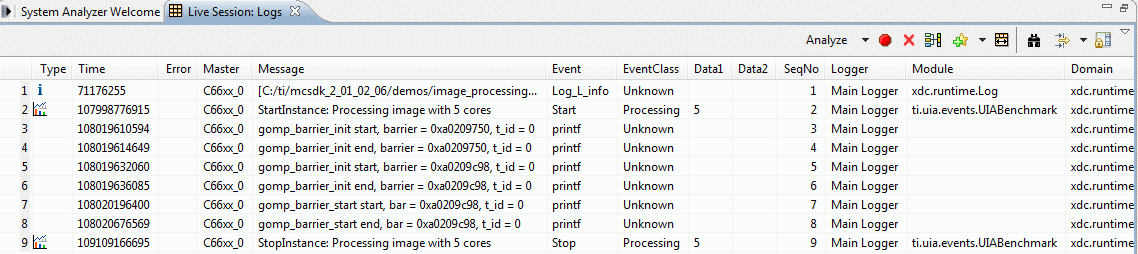
     which eliminates the warnings - the parameters to the Log_write2 macros are cast as IArg . I've also added an event before entering the main while(1) loop after the mailboxes have been successfully initialized.  On my setup, this event appears in the Live Session: Logs view around 10-20 seconds after the IP address is displayed in the console window.

    Note that events are logged at the start and end of the processing of each image, so you will not see any more events displayed in the Live Session: Logs view until after each image has been fully processed and displayed in the web browser. 

    Steps:

    - ensure the .ccxml launch configuration has the C66xx_0 initialization script setting configured to run the ccsv5\ccs_base\emulation\boards\evmc6678l\gel\evmc6678l.gel file

    - if you have a debug session already in progress, terminate it

    - launch the target and connect only to core 0

    - with core 0 selected, apply a system reset (from the CCS main menu: Run / Reset / System Reset)

    - load the project.  It should run to main.

    - start System Analyzer while the target is halted and at main.  (Tools / System Analyzer / Live -> Start)

    - run core 0

    - open a web browser at http://<IP address displayed in the console window>

    - in the web page, select number of cores to use, image to process, click the Process button.

    Here's a screenshot of what you should see after you have processed an image:

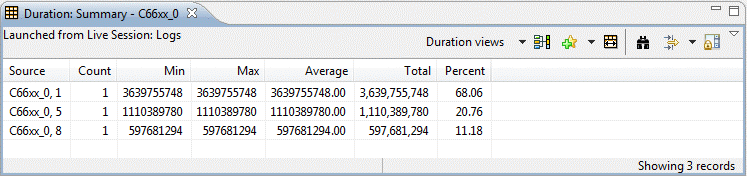
    You can then click on the word Analyze in the toolbar and select "Duration" to see a table with info on the amount of time it took to process the image.  Each time you select a different number of cores to process the image, a new line will be added to the table.  The second value in the "Source" column indicates the number of cores used to process the image.

    Does this work on your setup?

    Regards,

      Brian

  • Thanks Brian,
    That worked. So I went back to the earlier version of mcip_master_main.c (with the warnings) and that works too. I think I must have got my sequence of steps wrong but now I get the logs as you do with both versions of mcip_master_main.c and the sequence of steps that you outlined.

    - Shiv

  • Hi Shiv,

      That's great! 

    We're introducing some improvements to System Analyzer's JTAG transport in CCSv5.4 which will make the sequence of steps less critical - it has been updated to cope with targets where initialization has not yet finished or the target has already started running.  For CCSv5.2 and v5.3, however, you need to ensure that the target is halted at main when System analyzer is started up to ensure that initialization of the logger data structures is complete and the target is not running.

    Regards,

      Brian

  • Hi Brian and Paula,

    I have followed Brian's instructions and the process went smoothly. Everything worked as described and I can add my own SA commands for more analysis.

    Hi Paula, I have noticed Brian 's experiment was based on mcsdk-2.1.2.6; and i was using mcsdk-2.1.2.5 and pdk-1.1.2.5, but I naively assume that shouldn't make a difference. Of course, it was my mistake.

    I will move onto our own image processing codes and hope they will work just as well.

    Thank you very much for the help from both of you.

    Wing

  • Wing, Shiv thanks for your confirmation. Brian, thanks for your help

    Paula