This thread has been locked.

If you have a related question, please click the "Ask a related question" button in the top right corner. The newly created question will be automatically linked to this question.

CCS5 with EVM6657LS "License cannot be acquired"


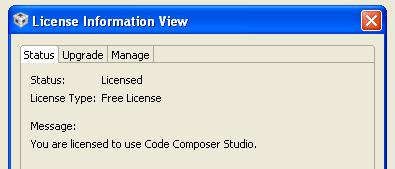
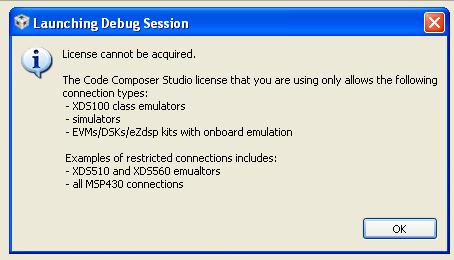
I have just done a clean install of the EVM6657LS DVD including CCS5, created a project using the supplied "hello world" program and "evm6657ls.ccxml" which is clearly included as part of the project in the "target configs" folder and is marked as "active". The CCS5 license manager says I have the "free license". The project compiles without error, but when I press "Debug" I get the message "License cannot be acquired" and the license status changes to "not licensed". I can use the license manager to create a new "free license", but the problem repeats when I press "debug".  I went on to do a full update of CCS5 and this problem is unchanged.

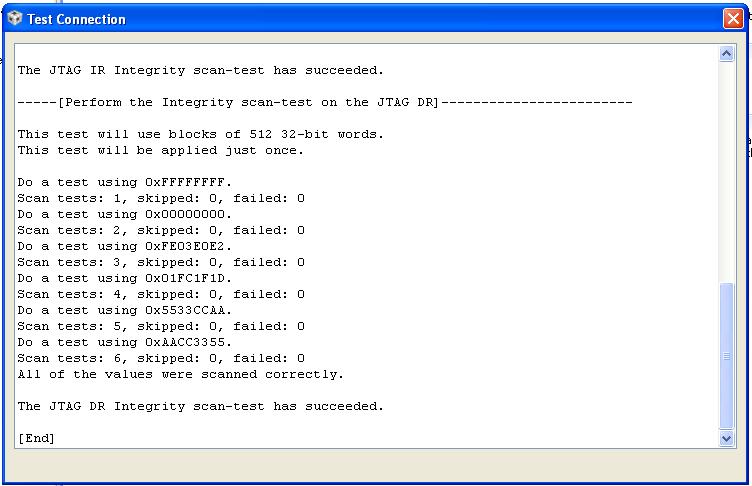
The EVM6657LS is connected with the USB cable plugged into J1 on the XDS2xx mezzanine, and if I open the evm6657ls.ccxml and press "test connection" I get the message "test succeeded".

I have also tried installing the supplied license file "CCSv5-EVM-C6657.lic", and this problem is unchanged.

I would be very grateful for any suggestions.

Here are some screen shots in case they help:

Steve
  • Hi Steve,

    where did you get that license file?  Could you please try the following

    In the "Upgrade" tab could you please relaunch the license setup and select free limited license there.

    Please keep us informed how that goes.

    Best Regards,

    Lisa

  • Dear Lisa,

    Thanks for your reply. I found the license file with a search at this location:

    D:\ti\ccsv5\ccs_base\DebugServer\license\CCSv5-EVM-C6657.lic

    The CCS was installed to D:\ti

    I repeated the Jtag test to confirm a good connection.

    I went to the license information view where it said "unlicensed".

    I went to the upgrade tab and launched license setup

    I clicked on the "free license" option,pressed finish and status changed to licensed.

    I pressed "debug" with project as described before, and after a little activity received the message "license can not be acquired"

    So no change.

    Any other ideas?

    Steve

  • Hi Steve,

    could you send me a copy of that license file/verify it is not a v4 license which is a suspicion I have. 

    Can you make a backup of it/rename it and then delete it and try the relaunch again?

    Best Regards,
    Lisa

  • Dear Lisa,

    Thanks again for your reply. I have attached the license file, but I would point out that I was having the problem before I tried using this license file.

    I had to zip it as this system does not allow uploading files type .lic.

    I deleted this license file itself, and used the license "manage" tab to delete everything I could.

    I then went to the "upgrade" tab and selected the "free" license option.

    Afterwards the status report was "license type: free license"

    I have attached a screen shot of the license manager file list with the location of the free license I just created highlighted, in case that helps.

    Pressing debug resulted in the same failure to acquire a license message.

    Having looked again at the license manager file list, I decided to have a look at each one.

    D:\ti\ccsv5\....   does not seem to contain anything resembling a license

    C:\ti\license does not exist as a directory.

    C:\Documents and settings\Steve....  does appear to contain the free license I had just created

    Are the first 2 locked (can not be deleted) references as expected?

    Could the install have gone wrong simply because I installed on the D drive?

    Any other ideas?

    Thanks

    Steve

    5224.CCSv5-EVM-C6657.zip

  • Hi Steve,

    yes it is possible this is the c vs d thing.  Could you move the new license to a simple directory and point ccs to it.  Failing that I can only think you may have hit a bug with the free license generation we saw but what is odd is that that bug should be fixed and you do seem to have the latest version.

    Please let us know how the c vs d works out.

    Best Regards,
    Lisa

  • Dear Lisa,

    Thanks for your reply.

    I created a new directory D:\ccslicense and copied the file "TI_CCS_Free_License.lic" from the the C: drive into it.

    I then used the manage tab to delete the C: drive license reference and add the D: drive license reference.

    There was no change in the behavior of Debug.

    Is there any possibility that a clean install on the C drive would help? I could try to make enough room, or find another machine.

    Could there be a fault in my EVM and if so how could I demonstrate it?

    Any other ideas?

    Thanks

    Steve

  • Hi Steve

    I hope I have figured out what might be the problem.  Have you selected "Texas Instruments XDS2xx USB Onboard Emulator" as your connection type?

    Please give that a try and let us know. 

    Best Regards,
    Lisa

  • Dear Lisa,

    Thanks for your reply.

    I have attached a screen shot of the current device, which is the TI XDS2xx USB Emulator.

    This has been the device setting during all the previous tests.

    Is this the correct device name for the XDS2xx mezzanine on the EVM6657?

    Thanks

    Steve

  • Hi Steve,

    as mentioned no, you need to use the onboard named one.  "Texas Instruments XDS2xx USB Onboard Emulator"

    Please give that a try.

    Best Regards,

    Lisa

  • Dear Lisa,

    Thank you for your reply.

    I opened the TI supplied EVM6657LS.CCXML and changed the connection from:

    Texas Instruments XDS2xx USB Emulator

    to

    Texas Instruments XDS2xx USB Onboard Emulator

    The debug operation then ran to completion and the license problem is solved, so thank you very much for your help.

    I think all EVM users would be very grateful if TI could widely publicise the following paragraph:

    In release 02.01.01 of "Multicore Software Development Kit", and possibly other releases, the supplied EVM6657LS.CCXML, and possibly other EVM   .CCXML files, only have the connection "Texas Instruments XDS2xx USB Emulator" defined in them. This connection prevents the use of the supplied Code Composer free license. The connection "Texas Instruments XDS2xx USB Onboard Emulator" is required in order to use the supplied Code Composer free license. The supplied EVM6657LS.CCXML must be opened and the connection changed manually.

    I feel this is a very subtle problem created by TI which could only be solved with some expert assistance from you Lisa.

    It was especially subtle because the XDS2xx JTAG connection test works correctly, even though the connection type is wrong, so only the free CCS license fails.

    I hope future EVM releases can have this problem fixed before they are shipped. I would add this has cost us at least a days work.

    Thank you again

    Steve

  • Hi Steve,

    glad to hear that was it and thanks for updating and the feedback which I will pass along.  I fully agree clear documentation could well have avoided you having any issues at all.

    All the best with development.

    Best Regards,
    Lisa