This thread has been locked.

If you have a related question, please click the "Ask a related question" button in the top right corner. The newly created question will be automatically linked to this question.

UniFlash config file question

Other Parts Discussed in Thread: TMS320F28335, UNIFLASH

Hi,

I have UniFlashv2 with an XDS220 emulator for programming TMS320F28335 devices under a production environment. 

I am able to configure the programmer and flash 1 device, but I'd like to know if I have to configure the programmer everytime I swap in a new device for programming.

I've been doing all the commands through the cmdline, for example to program my device: uniflash -ccxml <configFile> -program <programFile>. Is it possible to run only uniflash -program <programFile>, without the config file?

Thanks in advance.

Regards,
Dan 

  • Hi Dan,

    What exactly is your use case and the problem you are facing?

    1. Do you want something which configures only once and because the configure time is too long for every load operation? Or because of some other reason?

    2. Are you scripting the command lines?

    Currently we can't do something like you described on separate commands. However a relatively quick fix could be done in a way such that the load program command does not fully exit, it will only configure once, and every time the program load finishes it will wait for you to hit enter to repeat the load again, without re-configuring. This would cause you not able to mix in generic system commands between the loads. Would something like that solve your problem? Or do you need a really generic solution?

    Regards,

    Victor

  • Hi Victor, 

    Thanks for the reply.

    I'll be scripting all the commands but at the moment, I'm looking for ways to reduce the time to program the devices. The scenario is to have the emulator program device after device during high volume production. If I can configure the emulator only once with the config file and just run load commands for all subsequent devices without configuring again, that'd save a lot of time on production. 

    What is the quickfix you had in mind? For a typical operation, I'll load the program and verify if the target is programmed successfully. cmd line may look like this: uniflash -log<logFile> -ccxml<configFile> -program<loadFile> -verify<loadFIle> . Can this operation incorporate your solution?

    Regards,

    Dan

  • Hi Dan,

    The full verification is done by default when you program the file, so you don't need to explicitly verify it again.

    As with the quick solution, the commands themselves are implemented with Java script. Like I was saying earlier we can edit in a way that the program load command doesn't fully exit, every time it finishes programming a board it will sit there and wait for your to press enter to repeat the previous operation, or press some other button, say "esc" to exit. This way you will only have the time cost of configuring the device once.

    So it on the command line, it will be something like:

    > uniflash -log<logFile> -ccxml<configFile> -program<loadFile>

    <configures connection/setup, program loads.....>

    Press Enter to load again or Esc to quit.

    <press enter here, and the program loads again without re-configure>

    Press Enter to load again or Esc to quit.

    <press esc here, de-configure the setup, the program/cmd exit>

    Command Terminated

    >

    Regards,

    Victor

  • Hi Victor,

    To achieve this, I suppose I'll need to alter the uniFlash_main.js file and add a do..while() loop after calling config(), with the remaining TI codes inside the loop and make some minor adjustment to recalculate the programming time.

    I tried to implement this method but I’m having difficulties getting user inputs as a condition to end the loop. I’m not very familiar with java or javascript, can you show me how to adjust the code to implement this?

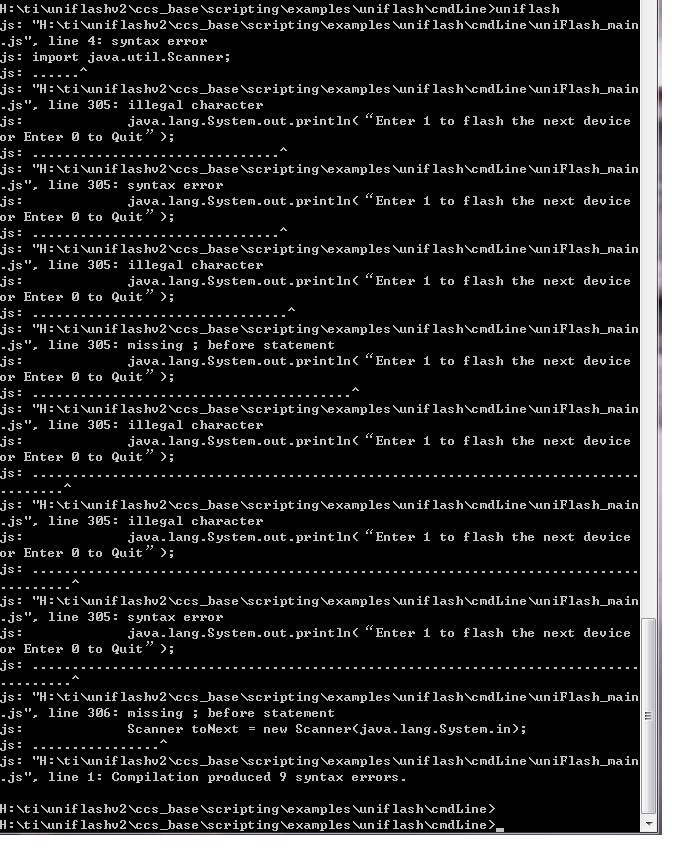
    Here’s what I’ve changed to the uniFlash_main.js file:

    testEnv = {}; "TI code"

    import java.util.Scanner; 

    ... TI functions()...

    function main()

    {

                    Parse input Arguments(); “TI code”

                    Config() “TI code”

                    Do{

                                    Perform Operations (ex: program devices); “TI Code”

                                    java.lang.System.out.println(“Enter 1 to flash the next device or Enter 0 to Quit”);

                                    Scanner toNext = new Scanner(java.lang.System.in);


                           }while(toNext = 1) ;

                    Quit(); “TI Code”

    }


    Syntax errors occur If I use this code and run it from the cmdline(Please see attachment). Instead of using the scanner function, should I use something else to get user inputs from the keyboard?

    Regards,

    Dan


  • Dan,

    The UniFlash command line tool is implemented using JavaScript running within the Rhino Environment. Because of this, the way you import Java packages should look something like this:

    importPackage(java.util.Scanner);

    Based on the information from this thread, I have tried updating the tool to allow running the same operation without needing to re-configure the device; please see the attached uniFlash_main.js (need to be unzipped and place in the location mentioned above, back up original as required).

    Notes on the changes:

    - after running the specified operation in the command line, waits for input. If 'exit', the script ends, otherwise, it will execute the same command again

    - the target will be disconnected and reconnected between input; this should allow you to physically switch out a device (has to be same type of device)

    - with the current solution, there is no way to modify the current configuration, or any of the operations originally specified. In theory, we can update the script to be able to switch command line parameters based on user input

    - because we don't stop the time calculations while waiting for user input, the operational time and total time can be misleading at the end of the script

    Please evaluate the solution I have presented, and make modifications for your own scenario as needed. We are currently evaluating if we want to include this change in the main product, so please share your opinion on this. Your feedback is greatly appreciated and will help us improve the overall product.

    Please let me know if you have additional questions.

    Thanks,

    Ricky

  • Hi Ricky and Victor,

    Thanks for the file. I think you forgot to initialize optionExist in your code. I've attached the error for your reference.
    With that block of code deleted, the solution works great and I am seeing a ~50% reduction in the flash time. I'd recommend having this programming method as an option since it saves time during high volume flashing processes.

    While we are on this topic, I have another scenario related to the config file and would appreciate your inputs. This question may have been asked before but I'd like to confirm it again.
    In the near future I'll have a script to automate a similar production process and it will function like this:

    1. execute ParentScript
    2. call functions to measure signals...
    3. call uniflash_function to Program Devices (uniflash -ccxml<file> -program<file> for first time only) or (uniflash -program<file> for later devices)
          ... in the background

         *Start Process
         *Configure emulator(first time only) and/or Load device obj files(subsequent devices)
         *Save device status
         *End Process


    4. retrieve flash device status and call function to measure signals...
    5. process ends
    6. physically swap to new board/device
    7. repeat step 2 (repeat or stop till operator ends production process)

    *Operator only has the option to start or stop the production process at step7

    For step3 in this case, I have to end the uniflash process each time without any user inputs. Again, for the purpose of saving time, I'd like to configure the device for the first time only (ex: store the config inside emulator's flash memory) and run only uniflash -program<file> commands for later devices.
    Can Uniflash be altered to achieve this?

    For my 2nd question. Is it possible to log the results (either PASS or FAIL) after each operation in a txt file? The -log operation contains a lot of information, even with verbose =0. (The pass/fail txt file may be used by the operator to check board status)

    Again, thanks for your assistance.

    Regards,
    Dan

  • Hi Dan,

    Here are my answers:

    Q 1:

    > Currently this is not doable in command line, as what you are proposing needs to have the back-end code running on a separate process. It will involve IPC and won't be that straight forward. 

    Q 2: 

    > It is not in the code now, but same as before, you can change the script file to do this yourself.

    It sounds like you want to do complex operations, in this case you should get out of the command line interface and start using the scripting interface. We have a scripting interface called DSS:

    Debug Server Scripting (DSS) is a set of cross platform Java APIs to the Debug Server which allow scripting through Java or 3rd Party tools such as JavaScript (via Rhino), Perl (via Inline::Java), Python (via Jython), TCL (via Jacl/Tclblend), etc. 

    You can find example scripts in <uniflash install>\uniflashv2\ccs_base\scripting\examples\uniflash\scripting

    It might seems there's a lot more to learn with the scripting interface, but by using this you will write less throw away code and gain more flexibility. You will also have more control and management over your flash scripts in the long run. I strongly suggest you to try it out.

    Regards,

    Victor

  • Dan,

    Just a minor note on the updated script I posted.

    I forgot to mentioned in my previous post that the update was implemented based on UniFlash v2.1. Based on the error message you got, you are probably not using 2.1, since optionExist() was added in the latest release to fix a problem with command line tool on certain devices. On C2000 based devices, you should be ok with removing the block of code to get it to work for previous UniFlash builds.

    Thanks,

    Ricky

  • Hi Victor,

    By configuring the emulator the first time, isn't the configuration setup saved inside emulator's(XDS220) flash memory? With some of the other interfaces + programmers I used in the past, I am able to configure the programmer only once and execute operations thereafter. What is the case for uniflash with xds220?

    Regards,
    Dan

  • Hi Dan,

    I was talking about "configure" on the back-end flashing process that you run on the host, which is the gut of UniFlash, the tool you are using. Obviously you can access the emulator directly after connecting. But that is really independent from the control logic on how you flash the device.

    If you can do that with other tools in command line, it just means they have daemons running on the back ground, or you are in the same process, ie, not true command line.

    Regards,

    Victor