This thread has been locked.

If you have a related question, please click the "Ask a related question" button in the top right corner. The newly created question will be automatically linked to this question.

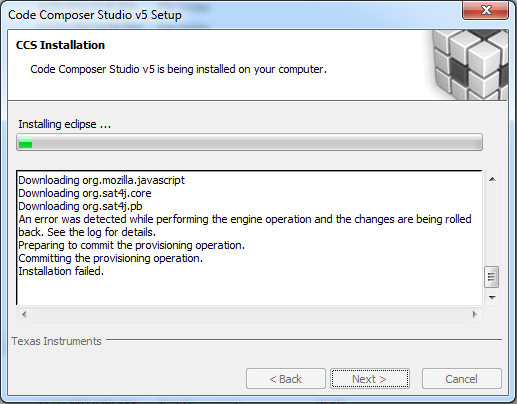
CCS 5.3.0.00090_win32 on Windows 7 64-bit "Failed to install eclipse."


I am trying to install CCS 5.3.0.00090_win32 on Windows 7 64-bit. It warns me that McAfee firewall is running. Our IT limits my ability to turn off McAfee components. I was able to shut down "On Access Scan" and other components, but NOT the firewall. However, I have an XP machine on the domain network running the same version of McAfee. I shut McAfee with the same limitations on that XP PC but, the CCS 5.3 installed fine. So, I am pretty sure it is not a firewall problem.

I used to have CCS4 on this PC but un-installed it before attempting to install CCS5. So the previous version did install.

Things I tried:

1) Moving the unzipped installation folder to C:\Temp\TIStuff
   -- (just in case the Desktop was an issue as it might be a junction)
   
2) Installation with both the offline installer and the online installer.

3) Running the installation executable as "Administrator".
   -- Right-click->Run as Administrator
   
4) Rebooting the PC, then run the install from C:\Temp\CCS5.3, launching with "Run as Admin"

I read a few other threads on this forum but none of them had a clear concise fix that I could see. It is surprising to me that the fix is not in BOLD on the TI CCS Wiki when so many people are complaining this issue, going back to the beta versions.

I have attached my log file from: "C:\Program Files (x86)\InstallJammer Registry\ccsv5\60556FE5-C1A1-4061-8DF8-FFB8393BAE2D"

Any help would be appreciated.

Regards,

Jim

  • HI Jim,

    thanks for the logs.  We will get you feedback as soon as possible. 

    Best Regards,

    Lisa

  • Hi Jim,

    Are you trying to do a fresh install? From the logs it looks like it was a re-run attempt, i.e. there were already components in the ccsv5 folder and the eclipse there was corrupted. Could you try to run in a new directory or remove everything from the ccsv5 folder and try again? This would give us a better idea of the issue you're facing.

    Thanks

    Danish Innis

  • Hi Danish,

    Yes, I tried re-installing many times, As I said, I tried from the stand-alone installer and from the web. I sent only the most recent log file. However, after looking at the log file names and dates further, I can see that I had installed (or attempted to) version 5.2.1 in September, 2012.

    This post (thread) is regarding attempting to install CCS5.3 onto my laptop. I realize now that I got confused about the version 4 uninstall, that was on my XP desktop. I uninstalled CCS4 and installed CCS 5.3. I had stated earlier that that was on the PC with the install issue, the laptop; the reason for this thread. That was incorrect.

    Apparently, on this laptop, I uninstalled CCS 5.2.1. So yes, there was likely some remnants from that older installation. I renamed the C:\ti\ccsv5 folder, and viola, the installation was successful the next time.

    PROBLEM SOLVED!

    Thanks for the tip. You may want to have the CCS group fix the installer to rename the directory on its own (maybe with a warning to the user) to fix this install issue.

    Although not really necessary at this point, I have pasted my log file directory listing below.

    Regards,

    Jim

  • Whoops, forgot to paste the directory listing. As I said, it is not necessary, BUT, now I said I would do it so I am committed ;-)

    Regards,

    Jim

    =======================

     Volume in drive C is TI106427W0D
     Volume Serial Number is 781B-1A62

     Directory of C:\Program Files (x86)\InstallJammer Registry\ccsv5\60556FE5-C1A1-4061-8DF8-FFB8393BAE2D

    03/12/2013  05:35 PM    <DIR>          .
    03/12/2013  05:35 PM    <DIR>          ..
    03/12/2013  05:35 PM           847,238 ccs_setup_5.3.0.00090_install.log
    03/12/2013  05:35 PM               421 7F63FE68-8948-4519-99E9-31E008531839.info
    03/12/2013  05:35 PM             1,501 7F63FE68-8948-4519-99E9-31E008531839.log
    03/12/2013  05:34 PM            34,433 20130312-173512_ccs_config.xml
    03/12/2013  05:09 PM            34,095 ccs_config.before.eclipse
    03/12/2013  01:14 PM           714,329 20130312-170755.ccs_setup_5.3.0.00090_install.log
    03/12/2013  12:48 PM           735,324 20130312-131119.ccs_setup_5.3.0.00090_install.log
    03/12/2013  11:48 AM           714,097 20130312-120139.ccs_setup_5.3.0.00090_install.log
    03/12/2013  11:19 AM           718,136 20130312-114628.ccs_setup_5.3.0.00090_install.log
    03/12/2013  11:14 AM           720,586 20130312-111642.ccs_setup_5.3.0.00090_install.log
    03/12/2013  11:08 AM           717,764 20130312-111035.ccs_setup_5.3.0.00090_install.log
    03/12/2013  10:34 AM             9,669 TI_CCSv5_uninstall.log
    12/13/2012  06:12 PM            30,621 20130312-114812_ccs_manifest.xml
    12/13/2012  06:12 PM            30,621 20130312-111422_ccs_manifest.xml
    12/13/2012  06:12 PM            30,621 20130312-173512_ccs_manifest.xml
    12/13/2012  06:12 PM            30,621 20130312-110807_ccs_manifest.xml
    12/13/2012  06:12 PM            30,621 20130312-131436_ccs_manifest.xml
    12/13/2012  06:12 PM            30,621 20130312-111921_ccs_manifest.xml
    11/23/2012  10:41 PM            30,621 20130312-124839_ccs_manifest.xml
    11/05/2012  07:23 PM           113,312 20130312-114812_ccs_installini.xml
    11/05/2012  07:23 PM           113,312 20130312-173512_ccs_installini.xml
    11/05/2012  07:23 PM           113,312 20130312-111422_ccs_installini.xml
    11/05/2012  07:23 PM           113,312 20130312-111921_ccs_installini.xml
    11/05/2012  07:23 PM           113,312 20130312-131436_ccs_installini.xml
    11/05/2012  07:23 PM           113,312 20130312-110807_ccs_installini.xml
    11/05/2012  07:23 PM           113,312 20130312-124839_ccs_installini.xml
    08/28/2012  10:45 AM        10,218,138 ccs_setup_5.2.1.00018_install.log
                  27 File(s)     16,473,262 bytes
                   2 Dir(s)  239,843,241,984 bytes free

  • Hi Jim,

    great to hear and thanks for the update.


    Thanks Danish!

    All the best with development,

    Lisa

  • It seems I have a similar issue, but I am unsure? I followed the suggestions in this post; however, I have been unsuccessful with installing CCSv5.5. The Eclipse installation still fails.

    I have attached a couple of snapshots along with the latest log file. This log file was created when running the installer as Administrator.

    Am I missing something, or is this new?

    Any help with this matter would be greatly appreciated. Thanks!

    Brad

    5140.ccs_setup_5.5.0.00077_install.log

  • I just turned off the McAfee real-time scanning. This seems to be the problem.

    I apologize for the post!

    Brad