This thread has been locked.

If you have a related question, please click the "Ask a related question" button in the top right corner. The newly created question will be automatically linked to this question.

Make not found error


Hi,

 I have imported code from my collegue  and trying to compile on my PC, I am using CCS  Version: 5.1.0.09000,

I am getting error Make not found.
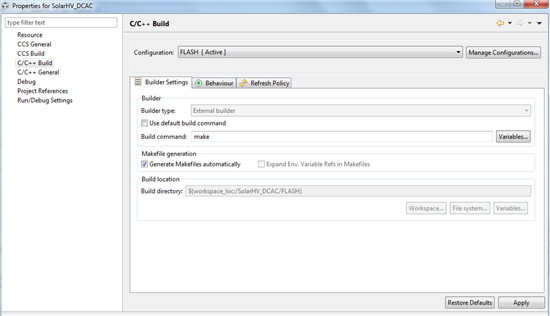
Pls help

Thanks.


  • Hello,

    The "Use default build command" option should be enabled. In your screenshot, it is disabled. Please enable it and try again.

    Thanks

    ki

  • Hi Ki,

    Thanks I have tried that .. However it is not possible to click the tick mark ?? I don't know why but I am unable to click there .., I tried on 2 PCs same problem.

    Regards,

    Chaitanya

  • The only things I can think of is that you don't have write permissions to the project meta files or the project is corrupted. Check the project meta file (.project, .cdtproject, .ccsproject) and make sure you have correct permissions.

    Thanks

    ki

  • Hi Ki,

    Yes looks like that was the problem.. it was read only. However another problem I am getting is after importing I am not seeing any project in the editor window? howcome?  later I tried deleting the old project from the workspace too .. still after new import( which looks successful) but no programs are seen in the window??

    Pls guide me..

    Thanks,

    Chaitanya


  • chaitanyab said:
    However another problem I am getting is after importing I am not seeing any project in the editor window? howcome?  later I tried deleting the old project from the workspace too .. still after new import( which looks successful) but no programs are seen in the window??

    More details are needed. Provide at least a screenshot. A detailed reproducible test case would be best.

    Thanks

    ki