This thread has been locked.

If you have a related question, please click the "Ask a related question" button in the top right corner. The newly created question will be automatically linked to this question.

CCS 5.3.0 Installation at Windows 7 64 bit

Other Parts Discussed in Thread: MSP430G2553

Hello,

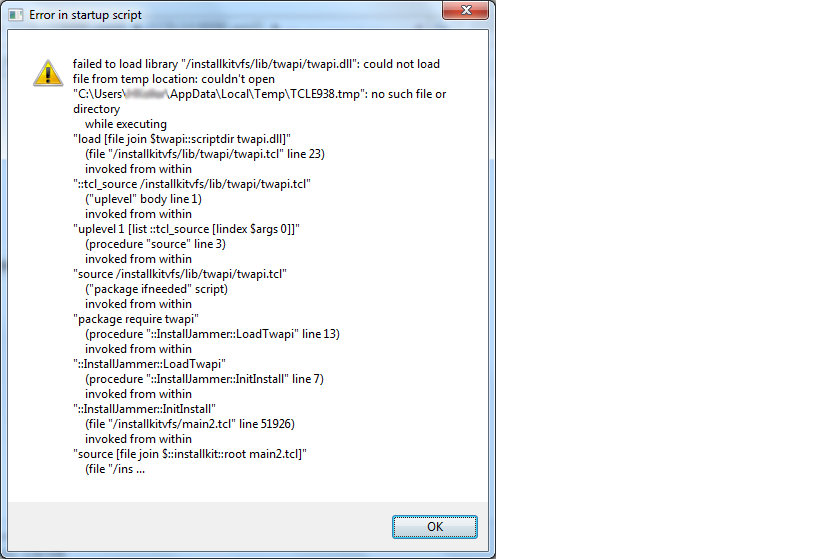
I have trouble with the full (offline) installer of the CCS 5.3.0, to program a MSP430G2553 device. When I will start the installer I got an error (picture).  I have a Windows 7 64 bit system with three partitions.( One for system, programms, data). Please can you help me? I watched for hours in serveral bloggs but no result. I only know that there could be problems with a differing installing location... I have no idea how to solve this?

Thanks a lot!

Greetings

Hendrik

  • Hi Hendrik,

    could you please send us the installation logs?  These will be found in the installjammer registry directory which is a possibly hidden folder in program files or program files(x86).

    These will tell us the story (or hopefully will).

    Some common issues

    - antivirus or permissions interference

    - use of junctions/mapped/virtual drives or servers

    - use of program files to install

    - special characters in a user name

    Best Regards,

    Lisa

  • Hi Lisa,

    thank you for your reply. I have uploaded the InstallJammer-Logfile, after the installer broke down at 2% of installation -> this time I got no error/ warning from the installer, only from Windows "maybe the program wasn't installed correctly, searching for a solution..."!?

    I have checked all of your common issues, but there was no solution. (Otherwise I would not have opened this new topic.)

    Greetings Hendrik

  • Hi Hendrik,

    as a next step can we please verify that eclipse did unzip?  It woud be in:

    C:/Users/HeKe/AppData/Local/Temp/ijtmp_44F21BC3-C33E-4223-9C3D-2990B301DB07/eclipse

    The eclipse unzip commands are:


    C:/Users/HeKe/AppData/Local/Temp/ijtmp_44F21BC3-C33E-4223-9C3D-2990B301DB07/unzip.exe -q -o -d "C:/Users/HeKe/AppData/Local/Temp/ijtmp_44F21BC3-C33E-4223-9C3D-2990B301DB07" "C:/CCS5.3.0.00090_win32/baserepo/eclipse_core_3.7.2.zip"


    C:/Users/HeKe/AppData/Local/Temp/ijtmp_44F21BC3-C33E-4223-9C3D-2990B301DB07/unzip.exe -q -o -d "C:/Users/HeKe/AppData/Local/Temp/ijtmp_44F21BC3-C33E-4223-9C3D-2990B301DB07/baserepo" "C:/CCS5.3.0.00090_win32/baserepo/eclipserepo.zip"

    Best Regards,
    Lisa

  • Hi Lisa,

    I dont have these folder "ijtmp_44F21BC3-C33E-4223-9C3D-2990B301DB07" in my Temp directory?

    What do you mean with the eclipse unzip commands? Can I manually execute them ? Because of the missing folder "ijtmp_44F21BC3-C33E-4223-9C3D-2990B301DB07" folder I cant check them.

    I hope you have another idea for this problem...

    Greetings Hendrik

  • Hi Hendrik,

    we suspect that this is due to use of junctions. ( ie mapped/virtual/junction drive).

    Could you please do a fresh full install not using junctions.  Ie fully unzip and install to a local simple directory like c:/myccs.

    Please keep us informed how that goes.

    Best Regards,
    Lisa

  • Hi Lisa,

    i still tried it without junction, nevertheless I tried it again with a new download and a new installation from C:/TITemp to C:/CCS5 -> result: installer breaks down, no "ijtmp_44F21BC3-C33E-4223-9C3D-2990B301DB07" folder...

    Now I have no hope or idea to get this CCS5 installed on my PC :-(

    I have seen another threat of you in which WeiWei has exactly the same problem as me:

    http://e2e.ti.com/support/development_tools/code_composer_studio/f/81/t/246226.aspx

    and you suggested: "Weiwei - you may have to create a temporary using, leave the user profile on C:/ and install for all users.  You as well are using junctions and have moved your profile which are not supported". Can you explain this a little bit more in detail, please? Maybe it will help me too.

    Greetings Hendrik

  • Hi Hendrik,

    CCS 5.3 does not install correctly if the user's using junctions either in their home directory, their temp directory or the install directory. To get around this you need to:

    1. set TMP and TEMP variables from control panel to a writable directory that already exists and that you know doesn't have any junctions or links in the path.

    2. Clean out the install directory completely (a delete will do)

    3. Use CCS5.4.0 beta

    Please let us know if you still have problems.

    Danish Innis

  • Hi danishinnis,

    thank you very much for your advice, but unfortunately it doesn't work at all. I get this error warning...and a new InstallJammer-file.

    extract of the InstallJammer:

    Executed
    03/31/2013 20:06:40PM - Checking condition 13D96D8B-3F10-4DE3-AE45-2260F3EEF34D - File Exists Condition
    03/31/2013 20:06:40PM - Checking to see if <%EclipseDir%>/ccs_config.xml.bk exists
    03/31/2013 20:06:40PM - ** Checking to see if C:\ti/ccsv5/eclipse/ccs_config.xml.bk exists
    03/31/2013 20:06:40PM - Condition failed
    03/31/2013 20:06:40PM - Skipping action 8DC9C68D-0C93-432C-9F50-9ECCB01EE7D2 - Rename File - conditions failed
    03/31/2013 20:06:40PM - Checking conditions for 05EE68FE-6C93-4340-82C2-21CF20CE1591 - Create Update.txt - Before Action is Executed
    03/31/2013 20:06:40PM - Checking condition C8AE338B-8D17-4EDB-99A9-313C01CA352A - String Is Condition
    03/31/2013 20:06:40PM - Checking to see if <%updates_found%> is true
    03/31/2013 20:06:40PM - ** Checking to see if false is true
    03/31/2013 20:06:40PM - Condition failed
    03/31/2013 20:06:40PM - Skipping action 05EE68FE-6C93-4340-82C2-21CF20CE1591 - Create Update.txt - conditions failed
    03/31/2013 20:06:40PM - Checking conditions for 1160585F-F26F-4111-911E-B0D10C849C31 - Remove .ij_running.txt - Before Action is Executed
    03/31/2013 20:06:40PM - Checking condition 588D69A8-22C4-4BE8-A09F-5123D47D7FEF - File Exists Condition
    03/31/2013 20:06:40PM - Checking to see if <%EclipseDir%>/downloads/.ijrunning.txt exists
    03/31/2013 20:06:40PM - ** Checking to see if C:\ti/ccsv5/eclipse/downloads/.ijrunning.txt exists
    03/31/2013 20:06:40PM - Condition failed
    03/31/2013 20:06:40PM - Skipping action 1160585F-F26F-4111-911E-B0D10C849C31 - Remove .ij_running.txt - conditions failed

    Greetings Hendrik

  • Hi Hendrik,


    Can you post the full log please? The extract you sent only contains the roll back information, not the actual failure.

    thanks

    Danish

  • Hi danishinnis,

    I tried it again with your three step instruction ... and it works :-)

    I think I have made a misstake by setting the TMP and TEMP variable.

    Thanky you very much and best regards!

    Lucky Hendrik

  • Hi Hendrik,

    very happy to hear.  Thanks for the update and all the best with development.

    THanks Danish!

    Best Regards,
    Lisa