


Hello,
I am using CCSv5.3 latest and I am having an annoying issue in which the problem viewer is not reporting any of the errors in the code. They show up in the build log but not in the Problems tab.
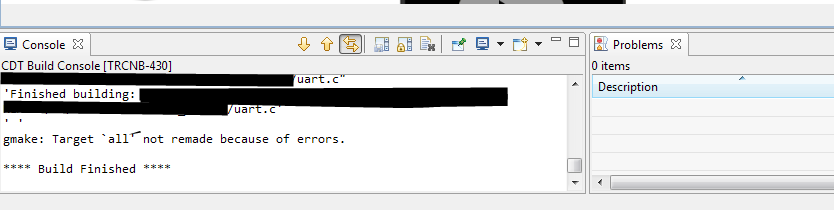
This is only occurring on one workspace. I am working two related codebases on the same (real-life) project, separated in two different CCS projects, each in its own workspace (so that I can debug both simultaneously). The project/workspace that I've been working on the most recently has this problem in the last week or so; the other one, which I had not built for a while until this morning to test, does not have the problem.
After attempting full clean/rebuild cycles, then restarting the program, (and not having found anything in a quick search of these forums) I decided to try updating CCS (I was probably on 5.2 or something -- it took quite a while to download all the updates). Well, that was a big failure and ate most of my day yesterday :(. The updater hung hard so I eventually had to kill it. Then of course CCS had major errors, as did the installer I tried to re-run. And the uninstaller. Finally I downloaded the full 1.3GB installer and manually deleted CCS and some registry entries so that it would reinstall. That finally went, but I still have the original problem. (Over the course of the day I tried the advice here: http://processors.wiki.ti.com/index.php/Troubleshooting_CCSv5 - particularly the whole "InstallJammer" bit. Good name - exactly what it did. Jammed up my install.)
I found (and copied pertinent parts of :)) a similar post here: http://e2e.ti.com/support/development_tools/code_composer_studio/f/81/t/197977.aspx . However, there are some differences between their issue and mine. I have now tried resetting my perspective, doing a -clean launch, cleaning and starting a new workspace. Still the same behaviour.
Does anybody have any ideas? Thanks in advance.
Signed,
Very Frustrated

