This thread has been locked.

If you have a related question, please click the "Ask a related question" button in the top right corner. The newly created question will be automatically linked to this question.

CCS V5.3 installation problem


Hi,

I encountered a installation problem about CCS V5.3, and i followed

http://processors.wiki.ti.com/index.php/Troubleshooting_CCSv5, but there is nothing to help,

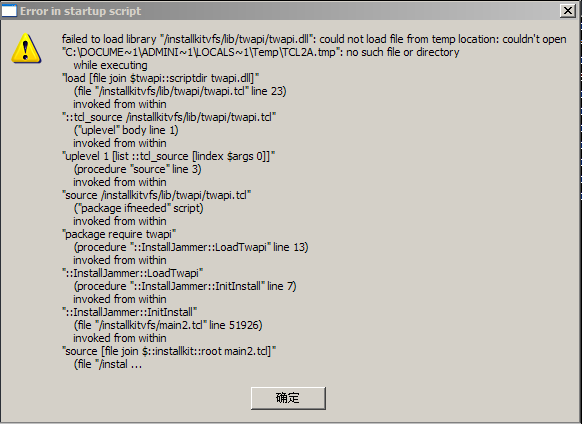
and i tried V5.2 and also web installer  of both V5.2 V5.3, it seems they are the same problem:

and i never install a CCS before....This dialog popup just 1~3 seconds after i double click the installer;

i encountered this problem weeks ago, and this time before i try the installation, i restored my system with ghost, my system is Windows XP SP3;

Can anybody help me ? Thanks.

  • Hi Huabo,

    could you please send the installation logs.  these are in the installjammer registry directory (which is likely hidden and found under program files or program files(x86)).

    some typical issues

    - antivirus or permissions issues

    - use of servers/junctions/mapped drives

    - use of special characters in the directory or user name

    - use of program files

    Please keep us informed.

    Best Regards,
    Lisa

  • Hi Lisa,  I don't understand where to get the installation logs as you mentioned above, but i tried the following 2 step and didn't find the intallation logs:

    1.  I looked into the path 'C:\Program files\'(there is no 'program files(x86)'), there is no log file or directory related with CCS

    2.  I ran the command 'regedit', and searched 'texas', and also , there is nothing about CCS

    and about the typical issues, i have some info:

    1. my antivirus soft is "360 safe",  but i close it every time after the system start up;

    2. the directory "C:\Documents and Settings" i have it mapped to drive H:

  • Hi Huabo,

    the installation logs are in a directory called "installjammer registry" .  This folder will be in program files or program files(x86) and may be hidden so make sure to show hidden folders and files.  

    You mention using a mapped drive ... this could be the problem.  You could try fully unzipping and installing to a local directory (not mapped).  Eg unzip and install in C:/myccs or similar.

    Please keep us informed.

    Best Regards,
    Lisa

  • Hi Lisa,

    I searched the whol C: drive( the hidden files is visible on my system), and I can't find any directory which name contains "registry" or "installjammer"

    1. I ran the installer from fully unziped directory, not just run it from the zip file.

    2. I didn't choose to install it to install CCS into C: drive, actually, I think the problem occured before the installer let me  to choose the installation path. And i was never like to install any software to C: drive, usually, if possible, i will install all soft onto D: or E: drive; And i never use the directory name "Program files" as the installation path;

  • Hi Lisa,

    by the way, i remember that i attached a installation error snapshot in the first post, but i can't see it now,  did you see it ? can you see it now ?

  • Hi Lisa,

    this is the error dialog, post it again

  • Hi Huabo,

    without the logs we can not tell for sure what is going on.  But again please clear out your installation and try fully unzipping and installing to a simple local directory like c:/mycss with any antivirus disabled.  You may want to now try v5.4 which was released today:

    http://processors.wiki.ti.com/index.php/Download_CCS

    Best Regards,
    Lisa

  • Hi Lisa,

    Problem solved, Thanks a lot

    It's wierd, i copied the whole unziped directory CCS5.3.0.00090_win32 to C:\, and it worked, but if the directory is under E:\, and then the problem occurs.

  • Hi Huabo,

    great, very happy to hear.  Thanks for the update and all the best with development.

    Best Regards,

    Lisa

  • Hi Lisa,

    As you mentioned, The underlying reason is that  I mapped C:\Documents and Settings to H: drive, and all things is ok if i cancel this map;

  • Hi Huabo,

    great, very happy to hear.  All the best with development.

    Best Regards,
    Lisa