This thread has been locked.

If you have a related question, please click the "Ask a related question" button in the top right corner. The newly created question will be automatically linked to this question.

CCS 5.4 install failure


I tried installing CCS5.4 on a Windows XP SP3 computer.  The computer did not have a previous CCS installation.

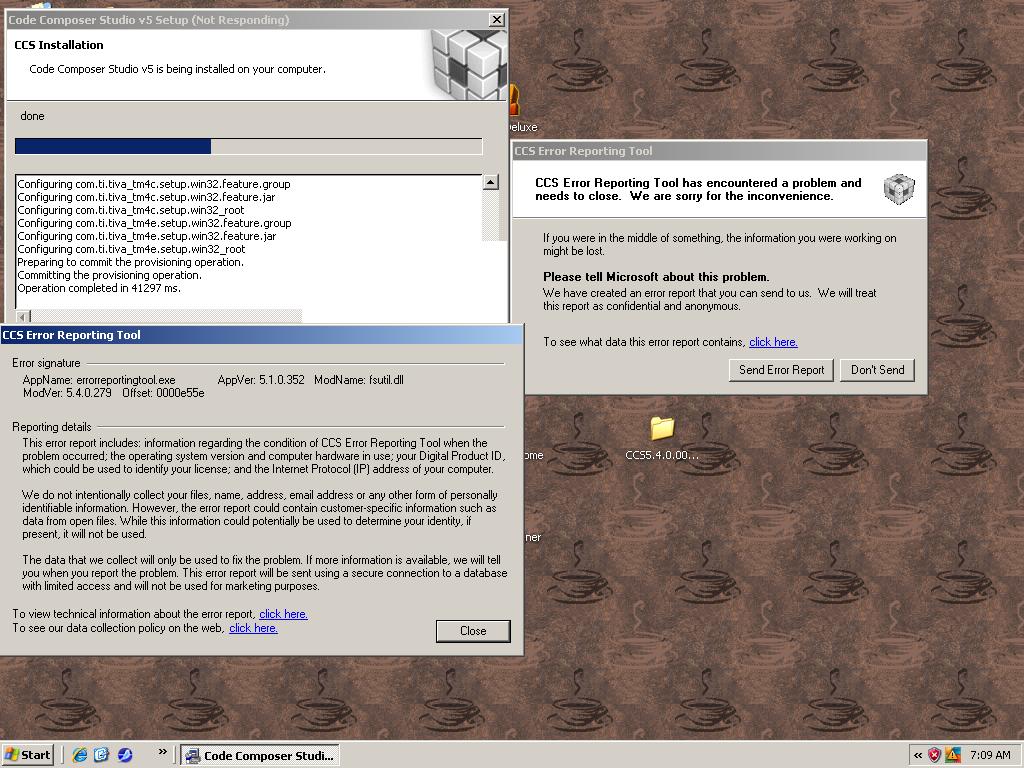
After about a half hour, I got the Microsoft Dialog box telling me that the installer encountered an error and had to close.  It sent the error report to Microsoft.

The install dialog then told me it was done, started CCS, asked for a workspace, then after I said OK, CCS silently exited.

Install log showing an error attached.

The options installed were the various ARM devices, and the XDS100 emulator support.

This happened with both the online and offline installers.

Gerry Belanger

  • Hi Gerry,

    can you please ensure your antivirus was off and you were not using any junctions/mapped drives or servers?  Also can you please send us the ccs install logs?  These are in the installjammer registry directory, which may be hidden and is found inprogram files or program files(x86).

    Best Regards,

    Lisa

  • Lisa,

    I uninstalled the failed install, turned off Windows Firewall and Anti-virus(AVG) and retried with the offline installer.

    Same error.  I copied the windows error reporting file to the Installjammer directory, and have attached the directory.

    Gerry Belanger

    InstallJammer Registry.zip
  • Hi Gerry,

    what exact issues are you seeing?  I ask because the log shows a sucessful installation and the only thing I noticed was that there was a c and a d drive involved.  This may or may not have caused a few issues.   It is always best to install in a fresh directory and keep everything (full install and unzip) local ... ie do all in c:/mycss.

    Best Regards,
    Lisa

  • Lisa,

    When I start CCS, I get the dialog box to select a workspace.  Then it eventually shows the IDE screen, and after a couple of seconds exits.

    It never asked me for a license.  I would be using the free XDS100V2 option, as the BeagleBone is my target.

    My D drive is where I unzipped the installer as that had more room.  Tomorrow I will uninstall and try again with the install file on the C drive.

    Gerry Belanger

  • Lisa,

    I move the install directory to the C drive, same result.

    Attached is a screen shot of where the failure occurs.  The details sent to MS were in the installjammer root directory I sent yesterday.

    The CCS log file which showed an error was not in the installjammer directory, but in C:\ti\ccsv5\install_logs,

    and was attached to the first post of this thread.

    It does not appear to matter whether I install from C: or D:, or the web installer or the offline installer, or have Windows firewall on or off, or have Anti-virus on or off.

    I get the same error each time.

    To summarize:

    At the point in the installation shown in the attached screen shot,with the progress bar about halfway through, the MS failure dialog pops up.

    I send the error report to MS, then the installer thinks it is done.

    When CCS starts, it asks for the workspace (It did not matter whether I used the default or one I created),

    When the IDE shows on the screen, it immediately exits without any error message to the user.

    The only log I found which shows an error is C:\ti\ccsv5\install_logs\hercules_5.4.0.3_install.log

    Gerry Belanger

  • Gerard,

    The install logs seem to indicate the non-Java components of CCS are crashing when they are trying to be run. I'm wondering if one of the Microsoft runtime libraries has not been correctly installed. On that thesis, here are some additional questions for you:

    • Did CCS ever prompt for you to reboot this PC, and have you rebooted the PC between any of the failed install attempts? Perhaps one of the MS installers has left a pending file operation that would be cleared to a reboot.
    • Could you navigate to C:\ti\ccsv5\ccs_base\DebugServer\bin, and run the "ErrorRerportingTool.exe"?  This is the program that caused the crash dialog during the install. I want to confirm that it still crashes.  Assuming it does, please proceed with the remaining items.
    • Could you try running each of these Microsoft installers directly and see if they complete OK: 
    • <your unzipped CCS install folder>\CCS5.4.0.00091_win32\baserepo\vcredist_x86.exe
    • <your unzipped CCS install folder>\CCS5.4.0.00091_win32\baserepo\vcredist_x86_2005.exe
    • <your unzipped CCS install folder>\CCS5.4.0.00091_win32\baserepo\vcredist_x86_2012.exe
    • Please do a reboot after running these.
    • After the reboot, please re-run the ErrorReportingTool.exe. Does it still crash?
    If ErrorReportingTool is still crashing, my next step would be to collect a Dr. Watson minidump for this process (type drwtsn32 in the run menu, and enable collection of a minidump, post the minidump here).
  • Andy,

    • CCS install never prompted me for a reboot.
    • Error reporting tool still crashes
    • I ran each of the installers:
      • The first and third asked me for repair or uninstall; I picked repair.
      • The 2005 one did not ask, but put up a progress bar which did not move across, then after a minute or so just dropped out.
      • I then re-booted.
    • the error reporting tool still crashes.
    • Since the e2e upload function would not accept the .dmp file, I zipped it with the log file of all the crashes since I started this Friday night.
    Dr Watson.zip
  • Thank you Gerard.

    It's crashing with an illegal instruction exception when a temporary file is trying to be unlocked. Specifically, it crashes on a "movq" instruction. I need to research this further, but if the CPU in your computer didn't support the Intel SSE (SSE2?) extensions, this might be an explanation, Can I ask what CPU you have in your PC?

  • AndyW said:

    Thank you Gerard.

    It's crashing with an illegal instruction exception when a temporary file is trying to be unlocked. Specifically, it crashes on a "movq" instruction. I need to research this further, but if the CPU in your computer didn't support the Intel SSE (SSE2?) extensions, this might be an explanation, Can I ask what CPU you have in your PC?

    AMD Sempron 2200+.  This is my main PC at home.

    Gerry Belanger

  • Gerry,

    I'm not 100% certain of this yet, but I think the issue is your CPU does not support SSE2. If this is correct, you are not going to be able to run CCSv5.4 on this PC.

  • Andy, 

    In looking at various sources, my CPU supports SSE, but not SSE2.  I would need a different AMD CPU to support that.  Oh Well.  One Forklift Upgrade coming up.

    To prevent other customers from wasting a day or two on this like I did, I would suggest that at installation startup, TI test the processor capabilities and alert the user with a meaningful message rather than letting the install fail mysteriously after a half hour, then having to clean up after it.

    It would also be nice to specify SSE2 in the system requirements.

    GerryB

  • Gerry,

    I'm sorry for the trouble here. CCSv5.4 was the first CCS version to use Microsoft Visual Studio 2012 and MS has turned on SSE2 by default starting with this version. This fact escaped our notice and testing. I agree this requirement needs to be made more clear so customer's time is not wasted on this change.  We actually test with some pretty old PCs, but the oldest Pentium 4's have these instruction extensions.