This thread has been locked.

If you have a related question, please click the "Ask a related question" button in the top right corner. The newly created question will be automatically linked to this question.

CCS5.4.0.00091_win32 installation problem

Hi,

 I am facing issue while installing CCS5.4.0.00091_win32. I have tried with both web installer and offline mode but no success.

My system Configs:

  .Windows XP and 32 bit machine.

Initially i was using ccs5.2, i do want to try with ccs5.4 so i have uninstalled ccs5.2 completely and downloaded 5.4 and started installing.

Offline installer:

.I downloaded the package, first of all when i extracted it is not properly extracting but when i opened with "view files" it is showing many file. So i individually copy each file and folder and paste it in my folder. So now i have the extracted package. But when i tried to install it is showing error as follow.
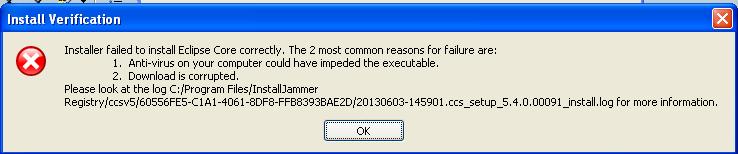
I don't the root cause. Please some one have a look and provide me a solution.

Web installer:

When i used webinstaller it has been downloaded only "CCS5.4.0.00091_win32.exe" file. I double clicked on this to run, i got the error as follow.


Please check  and let me know ASAP .

Thanks in advance.

-Pavan

  • Hi Pavan,

    It looks like you have problems downloading from the web, so I would suggest you try installing with the downloaded package. I need to see your install logs to determine why that's failing.

    Please do the following:

    1. Remove everything from your installation folder (e.g. c:\ti\ccsv5).

    2. Run the installer from the unzipped download package.

    3. When it fails, please attach the log file from c:\program files\installjammer registry\ccsv5\60556FE5-C1A1-4061-8DF8-FFB8393BAE2D to this forum post.

    I'll take a look and get back to you as soon as possible.

    Danish Innis

  • Hi Danish,

     I didn't even get the logs, I searched in the same path and my drive too, I didn't find any kind of logs related to this. This is some thing strange.

    -Pavan


  • Pavan,

    The installjammer registry folder is a hidden folder, you may need to unhide it from explorer.

    Danish

  • Thanks and sorry I don't know this. 7028.60556FE5-C1A1-4061-8DF8-FFB8393BAE2D.zipPlease find the logs as an attachment.

  • Hi Pavan,

    It looks like the zip file you downloaded is corrupted. The installer was unable to unzip the file "C:/Documents and Settings/pavank/Desktop/CCS5.4.0.00091_win32/CCS5.4.0.00091_win32/baserepo/eclipse_core_3.7.2.zip". What problem do you encounter when you download files from the TI site? Do you have some kind of anti-virus installed that prevents files from being downloaded?

    Danish

  • I haven't get any download error. But i am unable to unzip the file properly, if i view the files there are lot many are there by double clicking the zip file, if i unzip i couldn't see all the files extracted. I have antivirus installed i don't think so it is  creating any problem.

    -Pavan

  • Actually, Pavan, we've seen many instances where the anti-virus does not allow files to be unzipped. Can you turn off your antivirus and try unzipping the downloaded package to another folder? See if you see any differences in the first unzip vs the second, with the anti-virus turned off.

  • Hi Pavan,

    Were you able to download the installer package successfully? Please keep us updated with your progress.

    Danish

  • Danish,

     Sorry, i was busy with other work. No success it is still showing same error, even though i turn off my antivirus i am not able to unzip propely and install. What could be the issue?Please check

  • Is it possible for you to download it on a personal computer that doesn't have the same set up as the computer you want to install to? You could then unzip it, copy to a usb drive and try to install it from there. Unfortunately, the installer won't run without the zip file being downloaded and unzipped correctly.

  • Hi Danish,

      Thanks for your support. At last I have successfully installed ccs5.4. I redownloaded the pakage and i unzipped and installed, every thing went fine.

    My analysis is that, we should not copy to anywhere else means where ever you downloaded from that path only you should start extract and then install.

    Previously what i had done is i copied ccsv5.4zip file from my download folder to D drive and then started extracting and installing it was not success.

    This time i started from download path only it works fine.

    Thank you,

    :-)

  • Happy to know you're up and running.
    Danish

  • Hi Danish,

     I have a doubt pls, I have imported ccsv5.3 project to ccs5.4(which i am currently using). I have got warning message saying "This project was created using a version of compiler that is not currently installed: 4.9.0 [ARM]. Another version of the compiler will be used during build: 5.0.4. Please install the compiler of the required version, or migrate the project to one of the available compiler versions by adjusting project properties." As soon as i get, i changed my compiler version to "TI v5.0.4" in prperties->general->advance settings->compiler version, warning message went off but i got the compiler errors saying unresolved symbols remain but same project working fine in ccsv5.3. After some time i realized and installed arm compiler of version 4.9.1 and set it as my compiler version as 4.9.1 then my i code got  properly build with out any errors. If want to use arm compiler of version v5.0.4 what i have to do?Can u please post the step by step procedure how to migrate my project to arm compiler of version v5.0.4?

    Thanks in advance,

  • Hi Pavan,

    This is not an install issue. Please start another forum post so the right people can help you.

    Danish