This thread has been locked.

If you have a related question, please click the "Ask a related question" button in the top right corner. The newly created question will be automatically linked to this question.

Licensing CCS for TMDXDOCK28M36

Hi,

I purchased the TMDXDOCK28M36 H63C2 Concerto Experimenter Kit and I got it today.

http://www.ti.com/tool/tmdxdock28m36

I cannot found Code Composer StudioTM IDE v5 in my package so I downloaded it from:

http://processors.wiki.ti.com/index.php/Download_CCS

When installation finished:
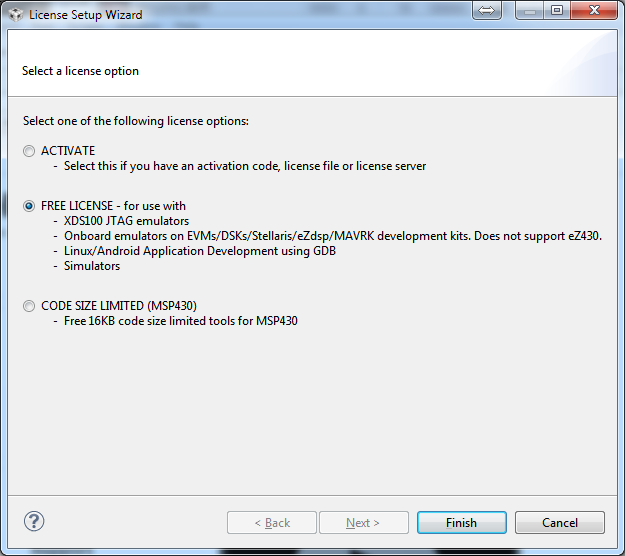
I wanna ask. where could I retrieve an activation code for this? my order number is 246398.

Or Did I do something wrong? Please let me know what should I do next.


  • Hello!

    For all I know TI provides three variants of CCS:

    1 Free 90-day variant without code size limited.

    2 Free variant with code size limited and without time limit.

    3 Purchase variant without code & time limit (at this case you get the activation code).

    Regards,

    Igor

  • Hi,

    as Igor posted you will need to

    - try ccs on the demo license

    - purchase a license

    However, I believe with your kit, you have an onboard ez emulator/xds100 in which case you can choose the free limited license (limitation in this case being the hardware not ccs capability.  this license is for the xds100 and a few onboard emulators)

    Activation codes are normally only for a purchased ccs license.

    Does this help clarify?

    Best Regards,
    Lisa

  • Thank you all for your reply,

    As I found little information about the kit after I actually purchased.

    I will keep everyone in the loop if I found any update on it.

  • Hi,

    Even i have the same kit with me with very similar problem, but i have already used both the 30 days free trial and 90 days license and it has expired. Now I am not able to run any program in my ccs. I have a project to be submitted. 

    Kindly help me.

    Best Regards,

    Sudharsan

  • Hi Sudharsan,

    first just to let you know it is much better to  start a new thread as otherwise things can get lost.

    Have you tried using the "free limited license"?   If you go to Help->Code Composer Studio Licensing information, the upgrad tab should have the "launch license setup" button.

    Remove the demo license(s) and give that a try selecting "free limited license".  The limitation being the hardware allowed.

    Best Regards,
    Lisa