This thread has been locked.

If you have a related question, please click the "Ask a related question" button in the top right corner. The newly created question will be automatically linked to this question.

CCS v5.4 crash rigth after launch

Other Parts Discussed in Thread: CCSTUDIO

Hi,

I have installed CCS V5 (build 5.4.0.00091) on my laptop (Win 7 - 64 bits, Core i7, Intel HD Graphics Family),

The installation has been done using the off-line installer and seems to complet correcly. When I lauch CCS, the Eclipse environment starts, and ask me for the workspace location (I let the default value).

Right after I click the "OK" button, the application crashes closing the windows without any error message

This behavior is obtained also if I change the workspace location to another place

Any idea ?

Bruno

  • Hi Bruno, 

    Could you check if you have files in InstallRoot\ccsv5\eclipse\configuration where filename is a bunch of digits with .log extension. I am specifically interested in files that are created when a crash occurs, please take a look at the time stamp. Also, could you see if there are any workspace logs in "WorkspaceDir"\.metadata, the file should be called .log. Lastly, could you search ccsv5 directory for any files that have following patter "hs_err*.log". If you find any of these files, please zip them up and attach to your reply. These might provide some clues as to what is happening. 

    Thanks,
    Martin


  • Hello Martin,
     
    I tryed uninstall - re-install, so files are dated from today's
    I have only one file in InstallRoot\ccsv5\eclipse\configuration. It is located in org.eclipse.update and is named install.log
     
    The file contains the following lines :

    !CONFIGURATION 1371541019251 Tue Jun 18 09:36:59 CEST 2013
    !ACTIVITY 1371541366606 juin 18, 2013 09:42:46.606 file:/C:/ti/ccsv5/eclipse/ site-install success

    In the WorkspaceDir\.metadata, I have a .log file (see .log.zip file attached)
     
    There is no hs_err*.log file in the ccsv5 install directory.
    By the way, I also tried the following :
     
    1- execute CCS v5 with admin privileges and Win XP SP3 compatibility mode
    2- change java directory in %PATH% (using the one installed in C:\ti\ccsv5\eclipse\jre\bin)
     
    Thoses changes have no effect
    Regards
    Bruno
  • Bruno,

    On Windows 7 with CCSv5.4, the hs_err* files Martin referred to would be located in a sub-folder of C:\Users\<your-login-id>\AppData\Local\.TI . Could you search this folder for hs_err files and post any you find here?

  • Hi

    There is no hs_err file in the .TI folder

    See attached, the .TI folder, it only contains .lock empty files.....

    6102..TI.zip

    Bruno

  • Hi Bruno, 

    In previous post you mentioned that configuration folder only has install.log in org.eclipse.update directory. There should also be a config.ini file in ccsv5\eclipse\configuration folder. It is a pretty important file. Could you confirm that it is present in configuration folder in your installation? 

    If that file is present then we are hoping that you could try disabling welcome page. You would need to open this file in text editor 

    "InstallRoot\ccsv5\eclipse\plugins\com.ti.ccstudio.branding_5.3.0.201304301100\plugin_customization.ini"

    and add a new line with following contents: 

    org.eclipse.ui/showIntro=false

    The other possibility that I can think of is that we had some issues in the past with CCS startup when there was a pretty advanced network proxy script configured on the machine. Is your machine configured with a network proxy? Is it possible to disable it temporarily to confirm whether this might be the issue? 

    Thanks,
    martin


  • Bruno,

    In the interest of getting to a solution faster, I'll add a couple of requests to what Martin has mentioned that would help if Martin's suggestions don't work.

    First, would we get the ccsv5 installation log folder? This is located in C:\Program Files (x86)\InstallJammer Registry\ccsv5\60556FE5-C1A1-4061-8DF8-FFB8393BAE2D .

    Second, it might be useful to get a log of file and registry activity from the ccstudio process. To do this, you would need to download the Process Monitor tool from Microsoft (http://technet.microsoft.com/en-ca/sysinternals/bb896645.aspx). Start this tool, and then filter out all processes except ccstudio.exe. You can add filters by right clicking on a line in the list view and selecting "exclude process".  Once all unnecessary activity is filtered, start CCS and collected a log until the point where CCS crashes. Save this log to a PML file and post it here.

  • Hi
     
    I indeed have a config.ini file in the ccsv5\eclipse\configuration folder

    I also have the ccsv5\eclipse\plugins\com.ti.ccstudio.branding_5.3.0.201304301100\plugin_customization.ini in which I added the line :

    org.eclipse.ui/showIntro=false

    And I can now have the Licence Setup Wizard !
    No crash.
     
    Thanks a lot !
     
    Regards
    Bruno


  • Hi Bruno,

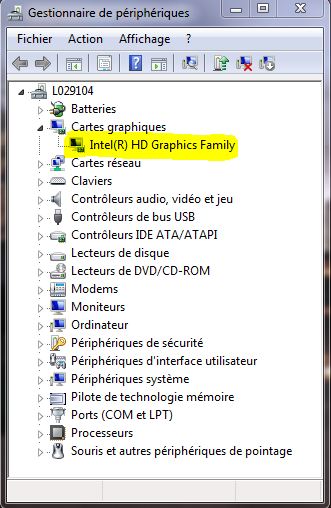
    Can you tell me what video card you have on your PC? If it is nvida, do you have the latest driver on your PC?

    Regards,
    Patrick 

  • Hi Patrick

    I have no video card on my laptop except the embedded GPU on the Core i7

    So I think the correct answer is : no Nvidia, Intel based video Card (see capture)

    Bruno