This thread has been locked.

If you have a related question, please click the "Ask a related question" button in the top right corner. The newly created question will be automatically linked to this question.

Post-build step *.bat file include


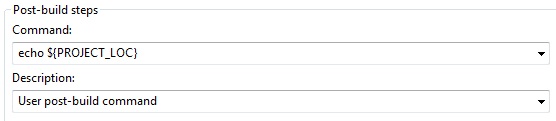
I'm using CCS 5.3.0.00090. I have to involve some bat-file after building the program. But the way to this file must be independed of project location. So i decided to specify in "Post-Build steps" in "Command" line:

I tried to use ${PROJECT_LOC}, "${PROJECT_LOC}" and others, but it doesn't work. Which way to specify my bat-file is correct?

  • Hi Vyacheslav,

    have you tried

    "${PROJECT_LOC}\Debug\test.bat"  ?

    You need the $ and you need to put everything inside the quotes.

    Best Regards,
    Lisa

  • Hi, Lisa! I tried this, but it doesn't work. Console window just reports:

    'Finished building target: C28346_User_Program.out'
    ' '
    C:/TI/ccsv5/utils/bin/gmake --no-print-directory post-build
    'User post-build command'
    "\Debug\test.bat"
    ‘Ёб⥬Ґ ­Ґ г¤ Ґвбп ­ ©вЁ гЄ § ­­л© Їгвм.
    gmake[1]: [post-build] Error 1 (ignored)
    ' '

    **** Build Finished ****

    But if I put the whole adress line of the test.bat file, it works. But I need it to work with {PROJECT_LOC} variable. What else can you suggest me?

  • Hi Vyacheslav,

    one thought is whether special characters are causing a problem.

    Can you try to set the command line for

    echo ${PROJECT_LOC}

    this should print the location to the console output.  You then verify what that path is set to and make any necessary corrections.

    Please keep us informed.

    Best Regards,

    Lisa

  • After I changed post-build steps:

    console reports:

    "../DSP2834x_Headers_nonBIOS.cmd"
    <Linking>
    'Finished building target: C28346_User_Program.out'
    ' '
    C:/TI/ccsv5/utils/bin/gmake --no-print-directory post-build
    'User post-build command'
    echo
    ђҐ¦Ё¬ ўлў®¤  Є®¬ ­¤ ­  нЄа ­ (ECHO) ®вЄ«о祭.
    ' '

    **** Build Finished ****

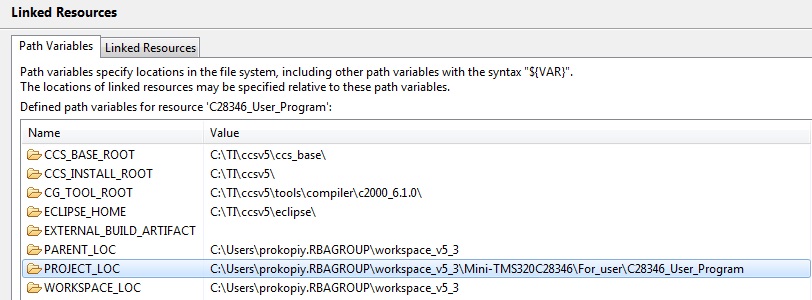
    But in "linked resources" this variable defined correctly:

    So i still have a problem with it.

  • Some attempts with results:


    echo "&{PROJECT_LOC}":

    'User post-build command'
    echo "&{PROJECT_LOC}"
    "&{PROJECT_LOC}"
    ' '

    echo "${PROJECT_LOC}":

    'User post-build command'
    echo ""
    ""
    ' '

    echo ${PROJECT_LOC}:

    'User post-build command'
    echo
    ђҐ¦Ё¬ ўлў®¤  Є®¬ ­¤ ­  нЄа ­ (ECHO) ®вЄ«о祭.
    ' '

    echo &{PROJECT_LOC}:

    'User post-build command'
    echo &{PROJECT_LOC}
    ђҐ¦Ё¬ ўлў®¤  Є®¬ ­¤ ­  нЄа ­ (ECHO) ®вЄ«о祭.
    "{PROJECT_LOC}" ­Ґ пў«пҐвбп ў­гв७­Ґ© Ё«Ё ў­Ґи­Ґ©
    Є®¬ ­¤®©, ЁбЇ®«­пҐ¬®© Їа®Ја ¬¬®© Ё«Ё Ї ЄҐв­л¬ д ©«®¬.
    gmake[1]: [post-build] Error 1 (ignored)
    ' '

    echo {PROJECT_LOC}:

    'User post-build command'
    echo {PROJECT_LOC}
    {PROJECT_LOC}
    ' '

    echo PROJECT_LOC:

    'User post-build command'
    echo PROJECT_LOC
    PROJECT_LOC
    ' '

    echo "PROJECT_LOC":

    'User post-build command'
    echo "PROJECT_LOC"
    "PROJECT_LOC"
    ' '


  • Hi Vyacheslav

    this is your problem ....

    echo ${PROJECT_LOC}:

    'User post-build command'
    echo
    ђҐ¦Ё¬ ўлў®¤  Є®¬ ­¤ ­  нЄа ­ (ECHO) ®вЄ«о祭.
    ' '

    As you can see the echo command (correct version) is not returning the path properly.  You need to fix this in your environment

    Best Regards,
    Lisa

  • Hi, Lisa.

    I've changed location of the project.

    But console returns the same string, like before:

    'User post-build command'
    echo
    ђҐ¦Ё¬ ўлў®¤  Є®¬ ­¤ ­  нЄа ­ (ECHO) ®вЄ«о祭.
    ' '

    If i try get: echo ${WORKSPACE_LOC}. I recieve the same combination of returned symbols:

    'User post-build command'
    echo
    ђҐ¦Ё¬ ўлў®¤  Є®¬ ­¤ ­  нЄа ­ (ECHO) ®вЄ«о祭.
    ' '

    It seems, the error is in syntax of the command "echo" or in declaration of path "${PATH}". I think it not depends on project location. What do you think I have to fix else? Or what have I to check?

  • Hi Vyacheslav,

    it seems in v5.3 the system variable PROJECT_LOC is not there but it is there in v5.4

    So a couple things to do next

    option1 : move to v5.4 ... this is the latest version and I would recommend doing this by creating a full fresh installation of v5.4 into a new simple directory

    option 2 : try using PROJECT_ROOT instead

    Please keep us informed.

    Best REgards,
    Lisa 

  • PROJECT_ROOT works perfect! It resolves my problem. Lisa, thank you very much for helpful support!

  • Hi Vyacheslav,

    great, very happy to hear.  

    All the best with development.

    Best Regards,
    Lisa