This thread has been locked.

If you have a related question, please click the "Ask a related question" button in the top right corner. The newly created question will be automatically linked to this question.

CCSv5 - problem installing RTSC products

Other Parts Discussed in Thread: MATHLIB

Hi

XP, C6472

I did a complete re-install of ccv5.4. I also have CCSv4 installed with all the RTSC products we've used during development. But now its time to work on the next product so we need CCSv5

The problem is that I get the error below when after it finds products in the c:\Program Files\Texas Instruments folder

Operation details
Your original request has been modified.
"DSP/BIOS (IDE Client)" will be ignored because a newer version is already installed.
"SYS/BIOS (IDE Client)" will be ignored because a newer version is already installed.
"IPC (Multicore and I/O) (IDE Client)" will be ignored because a newer version is already installed.
"System Analyzer (UIA Target) (IDE Client)" will be ignored because a newer version is already installed.
"Third-Party Components for GMF Runtime " will be ignored because a newer version is already installed.
"RTSC/XDCtools (IDE Client)" will be ignored because a newer version is already installed.
Cannot complete the install because of a conflicting dependency.
Software being installed: IPC (Multicore and I/O) 1.23.2.27 (com.ti.ipc_1.23.feature.group 1.23.2.27)
Software currently installed: IPC (Multicore and I/O) (IDE Client) 1.24.3.32 (com.ti.rtsc.IPC.product.ui.feature.group 1.24.3.32)
Only one of the following can be installed at once:
IPC (Multicore and I/O) IDE Tooling 1.24.3.32 (com.ti.rtsc.IPC.product.ui 1.24.3.32)
IPC (Multicore and I/O) UI Plugin 1.22.5.27 (com.ti.rtsc.IPC.product.ui 1.22.5.27)
IPC (Multicore and I/O) UI Plugin 1.23.2.27 (com.ti.rtsc.IPC.product.ui 1.23.2.27)
Cannot satisfy dependency:
From: IPC (Multicore and I/O) 1.23.2.27 (com.ti.ipc_1.23.feature.group 1.23.2.27)
To: com.ti.rtsc.IPC.product.ui [1.23.2.27]
Cannot satisfy dependency:
From: IPC (Multicore and I/O) (IDE Client) 1.24.3.32 (com.ti.rtsc.IPC.product.ui.feature.group 1.24.3.32)
To: com.ti.rtsc.IPC.product.ui [1.24.3.32]

The second problem is CCSv5 sees my ipc version 1.24.3.32 in the error output below, but won't install it (can't see it in Window->preferences->Code Composer->RTSC. And why does it say these versions can't be installed together? They are different versions.

Operation details
Cannot complete the install because of a conflicting dependency.
Software being installed: IPC (Multicore and I/O) 1.22.5.27 (com.ti.ipc_1.22.feature.group 1.22.5.27)
Software currently installed: IPC (Multicore and I/O) (IDE Client) 1.24.3.32 (com.ti.rtsc.IPC.product.ui.feature.group 1.24.3.32)
Only one of the following can be installed at once:
IPC (Multicore and I/O) IDE Tooling 1.24.3.32 (com.ti.rtsc.IPC.product.ui 1.24.3.32)
IPC (Multicore and I/O) UI Plugin 1.22.5.27 (com.ti.rtsc.IPC.product.ui 1.22.5.27)
IPC (Multicore and I/O) UI Plugin 1.23.2.27 (com.ti.rtsc.IPC.product.ui 1.23.2.27)
Cannot satisfy dependency:
From: IPC (Multicore and I/O) 1.22.5.27 (com.ti.ipc_1.22.feature.group 1.22.5.27)
To: com.ti.rtsc.IPC.product.ui [1.22.5.27]
Cannot satisfy dependency:
From: IPC (Multicore and I/O) (IDE Client) 1.24.3.32 (com.ti.rtsc.IPC.product.ui.feature.group 1.24.3.32)
To: com.ti.rtsc.IPC.product.ui [1.24.3.32]
  • Hi Eddie,

    do you have multiple copies of the same version it is finding?

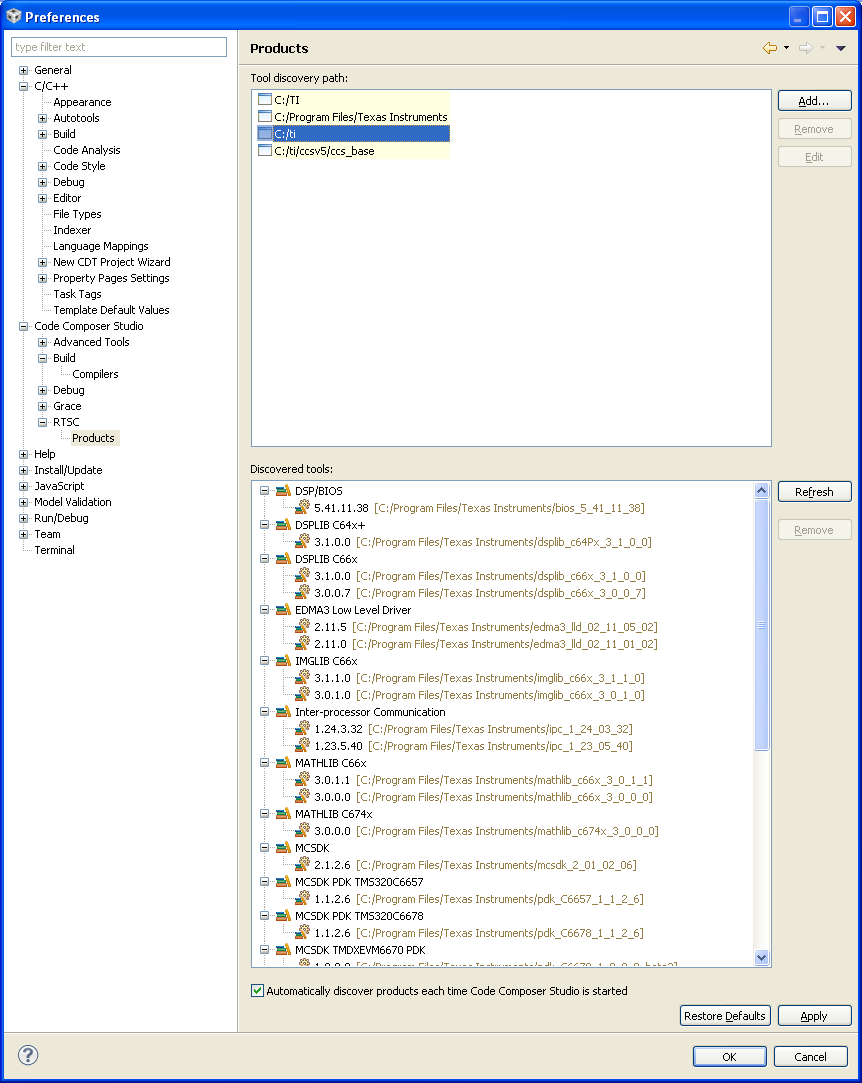
    Could you please send a screen shot of Window->Preferences->Code Composer Studio->RTSC->products

    It is true only certain versions can be used in combination.

    Best Regards,
    Lisa 

  • Hi Lisa

    There are no duplicates. Below is a listing of my c:\TI directory (I've now installed ccsv5 in c:\TI), and my c:\Program Files\Texas Instruments directory. The ccsv5.4 version does not like having more than one copy of xdc, bios, or ipc. Please file a bug for this. Our team will be using CCSv5.4 soon and this is a real deficiency.

    I have not tried NOT using the auto-discover. Maybe that would be safer.

    Also, why in the Window->Preferences->Code Composer Studio->RTSC->products can i not delete yellow items in the "Tool discovery path"?

    C:\TI>dir
    Volume in drive C has no label.
    Volume Serial Number is 8892-3591

    Directory of C:\TI

    07/19/2013 09:51 AM <DIR> .
    07/19/2013 09:51 AM <DIR> ..
    03/14/2013 11:30 AM <DIR> bios_6_35_01_29
    07/19/2013 09:52 AM <DIR> ccsv5
    07/19/2013 09:51 AM 1,550 Code Composer Studio v5.lnk
    03/14/2013 10:51 AM <DIR> uia_1_03_00_02
    07/19/2013 09:45 AM <DIR> xdais_7_21_01_07
    03/13/2013 04:41 PM <DIR> xdctools_3_25_00_48

    And my c:\Program Files\Texas Instruments directory

    C:\TI>cd "c:\Program Files\Texas Instruments"

    C:\Program Files\Texas Instruments>dir
    Volume in drive C has no label.
    Volume Serial Number is 8892-3591

    Directory of C:\Program Files\Texas Instruments

    07/19/2013 09:28 AM <DIR> .
    07/19/2013 09:28 AM <DIR> ..
    12/13/2011 10:51 AM <DIR> bios_5_41_11_38
    12/13/2011 09:14 AM <DIR> bios_6_31_04_27
    12/13/2011 08:31 AM <DIR> bios_6_32_02_39
    12/13/2011 10:52 AM <DIR> bios_6_32_05_54
    08/06/2012 08:33 AM <DIR> bios_6_33_05_46
    06/07/2013 12:29 PM <DIR> bios_6_33_06_50
    10/23/2012 11:01 AM <DIR> bios_6_34_02_18
    07/18/2013 09:52 PM <DIR> bios_6_35_01_29
    07/03/2012 10:41 PM 131,028,136 bios_setupwin32_6_33_06_50.exe
    01/02/2013 02:34 PM <DIR> C6000 Code Generation Tools 6.1.5
    12/13/2011 09:09 AM <DIR> C6000 Code Generation Tools 7.2.6
    07/18/2013 09:58 PM <DIR> ccsv4
    06/07/2013 12:46 PM <DIR> cg_xml
    06/02/2011 11:30 AM 30,167,504 cg_xml-v2_30_00-Setup.exe
    01/06/2012 10:51 AM <DIR> csl_c6472_03_00_06_03
    02/28/2012 05:38 PM <DIR> csl_c6472_src_03_00_06_03
    01/06/2012 03:02 PM <DIR> csl_c64xplus_intc_03_00_05_06
    10/12/2012 11:08 AM <DIR> dsplib_c64Px_3_1_0_0
    03/05/2013 04:10 PM <DIR> dsplib_c66x_3_0_0_7
    05/04/2011 04:46 AM 37,161,439 dsplib_c66x_3_0_0_7_Win32.exe
    06/07/2013 12:44 PM <DIR> dsplib_c66x_3_1_0_0
    10/19/2011 09:32 AM 9,898,445 dsplib_c66x_3_1_0_0_Win32.exe
    12/13/2011 01:19 PM <DIR> eclipse
    03/05/2013 03:53 PM <DIR> edma3_lld_02_11_01_02
    06/07/2013 12:18 PM <DIR> edma3_lld_02_11_05_02
    03/05/2013 04:02 PM <DIR> imglib_c66x_3_0_1_0
    04/29/2011 11:33 AM 12,152,492 imglib_c66x_3_0_1_0_Win32.exe
    06/07/2013 12:41 PM <DIR> imglib_c66x_3_1_1_0
    06/04/2012 09:18 AM 7,056,830 imglib_c66x_3_1_1_0_Win32.exe
    12/13/2011 09:11 AM <DIR> ipc_1_22_03_23
    03/05/2013 03:59 PM <DIR> ipc_1_22_05_27
    12/13/2011 08:33 AM <DIR> ipc_1_23_02_27
    12/13/2011 10:54 AM <DIR> ipc_1_23_05_40
    08/06/2012 08:53 AM <DIR> ipc_1_24_03_32
    03/23/2011 09:24 AM 67,801,205 ipc_setupwin32_1_22_05_27.exe
    05/22/2012 04:56 PM 94,340,893 ipc_setupwin32_1_24_03_32.exe
    07/17/2013 11:27 AM <DIR> license
    10/12/2012 10:56 AM <DIR> mathlib_c66x_3_0_0_0
    06/07/2013 12:45 PM <DIR> mathlib_c66x_3_0_1_1
    02/06/2012 05:37 PM 4,692,557 mathlib_c66x_3_0_1_1_Win32.exe
    10/12/2012 10:58 AM <DIR> mathlib_c674x_3_0_0_0
    03/05/2013 04:15 PM <DIR> mcsdk_2_00_00_beta2
    06/07/2013 12:46 PM <DIR> mcsdk_2_01_02_06
    03/05/2013 03:52 PM <DIR> ndk_2_20_03_24
    06/07/2013 12:24 PM <DIR> omp_1_01_03_02
    06/07/2013 12:24 PM <DIR> openem_1_0_0_2
    06/07/2013 12:13 PM <DIR> pdk_C6657_1_1_2_6
    03/05/2013 03:49 PM <DIR> pdk_C6670_1_0_0_9_beta2
    03/05/2013 03:48 PM <DIR> pdk_C6678_1_0_0_9_beta2
    06/07/2013 12:09 PM <DIR> pdk_C6678_1_1_2_6
    05/03/2013 05:05 PM 330,880 SrioPortError_core0_errorOccured.bin
    10/22/2012 07:11 PM <DIR> ti
    05/17/2011 03:35 PM 52,885,366 ti_dvt_setup_3.1.0.04076.exe
    12/13/2011 10:56 AM <DIR> uia_1_00_03_25
    07/18/2013 09:54 PM <DIR> uia_1_03_00_02
    12/13/2011 08:38 AM <DIR> xdais_7_10_00_06
    07/18/2013 09:53 PM <DIR> xdais_7_21_01_07
    12/13/2011 09:08 AM <DIR> xdctools_3_20_08_88
    12/13/2011 08:37 AM <DIR> xdctools_3_22_01_21
    12/13/2011 10:50 AM <DIR> xdctools_3_22_04_46
    08/06/2012 08:03 AM <DIR> xdctools_3_23_02_47
    06/07/2013 12:38 PM <DIR> xdctools_3_23_04_60
    07/18/2013 09:49 PM <DIR> xdctools_3_25_00_48
    07/09/2012 07:45 PM 171,338,618 xdctools_setupwin32_3_23_04_60.exe
    12 File(s) 618,854,365 bytes
    54 Dir(s) 33,338,466,304 bytes free

  • Hi Eddie,

    Some of the older Target Content products (from CCS v4 time), cannot be installed alongside their newer versions in CCS v5.  If you no longer need these older products in your "Program Files" directory, you can delete them (or move them to some archive directory) to prevent CCS from discovering them.

    - Baltasar