Hi Champs,
The default directory path of CCSv5 "File > Open File..." is always the user directory after startup.
So, can I change it to any other path as default?
Thanks in advance for your information.
Best regards,
j-breeze
This thread has been locked.
If you have a related question, please click the "Ask a related question" button in the top right corner. The newly created question will be automatically linked to this question.
Hi Champs,
The default directory path of CCSv5 "File > Open File..." is always the user directory after startup.
So, can I change it to any other path as default?
Thanks in advance for your information.
Best regards,
j-breeze
Hi Lisa
Thank you for your prompt reply.
However, the preferences you mentioned in previous your post don't work for changing "open file" default directory path on startup.
Any other ideas would be appreciated.
Best regards,
j-breeze
Hi Gautam
I'm sorry, but I'm not sure what you mean.
The CCSv5 is installed under C:\ti directory on my PC, and the workspace is not my user directory.
Any comments would be appreciated.
Best regards,
j-breeze
Hi Gautam
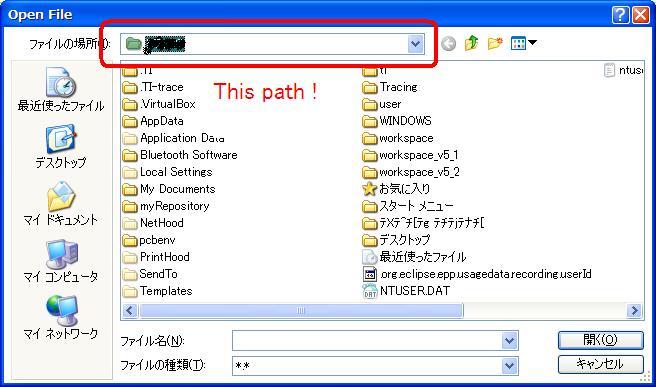
I'd like to attach the scrrenshot below.
After I select the ccsv5 menu File > Open File... , the Open File dialog is appeared. The dir path in the dialog is always my user dir on startup.
ccsv5 don't remenber the dir path I accessed last and return it to my user dir everytime I open it.
So, I'd like to change it to any other path as default or have ccsv5 remember the last path.
Best regards,
j-breeze
Hi,
This is what I was talking about. Everytime you open a file it directs you to user dir and I'm very sorry to inform you that there's nothing that we can do! This cannot be altered until you shift your workspace elsewhere.
Regards,
Gautam
Hi,
It still directs me to user dir after I shift my workspace elsewhere, but I understand there's nothing I can do.
Thank a lot for your kindly cooperation.
Best regards,
j-breeze