This thread has been locked.

If you have a related question, please click the "Ask a related question" button in the top right corner. The newly created question will be automatically linked to this question.

Connect via a USB port for MSP430 using Code Composer 4

Other Parts Discussed in Thread: MSP-EXP430FR5739, MSP430FR5739

What is the sequence to connect to an MSP exp assy using the USB port?

  • Hi,

    what OS are you on?   What msp board do you have?  Are you using a build in emulator or the USB-FET external one?

    Normally you simply connect with a USB cable.

    Have you tried a built in example?

    Best Regards,
    Lisa 

  • WinXP ... MSP-EXP430FR5739 ... connected via the PC USB. 

    Note that I have a second FET emulator on a different USB port.

  • Hi,

    are you having a problem?    

    With multiple FETs you need

    1 - multiple ccs sessions

    2 - you need to manually (ie yourself) determine which FET is associated with which session

    Hope this helps.

    Best Regards,
    Lisa 

  • Error msg "Error trying to initialize emulator."

    I've closed the project for the second emulator ... and opened the project for the FR kit.  How do I have CCSV4 display the multiple USB ports? ... and then select the correct one?

  • Hi,

    you need to test yourself which is connected to which session.

    Also see this wiki in case you have the wrong dll version, ccs v4 uses dll v2.

    http://processors.wiki.ti.com/index.php/MSP_Debug_Stack

    Best Regards,
    Lisa 

  • I'd appreciate a detailed response ... not links to verbose articles. 

    What is the sequence for identifying the use of dll v2?

    Here is what I have attempted:

    1) double click on the .ccxml file.

    2) select the Basic tab.

    3) select the Connection combo box.

    4) See a list of many emulators.  I see only three "TI MSP430 USB" choices.  The PC has six USB's.  A different program (not Code Composer) displays all six.

  • Hi,

    I would do the following:

    1 - connect one board

    2 - start a ccs debug session, having selected "TI MSP430 USB 1"

    You now know that session is attached to that board.  Then (keep the debug session live)

    3 - connect board 2

    4 - launch another ccs workspace/session (note you need a different workspace)

    5 - start a ccs debug session, having selected "TI MSP430 USB 2"

    This should get you working with two debug session on two msps at the same time.

    Best Regards,
    Lisa 

  • I found a way to force it ... removed the FET and used this sequence ... right click Project Name -> Open Target Configuration -> selected MSP430FR5739 ... then tried the different Connections "TI MSP430 USB1" "...USB2" "... USB3" until it found it. 

    There are six USB's on the PC.  Code Composer displays only three.  Is there a better way than trial and error?

  • Hi,

    glad you are up and running and thanks for the update.  As mentioned, unfortunately, as you have discovered, it is unfortunately a manual process.

    all the best with development.

    Best Regards,
    Lisa 

  • I forgot to mention ... I had to save the .c/.h files to another subdir -> delete the entire Project -> Create a new Project -> move the .c/.h files back into the project.  Without those actions, Code Composer 4 was unable to find the USB connection. 

    BTW I checked Code Composer 5 ... it displays only three USB ports, even though there are six.  It appears to re-assign one of those three to one of the USB ports on the front of the PC.  It would be good if the Code Composer code writers fixed this. 

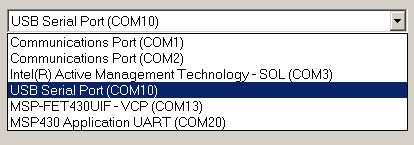
    Code Composer should display all six USB's and provide info about those six.  I have another program that displays all six and indicates what is attached to them ... see attachment.

  • The problem continues.  When both the FET and the kit are connected, Code Composer 5 tries to access the FET instead of the kit.  When I disconnect the FET, Code Composer 5 finds the kit. 

    This problem should be fixed.  Once assigned to a USB port, it should not re-assign to another USB port.

  • Hi,

    As mentioned it is a manual process so there is nothing that will help but connecting the kit first to ensure ccs connects with that.  Then connect the FET after that.

    I would post your feedback in the msp430 forum as they handle the dll/FET drivers.

    Best Regards,
    Lisa 

  • It would be good to forward this to the appropriate TI folks -> Code Composer program code writers.  It is not difficult to retrieve all of the USB ports / descriptions.  I pulled that section of code off of the internet ... was easy to implement.