This thread has been locked.

If you have a related question, please click the "Ask a related question" button in the top right corner. The newly created question will be automatically linked to this question.

Difference between Release and Debug versions of a build


Our group is discussing Debug vs. Release on the TiVA part using CCS5.4 and IT 5.0.5 build tool chain.

We are moving from an implementation that required a Release version because of JTAG pins conflicting with application pins.  On all of our TiVa implementations that is not a limitation.  All that differs between the build options are -g vs. --symdebug:none.  I am linking to the same libraries, so their options should not matter.  (Right?)

When I compare the hex files between the two builds, or the map files, there are huge differences.  The map files seem to be telling me the FLASH sizes differ by almost 2KB.

I have seen this question broached for other targets.  But those seemed to resolve as "different options".

We debug in simulation for many hours.  The 'debug' configuration may end up on real HW for many hours.  If we move to Release as a last step before sending to the field, are we setting ourselves up for obscure latent defects?  The extra ~1KB of code has to be taking clock cycles for something.

My options are:

Compiler options:
-mv7M4
--code_state=16
--float_support=FPv4SPD16
--abi=eabi
-me
-g
--include_path="C:/ti/ccsv5/tools/compiler/arm_5.0.5/include"
--include_path="C:/Data/Code/LM4FCommon/CommonApp/trunk"
--include_path="C:/Data/Code/LM4FCommon/CommonLib/trunk"
--include_path="C:/Data/Code/TWM240005/CommonLibTWM240005/trunk"
--include_path="C:/ti/TivaWare_C_Series-1.0"
--define=ccs
--define=PART_LM4F232H5QC
--define=TARGET_IS_BLIZZARD_RA1
--define=DBG_SUPPORT
--diag_warning=225
--display_error_number
--gen_func_subsections=on

Linker options:
-mv7M4
--code_state=16
--float_support=FPv4SPD16
--abi=eabi
-me
-g
--define=ccs
--define=PART_LM4F232H5QC
--define=TARGET_IS_BLIZZARD_RA1
--define=DBG_SUPPORT
--diag_warning=225
--display_error_number
--gen_func_subsections=on
-z
--stack_size=2048
-m"RF2CAN.map"
--heap_size=0
-i"C:/ti/ccsv5/tools/compiler/arm_5.0.5/lib"
-i"C:/ti/ccsv5/tools/compiler/arm_5.0.5/include"
--reread_libs
--warn_sections
--display_error_number
--rom_model

  • Hello John!

    John Osen said:

    When I compare the hex files between the two builds, or the map files, there are huge differences.  The map files seem to be telling me the FLASH sizes differ by almost 2KB.

    If we move to Release as a last step before sending to the field, are we setting ourselves up for obscure latent defects?  The extra ~1KB of code has to be taking clock cycles for something.

    I'm not sure whether I understand your question exactly. The Debug build configuration usually has no optimization and full symbolic debug enabled, to enable easy debugging. The Release build configuration will often have optimization enabled and symbolic debug disabled, to get your code as small or fast as possible without the need for source level debug. Since the Debug configuration is what comes up by default in CCS (both when creating a new project and when importing a project) users usually start tweaking the Debug configuration directly when they are ready to start optimizing their code or modifying other compiler and linker options. Instead it would be advisable to switch to the Release configuration when you are ready to optimize your code.

    Regards,

    Igor

  • Igor,

    Thanks for the reply.

    I used the Debug configuration as the basis for the Release configuration.  I then changed the one option.  Normally I also change what I link to.  Our dev libraries also have a Debug and Release configurations.  To compare apples to apples, I have both configurations linking to the same libraries for this investigation.

    So what is the extra code in the debug configurations .hex file?


  • John Osen said:
    All that differs between the build options are -g vs. --symdebug:none.

    From ARM Optimizing C/C++ Compiler v5.0 User's Guide SPNU151H:

    --symdebug:dwarf   Generates directives that are used by the C/C++ source-level debugger and enables assembly source debugging in the assembler. The  --symdebug:dwarf option's short form is -g. The --symdebug:dwarf option disables many code generator optimizations, because they disrupt the debugger. You can use the --symdebug:dwarf option with the --opt_level (aliased as -O) option to maximize the amount of optimization that is compatible with debugging (see Section 3.9.1).

    Therefore, the -g is probably changing the generated code by the act of disabling compiler optimizations.
    John Osen said:
    If we move to Release as a last step before sending to the field, are we setting ourselves up for obscure latent defects?
    Anything which changes the code after testing may invalidate any previous testing. The act of enabling compiler optimizations may cause defects due to either:

    a) The optimization changing the timing of the application which highlights race conditions in the application.

    b) A bug in the compiler which generates incorrect assembler when optimization is enabled.

    [To be honest, I have yet to find a TI compiler optimization which generated incorrect assembler]

  • There is a relevant wiki article titled Debug versus Optimization Trade-off.  Be careful with it.  The first part discusses what to expect of very recent compiler versions; for the ARM compiler that is version 5.1.0 or later.  We are talking about some 5.0.x release here, I think.

    If you are willing to upgrade to version 5.1.0, then you could consider a different approach.  It is discussed in this section.  Try building with the lowest level of optimization which meets all your constraints, and then see if you are okay with debugging it.  I think your chances are good.

    Thanks and regards,

    -George

  • That was a great reference.  I will consider moving to 5.1.0.  But moving from 4.9.x to 5.0.x was a royal pain.  I did it at the same time as moving from CCS 5.3 to 5.4. 

    Is the change from 5.0.5 to 5.1.0 painless?  (I only use optimization level 1 for my bootloader and default for main application.)


  • I have finally gotten back to this issue.

    When I create a simple hello world program and specify the optimization as the same for both release and debug AND select in steps to produce a hex file, the hex files end up being the same.

    When I have a project the links to libraries, hex outputs are not the same.

    I compare the options of both the linker, archiver and compiler for all configurations of all components and they are the same with the exception of the debugger option.

    When I look at the map file, about the third or fourth input section (I use generate subsections) start running different.  The first difference is on the same section (by name), but the function ends up being some multiple of four different in length.  Then the order of the sections starts to shuffle around.

    So it looks like the debug option for libraries does change code size around.  What is the difference there?

    Is there a way I can get the hex files coming out of debug vs release using libraries, to come out identical?

  • Changing the optimization level will not change which library gets pulled in, so functions that come from the library should not be affected.  Are you sure you are only changing the --symdebug (aka -g) option?  When you look at the map file, is the library name the same?

    By default, the linker orders sections by size, with the largest sections first.  If the size of one of your functions change, it could potentially reorder all smaller functions.

    You should have a look at http://processors.wiki.ti.com/index.php/Binary_comparison_of_executables_generated_by_TI_CGT_tools_to_reduce_test_cycle_time

  • Thanks for the response.  When I link the debug version of the app to the debug versions of the libraries, then linke the release version of the app to the release version of the libraries, I get hex files that ar >95% different, with sizes that differ about .5KB out of 10KB.  Optimization is at 'off' for all components.

    My next step is to take out some differences from the equation.

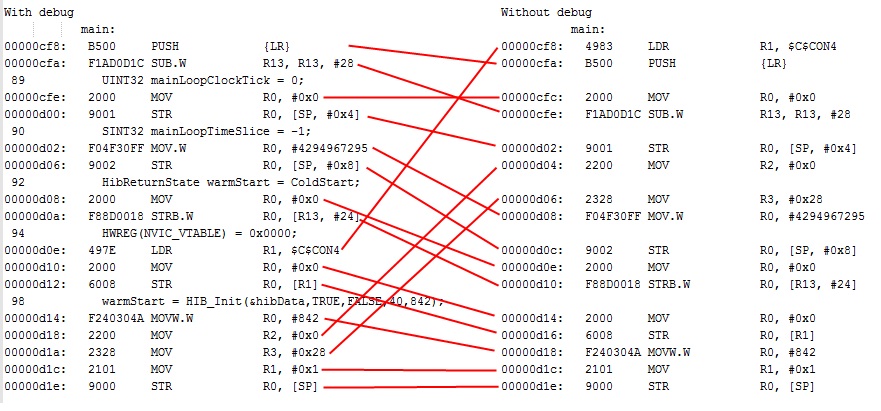
    So I decided to link the debug and release versions of the app to the debug versions of the libraries.  After rebuilding each app, I copy the output from the console window into a file.  I compare the two files.  The files compare line for line except for the debug options.  -g vs --symdebug:none.  The libarary search order is the same, etc.   Now the length of the two hex files are identical, but there are five sections where < 64 bytes disagree, but when you look at the dissassembly, the code is the 'same', just different ordering.

    The PUSH {LR} is curious.  It looks like pushing something on the stack, such as an inferred arguement to main. But why shouldn't that be the first line of assembly for main?

    I am not an assembly programmer, but the assembly below looks like that at the end of it the memory locations in RAM affected, will have been initialized to the same thing.

    I understood that with ARM 5.1, the debug option did not change optimization.  So if the release and debug configurations explicitly set the optimization, then the resulting hex files should be the same.  But I am finding the debug setting does change the code.

    Did I understand incorrectly?

    Is there some other setting that I can set to get the object file to be the same between -g and --symdebug:none?


  • I have attached a very simple test/testlib project pair that shows that when you call a library function, the code changes between debug and release, where the only difference is in the debug option.7774.ReleaseVsDebug.zip

  • I can't see the symptoms you describe in the project you posted.  The only differences between the Debug and Release directories are substituting --symdebug:none for -g, and the resulting XML link info file.  The map files are identical, and although the code in main.obj changes, the .text section in main.obj remains the same size.

    As a sanity check, you are not recompiling testlib.lib between attempts, correct?  I see only the one profile (Debug) under that directory.

  • John Osen said:
    The PUSH {LR} is curious.  It looks like pushing something on the stack, such as an inferred arguement to main. But why shouldn't that be the first line of assembly for main?

    That instruction is saving the return address on the stack; the function needs to remember this value so that it can return to the correct call site.  It doesn't necessarily have to be the very first instruction in the function, and it isn't necessary if the function makes no calls.

  • Thanks for your time.

    Archaeologist said:
    As a sanity check, you are not recompiling testlib.lib between attempts, correct?

    I am not recompiling the libraries for the test and testlib pair of projects.  I am only linking to the debug version of the library - wishing to remove the library build time and configuration variables from the analysis.

    On my system the the map file is the same as well.  Are your hex files the same?  My hex files differ on one line.  The hex output is the same length, but byte for byte they are not the same.

    Perhaps I am chasing a red herring.  What do you TI folks do?  Do you just ship the debug version? 

    [I am the lead at going into the TI toolset at this work site.  The other developers are working AVR based controllers, that we assume will be reaching life cycle issues sooner than later.  I see that for the AVR projects, "Debug" versions not only have the debug setting turned on, but have custom symbols defined to include extra code sections to keep ad hoc data to help in debugging.  I am trying to establish whether just switching to code with no "debug only" code compiles to the same thing.  So we can with some certainty go from debug to release without the baselin code changing.]

  • Archaeologist said:

    That instruction is saving the return address on the stack; the function needs to remember this value so that it can return to the correct call site.  It doesn't necessarily have to be the very first instruction in the function, and it isn't necessary if the function makes no calls.

    I am ignorant of what happens when you 'return' from main() with this compiler.  Where does it return to?

    And why should the logic of when the return address gets pushed on the stack change between having debug option on and off?

    I am not being confrontational here.  I am quite pleased with the build tool chain.  But I gotta get these details nailed down so we can define a white box, gray box, black box testing approach.  I would like the white box testing at our desks to count for something in the final analysis.  If the code changes, I believe the white box testing with debug on is 'nice to know, but technically irrelavent'.

  • "main" returns to the startup function.  The C standard does not define the startup function, but it does require that if main returns, the "exit" function gets called, so that atexit-registered functions may be called. For this reason, main must take care to keep the stack correct, and must save and restore the return address like any other function.

    The compiler will aggressively reorder instructions for various reasons, mostly performance.  The most likely reason for the difference in instruction order between -g and --symdebug:none is that when source-level debugging is turned on, the compiler will not be as aggressive about mixing instructions that correspond to the same source line, so that the debugging experience will be preserved.

  • No, the hex files are not the same.  The line that differs corresponds to the address range where main is located.  Because the assembly code for main is different, the hex file is also different.

    I can't speak for the TI groups which release the bulk of target-side software.  I work in the compiler group, and the only such code we release is the RTS, which is always built and tested with optimization enabled.

    In your first post, you said that the map files told you the FLASH size differed by almost 2KB, but this is not reflected in the posted test case. In a later post, you said:

    John Osen said:

    When I create a simple hello world program and specify the optimization as the same for both release and debug AND select in steps to produce a hex file, the hex files end up being the same.

    When I have a project the links to libraries, hex outputs are not the same.

    I compare the options of both the linker, archiver and compiler for all configurations of all components and they are the same with the exception of the debugger option.

    When I look at the map file, about the third or fourth input section (I use generate subsections) start running different.  The first difference is on the same section (by name), but the function ends up being some multiple of four different in length.  Then the order of the sections starts to shuffle around.

    So it looks like the debug option for libraries does change code size around.  What is the difference there?

    I took this to mean that you have two configurations (Debug and Release) for a single project with exactly the same options, and that

    1. when you do not use any libraries, the executable files are identical, but
    2. when you do use a library (the exact same library object code), the executable files are not identical

    This should not be possible.  Have I misunderstood the nature of the problem?

  • Archaeologist said:
    1. when you do not use any libraries, the executable files are identical, but
    2. when you do use a library (the exact same library object code), the executable files are not identical

    You understand me precisely.  On the simple test/testlib projects I sent you, the hex files are not identical between debug and release, even though both debug and release configurations of the test project link to the debug configuration of the testlib project.

    Archaeologist said:

    No, the hex files are not the same.  The line that differs corresponds to the address range where main is located.  Because the assembly code for main is different, the hex file is also different.

    If the debug and release configurations have the same options (in particular, the optimization level specified as the same in both configuration - no default optimization level) except for the debug option, should I expect the assembly code for main to be the same or different?  I am expecting the same.

  • John Osen said:
    If the debug and release configurations have the same options (in particular, the optimization level specified as the same in both configuration - no default optimization level) except for the debug option, should I expect the assembly code for main to be the same or different?  I am expecting the same.

    Aside from differences in timestamp (such as you'd get from using the __TIME__ macro), using exactly the same options should get you exactly the same object files.

    John Osen said:
    On the simple test/testlib projects I sent you, the hex files are not identical between debug and release, even though both debug and release configurations of the test project link to the debug configuration of the testlib project.

    But those object files were not compiled with identical optionsets; one was compiled with -g and one was compiled with --symdebug:none, causing main.obj to be different.  This should cause the executable file to be different regardless of whether you link to a library or not.

  • Archaeologist said:
    But those object files were not compiled with identical optionsets; one was compiled with -g and one was compiled with --symdebug:none, causing main.obj to be different. 

    So my understanding that ARM 5.1.x will produce the same code regardless of the debug setting is incorrect.?

    5.1.x will not change the optimization levels, if specified.  But there is actually some other difference between -g and -symdebug:none that does not involve optimization?

  • John Osen said:
    So I decided to link the debug and release versions of the app to the debug versions of the libraries.  After rebuilding each app, I copy the output from the console window into a file.  I compare the two files.  The files compare line for line except for the debug options.  -g vs --symdebug:none.  The libarary search order is the same, etc.   Now the length of the two hex files are identical, but there are five sections where < 64 bytes disagree, but when you look at the dissassembly, the code is the 'same', just different ordering.

    I can explain this.  It is due to a compiler error.

    The problem occurs when you build with no optimization or --opt_level=0.  If you compare builds where one uses -g and the other uses --symdebug:none, you will see differences in the order of the assembly instructions.

    This particular error does not cause any externally observable differences in code execution.  It may impact performance.  In most cases, though, the performance impact is not much.  Our documentation clearly states that using -g does not cause differences in generated code, and this error does break that promise.

    A fix for the error will be available in the next ARM compiler which introduces new functionality.  At present, that will be release 5.2.0, which is planned for the 2nd half of 2014.

    Thanks and regards,

    -George

  • Thanks for the many patient replies.  I am going to propose to our group that we build and test at our desks using debug AND actually deliver the output from the debug configuration.  5.2.0 will close (further) any gap I am fixating about.

    The complexity of eight libraries and thirteen applications, all with debug vs. release options sets, supporting five new controllers, makes it is next to impossible to avoid getting the link search paths, include paths, options and defines well enough controlled to protect against some fat-fingered entry that is not caught for months.  I think it is probably a total number of option sets > (options*configurations)**2, assuming some options are not binary.

    Good luck on 5.2.0!  We will stick at 5.1.2 until then, as we are just too close to production for any changes.