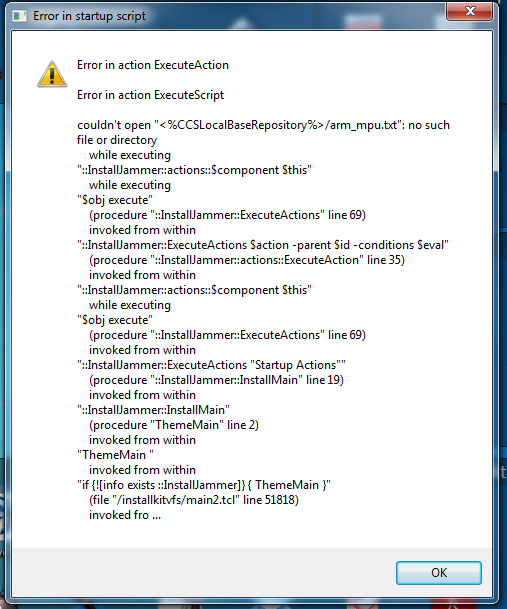
I just updated my CCS on a windows 7 Pro system and it now does not start up at all but post s the error show in the attached image file. I have no location showing any installjammer. How can I get my software to work again??
Scott Kilde
This thread has been locked.
If you have a related question, please click the "Ask a related question" button in the top right corner. The newly created question will be automatically linked to this question.
I just updated my CCS on a windows 7 Pro system and it now does not start up at all but post s the error show in the attached image file. I have no location showing any installjammer. How can I get my software to work again??
Scott Kilde
Hi Scott,
Can you take a look for logs in c:\program files\installjammer registry\ccsv5 (program files (x86) if you're using a 64 bit machine). The "installjammer registry" folder is hidden.
Thanks
Danish
Also, as a temporary fix to get you going while we figure out what happened, you may have some luck if you rename the C:\<install dir>\ccsv5\eclipse\downloads folder to something else.
Yes I can now see the folder but not seeing any fix to get me back up and running.
I renamed it x_downloads and the program now boots up and seems to work. Will wyuou be providing me a fix to return the name back to downloads? At this time I am assuming I have no way to update the program until the fix is found by you at TI.
Scott
Scott
Would you be able to post the logs referenced in post #2? Those would be helpful in understanding what was causing the error.
I've attached all logs dated with the date I started having this problem in the zip file. The logs are from the InstallJammer/ccsv5/60556FE5-C1A1-4061-8DF8-FFB8393BAE2D folder.
Scott,
Thank you for posting the log. I've seen this issue in another case and I'm looking for a reason as to why it occurs. During the install, various zip files are extracted to a temporary folder. In your case, when one of the files was later referenced, it could not be loaded. I don't have any evidence as to why this happens but one possibility is your anti-virus software is blocking access to it. Can I ask what AV software you are using?
Also, does this folder still exist: C:\Users\Scott\AppData\Local\Temp\ijtmp_3E64C3E6-5916-49B4-9B65-05148E655954\idebuildRepo ?
If it does, could you zip it up and post it here (it will be pretty big so I'm not sure if that is feasible).
I've got BitDefender Total 2013. I've never had any problems with updates until this one whith this AV. As for the folder it no londer exists on my machine, if it ever did.
Would you want me to restore the renamed folder deleating any of the files dated on the 9/26 and retry the updating?
Scott