This thread has been locked.

If you have a related question, please click the "Ask a related question" button in the top right corner. The newly created question will be automatically linked to this question.

Locating _c_int00 in a fixed position in memory

Other Parts Discussed in Thread: TM4C123GH6PGE

I am having to write a custom bootloader for the TM4C123GH6PGE part that we are using.  I need to use the linker file to locate _c_int00 in a specific location in memory.  I looked on ti e2e and found this:

 SECTIONS {

      .text:_c_int00 > 0x30000

}

 I tried using this but it did not locate the code at that location.  I am usingCode Composer Studio Version : 5.2.0.00069.  I would post on e2e but I’m not sure which forum to use.  Any insights would be very welcomed.

  • Hello,

    I moved this into the Code Composer Studio forum, as I believe they will have more expertise on this specific question.

    --Bobby

  • Susie Johnson said:
      .text:_c_int00 > 0x30000

    That doesn't work because that section name is not used in the ARM compiler RTS library boot routine.  Instead, you need to adapt a technique described in this wiki article.

    First, you need to know the exact name of the RTS library you are using.  That library is often chosen automatically.  Here is one way to find the name.

    % find "rts" file.map

    ---------- FILE.MAP
    00000020 00000102 rtsv7M4_T_be_v4SPD16_eabi.lib : ctype.obj (.const:.string:_ctypes_)
    00001000 00000048 rtsv7M4_T_be_v4SPD16_eabi.lib : boot.obj (.text)
    ...

    Replace file.map with the name of your map file.  If you are building with CCS, the map file is usually located in project_directory\debug.  (If necessary, change debug to the name of your build configuration.)  

    That rts_something.lib is the name of your RTS library.  In your linker command file add something similar to ...

        boot_section > 0x30000
        {
          -l rtsv7M4_T_be_v4SPD16_eabi.lib<boot.obj>(.text)
        }

    Thanks and regards,

    -George

  • Thanks George. 

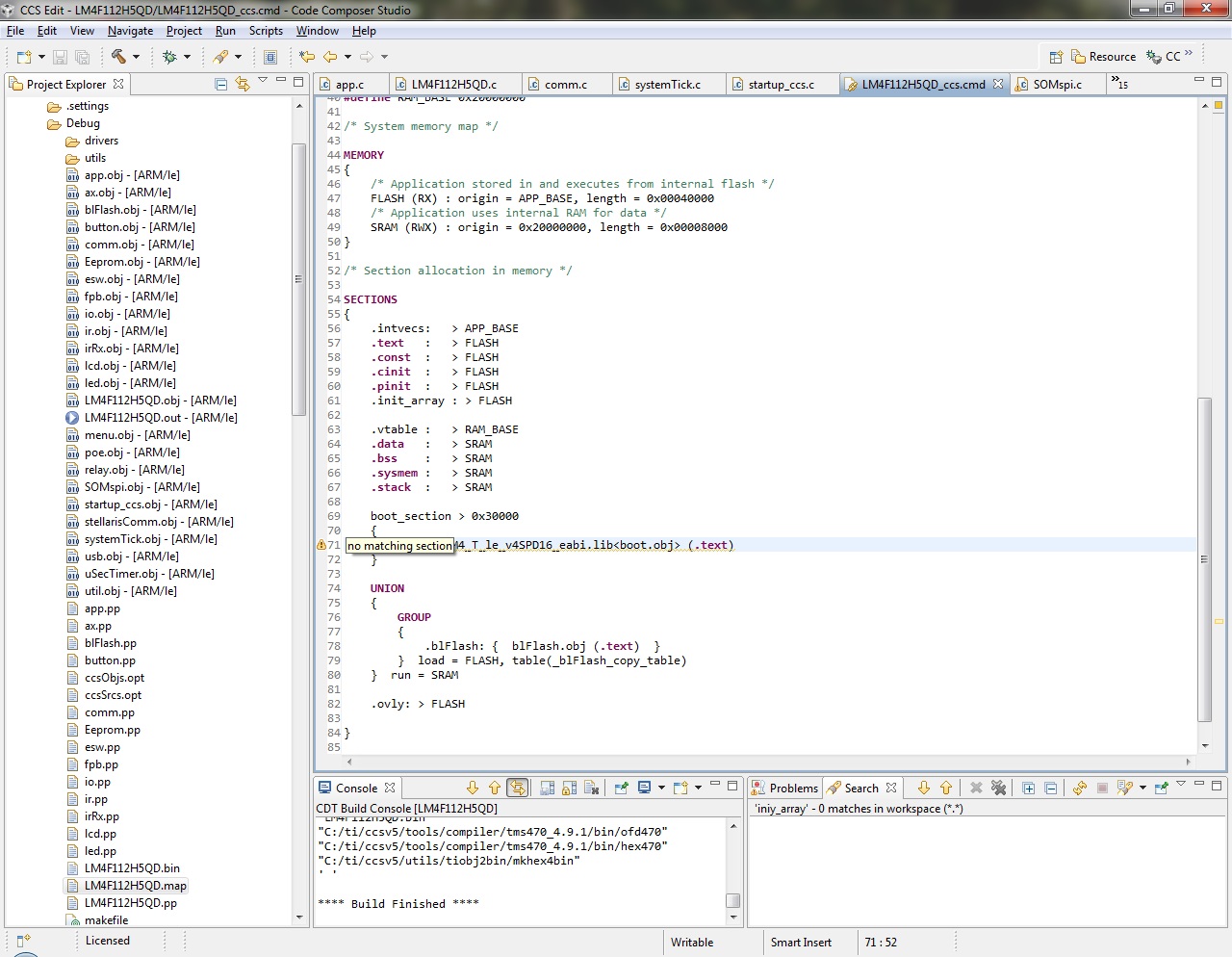
     I modified my file but it didn't work.  I got this warning:

    "No matching section." 

    Here is the snippet of code from the .cmd file.  I'm sure I did something wrong but don't know what.

    /* Section allocation in memory */

    SECTIONS

    {

        .intvecs:   > APP_BASE

    .text   :   > FLASH

    .const  :   > FLASH

    .cinit  :   > FLASH

    .pinit  :   > FLASH

    .init_array : > FLASH

    .vtable :   > RAM_BASE

    .data   :   > SRAM

    .bss    :   > SRAM

    .sysmem :   > SRAM

     .stack  :   > SRAM

        boot_section > 0x30000

        {

            -l rtsv7M4_T_le_v4SPD16_eabi.lib<boot.obj>(.text)

        }   

    UNION

        {

         GROUP

            {

                .blFlash: {  blFlash.obj (

    .text)  }

            }  load = FLASH, table(_blFlash_copy_table)

        }  run = SRAM

        .ovly: > FLASH

    }


    Thanks,

    Susie


  • Susie Johnson said:
         -l rtsv7M4_T_le_v4SPD16_eabi.lib<boot.obj>(.text)

    This library name has to exactly match the RTS library you are using.  I showed you how to see the name of that library using the map file from the earlier successful link.  Change this RTS library name to the one you are using.

    Thanks and regards,

    -George

  • The name of the library is rtsv7M4_T_le_v4SPD16_eabi.lib.  I don't know why it was underlined above.  So the exact line I have in my file is:

    -l rtsv7M4_T_le_v4SPD16_eabi.lib<boot.obj>(.text)

    I found where the section on the linker "Specifying Library or Archive Members as Input to Output Sections" and it uses and equal sign after the -l:

    -l=rtsv7M4_T_le_v4SPD16_eabi.lib<boot.obj>(.text)

    I tried this but it didn't work either.  I have attached a screen shot of the warning.

    Best regards,

    Susie

  • Try moving the boot_section lines to the beginning of the SECTIONS directive.  Please let me know if that works.

    Thanks and regards,

    -George 

  • I moved it to the top of the SECTIONS directive and it still gives me the same warning and does not locate boot.bin at the specified address.


    Thanks,

    Susie

  • Remove the "-l" or "-l=" in the linker command file; it is unnecessary and it is not recognized in older compiler versions.

  • Removed the "-l" did a clean and rebuilt the whole application and still have the same warning and the position of boot.obj is still in the same place -- it did not relocate to the specified memory location.


    Thanks,

    Susie

  • I am out of suggestions at this point.  Please show exactly how the linker is invoked, and post the map file.  There might be a useful clue there.

    Thanks and regards,

    -George

  • From the build console:

    'Invoking: TMS470 Linker'

    "C:/ti/ccsv5/tools/compiler/tms470_4.9.1/bin/cl470" -mv7M4 --code_state=16 --float_support=FPv4SPD16 --abi=eabi -me -g --gcc --define=ccs --define=PART_LM4F232H5QD --define=TARGET_IS_BLIZZARD_RA1 --diag_warning=225 --gen_func_subsections=on --ual -z --stack_size=9216 -m"LM4F112H5QD.map" --heap_size=0 -i"C:/ti/ccsv5/tools/compiler/tms470_4.9.1/lib" -i"C:/ti/ccsv5/tools/compiler/tms470_4.9.1/include" --reread_libs --warn_sections --rom_model -o "LM4F112H5QD.out"  "./util.obj" "./usb.obj" "./uSecTimer.obj" "./systemTick.obj" "./stellarisComm.obj" "./startup_ccs.obj" "./relay.obj" "./poe.obj" "./menu.obj" "./led.obj" "./lcd.obj" "./irRx.obj" "./ir.obj" "./io.obj" "./fpb.obj" "./esw.obj" "./comm.obj" "./button.obj" "./blFlash.obj" "./ax.obj" "./app.obj" "./SOMspi.obj" "./LM4F112H5QD.obj" "./Eeprom.obj" -l"libc.a" -l"C:/StellarisWare/boards/ek-lm4f232/hello/ccs/../../../../driverlib/ccs-cm4f/Debug/driverlib-cm4f.lib" -l"C:/StellarisWare/boards/ek-lm4f232/hello/ccs/../../../../grlib/ccs-cm4f/Debug/grlib-cm4f.lib" "../LM4F112H5QD_ccs.cmd"

    <Linking>

    "../LM4F112H5QD_ccs.cmd", line 58: warning: no matching section


    Zipped .map file:


    4760.LM4F112H5QD.zip

    Thanks,

    Susie


  • I'm sorry, but I cannot reproduce your problem, despite repeated attempts.

    You are using compiler version 4.9.1.  If it is practical, please try updating to the latest compiler version 5.1.2.  See this page for details.  I cannot promise this will fix your problem, but it might.

    If that doesn't work, then you need to send us your entire project.  I don't see another way forward.

    Thanks and regards,

    -George

  • Hi George,

    I got side-tracked for a few weeks bit I've finally updated my compiler and it fixed the problem.  Thanks so much!

    Susie