This thread has been locked.

If you have a related question, please click the "Ask a related question" button in the top right corner. The newly created question will be automatically linked to this question.

Launch GUI composer runtime without loading an app

Other Parts Discussed in Thread: TMS320F28062F, CCSTUDIO

Hello,

Is it possible to launch a GUI composer runtime project but without loading an app?

I would like to be able to have a connection with a board but without loading an app. Because in that case, I lose all the status flags, etc... that I would like to monitor.

I tried to simply put in comments the 2 lines about "loading program" in appInitScript.js file but it doesn't work.

I'm working with TMS320F28062F MCU.

Thank you in advance,

  • Yes, this should be possible but if your widgets are bounded to variables they will not be able to resolve themselves. If your GUI uses target side variables, then in the js program you should replace the load program with load symbols javascript commands. The syntax for that is Symbol->Load(). See DSS API docs under '<INSTALL DIR>\ccsv5\ccs_base\scripting\docs\GettingStarted.htm'


    Raj

  • The exact appInitScript.js syntax for loading symbol should be session.symbol.load(appProgramFile);

    Patrick

  • importPackage(Packages.com.ti.ccstudio.scripting.environment)
    
    function initTarget() {
    	var debugServer = ScriptingEnvironment.instance().getServer("DebugServer.1");
    
    	print("Initializing target : " + appConfigFile+"\n");
    	debugServer.setConfig(appConfigFile /* internal variable */);
    	var session = debugServer.openSession("*", "*" /* TODO: */);
    
    	//session.options.setBoolean("UseLegacyStopMode", true);
    	
    	if (!session.target.isConnected()) {
    		print("Connecting target: "+session.getName()+"\n");
    		session.target.connect();
    	}
    	
    	//print("Loading program: "+appProgramFile+"\n");
    	//session.memory.loadProgram(appProgramFile /* internal variable */);
    	
    	print("Enabling Realtime\n");
        session.expression.evaluate("ST1.DBGM = 0");
        session.expression.evaluate("GEL_EnableRealtime()");
    	
    	print("Loading symbols\n");
    	session.symbol.load(appProgramFile); 
    	
    	//print("Running Program...\n");
    	//session.target.runAsynch();
    }
    initTarget();
    Hello,

    I'm sorry for my late answer, I was on holiday.

    I have just tried the syntax you mention, but during the connection process, the processor stops.

    Please find attached the "appInitScript.js" file I'm using (don't forget to replace .txt by .js). Please tell me If something is wrong.

    Thank you in advance,

  • Hi Sebastien,

    Line 14 in your script, session.target.connect(), causes the target to stop. And you have line 28, session.target.runAsynch(), commented out.

    Regards,
    Patrick

  • Hi Patrick,

    Thank you for your answer.

    I commented out "session.target.runAsynch()" and now, I'm having a connection with the board without loading a new program.

    The problem is (as you mentionned) "session.target.connect()" causes the target to stop. So all the variables that I would like to watch are resetted. The connection step is mandatory, so is it possible to have a connection with the target without to stop it?

    Best Regards,

  • Hi Sebastien,

    You can try to put the device into realtime mode before connecting to the target. i.e setting STI.DBGM = 0. You have done this in your script. But it was done after the target is connected. You can't set this bit before connecting to the target. So, you will need to set this bit in your firmware code. I am not a firmware guy and don't know all the necessary bits and pieces. There might be some other bits that need to set inorder to put the device into realtime mode.

    The line  GEL_EnableRealtime() call in the script needs to be moved to before the connect() call as well.

    Regards,
    Patrick

  • importPackage(Packages.com.ti.ccstudio.scripting.environment)
    
    function initTarget() {
    	var debugServer = ScriptingEnvironment.instance().getServer("DebugServer.1");
    
    	print("Initializing target : " + appConfigFile+"\n");
    	debugServer.setConfig(appConfigFile /* internal variable */);
    	var session = debugServer.openSession("*", "*" /* TODO: */);
    	
    	print("Enabling Realtime GEL\n");
        //session.expression.evaluate("ST1.DBGM = 0");
        session.expression.evaluate("GEL_EnableRealtime()");
    	
    	if (!session.target.isConnected()) 
    	{
    		print("Connecting target: "+session.getName()+"\n");
    		session.target.connect();
    	}
    		
    	print("Loading symbols\n");
    	session.symbol.load(appProgramFile); 
    	
    	print("Running Program...\n");
    	session.target.runAsynch();
    }
    initTarget();
    Hi Patrick,

    I'm one step further.

    I put the device in realtime mode into the firmware, so I suppressed session.expression.evaluate("ST1.DBGM = 0"); in the appInitScript.js file. I put session.expression.evaluate("GEL_EnableRealtime()"); just before the connection to the target.

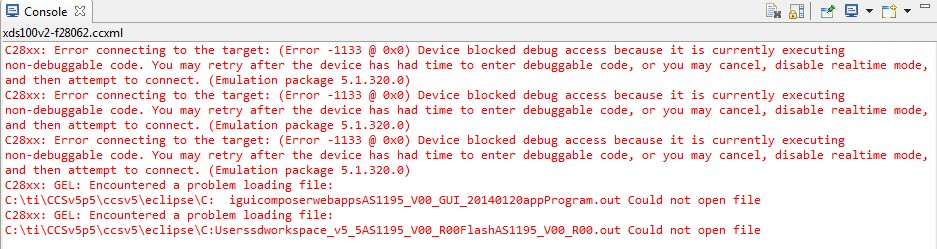
    It works but only once. I mean, I load the firmware with CCS and I'm able to have the connection with GUI composer runtime. If I close the GUI composer runtime window and open it again, I have the following error message.

    Thank you in advance,

    Regards,

  • It looks like this is an emulation issue, you can try to execute the same sequence of steps inside CCS and debug whether it is a board, target code, or device driver issue. Inside CCS, start a project less debug session by launch the same ccxml file in the Target Configuration view. Then execute the init script sequence of steps in the Script Console view. You will need to replace the appProgramFile variable with a fullpath to the out file and comment out the debugServer.setConfig; not need within CCS if a launch is already started.

    You can load the script into the script console using the loadJS command to avoid typing each command.

    As far as you can get the script to work inside CCS, you should be able to use the same script in GUI Composer. If you experience the same issue in CCS, I'd startup a new thread about this issue. There are others on this forum that have more experience with device driver, board, etc.. that can help.

    Regards,
    Patrick

  • Hi Patrick,

    I have tried what you suggested, but no success.

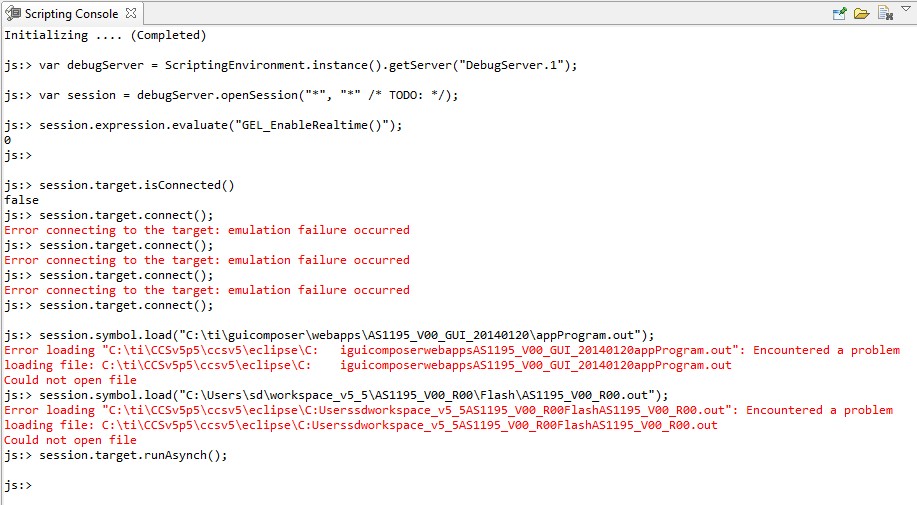
    The problem comes from the command to load the symbols.

    Please see the screenshot attached.

    If you have any other suggestion, please tell me.

    Best Regards,

  • You need to quote the string for the symbol load command.

    Patrick

  • Hello Patrick,

    I've made some tests and it works with GUI runtime and CCS but:

    with GUI runtime, I'm having (times to times) a connection problem

    with CCS, I can see the same connection problem and the command to load the symbols doesn't work. However, If I do this command with Run->Load->Load symbols, It works.

    Do you have an idea about the connection problem I'm having times to times?

    To load the symbols in the scripting console of CCS, do I need another command before this one?

    Because the fullpath to the .out file I'm using in the function session.symbol.load("..."); is correct but in the console of CCS, as you can see, the fullpath seems to be c:\.....c:\.

    Thank you in advance,

  • Hi Sebastien,

    For the path, you will need to use forward slashes or escaping the back slashes. 

    I am not sure what causes the connection to fail, I'll try to ask some one around to see if they know.

    Patrick

  • Hi Sebastien,

    The target application is in a state (perhaps incorrectly) where it's indicating that the program is at a critical point and should not be intruded upon by the debugger.  Since you are connecting in polite realtime mode, the application state is respected and the connection access is blocked.  This might be because it really is in a critical state, or because of some bug in the application.  You should be able to connect in stop mode (which will halt the target) and then debug and fix the program so that you can connect in realtime mode in the future.

    From this thread, I'm guessing you don't really care about the access protection schemes available with realtime mode and just want the ability to connect and access memory without explicitly halting.  Unfortunately, realtime mode and non-intrusive connect are tied together in the current version of the 28 emulators.  I've filed SDSCM00049367 to track the decoupling of these features.

    In the meantime, you may want to educate yourself on realtime mode and what the application has to do to indicate that the debugger may talk to it.  See http://processors.wiki.ti.com/index.php/Real-Time_Mode_Debug_with_CCStudio

    Darian