This thread has been locked.

If you have a related question, please click the "Ask a related question" button in the top right corner. The newly created question will be automatically linked to this question.

Unable to get GUI Composer to load in CCSV5

Other Parts Discussed in Thread: CCSTUDIO

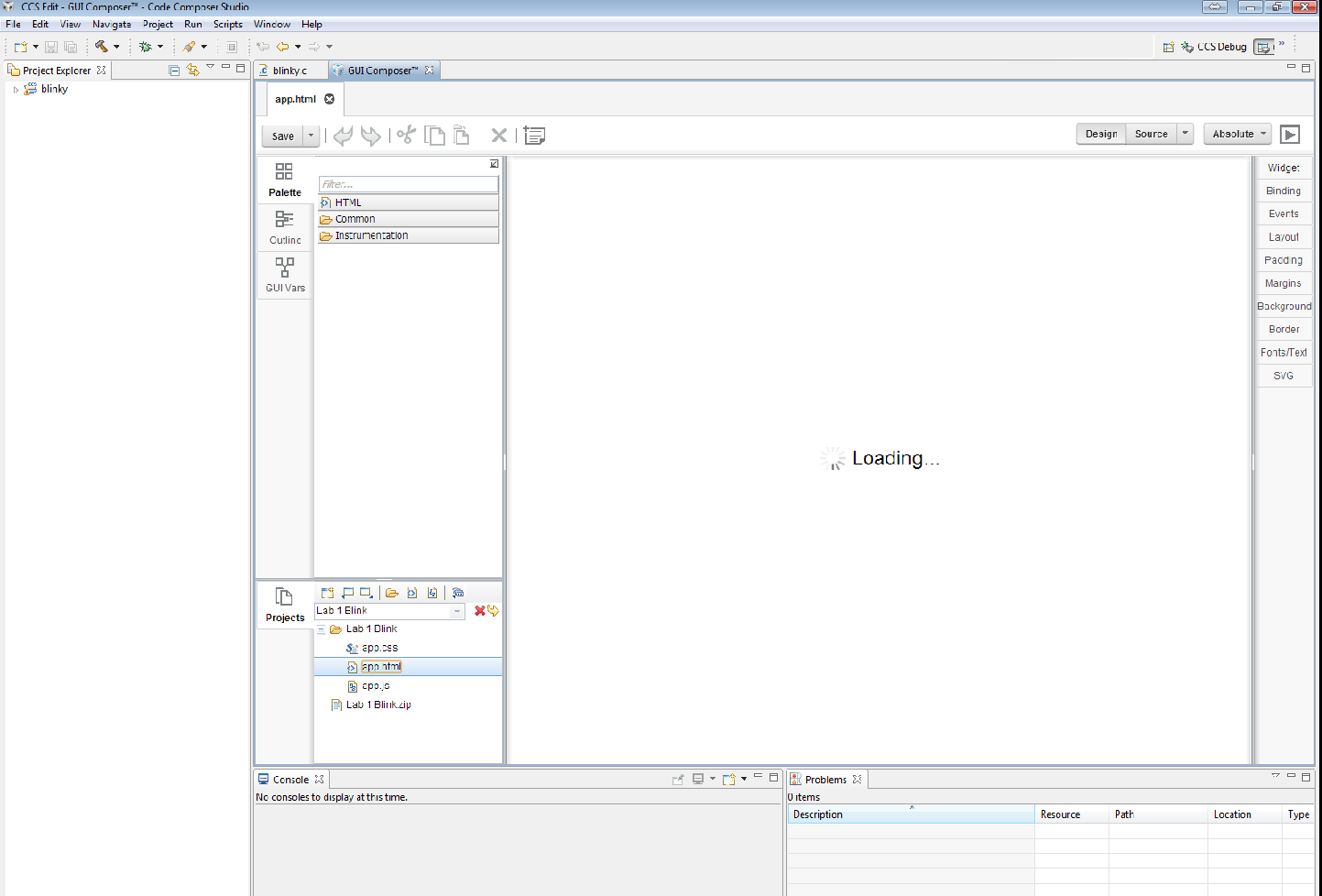
When I select View GUI Composer  - it starts with a message "Loading GUI Composer Studio". When the message and loading bar disappear a spinning circle comes up and never stops. I never get to the start screen. I am using version CCS 5.5.0.00077, the eval board I have is the Tiva C series. When I go to the gui installer logs and look at ti_tiva_tm4c_11167_install.log I see the following errrors:

Unpacking C:\ti\guicomposer\ccs_base\common\targetdb\connections\Stellaris_ICDI_Connection.xml [09:23:54] installing icdi(64bits) on windows installing icdi(64bits) driver Executing dpinst64.exe /lm /sw Script exit code: 768

Script output:  

Script stderr:  Program ended with an error exit code

  [09:23:55] installing ftdi(64bits) on windows installing ftdi(64bits) driver Executing dpinst64.exe /lm /sw Script exit code: 512

Script output:  

Script stderr:  Program ended with an error exit code

Is this why I can't get composer to load? What are this errors?

  • Hi Teresa, 

    The two issues are unrelated. The issue that you found in install logs deals with installing Tiva driver that allows PC -> target board communication. If you can start debug sessions in CCS, then you should not be a impacted by those error entries in install logs. 

    It is quite possible that GUI Composer issue is the same issue described in this thread. 

    http://e2e.ti.com/support/development_tools/code_composer_studio/f/81/t/292908.aspx?pi296443=1

    Specifically, please take a look at reply from Patrick dated :Oct 03 2013 12:43 PM to see if the same workaround will work for you as well. 

    Thanks,
    Martin

  • I replaced the class files like the posting recommends and now I get a start up error  'Maqetta Bundler Loader' had encountered a problem. An internal error occurred during:"Maqetta Bundler Loader".


  • I uninstalled CCS and reinstalled. Next I copied the files in that the post suggested. I no longer get the error that I was getting from my previous post but the composer never load - just get the spinning circle.

  • Hi Teresa,

    Can you also take a look at the same thread, page 2. In the middle of the page, there is an additional workaround that you can try to see if it helps to overcome the spinner issue. By setting  async: false, in the pagedesigner.html file.

    http://e2e.ti.com/support/development_tools/code_composer_studio/f/81/t/292908.aspx?pi296443=2

    Regards,
    Patrick

  • This did not help. It does eventually load but it can take over an hour. If I leave ccs open and periodically check I see it finally does load

  • If it takes a long time to load, it could be your machine have a proxy setting that limits the traffic for GUI Composer. Can you try to disable your system's proxy setting and see if there is any differences for the loading performance?

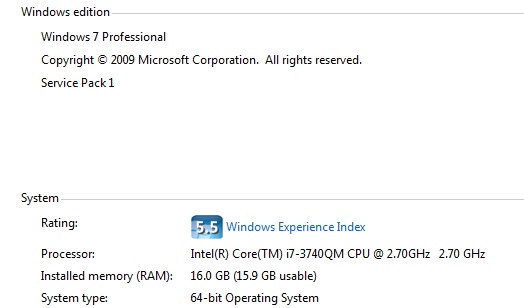
    Can you also let us know your PC spec?

    Thanks,
    Patrick

  • Here is what is in the debug log

    [0103/155556:ERROR:tcp_listen_socket.cc(72)] Could not bind socket to 127.0.0.1:4242
    [0103/155559:ERROR:renderer_main.cc(218)]
     Running without renderer sandbox
    [0103/155742:ERROR:ipc_channel_win.cc(401)] pipe error: 232
    [0103/155843:ERROR:tcp_listen_socket.cc(72)] Could not bind socket to 127.0.0.1:4242
    [0103/155843:ERROR:renderer_main.cc(218)]
    Running without renderer sandbox
    [0103/155944:ERROR:tcp_listen_socket.cc(72)] Could not bind socket to 127.0.0.1:4242
    [0103/155944:ERROR:renderer_main.cc(218)]
     Running without renderer sandbox
    [0103/160036:ERROR:tcp_listen_socket.cc(72)] Could not bind socket to 127.0.0.1:4242
    [0103/160036:ERROR:renderer_main.cc(218)] R
    unning without renderer sandbox
    [0103/161516:ERROR:tcp_listen_socket.cc(72)] Could not bind socket to 127.0.0.1:4242
    [0103/161517:ERROR:renderer_main.cc(218)]
     Running without renderer sandbox
    [0103/161517:ERROR:renderer_main.cc(218)] Running without renderer sandbox
    [0103/161812:ERROR:ipc_channel_win.cc(401)]
    pipe error: 232
    [0103/161812:ERROR:ipc_channel_win.cc(132)] pipe error: 109
    [0103/162240:ERROR:tcp_listen_socket.cc(72)]
    Could not bind socket to 127.0.0.1:4242
    [0103/162241:ERROR:renderer_main.cc(218)] Running without renderer sandbox
    [0103/162241:ERROR:renderer_main.cc(218)]
     Running without renderer sandbox
    [0103/162430:ERROR:ipc_channel_win.cc(401)] pipe error: 232
    [0106/074835:ERROR:tcp_listen_socket.cc(72)] Could not bind socket to 127.0.0.1:4242
    [0106/074839:ERROR:renderer_main.cc(218)]
    Running without renderer sandbox
    [0106/074841:ERROR:renderer_main.cc(218)] Running without renderer sandbox
    [0106/080249:ERROR:gl_surface_egl.cc(63)]
    eglInitialize failed with error UNKNOWN
    [0106/080249:ERROR:gl_surface_win.cc(54)] GLSurfaceEGL::InitializeOneOff failed.
    [0106/080250:ERROR:gl_surface_egl.cc(63)]
    eglInitialize failed with error UNKNOWN
    [0106/080250:ERROR:gl_surface_win.cc(54)] GLSurfaceEGL::InitializeOneOff failed.
    [0106/080250:ERROR:gl_surface_egl.cc(63)]
    eglInitialize failed with error UNKNOWN
    [0106/080250:ERROR:gl_surface_win.cc(54)] GLSurfaceEGL::InitializeOneOff failed.
    [0106/080536:ERROR:ipc_channel_win.cc(401)] pipe error: 232

  • Why is it dependent on the proxy setting?

  • The log shows that GUI Composer can't communicate to the local webserver at port 4242 and maybe some other ports as well. Perhaps your PC has another application that is using this port(s).

    GUI Composer is based on HTML5 technology and there is a webserver running locally on your PC. Hence your machine's proxy setting might have an affect on the local webserver.

    If you can't resolve the proxy setting, try switching to a different browser by adding the following line to the end of ccstudio.ini file and restart CCS. This ini file is located under the ccsv5/eclipse directory.

    -DTIBrowserType=mozilla

    Note that this option will not work by default in CCSv6, you will need to manually download the mozilla browser and add it to your CCS install.

    Regards,
    Patrick

  • I did what you said and tried the mozilla browers and still no luck.  My computer is:

  • Hi Teresa,

    You have a fast PC, the PC shouldn't be the bottleneck. Since you were able to load GC after a long period of time, there must be some setting that is conflicting with GC. Did you try disabling your system proxy if there is any?

    Patrick

  • Hi Patrick

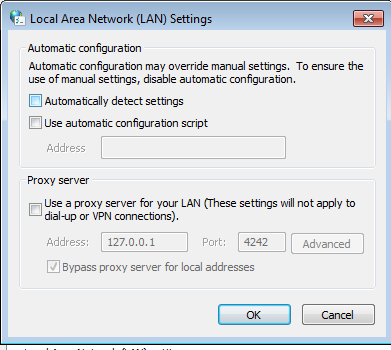
    Here is what my lan setting looks like and think it is disabled.


    The other test I did was I opened mozilla and tried to brower to the server by typing in http://127.0.00.1:4242 and it never connected.  What other test can I try see if the websever is even running


  • Hi Teresa,

    Port 4242 is a debug port for the default browser (chromium). You will need a chrome browser to connect to this port.

    Can we have a conference call and a webex session?

    Patrick

  • Hi Patrick,

    It is now working. My screenshot that I attached was deceiving because it shows the automatic detect unchecked which was the last thing I tried and I thought it did not help. But unchecking this made everything work. Does unchecking this disable the proxy?

  • I guess you didn't press the OK button. :) Yes unchecking the checkbox(s) means disabling.

    Patrick

  • I am now having the problem that the two new class libraries are suppose to fix.  I download the classes (3632.command.class, 7824.DavinciCommandServlet.class) and I started with a - clean.  When I try to load the saved project it just shows loading. I can sometimes get it to work by switching between workspaces. 

  • Can you tell me how you load the project? By importing the project into GUI Composer or copy&paste using file explorer?

  • These are projects I have created and they show up in the GUI Composer tab under projects. I select the project that I want to work on from the pulldown meny located int the projects sections. Next I click double click on the file app.html. Then the loading message comes up and stays there.

  • Can you attach the project that doesn't open here? I'll take a look at it and see if I can find any thing.

    Patrick

  • 2678.Lab 1 Blink.zip

    Hi Patrick,

    I have a really stupid question. The reason i started to learn about GUI Composer is that I thought I could use it to design the HMI for the project I am working on. It is going be a Cortex processor and the RTOS is going to be the TI-RTOS. A graphical display will be attached to the Cortex processor. From what I can tell the projects you make with GUI composer I designed to be run on a PC and the information gets passed to the embedded board through the debug USB port.  Can I use for what I want to do?

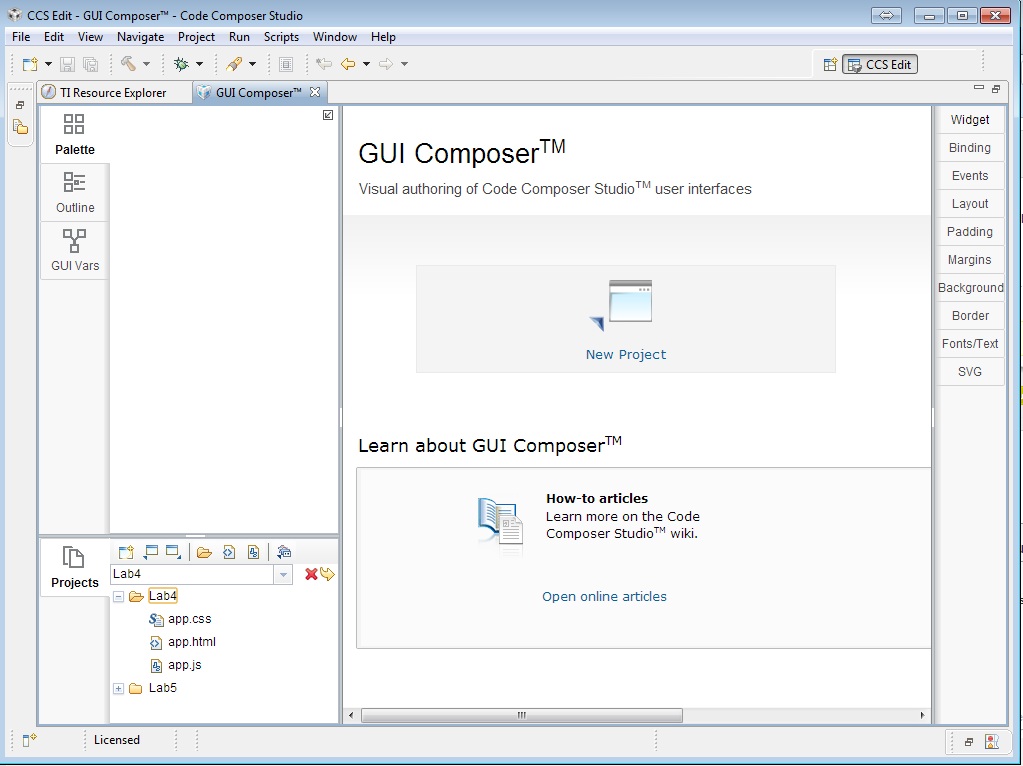
  • The project seems to be fine, I was able to open it in GUI Composer. Can you send a screen shot of GUI Composer? I like to see what is in your Project View. i.e how the files are layout. If you still stuck, try to delete the .GUIComposer folder in your workspace after shutting down CCS and start fresh.

    When you say USB port, do you mean UART? In this case, you will need to include a monitor in your target code. If you are using JTAG, then no change is required. There is a write up on the GUI Composer wiki page documenting the steps for setting up UART transport.

    Patrick

  • I don't think you understood my question I read through the step and I don't think GUI Composer will work for me. i will need to create my code using the TIVA graphics library

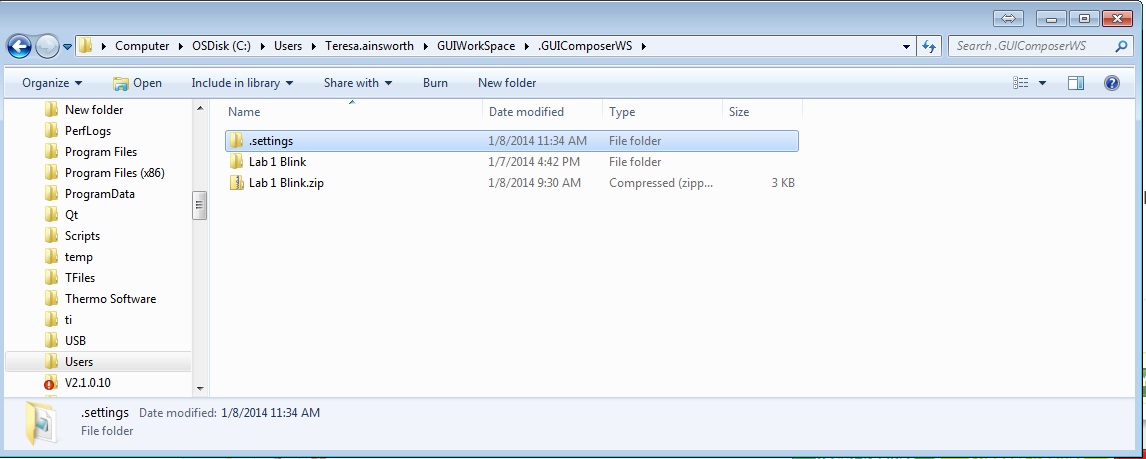
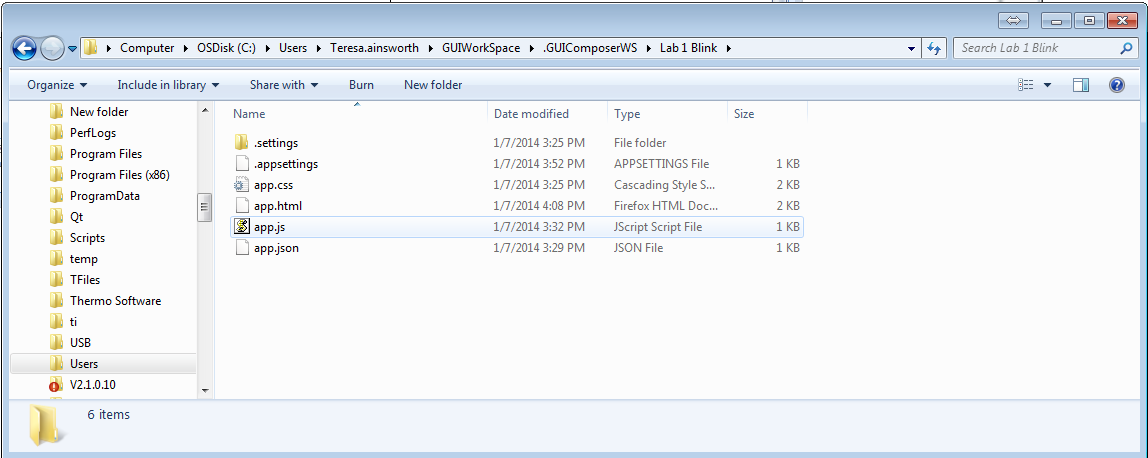
  • Regarding the loading issue, your project files are one level deeper than it should be. To be more precise, the .settings folder in your project needs to be at the root of the project folder. Can you double check if all the files, including the .setting folder, for this project are located under workspace/.GUIComposer/Lab 1 Blink/ ?

    I am not familiar with the TIVA graphic library. If you add a variable to the expression view within CCS and enable realtime update, do you see the value change while the target is running? GUI Composer works the same, it read/write variables using the same debug engine as CCS.

  • It looks like I have to .setting folders. Do I delete the one that is at the same level as Lab 1Blink? Why would this happen when I created the projects in GUI Composer inside CCS?


  • Assuming that the files are the same as the one you have attached in this thread. Keep the one that is inside the Lab 1 Blink.

    I don't know why it would create folder in such way, I haven't seen this before. Since you haven't done much to this project, can you reproduce this by deleting the entire .GUIComposerWS folder and restart from creating the project from scratch?

    Patrick

  • It seemed to work fine when I created a new WorkSpace and had only one project as soon as I made a second project. I started to get the loading problem again

  • I have figured out the pattern that causes the loading error to happen. 1. Open the gui composer tab 2. Don't touch the drop down box but expand the project from the project list. 3. Double click on app.html than the loading will come up but not go away.


  • If you see the project folders listed in the project view, in your case Lab4 and Lab5. Your workspace is already in a bad state. The question is, how did it get into this state. This is what I like to know; the sequence of steps to get Lab4 and Lab5 to show up in the Project view, instead of app.css, app.html and app.js for the current project (Lab4).

  • It comes up that way when you start GUI Composer. I think it might have to do with the state it was left in when you close down GC. Another bug I found is if you have 2 project and let say you are looking at Lab 4. When the Lab 4  Palette is display and you double click on it's app.html now that app.html will be the one that is always viewed. If you select Lab 5 it will still be showing Lab 4's palette. If you double click on Lab 5's app.html nothing happens it does not become visible. Maybe this is how it gets screwed up in the first place. You think - why would click on Lab 4's app.html because it is alreayd visible but it can be slow in coming up so you start clicking things to get something to start happening. It seems to me that GC has some bugs.