This thread has been locked.

If you have a related question, please click the "Ask a related question" button in the top right corner. The newly created question will be automatically linked to this question.

Data verification failed at address 0xC3100000. Please verify target memory and memory map?

Other Parts Discussed in Thread: OMAPL138, OMAP-L138

I am using CCS v3.3 and MatlabR2013b. I am trying to generate C code from simulink and load it on the OMAPL138/C6748. Simulink generates the code but when CCS loads my .out, I have the following error:

Data verification failed at address 0xC3100000. Please verify target memory and memory map

On Matlab, I configured the Target Hardware Resources like this: 

I also joined files: .cmd, cfg.cmd and .gel in a zip folder.

When I am looking in view memory I get this:
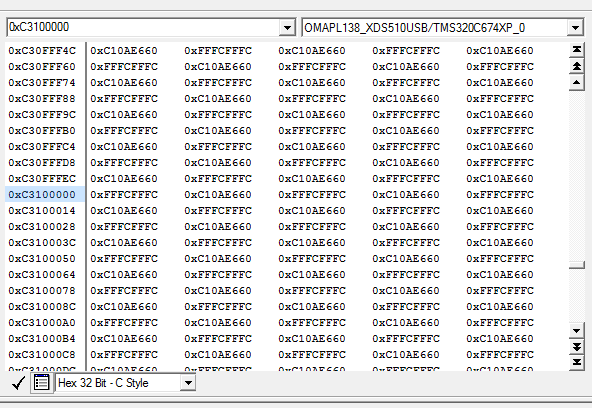
Can you help me? I tried to change address and length of the memory but I have always the same error.

Thanks.

Command_files_and_gel_file.zip
  • Hi,

    I don't see any memory inconsistencies in the files you sent, although there is a message in the screenshot that states you must set the heap to 0x100000 (1MB) but you are setting it to only 0x10000 (64kB). This alone would not cause the error itself, but it may give you trouble in the long run.

    Just as a quick test, from the memory view are you able to manually modify the contents at the failing address? I don't expect you will be able to do so, as I think there is no physical memory at that particular location, or it became damaged, or it is not properly initialized by the GEL file during connection.

    Which board are you using? The reason of my question is that I find strange the DDR2 memory space starts at 0xC3000000 and not at, say, 0xC0000000 (the base address of the external EMIF). In this case, you could try to move this DDR2 segment closer to the beginning of the external EMIF memory space and see if the problem goes away.

    Apart from this I don't have much more ideas on what may be happening.

    Hope this helps,

    Rafael


  • Hello Melanie,

    MELANIE JARNOUX said:
    Data verification failed at address 0xC3100000. Please verify target memory and memory map

    The primary causes of this error is documented here:

    http://processors.wiki.ti.com/index.php/Troubleshooting_CCS_-_Data_Verification_Errors

    Please read the article and try the suggestions. A quick look at your screenshot seems to suggest that SDRAM is not initialized (the third item listed in the article).

    Thanks

    ki

  • Hello

    Thanks for your feedback.

    I tried to initialize the SDRAM with the GEL functionn and now i get:

    Memory Map Cleared.
    ---------------------------------------------
    Memory Map Setup Complete.
    ---------------------------------------------
    Enabling Experimenter PSCs...
    PSC Enable Complete.
    ---------------------------------------------
    PLL0 init done for Core:300MHz, EMIF:25MHz
    mDDR initialization is in progress....
    PLL1 init done for DDR:150MHz
    mDDR init for 150 MHz is done
    ---------------------------------------------

    But I have always the same error. Am i missing something?

  • Is the board a custom board or a kit (LogicPD OMAP L138 eXperimenter Kit)?

  • It is a logicPD Zoom OMAP-L138 EVM. 

  • I find my problem, on Matlab I placed all sections in IRAM except .data and now it works.

  • That is good news. Thank you for the update

    ki