This thread has been locked.

If you have a related question, please click the "Ask a related question" button in the top right corner. The newly created question will be automatically linked to this question.

CCS v5.5 Command Line Build - Can't find gmake

Other Parts Discussed in Thread: CCSTUDIO

I have been building using CCS v5.1 with the command line. After moving to v5.5 it can no longer find make. I use the following command:

eclipsec.exe -nosplash -data "dir_above_proj_dir" -ccs.autoImport  -application com.ti.ccstudio.apps.projectBuild
-ccs.projects project_name -ccs.configuration Debug

The errors are attached at the bottom. The main jist of it is 

Cannot run program "\bin\gmake": Launching failed

Error: Program "\bin\gmake" not found in PATH

I tried taking out my custom Build command of "${CCS_UTILS_DIR}/bin/gmake -j -k" and I checked "Use default". After I removed that it says can't find make (not gmake).

Keep in mind that, not matter what version I am using or what build option I am using, these projects all build in the GUI IDE. 

I have read the Wiki about this topic and it says nothing about v5.5 differences.

Thanks 

Chris

-----------------------------------------------------------------------------------------------------------------------------------

14:28:35 **** Clean-only build of configuration Debug for project ber_calculator ****

"\\bin\\gmake" -j clean
Cannot run program "\bin\gmake": Launching failed

Error: Program "\bin\gmake" not found in PATH
PATH=[C:/ti/CCSv5.5/ccsv5/eclipse/jre/bin/client;C:/ti/CCSv5.5/ccsv5/eclipse/jre/bin;C:/ti/CCSv5.5/ccsv5/eclipse/jre/lib/i386;C:\Program Files (x86)\MATLAB\R2013b\bin\win32;C:\ti\CCSv5.5\ccsv5\ccs_base\emulation\analysis\bin\..\..\..\common\bin;C:\ti\CCSv5.5\ccsv5\ccs_base\emulation\analysis\bin\..\..\..\DebugServer\bin;C:\ti\CCSv5.5\ccsv5\ccs_base\emulation\analysis\bin\ofs;C:\ti\CCSv5.5\ccsv5\ccs_base\common\bin;C:\ti\CCSv5.5\ccsv5\ccs_base\common\uscif;C:\ti\CCSv5.5\ccsv5\ccs_base\DebugServer\license;C:\Windows\system32;C:\Windows;C:\Windows\System32\Wbem;C:\Windows\System32\WindowsPowerShell\v1.0\;C:\Program Files (x86)\MATLAB\R2013b\bin;C:\Program Files\TortoiseSVN\bin;;C:\ti\CCSv5.5\ccsv5\ccs_base\emulation\analysis\bin\.;C:\ti\CCSv5.5\ccsv5\ccs_base\emulation\analysis\bin\../xmldb/aet_config;C:\ti\CCSv5.5\ccsv5\ccs_base\emulation\analysis\bin\../xmldb/trace_config/setup;C:\ti\CCSv5.5\ccsv5\ccs_base\emulation\analysis\bin\../xmldb/trace_config/devices;C:\ti\CCSv5.5\ccsv5\ccs_base\emulation\analysis\bin\../../../common/bin;C:\ti\CCSv5.5\ccsv5\ccs_base\emulation\analysis\bin\../../../common/uscif;C:\ti\CCSv5.5\ccsv5\ccs_base\emulation\analysis\bin\../../tpi;C:\ti\CCSv5.5\ccsv5\ccs_base\simulation\env\ccs\drivers;C:\dsp_source\branches\us2128\unit_tests\projects;]

14:28:35 Build Finished (took 93ms)

14:28:35 **** Build of configuration Debug for project ber_calculator ****
"\\bin\\gmake" -j all
Cannot run program "\bin\gmake": Launching failed

Error: Program "\bin\gmake" not found in PATH
PATH=[C:/ti/CCSv5.5/ccsv5/eclipse/jre/bin/client;C:/ti/CCSv5.5/ccsv5/eclipse/jre/bin;C:/ti/CCSv5.5/ccsv5/eclipse/jre/lib/i386;C:\Program Files (x86)\MATLAB\R2013b\bin\win32;C:\ti\CCSv5.5\ccsv5\ccs_base\emulation\analysis\bin\..\..\..\common\bin;C:\ti\CCSv5.5\ccsv5\ccs_base\emulation\analysis\bin\..\..\..\DebugServer\bin;C:\ti\CCSv5.5\ccsv5\ccs_base\emulation\analysis\bin\ofs;C:\ti\CCSv5.5\ccsv5\ccs_base\common\bin;C:\ti\CCSv5.5\ccsv5\ccs_base\common\uscif;C:\ti\CCSv5.5\ccsv5\ccs_base\DebugServer\license;C:\Windows\system32;C:\Windows;C:\Windows\System32\Wbem;C:\Windows\System32\WindowsPowerShell\v1.0\;C:\Program Files (x86)\MATLAB\R2013b\bin;C:\Program Files\TortoiseSVN\bin;;C:\ti\CCSv5.5\ccsv5\ccs_base\emulation\analysis\bin\.;C:\ti\CCSv5.5\ccsv5\ccs_base\emulation\analysis\bin\../xmldb/aet_config;C:\ti\CCSv5.5\ccsv5\ccs_base\emulation\analysis\bin\../xmldb/trace_config/setup;C:\ti\CCSv5.5\ccsv5\ccs_base\emulation\analysis\bin\../xmldb/trace_config/devices;C:\ti\CCSv5.5\ccsv5\ccs_base\emulation\analysis\bin\../../../common/bin;C:\ti\CCSv5.5\ccsv5\ccs_base\emulation\analysis\bin\../../../common/uscif;C:\ti\CCSv5.5\ccsv5\ccs_base\emulation\analysis\bin\../../tpi;C:\ti\CCSv5.5\ccsv5\ccs_base\simulation\env\ccs\drivers;C:\dsp_source\branches\us2128\unit_tests\projects;]

14:28:35 Build Finished (took 78ms)

-----------------------------------------------------------------------------------------------------------------------------------

EDIT:

I just noticed that it spits out the path and nowhere in the path is a utils directory like:

C:\ti\CCSv5.5\ccsv5\utils\bin

as i would expect there to be.

  • Hi,

    try to disable antivirus application & Firewall.

    Regards,

    Igor

  • Not an option.

    Also, I don't see it in the path and I don't think those would prevent it from showing up in the path. It might block it from running but it should be in the path.

    I really need this to be able to migrate to newer TI products. I would like some help from TI.

  • c0l0jar0 said:

    The errors are attached at the bottom. The main jist of it is 

    Cannot run program "\bin\gmake": Launching failed
    
    Error: Program "\bin\gmake" not found in PATH

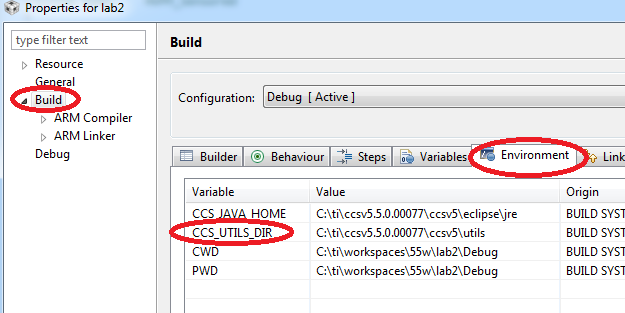
    Seems like the CCS_UTILS_DIR environment variable is not specified. Can you check your project properties and make sure it is set correctly?

  • Seems to be correct for 5.1 and 5.5.

    Here is the path that shows up in the IDE as you requested:

    C:\ti\CCSv5.5\ccsv5\utils

    gmake.exe is present in this directory as expected:

    C:\ti\CCSv5.5\ccsv5\utils\bin

    Everything seems the same.

  • Looks good. Not sure why the command line build is having issues then. In the command window, can you explicitly set CCS_UTILS_DIR to the correct path and then try the head-less build again?

  • Are you talking about making a system variable or what did you have in mind?

    By the way, this is the command that I am using to test it and this works fine when I change it to the 5.1 eclipsec.exe:

    C:\ti\CCSv5.5\ccsv5\eclipse\eclipsec.exe -nosplash -data "C:\dsp_source\branches\us2128\unit_tests\projects" -ccs.autoImport -application com.ti.ccstudio.apps.projectBuild -ccs.projects example -ccs.configuration Debug

  • c0l0jar0 said:
    Are you talking about making a system variable or what did you have in mind?

    Sorry, I mean an environment variable. Like:

    > set CCS_UTILS_DIR=C:\ti\ccsv5\utils

  • Seems it found gmake but now it has another error. 

    Has anyone successfully built with the command line in CCS 5.5? Why would something that worked in 5.1 not work here? What has changed that could cause this?

  • Has anyone successfully built with the command line in CCS 5.5?


    Maybe my problem is that this project used to be a 3.3 project and I am bringing with it some old features but I don't think should have broken.

  • c0l0jar0 said:
    Maybe my problem is that this project used to be a 3.3 project and I am bringing with it some old features but I don't think should have broken.

    It shouldn't make a difference. If it does, then that is a bug with CCS.

    I imported an old 3.3 project into my v5.5 workspace. I then build it from the command line without issue (using CCSv5.5).

    Did you trying using a new clean workspace folder? Are you still using the same workspace folder that you used with CCSv5.1?

  • I deleted the workspace ".metadata" folder and the output files in the project. I added the variable as you said.

    set CCS_UTILS_DIR=C:\ti\CCSv5.5\ccsv5\utils

    C:\ti\CCSv5.5\ccsv5\eclipse\eclipsec.exe -nosplash -data "C:\dsp_source\branches\us2128\unit_tests\projects" -ccs.autoImport -application com.ti.ccstudio.apps.projectBuild -ccs.projects example -ccs.configuration Debug

    Any idea what I can try next?

    Thanks

    Chris

  • There is something unusual with your project. Do you get the same error with other projects? Could you create a simple "hello world" project using all the default options and try building that from the command line?

    If that works but your original project fails, please attach the project meta files (.project, .cproject, .ccsproject found in the project folder.

    Thanks

  • Yes another project created from CCS v5.5 did build fine from the command line. I have attached the meta files from one that does not build.

    6165.meta.zip

    I'm looking into the possibility of creating all new projects for each of these unit tests but there are a lot of them.

    Thank you for looking into this for me.

  • Will someone look at these files eventually or does this mean no on knows.?

  • c0l0jar0 said:
    Will someone look at these files eventually or does this mean no on knows.?

    Unfortunately it is the latter (no one knows). The project files look fine. I then  tried to build it from the command line. It worked:


    C:\Users\a0389327\Desktop\headless>C:\ti\ccsv5.5.0.00077\ccsv5\eclipse\eclipsec.exe -nosplash -data "C:\dsp_source\branches\us2128\unit_tests\projects" -ccs.autoImport -application com.ti.ccstudio.apps.projectBuild -ccs.projects afc_corrector -ccs.configuration Debug                                                                            

    %%%%%%%%%%%%%%%%%%%%%%%%%%%%%%%%%%%%%%%%%%%%%%%%%%%%%%%%%%%%%%%%%%%%%%%%%%%%%%%%
    CCS headless build starting... [Sat Feb 22 13:57:09 EST 2014]
    %%%%%%%%%%%%%%%%%%%%%%%%%%%%%%%%%%%%%%%%%%%%%%%%%%%%%%%%%%%%%%%%%%%%%%%%%%%%%%%%

    ================================================================================
    Pre processing...


    ================================================================================
    Building...


    **** Clean-only build of configuration Debug for project afc_corrector ****

    "C:\\ti\\ccsv5.5.0.00077\\ccsv5\\utils\\bin\\gmake" -j -k clean
    DEL /F  "afc_corrector.out"
    DEL /F "afc_corrector.pp"
    DEL /F "afc_corrector.obj"
    'Finished clean'
    ' '

    **** Build Finished ****

    **** Build of configuration Debug for project afc_corrector ****

    "C:\\ti\\ccsv5.5.0.00077\\ccsv5\\utils\\bin\\gmake" -j -k all
    'Building file: C:/Users/algorithms/demod/afc_corrector.cpp'
    'Invoking: C6000 Compiler'
    "C:/ti/ccsv5.5.0.00077/ccsv5/tools/compiler/c6000_7.4.4/bin/cl6x" -mv6740 -g --define="_DEBUG" --define="_TMS320C6X" --define="C6x_SIM" --include_path="C:/ti/ccsv5.5.0.00077/ccsv5/tools/compiler/c6000_7.4.4/include" --include_path="C:/dsp_source/branches/us2128/unit_tests/projects/afc_corrector/Debug" --include_path="C:/ti/ccsv5.5.0.00077/bios_5_42_01_09/packages/ti/bios/include" --include_path="C:/ti/ccsv5.5.0.00077/bios_5_42_01_09/packages/ti/rtdx/include/c6000" --include_path="C:/ti/ccsv5.5.0.00077/xdais_7_21_01_07/packages/ti/xdais" --include_path="C:/Users/vendor_packages" --include_path="C:/Users/drivers/c6747_platform" --include_path="C:/Users/vendor_packages/ti/C6x_intrinsic_support" --include_path="C:/Users/drivers/hw_specific/wally2" --include_path="C:/Users/algorithms/demod" --include_path="C:/Users/drivers/dsp_bios_support_drivers" --include_path="C:/Users/drivers/device_drivers" --include_path="C:/Users/algorithms/utilities" --include_path="C:/Users/algorithms/testing" --include_path="C:/Users/algorithms/demod/c4fm" --include_path="C:/Users/algorithms/demod/pi4dqpsk" --include_path="C:/Users/algorithms/fec/ReedSolomon" --include_path="C:/Users/algorithms/fec" --include_path="C:/Users/algorithms/fec/convCode" --display_error_number --diag_warning=225 --abi=coffabi -k --preproc_with_compile --preproc_dependency="afc_corrector.pp"  "C:/Users/algorithms/demod/afc_corrector.cpp"
    "C:/Users/algorithms/demod/afc_corrector.cpp", line 14: warning #1005-D: return type of function "main" must be "int"
    'Finished building: C:/Users/algorithms/demod/afc_corrector.cpp'
    ' '
    'Building target: afc_corrector.out'
    'Invoking: C6000 Linker'
    "C:/ti/ccsv5.5.0.00077/ccsv5/tools/compiler/c6000_7.4.4/bin/cl6x" -mv6740 -g --define="_DEBUG" --define="_TMS320C6X" --define="C6x_SIM" --display_error_number --diag_warning=225 --abi=coffabi -k -z -m"afc_corrector.map" --warn_sections -i"C:/ti/ccsv5.5.0.00077/ccsv5/tools/compiler/c6000_7.4.4/lib" -i"C:/ti/ccsv5.5.0.00077/ccsv5/tools/compiler/c6000_7.4.4/include" -i"C:/ti/ccsv5.5.0.00077/bios_5_42_01_09/packages/ti/rtdx/lib/c6000" -i"C:/ti/ccsv5.5.0.00077/bios_5_42_01_09/packages/ti/bios/lib" -i"C:/dsp_source/branches/us2128/unit_tests/projects/afc_corrector" --reread_libs --xml_link_info="afc_corrector_linkInfo.xml" --rom_model -o "afc_corrector.out"  "./afc_corrector.obj"
    <Linking>
    warning #10210-D: creating ".stack" section with default size of 0x400; use the
       -stack option to change the default size
    warning #10210-D: creating ".sysmem" section with default size of 0x400; use
       the -heap option to change the default size
    'Finished building target: afc_corrector.out'
    ' '

    **** Build Finished ****


    ================================================================================
    CCS headless build complete!

    So this confirms that your project is file. Other than adding the dummy cpp, I did not change any of the project settings at all. This points to your actual CCS or PC environment being the issue.


    Igor made an earlier suggestion about disabling antivirus or other security monitoring temporarily while trying again. Did you actually try this? Igor's suggestion is a valid one (in helping us identify the root cause).


  • Thank you. I have put in a ticket with IT to see if they would disable antivirus.

    Could you please share with me the exact command you use to build so I can compare to what I am doing?

    Thanks

  • the exact command I am using is the first part of what I cut and pasted from my console output:

    Ki-Soo Lee said:
    C:\Users\a0389327\Desktop\headless>C:\ti\ccsv5.5.0.00077\ccsv5\eclipse\eclipsec.exe -nosplash -data "C:\dsp_source\branches\us2128\unit_tests\projects" -ccs.autoImport -application com.ti.ccstudio.apps.projectBuild -ccs.projects afc_corrector -ccs.configuration Debug    

  • Sorry, read your post quickly before leaving to a meeting. I'll try it out.

  • I tried without a firewall or antivirus and it did not help.


    I will try running as admin.

    ----------------------------

    Edit: Admin didn't work either.