This thread has been locked.

If you have a related question, please click the "Ask a related question" button in the top right corner. The newly created question will be automatically linked to this question.

“Trace Control” window missing in CCS 5.5


Hi,

We use CCS 5.5 to debug L138 and need to use ARM ETB, and the emulator is XDS560V2 STM. However we find that

1. “Trace Control” window is missing (screenshot 1).

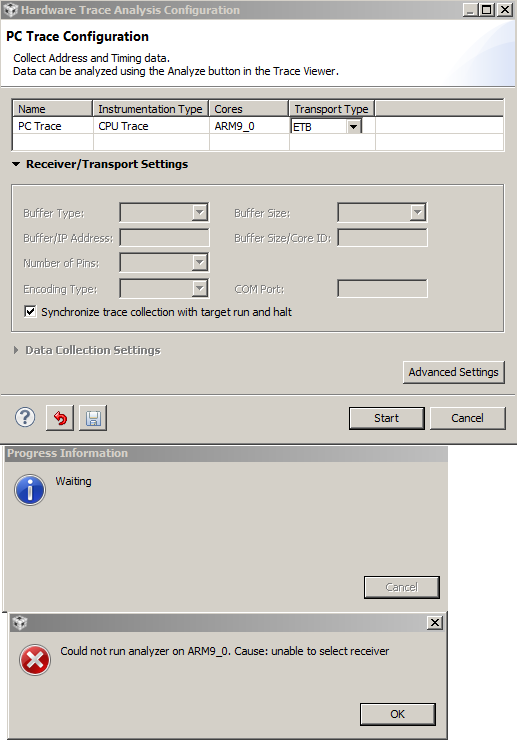
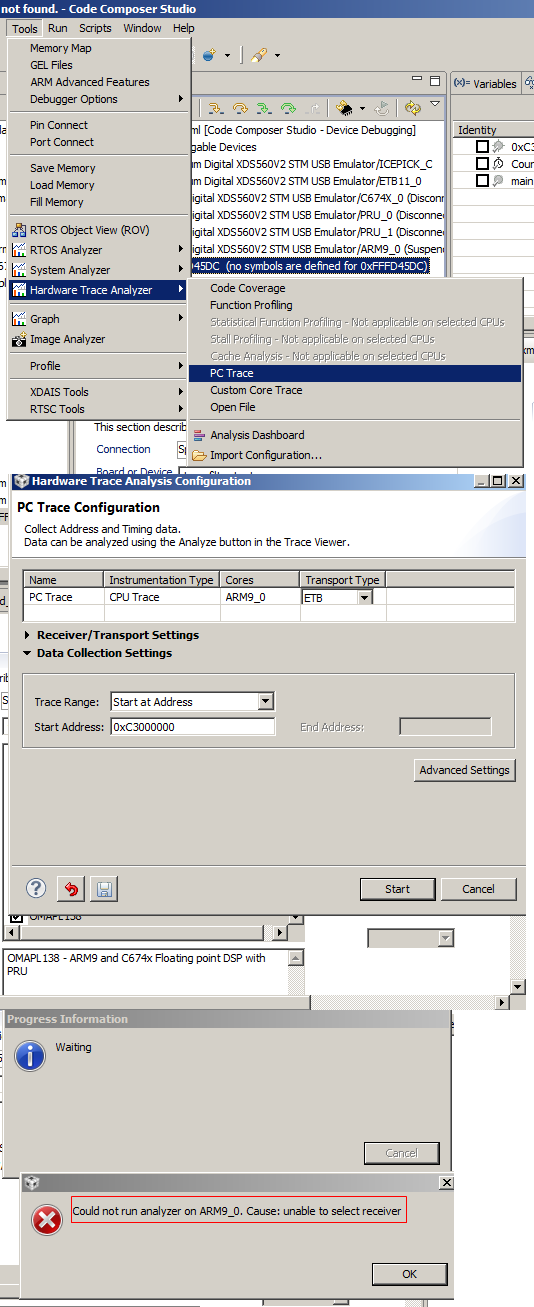
2. When running “Hardware Trace Analyzer”, either “Code Coverage” or “Function Profiling” or “PC Trace” fail to start showing error prompt “Could not run analyzer on ARM9_0. Cause: unable to select receiver” (screenshot 2).

screenshot 1
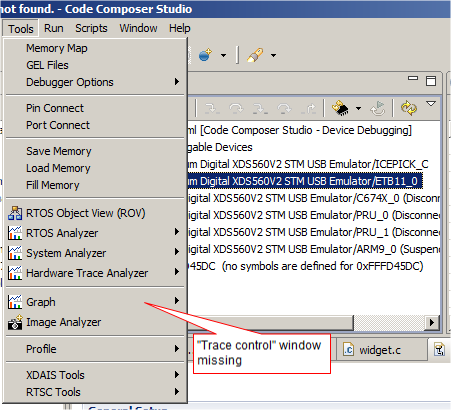
screenshot 1
 

The issue is very urgent. Please help!


Paul

  • Paul,

    ARM9 trace was removed by accident at a certain point in the evolution of emulation packages, but it is back in the latest couple releases - please check the screenshot below in my setup with release 5.1.340.0:

    The latest release is 5.1.402.0 and is available in the Code Composer Studio Update tool or at this page.

    Hope this helps,

    Rafael

  • Dear Rafael,

    Sorry for my later reply.

    I did download XDS 5.1.402.0, and installed into c:\ti\ccsv5 folder, and indeed find that the new files with today’s timestamp (Win 7 explorer’s “data modified” property).

    However, when trying to do PC trace, I still got the “unable to select receiver” problem.

    I also noticed that you filed a bug number SDSCM00048597 in another post ccsv5 on linux, hardware trace analyzer problem. That post and my questions are perhaps the same one, despite different platforms.

    Could you give some more help on this?


    Screenshot this time (the same as before XDS 5.1.402.0 updating):


    Paul

  • Paul,

    I am unsure what may be happening in your case, since I just updated my copy of CCS to 5.1 402.0 and just confirmed it working for me as well.

    Usually when strange behavior happens to me, I tend to perform the steps in the sections General IDE and Debugger of the troubleshooting page. This tends to fix things for me, especially if the trace cache files are corrupt.

    Hope this helps,

    Rafael