This thread has been locked.

If you have a related question, please click the "Ask a related question" button in the top right corner. The newly created question will be automatically linked to this question.

CCS bug in viewing function parameters

Other Parts Discussed in Thread: TMS570LS3137

There appears to be a bug in either the IDE or the compiler. I'll let you decide which.

I've cut this function down to the bare bones, the problem occurs when I try to view the contents of parameters sent to a function, when there are more than 4 parameters that are not 32 bit values. In the example below I have 8 x 8bit parameters. When I try to view var5 to var8 they read zero, but var1 to var4 come out correctly.

The code looks like this...

Doesn't get a lot more trivial than that. Here's what happens when I view it using CCS...

Now if you add up the value of all the parameters it comes to 36 (0x24). The memory browser on the right show the stack. The first 4 parameters are packed into a 32 bit space, then comes the return value in 16 bit space, then padding for 16 bits (I guess), the next 4 parameter each take up 32 bits. The IDE seems to be picking up the wrong space.
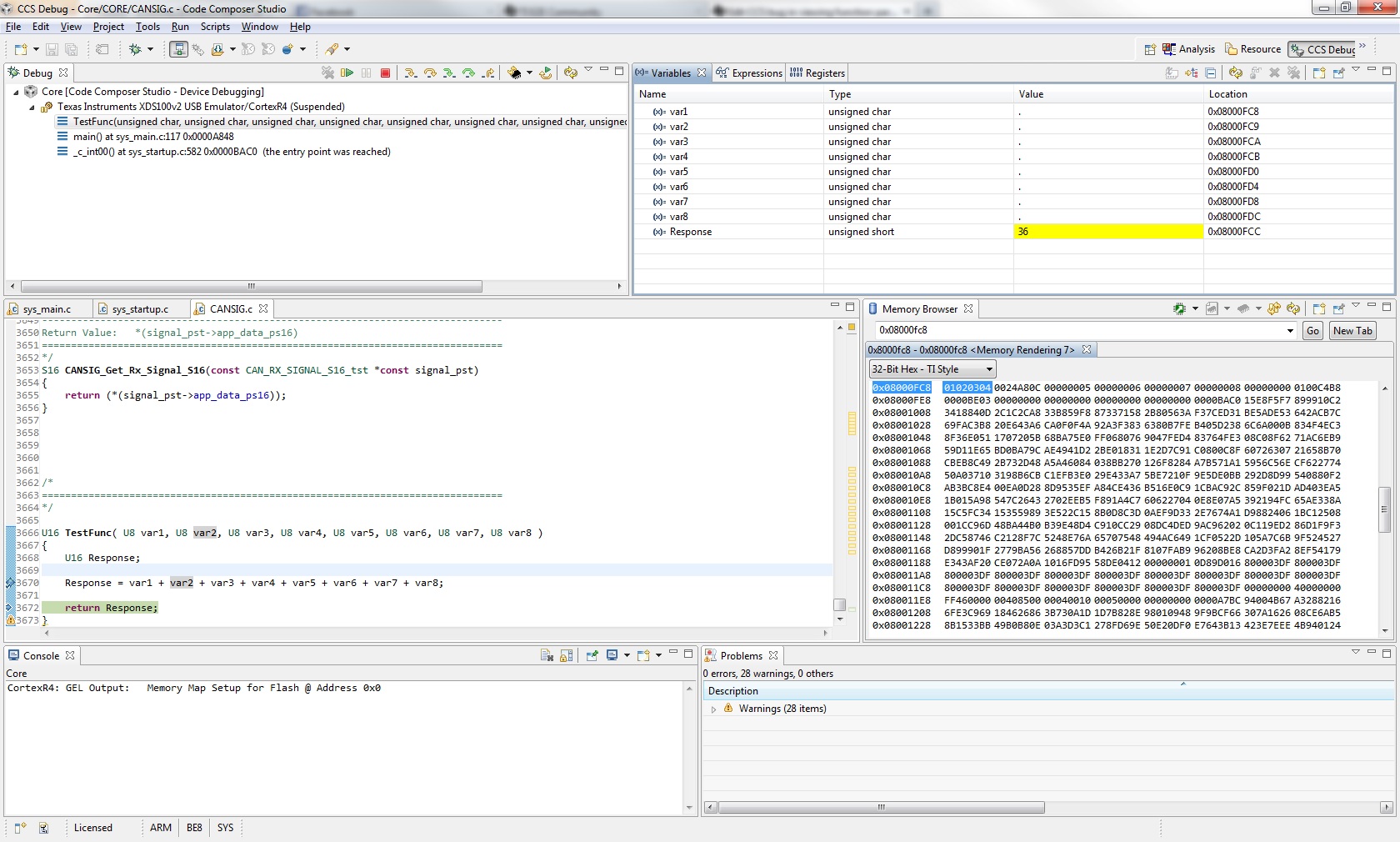
Why the last 4 8-bit parameter are packed into the stack frame in a different way to the first ones is a mystery, but the result comes out correctly. It does, however, make it difficult to debug. Sending 8 x 32 bit values works fine.

Regards

Andy

  • Hi Andy,

    We probably need to move this to the Code Composer Studio forum to get some help determining if this is a bug or not.
    I can't tell if you compiled with optimization on or not,  when you have optimization on then sometimes the displays in CCS aren't smart enough to track the optimized code, or sometimes you might be broken on a line of C code but not have actually executed the instructions going along with that line of code.  So if you do have optimization on, try turning it off and compiling with debug (-g) just to see if you get the same strange display.

    Otherwise, I don't think the 01020304 stored in the memory window is the parameter passing.  Instead the first four parmameters will be passed in R0,R1,R2,R3 and after that they'll be placed on the stack.  When you store on the stack it is with the "FD" mode so the lowest register appears at the lowest address.  This seems to match the display.

    There is a procedure call standard set of documents that's pretty complex,  but that's where this standard for passing parameters comes from.  It's in the doc  "Application Binary Interface (ABI) for the ARM Architecture" which you can find on infocenter.arm.com.  Our own compiler doc pretty much references this standard,  since we're complying with the ARM EABI.

    There is a forum post here w. the requested information for posting to the code composer forum:

    http://e2e.ti.com/support/development_tools/code_composer_studio/f/81/t/3131.aspx

    If you collect this information then you can either post there directly or add your information here and we can move this thread to get some help from the IDE folks.


  • Hi Anthony,

    The code is being built in debug mode and this turns off the optimisation (according to the readme.txt in the compiler directory).

    I changed the value of the first parameter from 0x01 to 0x0A and the first word in the memory window changed in sympathy. Similarly changing the 0x02 to 0x0B in the memory window and hovering over the cursor over var2 shows the value to be 0x0B. So I'm pretty convinced these are the first 4 parameters.

    When you say WE need to move this to another forum, do you mean I need to move it?

    Regards

    Andy

  • Hi Anthony,

    I have some additional information that might be useful.

    If you look at my first post, at the last screen shot, you'll see var5 is packed into a 32bit space in the third word (of the memory window). Notice that it's packed into the Least Significant Byte, then look at the variable window above. The address shown for var5 is the Most Significant Byte. This could explain why it comes out as zero.

    Regards

    Andy

  • Andy Worsley said:
    The code is being built in debug mode and this turns off the optimisation (according to the readme.txt in the compiler directory).

    Ok, thanks. 

    Andy Worsley said:
    I changed the value of the first parameter from 0x01 to 0x0A and the first word in the memory window changed in sympathy. Similarly changing the 0x02 to 0x0B in the memory window and hovering over the cursor over var2 shows the value to be 0x0B. So I'm pretty convinced these are the first 4 parameters.

    Here I'd keep an open mind.  It seems that your experiment is a good indicator that the IDE / debugger thinks that these are the first four parameters.  But it looks like the code that's generated is passing the first four parameters in the registers r0-r3 as the AAPCS standard dictates.  So maybe this is a symptom of the 'disconnect'.  If we had the disasssembly of the function call we could probably confirm this.

    Andy Worsley said:
    When you say WE need to move this to another forum, do you mean I need to move it?


    Sorry.  You can either post directly to the CCS forum, or I can move the thread to that forum - either way.
    But I think we should make sure we've got the information requested in the CCS forum 'before you post' thread otherwise the first questions that come back might be about the versions of all the components involved (i.e. compiler version, ccs version etc.)  


  • Would you mind moving the thread over to the CCS forum, please?


    I wrote this noddy little test function to demonstrate the problem I was seeing in the real code. It took me no more than a couple of minutes to write. Recreating the problem shouldn't be difficult. I can't send the real code for reasons of commercial sensitivity.

    CCS V5.4.0.00091

    compiler is in a directory called arm_5.0.4 , I presume this is the version number.

    Micro TMS570LS3137

    Thanks for your help

    Andy

  • Have there been any updates on this?


    Regards

    Andy

  • Hi Andy,

    Please tell me what you see in the variable view and what the PC is when you see 0 in var5.

    While it may appear that the first four parameters are assigned to R0-R3, they are copied to the stack at the beginning of the function.

    So, the locations of the first four parameters changes after the function prolog.

    In extreme cases, the location of a variable changes a few times during the execution of a function.

    Sometimes, the location of the variables may be undefined.

    The debugger interprets debug info generated by the compiler.

    The compiler may not be able to generate correct debug info in function prolog and epilog.

    Thus, viewing the local variables and parameters in function prolog and epilog may be incorrect.

    Regards,

    Raymond

  • Hi Raymond,

    The PC, at the point where the image below was taken, was 0x00003644 and SP 0x08000fd0.

    The data values being sent were as before: 0x0A, 0x02, 0x03, 0x04, 0x05, 0x06, 0x07 and 0x08 for vars1-8 respectively. The result for var8 looks interesting.

    Regards

    Andy

  • Have there been any new developments on this?

    Regards

    Andy

  • Hi Andy,

    As I explained in my previous message, the PC is at the middle of the function prolog.

    The code is in the middle of allocating stacks, copying parameters, and initializing local variables.

    I would advise that you step to the next source line before examining the locals.

    However, I think we should halt at the end of the function prolog when you step into this function.

    I will file a CQ on this.

    -Raymond

  • Hi Raymond,

    it doesn't make a difference. I've changed my test function to split it into several lines, like so:

    U16 TestFunc( U8 var1, U8 var2, U8 var3, U8 var4, U8 var5, U8 var6, U8 var7, U8 var8 )
    {
        U16 Response;
        
        Response = var1 + var2;
        Response += var3 + var4 ;
        Response -= (var5 + var6) ;
        Response += var7 + var8;
        
        return Response;
    }

    If I single step through the last line of the function, var5 - var8 all show a value of 0.

    Regards

    Andy

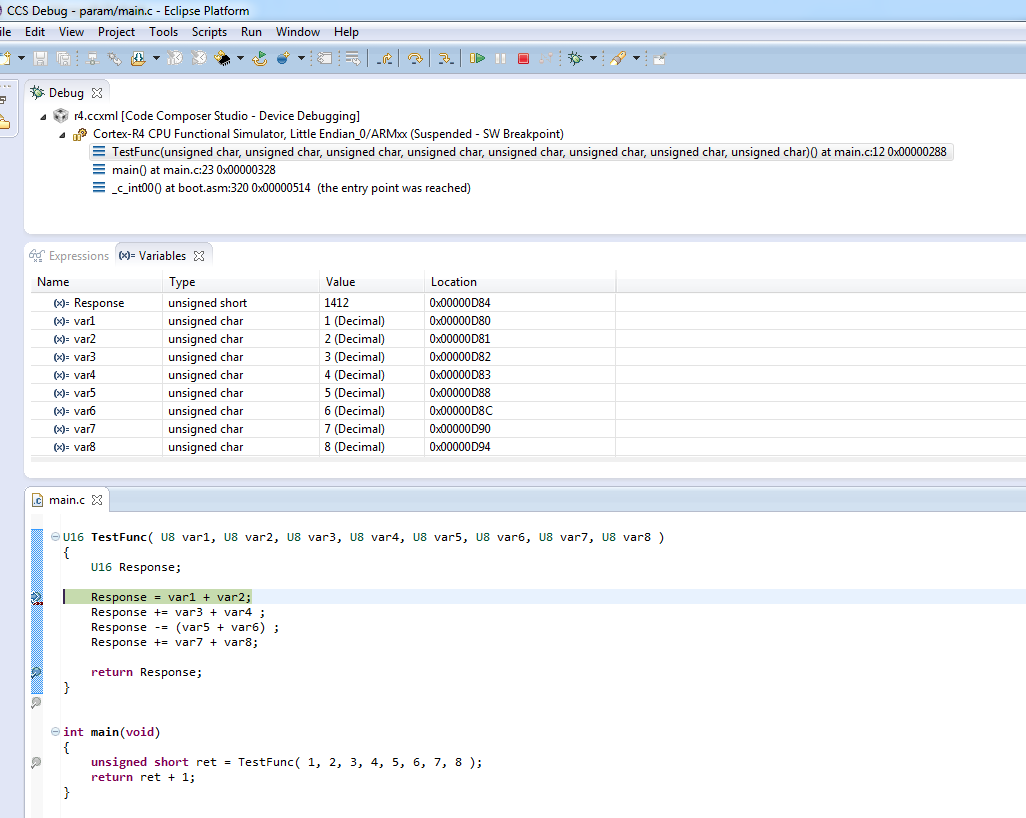
  • Try to upgrade to CCS v6 beta 4 which is released today.

    I try it. Here is what I get (see attached).

  • Hi Raymond,

    I've downloaded v6 and I still get the same problem. I did notice, however, that your build is little endian, where mine is big. Could that be the difference?

    Regards

    Andy

  • Hi Andy,

    You are right.

    I can finally reproduce the issue if I build with big endian.

    I have entered a CQ # SDSCM00049741.

    I will try to fix it for the final CCS v6 release.

    Thanks.

    Raymond