This thread has been locked.

If you have a related question, please click the "Ask a related question" button in the top right corner. The newly created question will be automatically linked to this question.

How to remove CCS Compiler flags?

The attached picture shows how to "Set Additional Flags" for the compiler in Code Composer Studio, but how do I clear them?  I'm probably staring at it, but simply don't see it, nor did I find any instructions in any documentation or in searching the forums.

Also, is there any clearer guidelines on the compiler optimization settings and what they do to the code than I can find in Chapter 3 of the TMS320C55x Optimizing C/C++ Compiler v 4.4 User's Guide ( document SPRU281G)?  With some of the compiler "optimization levels" and "options for speed" I've tried, the code appears to NOT perform the basic C code functionality correctly and I'm trying to understand why.

Any help would greatly be appreciated!

Tom

  • Since the input field is blank, you don't have any "additional flags", so there's nothing to clear.  The flags that show up in "Summary of flags set" represent all of the flags, including those specified with check boxes in the other menus.  Try looking at the "C/C++ Build" and "Debug" categories, for instance.

    What problem are you having with basic C code functionality?  Can you post a test case that demonstrates the problem?

  • Hi Archaeologist,


    Thanks for getting back to me. 

    I should have explained this, but my problems with the "code behavior" ( at least for what I expected ) happened when I added the optimization ( -O0 ) flag and the speed ( --opt_for_speed=3 ) flag that are shown in the "Summary of flags set:" area of the picture shown.  So my first question is how to remove these two flags so the compiler goes back to it's default settings?

    I'll work on getting the C ( and resulting assembly code ) example code for my second question a bit later today.  But if you can let me know how to get rid of these two flags before then it would help in figuring what "optimization case" to send.

    Thanks again,

    Tom

  • Tom Makovicka said:
    how to remove these two flags so the compiler goes back to it's default settings?

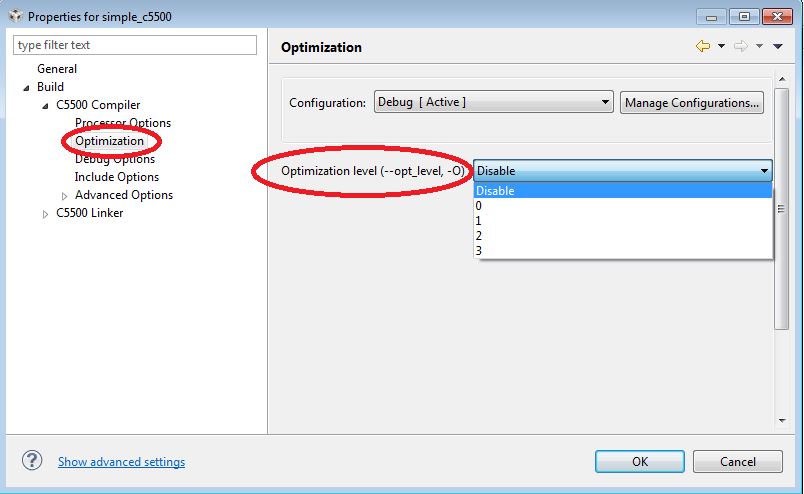
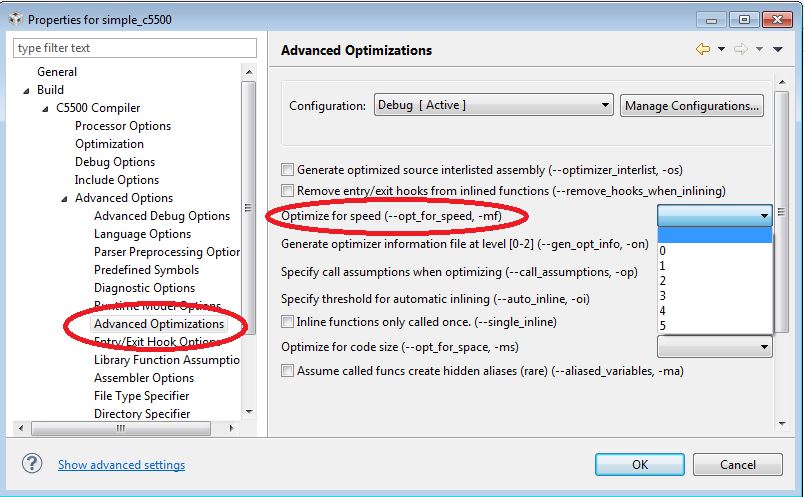
    The first screen shot below shows you how to disable optimization.  The second screen shot shows how to set --opt_for_speed back to the default.  That one is a bit tricky in that you have to select the blank entry.

    Thanks and regards,

    -George

  • Thanks George!


    I was setting the flags using the pop-up window and didn't realize they were further down in the menus.

    My other problem in understanding how the code is optimized appears to be how the assembly code gets "re-arranged" in order and also I had some variables that should have been declared as "volatile" since the optimization had removed them.


    Again,  Thanks for the help!

    Tom

  • Hey George,

    Could I ask what "tool" you used to capture the above screen "shots" that has the red "emphasis" ovals?

    It could be very handy in my work.

    Regards,

    Tom

  • Well, there probably is some cool screen capture tool that makes that easy.  I don't have such a tool.

    I copy the screen into a buffer by pressing Shift-PrtScn.  Then I open up MS-Paint, and press control-V to paste the screen image in.  Then I add the red ovals.  Then I open up MS-Snipping Tool to crop that down and save into a temporary file.  Then I attach that file to the post.  Messy, but it works for me.  If I did this a lot I would look for a better solution.  I'm sure something is out there.

    Thanks and regards,

    -George