Hello,
CCSv6 beta 4 Target Configuration doesn't give me the option to select Texas Instrument Simulator as a connection.
What do I need to do to get that option?
Stephen
This thread has been locked.
If you have a related question, please click the "Ask a related question" button in the top right corner. The newly created question will be automatically linked to this question.
Hello,
CCSv6 beta 4 Target Configuration doesn't give me the option to select Texas Instrument Simulator as a connection.
What do I need to do to get that option?
Stephen
Stephen,
Please see this note: http://processors.wiki.ti.com/index.php/CCSv6_Changes#Simulation
It should be in build 156. Not sure what you do not see it. You can try repairing your installation (rerun the installer over the existing install) but not sure if that will resolve your issue. Otherwise there is no way to drop in simulator support.
The final release will be released soon (end of this week or next week). In that release, you can get the simulators from the app center. I would wait for that build.
Thanks
ki
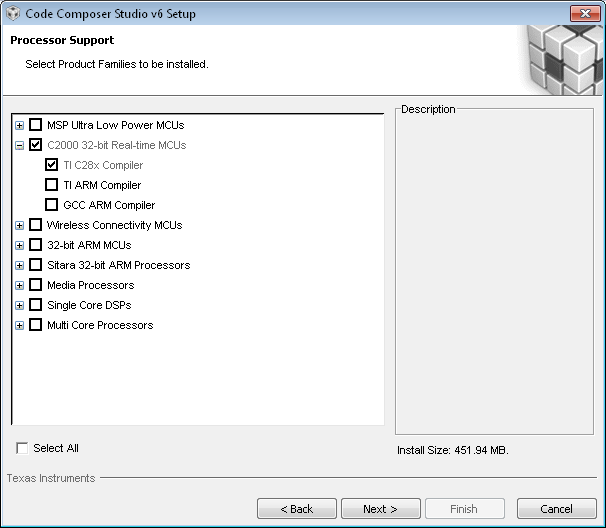
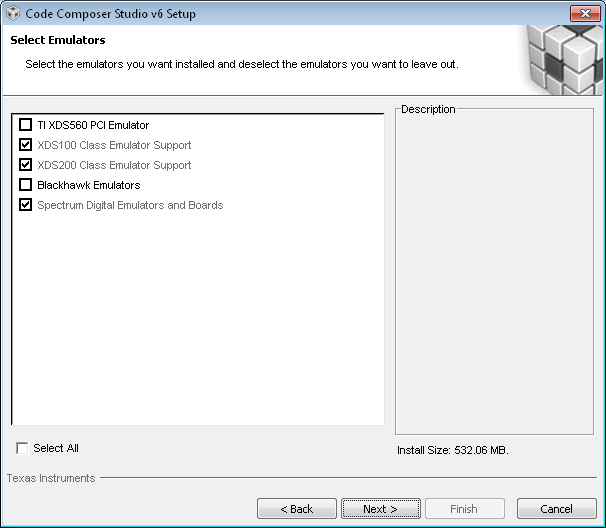
I re-ran the install. I didn't see a simulator option, so I didn't continue with the installationl. shown below are the option dialog boxes that were displayed during the re-installation.
Also, my company computer doesn't allow me to disable the virus scanner as recommended by the installation program. Could that be the issue?
Stephen
Sorry, I'm not really sure why it is not there. I assume you want to use the F283x CPU simulator.
Check the following directory:
<INSTALL DIR>\ccsv6\ccs_base\common\targetdb\configurations
Is there a file 'tisim_f283x.xml"? Do you have any files in that directory?
I just installed the final release of 6.0 and sure enough, the simulators went away and my ccxml file configured for a c64+ simulator no longer works. I'm in the app center (via view -> ccs app center) and I see nothing that appears to be simulators. Am I doing it wrong?
On the subject of downloads, TI documents online seem to indicate that the latest C6000 compiler is V7.6.x. I have 7.4.7 installed and both the app center and CCS through help->downloads indicate I have the latest version. Is there a new way of loading compiler updates?
Rick
I also noticed that the CCS v6 "Install New Software" wasn't giving the option to install the C6000 V7.6.x compiler.Richard9776 said:On the subject of downloads, TI documents online seem to indicate that the latest C6000 compiler is V7.6.x. I have 7.4.7 installed and both the app center and CCS through help->downloads indicate I have the latest version. Is there a new way of loading compiler updates?
Found https://www-a.ti.com/downloads/sds_support/TICodegenerationTools/download.htm#C6000 which has a download link for the C6000 v7.6.0 compiler. There is the following note, which maybe explains why CCS v6 wasn't offering installation of the V7.6.0 compiler:
The C6000 CGT v7.6.0 release is intended for MCSDK, OpenMP, and/or OpenCL project development. For new and existing general purpose C6000-based application development projects, we recommend the use of the latest available C6000 CGT v7.4.x release (v7.4.7 as of April 2014).
Hi Rick,
Richard9776 said:I just installed the final release of 6.0 and sure enough, the simulators went away and my ccxml file configured for a c64+ simulator no longer works. I'm in the app center (via view -> ccs app center) and I see nothing that appears to be simulators. Am I doing it wrong?
keystone simulators will show up in the App Center around next week. The rest of the simulators will not be available by default on the App Center. But v6 can be manually updated to have them. I'll provide more details later (when i get them)
Thanks
ki
Hi,
I am using KeyStone II, and by now I need the simulator support in the CCSv6.
Can anyone help me on this?
Thank you so much!
Ronny
Ronny - unfortunately we are no longer supporting simulators in CCS anymore. If you need a kystone simulator, please contact your local TI representative (sales or support). They may be able to provide some assistance.
Sorry.
ki