This thread has been locked.

If you have a related question, please click the "Ask a related question" button in the top right corner. The newly created question will be automatically linked to this question.

[Build Error]: Program "make" not found in PATH


Hi,

   I am now using the CCSv5.5.0.00077 to package an xDM algorithm.  By taking advantage of the GenAlg Tools, I've successfully get an iUniversal xDM algorithm.  Tring to import this algorithm as an Eclipse Project in my CCS, I sorrowly find that the project cannot be built:

16:50:26 **** Build of configuration Default for project g723enc ****
make all
Cannot run program "make": Launching failed

Error: Program "make" not found in PATH
PATH=[F:/Development/TI/ccsv5/eclipse/jre/bin/client;F:/Development/TI/ccsv5/eclipse/jre/bin;F:/Development/TI/ccsv5/eclipse/jre/lib/i386;C:\Program Files\NVIDIA Corporation\PhysX\Common;C:\Windows\system32;C:\Windows;C:\Windows\System32\Wbem;C:\Windows\System32\WindowsPowerShell\v1.0\;C:\Program Files\Microsoft SQL Server\100\Tools\Binn\;C:\Program Files\Microsoft SQL Server\100\DTS\Binn\;F:\Development\MATLAB\R2012a\runtime\win32;F:\Development\MATLAB\R2012a\bin;F:\Cadence\SPB_16.5\tools\pcb\bin;F:\Cadence\SPB_16.5\tools\bin;F:\Cadence\SPB_16.5\tools\libutil\bin;F:\Cadence\SPB_16.5\tools\fet\bin;F:\Cadence\SPB_16.5\tools\specctra\bin;F:\Cadence\SPB_16.5\tools\PSpice;F:\Cadence\SPB_16.5\tools\PSpice\Library;F:\Cadence\SPB_16.5\tools\Capture;F:\Cadence\SPB_16.5\OpenAccess\bin\win32\opt;F:\Development\altera\11.0\modelsim_ase\win32aloem;F:\Development\TI\ccsv5\eclipse;]

16:50:27 Build Finished (took 1s.160ms)


  However, the project could be perfectly built on my colleague's computer.

  Could you please help me?


Naroah

Apr/27/2014

  • Haoran Li1 said:
    Error: Program "make" not found in PATH
    PATH=[F:/Development/TI/ccsv5/eclipse/jre/bin/client;F:/Development/TI/ccsv5/eclipse/jre/bin;F:/Development/TI/ccsv5/eclipse/jre/lib/i386;C:\Program Files\NVIDIA Corporation\PhysX\Common;C:\Windows\system32;C:

     Hi Li1, your path has unix stile / instead of M$ stile (why ???) \, not sure this is the problem but sure it is a good starting point.

     I remember also when linux version was not ready CCS suffer from spanning of project over different Drive Letter, so if your installation is on F: drive and your project is on X:\ may be it doesn't compile/link.

     Also path to where is gmake is not present in your path, try compare to the one of your colleague and add what is missing.

  • Hi Naroah,

    The project you imported... is it a CCS Project or a standard Eclipse project?

    Thanks

    ki

  • Hi Ki,

        Thank you for your reply!

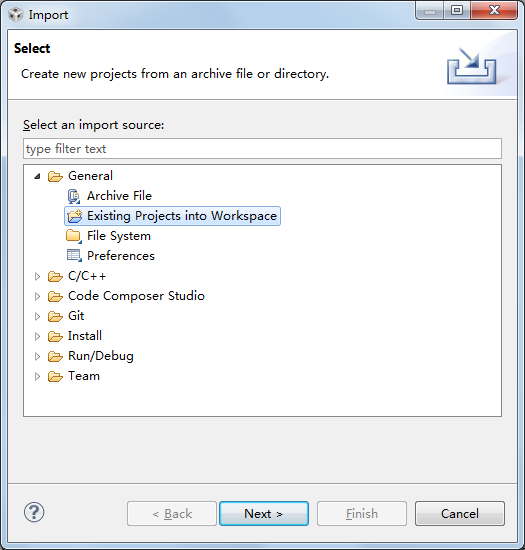
        For this thread, I take advantage of the "Existing Projects into Workspace" for my dedicated xDM algorithm.  And that is what my colleague do.  He never encounters "make not found" error.  However, by no means could I successfully build this simple xDM algorithm.

         I used to import the xDM project as an "Existing Code as Makefile Project", but I have to follow my colleague's setting and configuration this time.

        Could you please help me?

    Naroah

    Apr/28/2014

  • What I'm not sure of is the format of the xDM project. Is it a CCS project or a standard Eclipse project? Can you send me the project so I can look?

    Thanks

    ki