This thread has been locked.

If you have a related question, please click the "Ask a related question" button in the top right corner. The newly created question will be automatically linked to this question.

Hex2000 Utility Error - Cannot find the file specified


I'm using CCS  Version: 5.5.0.00077.

I'm trying to use the Hex2000 Utility in the Post-Build Steps (CCS Build >> Steps).

Command reads: 

"${CG_TOOL_HEX}" -i "${BuildArtifactFileName}" -o "${BuildArtifactFileBaseName}.hex" -order MS -romwidth 16

Description is:

"Create flash image: Intel-HEX"

My error is:

process_begin: CreateProcess(NULL, mingw32-make -j4 --no-print-directory post-build, ...) failed.
make (e=2): The system cannot find the file specified.

I never had this problem before and had been running this utility for about a year. Ever since a recent version upgrade, I've been getting this error.

Any help?

  • AgentNitro,

    One thought:
    Can you make sure that the CG_TOOL_HEX variable is correctly pointing to the path to the hex2000 utility?  This variable should show up in the project's properties (you may have to have 'system' variables be shown to see it).


    Thank you,
    Brett

  • Thanks, Brett.

    My project properties showed:

    C:/ti/ccsv5/tools/compiler/c2000_6.1.6/bin/hex2000

    I also tried changing my compiler from 6.1.6 to 6.1.7, 6.1.5, and 6.1.0. The hex utility system property changed accordingly, but the problem persists.  

    I can use the hex2000 utility with a .bat file, but it's so much nicer having CCS5 generate the hex file for me.

  • Hi AgentNitro,

    I'm going to bump the thread over to the compiler forum.  They should have more idea on what the error message you received means.


    Thank you,
    Brett

  • AgentNitro said:

    My error is:

    process_begin: CreateProcess(NULL, mingw32-make -j4 --no-print-directory post-build, ...) failed.
    make (e=2): The system cannot find the file specified.

    I never had this problem before and had been running this utility for about a year. Ever since a recent version upgrade, I've been getting this error.

    What was the recent upgrade you performed after which this error appeared?

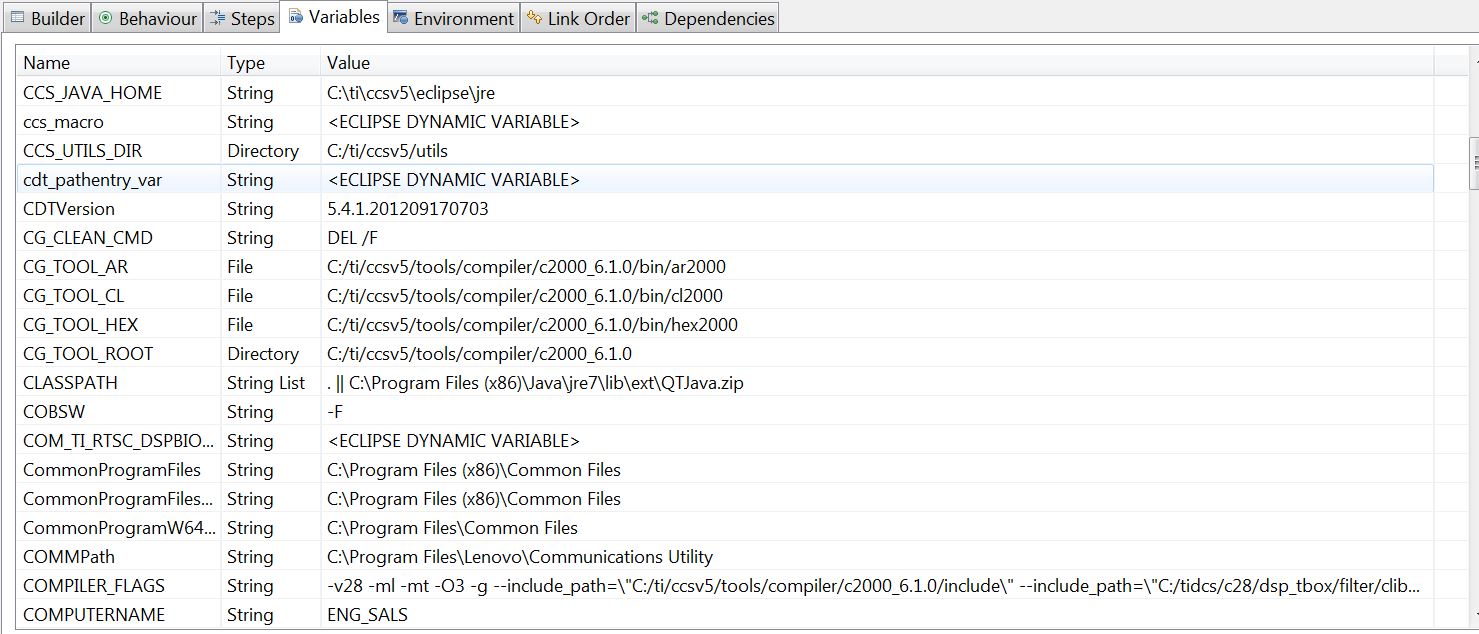
    Can you post the complete output in the CCS build console? You can copy and save it to a text file and then attach it here. Also please attach a screenshot of the build variables in CCS (with system variables enabled) of the section where CG_TOOL_HEX and similar variables are defined.

  • AgentNitro said:
    process_begin: CreateProcess(NULL, mingw32-make -j4 --no-print-directory post-build, ...) failed.  make (e=2): The system cannot find the file specified

    That is a Windows error message that unfortunately could have several causes.  You need to make sure that your PATH environment variable is set correctly (do not use any quotation marks) and that mingw32-make is in a directory on that PATH.

    • What is the value of your PATH?
    • Do you use Cygwin?
    • Does the hex creation command show up in the build console window?   What is the exact text of the hex invocation in the build console window?
  • Archaeologist,

    1. I do not have a PATH value. I do have a Path value. It is:

    C:/ti/ccsv5/eclipse/jre/bin/client
    C:/ti/ccsv5/eclipse/jre/bin
    C:/ti/ccsv5/eclipse/jre/lib/i386
    C:\MentorGraphics\9.4PADS\SDD_HOME\common\win32\bin
    C:\MentorGraphics\9.4PADS\SDD_HOME\common\win32\lib
    C:\MentorGraphics\9.4PADS\MGC_HOME.ixn\bin
    C:\MentorGraphics\9.4PADS\MGC_HOME.ixn\lib
    C:\Program Files\Common Files\Microsoft Shared\Windows Live
    C:\Program Files (x86)\Common Files\Microsoft Shared\Windows Live
    C:\Windows\system32
    C:\Windows
    C:\Windows\System32\Wbem
    C:\Windows\System32\WindowsPowerShell\v1.0\
    C:\Program Files\Intel\WiFi\bin\
    C:\Program Files\Common Files\Intel\WirelessCommon\
    C:\Program Files\ThinkPad\Bluetooth Software\
    C:\Program Files\ThinkPad\Bluetooth Software\syswow64
    C:\Program Files\Broadcom\WHL\
    C:\Program Files\Broadcom\WHL\syswow64
    C:\Program Files\Broadcom\WHL\SysWow64\
    C:\Program Files\Broadcom\WHL\SysWow64\syswow64
    C:\Program Files (x86)\Common Files\Ulead Systems\MPEG
    C:\Program Files\Common Files\Lenovo
    C:\Program Files (x86)\Windows Live\Shared
    C:\SWTOOLS\ReadyApps
    C:\Program Files (x86)\Intel\Services\IPT\
    C:\Program Files (x86)\Common Files\Lenovo
    C:\Program Files\Google\Google Apps Migration\
    C:\Program Files\SourceGear\Common\DiffMerge\
    C:\Program Files (x86)\Symantec\VIP Access Client\
    C:\Program Files (x86)\QuickTime\QTSystem\
    C:\Program Files\Microsoft SQL Server\110\Tools\Binn\
    C:\MentorGraphics\9.4PADS\SDD_HOME\common\win32\lib
    C:\ti\ccsv5\eclipse

    Wow, that seems like a lot.

    2. I do not use cygwin.

    3. No, hex creation does not show up in the build console window anymore.

    <Linking>
    'Finished building target: C:/MyProjects/Z5001-003/Z5001-003/Executable/Z5001-003.out'
    ' '
    make (e=2): The system cannot find the file specified.

    gmake: *** [C:/MyProjects/Z5001-003/Z5001-003/Executable/Z5001-003.out] Error 2
    gmake: Target `all' not remade because of errors.

    **** Build Finished ****

  • Please reply to these questions posed in an earlier post by AartiG ...

    AartiG said:

    What was the recent upgrade you performed after which this error appeared?

    Can you post the complete output in the CCS build console? You can copy and save it to a text file and then attach it here. Also please attach a screenshot of the build variables in CCS (with system variables enabled) of the section where CG_TOOL_HEX and similar variables are defined.

    My guess is one of your system variables is incorrect.  That's why it would be good to see them.

    Thanks and regards,

    -George

  • My most recent upgrade was to CCS6. But, I didn't know that I would need a new license for it so I had to uninstall it.

    I'm sorry, I can't post everything in the CCS build console. Is there a particular section that you are most interested in? The C2000 Compiler is invoked for every file during the build  stage. When build is complete, a .out file is generated. Then the C2000 Linker is invoked. Then I get this message:

    <Linking>
    'Finished building target: C:/MyProjects/Z5001-003/Z5001-003/Executable/Z5001-003.out'
    ' '
    process_begin: CreateProcess(NULL, mingw32-make -j4 --no-print-directory post-build, ...) failed.
    make (e=2): The system cannot find the file specified.

    gmake: *** [C:/MyProjects/Z5001-003/Z5001-003/Executable/Z5001-003.out] Error 2
    gmake: Target `all' not remade because of errors.

    **** Build Finished ****

    On a previous question: CYGWIN says nodosfilewarning in the system variables section.

    Thanks for your help, in advance.

  • It looks like you are using mingw32 for the project build. I assume you set it to use this instead of the default gmake build command by changing the "Builder tab" under Build Properties. Could you set it back to use the default gmake build command as a test and let us know if the same error appears? You can even add the -j option to the gmake that comes with CCSv5.5.

    Also, what is the exact command specified in the post-build step?

    You mentioned the hex conversion step works when invoked from a batch file. What is the command you have in the batch file? And does it work if you simply call the batch file from the post-build step or do you invoke the batch file separately on command file?

  • In the Builders tab under CCS Build, Use default build command is checked.

    I don't understand what you are suggesting in regards to -j.

    Exact command specified:

    "${CG_TOOL_HEX}" -i "${BuildArtifactFileName}" -o "${BuildArtifactFileBaseName}.hex" -order MS -romwidth 16

    My .bat file says:

    C:\ti\ccsv5\tools\compiler\c2000_6.1.6\bin\hex2000.exe -i -romwidth 16 -o C:\MyProjects\Z5001-003\Z5001-003\Executable\Z5001-003.hex C:\MyProjects\Z5001-003\Z5001-003\Executable\z5001-003.out

    As you suggested, I filled in the Post-build step command with:

    "${CG_TOOL_HEX}" -i "C:\MyProjects\Z5001-003\Z5001-003\Executable\z5001-003.out" -o "C:\MyProjects\Z5001-003\Z5001-003\Executable\Z5001-003.hex" -order MS -romwidth 16

    However, I get the same error.

  • Hi,

    the autogenerated makefile invoke the postbuild with the command: @$(MAKE) --no-print-directory post-build

    Normally ${MAKE} is automatic defined as  the make command you use (CCS uses), that i s"gmake.exe all" (or something similar), but if your environment have already defined a varaible MAKE, this one it is used.

    Check you default DOS enviroment to see if MAKE is defined as "mingw-make" (echo %MAKE%). If this is the case, try to undef it (at system level, since any change to the environment in a dos box is local to that instance of cmd.exe)