This thread has been locked.

If you have a related question, please click the "Ask a related question" button in the top right corner. The newly created question will be automatically linked to this question.

CCSv6 - How do you get the printf logs window to upload a different core?

Other Parts Discussed in Thread: SYSBIOS

Hi

CCSv6, C6472, XDC 3.30.1.25_core, IPC 3.20.0.06, NDK 2.23.2.03, SYSBIOS 6.40.1.15, UIA 2.0.0.28 and XDAIS 7.10.0.06, CGT 7.4.8

I have the following logger configuration in multicore example code (its a modified NDK-less version the CCS message queue example).

Log = xdc.useModule('xdc.runtime.Log');
var LoggingSetup = xdc.useModule('ti.uia.sysbios.LoggingSetup');
LoggingSetup.loggerType = LoggingSetup.LoggerType_MIN;
LoggingSetup.loadLoggerSize = 512;
LoggingSetup.mainLoggerSize = 512;
LoggingSetup.sysbiosLoggerSize = 128;
LoggingSetup.sysbiosTaskLogging = false;
LoggingSetup.loadLogging = false;
LoggingSetup.mainLoggingRuntimeControl = false;

I've created a single group for all cores (don't know if I should use "sync group" instead), loaded them, then ran the example. Then I stopped all cores.

I can get the Printf Logs window to show one of the cores, but it won't update when I click on different cores in the debug window. If I go to the RTOS Object View (ROV) -> LoggerMin->Records, I see the "records" updating each time I select a different core. So this proves that there are logs on the other cores. But the Printf Logs window seem stuck on Core 5 (at least this time, other times its shown core 0 and others core 1). 

I did an experiment where I shut down the Printf Logs and Live Session windows, selected core 1, and re-opened the Tools->RTOS Analyzer->Printf and Error Logs. This time the Printf Logs window shows core 4. 

In CCSv4, you had to select an enable button in the Printf Logs and then do an assembly step to tell the tool to load and decipher the core's log. The buttons are missing on CCSv6.

All looks good in the Analysis Configuration window.
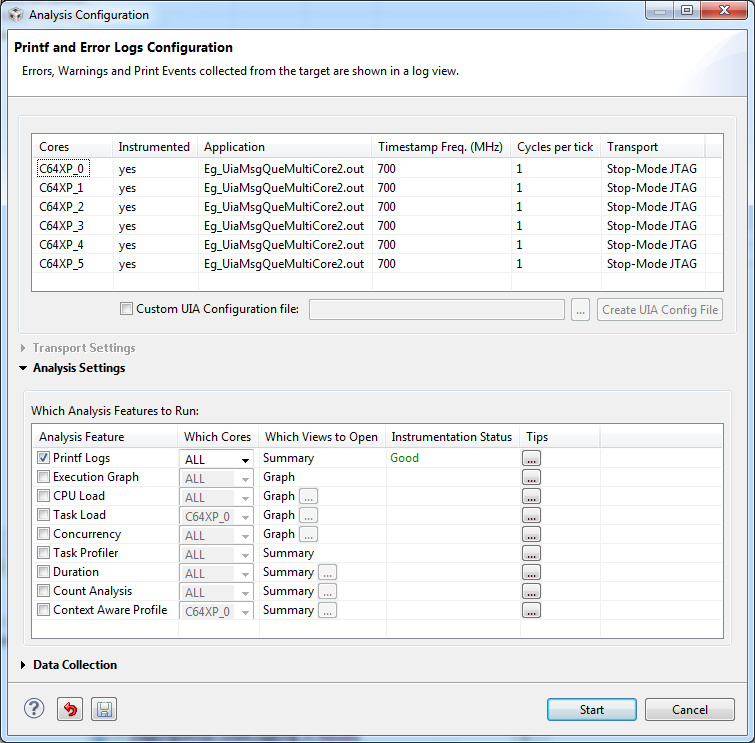
Cheers2u

  • I'm sometimes getting printf logs and sometimes not with this configuration. When I do get them, all cores printfs are showing up in the printf tab. Unlike CCSv4, only the core you select would show up. 

    Log = xdc.useModule('xdc.runtime.Log');
    var LoggingSetup = xdc.useModule('ti.uia.sysbios.LoggingSetup');
    LoggingSetup.loggerType = LoggingSetup.LoggerType_MIN;
    LoggingSetup.loadLoggerSize = 128;
    LoggingSetup.mainLoggerSize = 8192;
    LoggingSetup.sysbiosLoggerSize = 128;
    LoggingSetup.sysbiosTaskLogging = false;
    LoggingSetup.loadLogging = false;
    LoggingSetup.mainLoggingRuntimeControl = false;
    //LoggingSetup.memorySectionName = "DDR2";

    // Only use this if the buffer is in shared memory. We hope to do this
    // when its in DDR.
    //LoggingSetup.numCores = 6; // tells logger that cores share a memory location.

    The ROV tab will change to show only the core that is selected. Is there a way to do this for the printf tab display? Or will it always show all cores?

    When I uncomment these, the ROV Records tab no longer changes when I select a different core. Nor is there any logs on the Printf Logs tab.  :o(

    //LoggingSetup.memorySectionName = "DDR2";

    // Only use this if the buffer is in shared memory. We hope to do this
    // when its in DDR.
    //LoggingSetup.numCores = 6; // tells logger that cores share a memory location.

    This sure feels like the early days of CCSv4 again.

    Here is my project.

    http://e2e.ti.com/cfs-file.ashx/__key/communityserver-discussions-components-files/81/7242.Eg_5F00_UiaMsgQueMultiCore2.7z

    Thanks for your help.

  • I think I figured out how to open printf windows for each core. When you do Tools->RTOS Analyzer->Printf and Error Logs, two windows open. One is live and the other looks like it defaults to the first core thats setup for logging. To get another core, go to the live window, click on the Analyze button next to the play/pause button. Its dropdown will let you select which core's printf you wish to see.

    Haven't figured out the issue with putting logs in DDR2 however.  :o(

    Cheers

  • Eddie3909 said:
    I think I figured out how to open printf windows for each core.

    Glad to hear you were able to figure this out.

    Eddie3909 said:
    Haven't figured out the issue with putting logs in DDR2 however.

    Could you clarify again what you did you reproduce this issue? Did you simply uncomment the following line in the .cfg file?
        //LoggingSetup.memorySectionName = "DDR2";

    And when you did that, it no longer generates any Printf log data at all?

  • Hi 

    AartiG said:
    Could you clarify again what you did you reproduce this issue?

    I put this in the message.cfg file

    LoggingSetup.memorySectionName = "DDR2";

    LoggingSetup.numCores = 6; // tells logger that cores share a memory location.

    Cheers

    Eddie

  • Hi Eddie,

    If you want to use DDR2 for the logs, you should use LoggerStopMode, and not LoggerMin.  With LoggerStopMode, the Log buffer will be split up among the cores so that they will not over-write each others data.  Could you try removing the line:

    LoggingSetup.loggerType = LoggingSetup.LoggerType_MIN;

    in your configuration file and see if that fixes the problem?

    Best regards,

        Janet

  • Yay! Thats IT! Bad LoggerType_MIN  :)

    Problem solved. My bad I missed this requirement somewhere in the documentation  :o(

    One other question, did I post this problem in the right forum? (this is any easy question)

    http://e2e.ti.com/support/embedded/tirtos/f/355/t/349196.aspx

    Cheers

  • Great!  Good to hear that's been solved.  Does this mean the other post:

    http://e2e.ti.com/support/embedded/tirtos/f/355/t/347073.aspx

    is also solved?  I should have noticed earlier that you might have been using LoggerMin.  We can definitely add more checks to warn about LoggerMin being used in the multi-core case.

    Regarding your post http://e2e.ti.com/support/embedded/tirtos/f/355/t/349196.aspx

    that is the correct forum, and someone should be looking into that soon.

    Best regards,

        Janet

  • Hi Janet

    Thanks for reminding me. I indicated that it too is answered and added a link to this post.

    Thanks again