


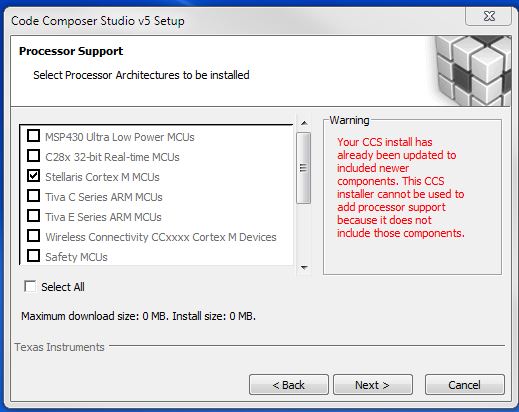
Trying to get the latest NDK (2.23.02.03) example running and it said it was validated under Code Composer 5.5 so we decided to upgrade from 5.4. Downloaded ccs_setup_5.5.0.00077.exe and attempted to install. We got a warning seen here:
Code Composer then fails with a initial error of "Error in action ExecuteExternalProgram_Join
couldn't execute "C:\ti\ccsv5\eclipse\downloads\ti_cgt_tms470_5.1.6_windows_installer.exe": no such file or directory". I've attach the error log and I'm wondering what else I should do. I'd rather not uninstall version 5.4 as we continue to develop on the older compiler/linker.
Thanks,
John C.
Error in action ExecuteAction

Error in action ExecuteAction

Error in action ExecuteScript

Error in action ExecuteExternalProgram_Join

couldn't execute "C:\ti\ccsv5\eclipse\downloads\ti_cgt_tms470_5.1.6_windows_installer.exe": no such file or directory
    while executing
"::InstallJammer::actions::$component $this"
    while executing
"::InstallJammer::actions::$component $this"
    while executing
"$obj execute"
    (procedure "::InstallJammer::ExecuteActions" line 69)
    invoked from within
"::InstallJammer::ExecuteActions $action -parent $id -conditions $eval"
    (procedure "::InstallJammer::actions::ExecuteAction" line 35)
    invoked from within
"::InstallJammer::actions::$component $this"
    while executing
"$obj execute"
    (procedure "::InstallJammer::ExecuteActions" line 69)
    invoked from within
"::InstallJammer::ExecuteActions $action -parent $id -conditions $eval"
    (procedure "::InstallJammer::actions::ExecuteAction" line 35)
    invoked from within
"::InstallJammer::actions::$component $this"
Error in action ExecuteAction

Error in action ExecuteAction

Error in action ExecuteScript

Error in action ExecuteExternalProgram_Join

couldn't execute "C:\ti\ccsv5\eclipse\downloads\ti_cgt_tms470_5.1.6_windows_installer.exe": no such file or directory
    while executing
"::InstallJammer::actions::$component $this"
    while executing
"::InstallJammer::actions::$component $this"
    while executing
"$obj execute"
    (procedure "::InstallJammer::ExecuteActions" line 69)
    invoked from within
"::InstallJammer::ExecuteActions $action -parent $id -conditions $eval"
    (procedure "::InstallJammer::actions::ExecuteAction" line 35)
    invoked from within
"::InstallJammer::actions::$component $this"
    while executing
"$obj execute"
    (procedure "::InstallJammer::ExecuteActions" line 69)
    invoked from within
"::InstallJammer::ExecuteActions $action -parent $id -conditions $eval"
    (procedure "::InstallJammer::actions::ExecuteAction" line 35)
    invoked from within
"::InstallJammer::actions::$component $this"
    while executing
"$obj execute"
    (procedure "::InstallJammer::ExecuteActions" line 69)
    invoked from within
"::InstallJammer::ExecuteActions $id -when $when"
    (procedure "::InstallJammer::RaiseEventHandler" line 93)
    invoked from within
"::InstallJammer::RaiseEventHandler  .wizard"
    (command bound to event)

