This thread has been locked.

If you have a related question, please click the "Ask a related question" button in the top right corner. The newly created question will be automatically linked to this question.

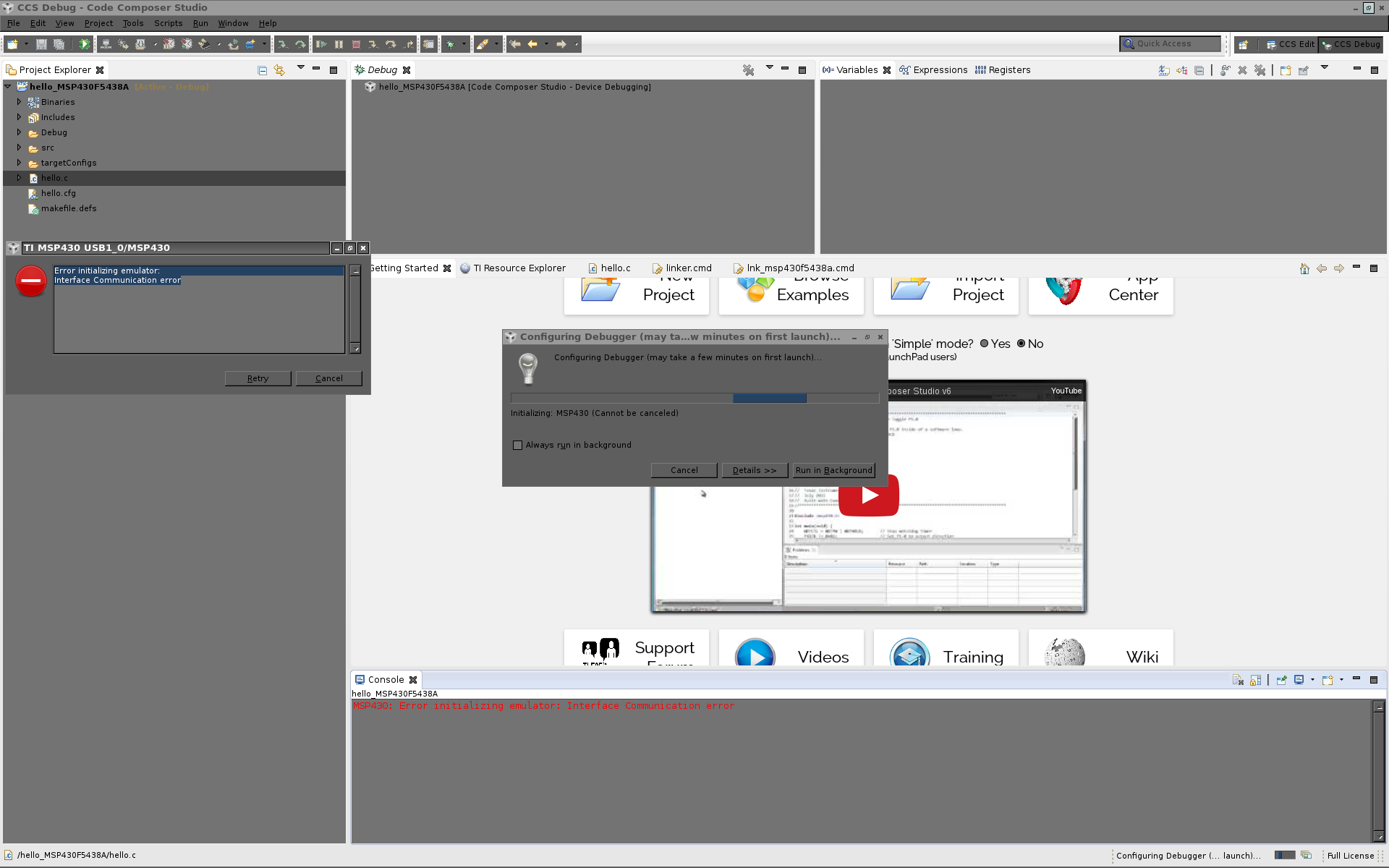
interface communication error

Other Parts Discussed in Thread: MSP-FET, SYSBIOS

I am getting a "Interface Communication Error" from CCS 6 under linux when trying to connect with my MSP-EXP5438 using an MSP-FET debugger.

My MSP-FET begins with the numbers "1401" and I found instructions for installing a patch to the MSP-FET
here, which I've already done:

http://software-dl.ti.com/msp430/msp430_public_sw/mcu/msp430/MSP-FET_Linux_Patcher/1_00_00_00/index_FDS.html

Screen shot below.

Any help would be appreciated.

--Randy
  • I got a little further as follows. I noticed that inserting the msp-fet usb connector created two new device nodes: /dev/ttyACM0 and /dev/ttyACM1. I further noticed that the group of these device nodes was "dialout". I checked my own account and found that I was already a member of the dialout group, however, root was not. I added the dialout account to root and have now been able to get past the above error. Note that I installed CCS as root, and so it runs as root.


    Now I've had CCS behave in two different ways when attempting to launch a debug configuration.

    The first behavior, which happened once or twice initially after changing the root group  membership as discussed above, was that it appeared that CCS connected with the MSP-EXP430 board and flashed the program. But 1) the program wouldn't run (just the Hello World example from sysbios examples), and 2) both the red light and green light remained on on the MSP-FET while in the debug session. Again, this only happened once or twice; ever since then I've been consistently getting the second behavior described below.

    The second behavior is that I can no longer get to a debug session and am instead getting an "error initializing emulator: Tried to initialize USB FET number 2, but only found 1 USB FETs" message everytime i try to start.

    Please help!

  • PS: I'm running fedora 20.

  • OK, here's another piece of the puzzle: It works if I run CCS as root.

    It seems like this has got to be udev permissions problems, but they look like they've been set correctly according to the attached /etc/udev/rules.d files.

    --Randy

  • Hi Randy,

    glad you at least got this far!  I will see if I can send this to a Linux person for you after the weekend.

    Best regards,

    Lisa

  • Randy,

    I'm not sure if this would cause a problem, but as it would be simple to check could you do the following:  (1) rename the ~/.ti folder to to something else (IE, .ti-temp), and (2) make sure the folder  ~/ti/CCSExternalReferences and all files in that folder are globally readable, and (3) make sure the permissions on the udev rules file itself are at least 644 .  FYI, the script that creates the rules file is located in <install_dir>/ccsv6/install_scripts.