This thread has been locked.

If you have a related question, please click the "Ask a related question" button in the top right corner. The newly created question will be automatically linked to this question.

"PC-relative displacement overflow" errors

Hi all,

Currently I am using a very old TI DSP (C33 series) to build a firmware for our device.

I met a problem that when I tried to link a .out file.

The .cmd file looks like:

======CMD START=====

-r
-x

d:\DEV\LCDIST\DISP\PTFSYST\BOOT\sbi_timer.obj
d:\DEV\LCDIST\DISP\PTFSYST\BOOT\sbs_atInit.obj
d:\DEV\LCDIST\DISP\PTFSYST\BOOT\sbs_atPerm.obj
d:\DEV\LCDIST\DISP\PTFSYST\MEMOIRE\smf2_drv.obj
d:\DEV\LCDIST\MAIN\OBJEMU_IEC61850\dm_ITMem.obj
d:\DEV\LCDIST\DISP\PTFSYST\MEMOIRE\smf_drv.obj
-l d:\DEV\LCDIST\MVP\UCA2\OBJEMU_IEC61850\mvp_IEC61850.lib
d:\DEV\LCDIST\DISP\PTFSYST\BOOT\sbi_tmi.obj
d:\DEV\LCDIST\SUPERVISION\OBJEMU_IEC61850\dsuf_msf.obj
d:\DEV\LCDIST\SUPERVISION\OBJEMU_IEC61850\dsu_Boot.obj
d:\DEV\LCDIST\SUPERVISION\OBJEMU_IEC61850\dsu_Coproce.obj
d:\DEV\LCDIST\SUPERVISION\OBJEMU_IEC61850\dsuf.obj
...
d:\DEV\LCDIST\SUPERVISION\OBJEMU_IEC61850\dsuf_tr_cmde.obj

...

-l d:\DEV\LCDIST\MAIN\OBJEMU_IEC61850\main_IEC61850.lib

d:\DEV\LCDIST\SUPERVISION\OBJEMU_IEC61850\dsuf_mvp.obj
d:\DEV\LCDIST\SUPERVISION\OBJEMU_IEC61850\dsuf_mvp_pcf.obj
d:\DEV\LCDIST\SUPERVISION\OBJEMU_IEC61850\dsuf_mvp_str.obj

...
-l d:\DEV\LCDIST\DISP\LIV50300PL\util\util.lib
-l d:\DEV\LCDIST\lib\tex\rts.pc.lib
-l d:\DEV\LCDIST\lib\tex\mathrco2acfim.lib


SECTIONS
{
    .text:
    {
        *(.text)
    }
}

======CMD END=====

Then I adjust the location of the overflowed .obj files. If I am lucky, the overflow problem may disappear, if not, another overflow problem will appear.

After a lone adjustment work are done, the overflow problem disappeared at last, but the next time when we fix some bugs in the code or try add some new features to the firmware, we link all libraries and .obj files again, then we will encounter some other overflow problems.

The adjustment work for some .obj files need to be done again, the procedure of adjusting the location of some .obj files is like a nightmare, sometimes it makes me crazy. 

How can we avoid this from happening? Is there any way to let the overflow problem never show again?

Thank you very much!

  • I usually don't publish an answer in this forum unless I'm certain I'm correct.  In this case I'm making an exception.  This toolset is around 15 years old.  You are fortunate that I remember as much as I do, and that I even have an expert to consult.  However, that expert is out right now.  So, while I am confident I am correct, I cannot say that with total certainty.  I think it is better to go with this answer than to make you wait.

    Function calls are implemented with a CALL instruction that uses a PC relative addressing method.  An offset is added to the PC to form the destination address.  This offset is limited in size, and this limits how far away a CALL instruction can reach.  When the CALL instruction doesn't reach, you see that diagnostic.  The answer is to use the far modifier to tell the compiler to use the far call sequence (load the destination address in a register, then branch indirectly through that register) instead of a CALL instruction.  

    How can you know which function to apply far to?  See the section titled How to Use Linker Error Messages in the C6000 Programmer's Guide.  Yes, this book is for the C6000, not C30.  But at a conceptual level, the information is correct.  That describes the method you can use to see the name of the function being called.  That is the function which needs the far modifier.  Apply it in at least two places: where the function source code definition appears, and where the the function declaration appears (usually in a header file).  

    All of this raises the question: Is there a command line option to make all function calls far?  Unfortunately, no.  The option -ml tells the compiler to call the internal RTS functions (like integer divide) with the far call sequence.  You can try -ml if you want.  I think it is unlikely to solve your problem.

    In case it is useful, here is the C30 compiler manual.  I'm pleasantly surprised to find it online at all.  I recommend you stash your own copy of it.

    Thanks and regards,

    -George

  • Hi George,

    Thank you very much for your help, because we are developing the firmware on a very old device that runs in electric power industry, and the device is designed in 1990s, because of the special of the industry, we do not need to update our device very frequently, some of our main work is to maintain the old device, to fix bugs, to add new features to it.

    Currently we are adding some new features to our device, and the main board is not redesigned, thus we need to adjust our code to let it run in the very old DSP (C33), and unfortunately, we met the current problem.

    I will take some time to try your advice, and thank you again, you help is very appreciated:) 

  • Hi George,

    I have a question about the compilation tool chain of C3x series.

    We have two kinds of devices and each of them use different tool chain, one is 4.70 and another is 5.11. What differences are there in the two set of compilation tool chain?

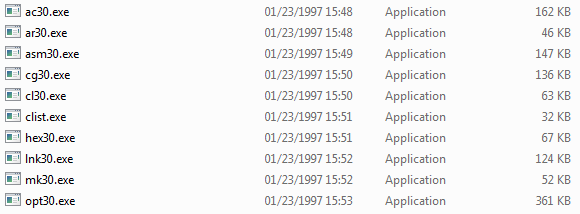
    Tool chain v4.70

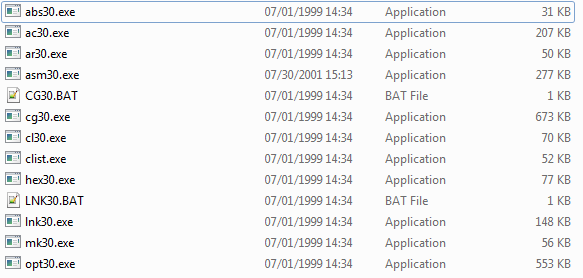
    Tool chain v5.11

    I use the different tool chain to compile a totally the same file and I get the different .asm files.

    By using v4.70, I get the following assembly code. 

    ******************************************************
    * TMS320C30 C COMPILER Version 4.70
    ******************************************************
    ;	C:\tic3x4x\c3x4x\cgtools\bin\ac30.exe -v31 -q -mr -x -dNDEBUG -dNU_NO_ERROR_CHECKING -dCR_INC_STATUS -dCR_INC_RX_MSTAG -i\Tools\
    ;	C:\tic3x4x\c3x4x\cgtools\bin\opt30.exe -v31 -q -r -a -f -O2 C:\DOCUME~1\micom\LOCALS~1\Temp\security.if C:\DOCUME~1\micom\LOCALS
    ;	C:\tic3x4x\c3x4x\cgtools\bin\cg30.exe -v31 -q -p -a -c -i -a C:\DOCUME~1\micom\LOCALS~1\Temp\security.opt security.asm C:\DOCUME~1\micom\LOCALS~1\Temp\security.tmp 
    	.version	31
    FP	.set		AR3
    	.globl	_atof
    	.globl	_atoi
    	.globl	_atol
    	.globl	_strtod
    	.globl	_strtol
    	.globl	_strtoul
    	.globl	_rand
    	.globl	_srand
    	.globl	_calloc
    	.globl	_free
    	.globl	_malloc
    	.globl	_bmalloc
    	.globl	_minit
    ...
    
    BZ L7
    NEGI R2,AR2
    OR @CONST+7,AR2
    CALL _plerr_HandleError
    ...

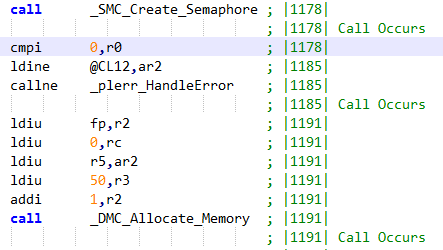
    By using v5.11, I get the following assembly code. 

    ;******************************************************************************
    
    ;* TMS320C3x/4x ANSI C Code Generator Version 5.11 *
    ;* Date/Time created: Mon Jul 14 16:25:21 2014 *
    ;******************************************************************************
    .regalias ; enable floating point register aliases
    fp .set ar3
    FP .set ar3
    ;******************************************************************************
    ;* GLOBAL FILE PARAMETERS *
    ;* *
    ;* Silicon Info : C31 Revision PG1-5 *
    ;* Optimization : Always Choose Smaller Code Size *
    ;* Memory : Small Memory Model *
    ;* Float-to-Int : Fast Conversions (round toward -inf) *
    ;* Multiply : in Software (32 bits) *
    ;* Memory Info : Unmapped Memory Exists *
    ;* Repeat Loops : Use RPTB for ALL Loops -- Disallow RPTS *
    ;* Calls : Normal Library ASM calls *
    ;* Debug Info : No Debug Info *
    ;******************************************************************************
    ; S:\Tools\texas\ti\c30\bin_511\opt30.exe -v31 -q -r -a -f -O2 C:\Users\SESA15~1\AppData\Local\Temp\security.if C:\Users\SESA15~1\AppData\Local\Temp\security.opt
    
    ...
    
    cmpi 0,r0 ; |1178| 
    ldine @CL11,ar2 ; |1185| 
    callne _plerr_HandleError
    
    ...

    Here comes another question, why I use almost the same compilation command to compile the same file by using two compilation tool chain, the result is so different from each other?

    You can see from the above example, one is "TMS320C30 C COMPILER" while another is "TMS320C3x/4x ANSI C Code Generator", and one uses CALL instruction and another uses callne instruction to call the function plerr_HandleError.

  • Alex REN said:
    We have two kinds of devices and each of them use different tool chain, one is 4.70 and another is 5.11. What differences are there in the two set of compilation tool chain?

    Those toolsets were released some 2-3 years apart.  In that time lots of work was done to improve the C30 compiler.  As you have seen, the differences in the assembly output can be significant.  This is all normal.

    Thanks and regards,

    -George

  • Hi George,

    Many thanks for your reply.

    It would be even more helpful if you can give me some more detailed information
    about the compiler toolsets update.

    Let me describe our code structure at first.

    Our project has been divided into several modules, e.g., we are using nucleus OS
    to be as an embedded operating system for our device, thus we link all .obj files
    of nucleus system to be a .lib file.
    Before we link the executable output file, we will use lnk30 to generate several
    .lib files. Then we use lnk30.exe to link all static .lib files and other .obj
    files to be an executable file, at last we use hex30.exe to convert the .out file
    to a .dat file to download it to the Flash memory of our device.

    Then I have made some test on our project.
    Originally, we use C30 compiling toolsets v4.70 to compile our program, and we
    can generate all .lib file, .out file and .dat file.
    Then I update the toolsets to v5.11, then "PC-relative displacement overflowat ..."
    error appears during the link procedure of .out file.

    I compare the .asm files generated by the two toolsets, and I find that the .asm
    file are far too different from each other.

    For v5.11, it looks like

    For the result of v4.70, it looks like

    If I modify the order of the .obj files in the linked command file, if I am fortunate, the callne may become call, then the overflow problem will disappear. 

    I think the 64K size restriction always exists no matter we are using v4.70 or v5.11 or not on DSP C30 series, am I right?

    Before we enhance our project, we always use v4.70 to compile the firmware, and the result shows that if the compiler do not tell us that there are overflow problems, the program runs well in our device. But as the discussion before, we should have seen the same overflow problem, why it isn't? 

    Can you give me some advice? I am almost crazy about this problem.

    And thank you again.

    Best regards

    Alex REN

  • The CALL instruction encodes a 24-bit absolute address.  The CALLcond instruction (the cond can be ne, eq, and so on) encodes a 16-bit signed PC relative address.  Thus, a CALL instruction has farther reach than CALLcond.  The 4.70 compiler never uses the CALLcond instruction.  The 5.11 compiler does use CALLcond.  There is no method for disabling use of CALLcond in 5.11.

    If you continue to use 5.11, you have to contend with these CALLcond instructions which do not reach and thus get that relocation overflow message.  You can fix these on a case-by-case basis by determining which function is being called, then applying the far keyword to that function.  My first post discussed how to do that.

    If you continue to use 4.70, then the compiler will never generate CALLcond.  But you do run the risk of experiencing bugs which are fixed in 5.11.

    I can't tell you which choice is better.  It depends on how you weight these concerns.

    Thanks and regards,

    -George

  • Hi George,

    Thank you very much!

    Now I know some of the differences between the two version of compilers.

    We will take some new investigations about whether update the compiler or not.