This thread has been locked.

If you have a related question, please click the "Ask a related question" button in the top right corner. The newly created question will be automatically linked to this question.

Memory use display in CCS


I'm trying out CCS  6.0.0.00190 with MSP430 GCC Tools 4.8.0.20140423,
and all the latest updates installed as of 11-July.

As any developer, I need to see current memory use by the project.
I'm expecting to see something like (image from Rowley Crossworks):
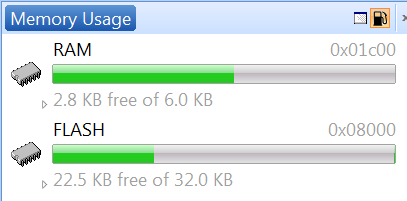
Even better would be a summary breakdown segregating RAM use (stack, heap, variables, free)
and flash (libraries, user code, user data).

Unfortunately, all I can find is this:
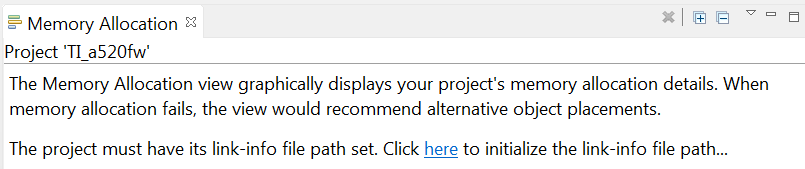
I click on "here" and nothing happens...

HELP!

Thanks in advance,
Best Regards, Dave

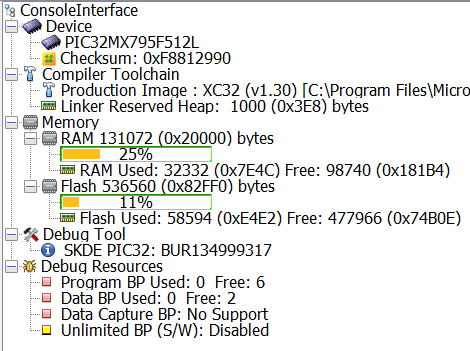
PS: Here's another example from Microchip MPLABX:
  • Dave Nadler said:
    I'm trying out CCS  6.0.0.00190 with MSP430 GCC Tools 4.8.0.20140423,
    and all the latest updates installed as of 11-July.

    The CCS Memory Allocation view appears to parse the output of the "XML link information file" which is generated by the linker of a TI compiler, as specified by --xml_link_info file option.

    With CCS 6 projects built using a TI compiler I found that the Memory Allocation view is populated.

    However, with CCS 6 projects built using a GCC compiler I saw the same problem as you, in that the Memory Allocation view didn't display the memory usage with a "The project must have its link-info file path set. Click here to initialize the link-info file path..." message. Clicking here didn't have any effect.

    Therefore, I think the CCS 6 Memory View isn't supported when a GCC compiler is used - although I can't find any statement to that effect in the CCS 6 help.

  • Chester Gillon said:
    Therefore, I think the CCS 6 Memory View isn't supported when a GCC compiler is used - although I can't find any statement to that effect in the CCS 6 help.

    Chester is correct.

    I filed two reports for this regarding the Memory Usage view. Tracking IDs are:

    SDSCM00050555 - fix misleading message when non-TI compiler is used.

    SDSCM00050556 - support GCC compilers

    Thanks

    ki

  • Thanks Ki. Are you saying that GCC is not really supported?
    I never received any reply to this inquiry; perhaps you can help?

    http://e2e.ti.com/support/microcontrollers/msp430/f/166/t/354694.aspx

  • The GCC support I was referring to was specifically for the Memory Usage view.

    In regards to your other thread - I guess it doesn't surprise me the the GCC documentation is missing. But you're right, we should have it available from within CCS instead of just pointing people to a webpage. We will look into improving this. Thanks for the feedback.

    ki

  • Neither the TI documentation within CCS nor the FAQ web page I referenced point at a web page.

    I have not located any pointer to MSP430 GCC documentation; please provide one if you have it.

    Are you going to create tickets for these issues?

    Should I give up on using this compiler before spending more time evaluating this?

    Thanks!
    Best Regards, Dave

  • All I have is a link to the older documentation on sourceforge. I first need to talk to the folks involved with mspgcc and see what we actually have and once I have an idea of what the situation is and what the best way forward is, I will file some tickets and be sure to post the ticket numbers here for your reference.

    Thanks

    ki

  • For what it's worth, I do the following to get some rough numbers regarding memory usage when using MSP430 GCC:

    1. Open up Project -> Properties -> CCS Build -> Tab: Steps
    2. Into "Post-build steps" I enter:
      "${CG_TOOL_ROOT}/bin/msp430-elf-size" --format=berkley "${BuildArtifactFileName}"
    3. Into the corresponding "Description" field I enter:
      Invoking: GNU Size Utility

    The output looks like the following:

       text	   data	    bss	    dec	    hex	filename
        226	      8	     10	    244	     f4	PROJECTNAME.out
    

    For an explanation of the output you might want to follow this link:
    https://mcuoneclipse.com/2013/04/14/text-data-and-bss-code-and-data-size-explained/