This thread has been locked.

If you have a related question, please click the "Ask a related question" button in the top right corner. The newly created question will be automatically linked to this question.

CCSv6 DDR3 register view for a TMS320C6678 shows all zeros

Other Parts Discussed in Thread: TMS320C6678

Using CCS 6.0.1.00040 to debug a TMS320C6678 the register view was reporting all the DDR3 registers as having the value zero.

If in the register view right click on the emif_mod_id_rev register and select "View Memory At Address" the memory browser opens at the correct address and displays non-zero values:
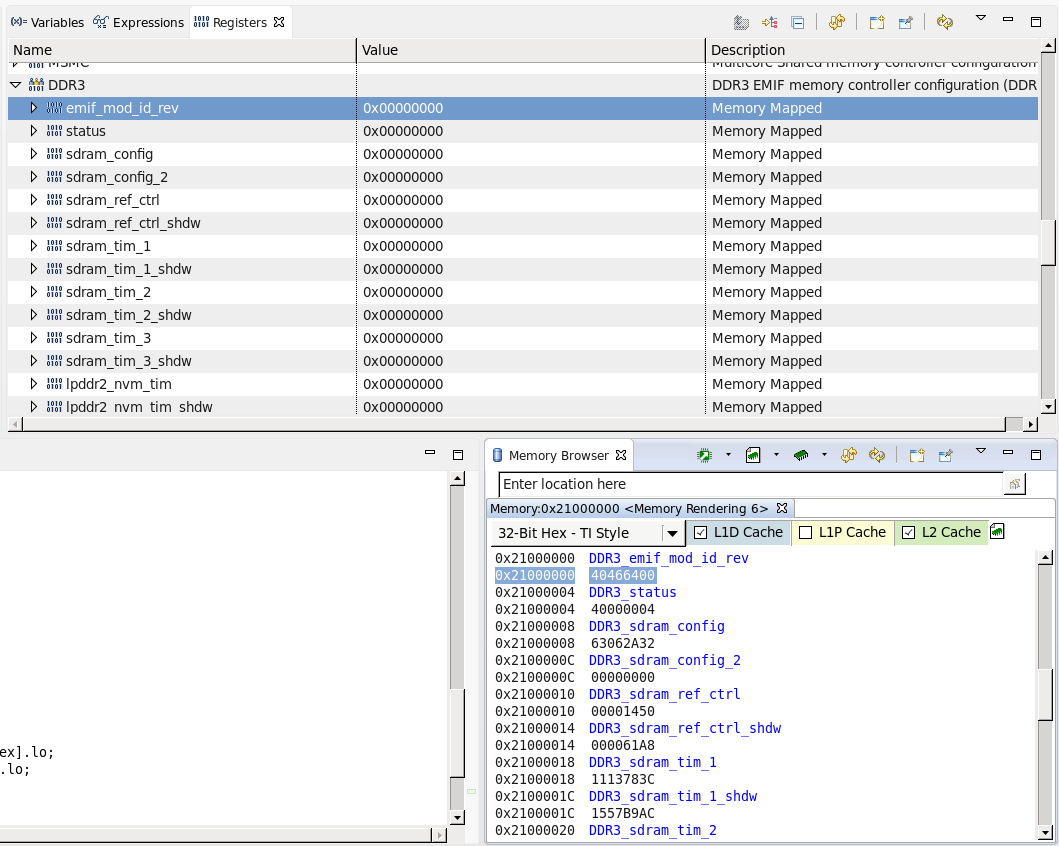
Therefore, doesn't appear to be an incorrect base address specified in the device XML files.

Also, there are no GEL files specified in the Target Configuration, so don't think the GEL memory map can be causing the issue.

  • Chester,

    I get this in several versions and tried to modify the parameters of the XML files to no avail. I will get some additional info and possibly file a bug.

    Regards,

    Rafael

  • Chester,

    I have been talking to several teams about this issue. Apparently Keystone DDR registers are physically located above 32-bit addresses and are mapped via the MPAX configuration to the address 0x21000000 (this is somehow done by default, either via a GEL function or the device bootloader).

    Given the Registers view bypasses any MMU/MPAX address translation but still obey what is shown in the Device XML file (which states that DDR3 registers are physically at 0x21000000), the result is a sea of zeros (there is nothing physically at 0x21000000).

    Therefore, you can still show the content of these registers in the Register view by doing a somewhat nasty workaround that turns all memory accesses into CPU accesses (not physical). This will also turn ineffective all the L1/L2 cache coloring (as CCS cannot differentiate between the L1/L2 and the physical memory contents).

    To do that, simply open the Scripting console view (menu View --> Scripting Console) and issue the following command:

    eval('DEBUG_DefineFakeMemLevel( 0, 0 )');

    The definitive fix for that is somewhat intricate, as it will imply issuing exceptions to the Register view. The exception itself is not a problem, but the fact it is device-dependent (even Keystone2 devices may be different) tends to create problems in the long run. 

    In any case, I will see what can be done in this regard.

    I apologize for the inconvenience,

    Rafael