This thread has been locked.

If you have a related question, please click the "Ask a related question" button in the top right corner. The newly created question will be automatically linked to this question.

CCS errors with new installation for CC3200 launchpad

Other Parts Discussed in Thread: CC3200, CC3200SDK

I have just installed CCS version 6.0.1.00040  in an attempt to bring up the CC3200 Launchpad with project 0,  the wlan_station example.  Whenever I try to build the project, however, I get an error as follows:

An internal error occurred during: "Refreshing paths and symbols".

java.lang.NullPointerException

Also the following error and warning are given with ti_rtos_config:

Error:  This project was created using a version of XDCtools that is not currently installed: 3.30.4.52_core. Please install the XDCtools of this version, or migrate the project to one of the supported versions.

Warning: Build variable 'TARGET_CONTENT_BASE' cannot be resolved.

In addition, the following error is given for oslib:  Cannot build project. Referenced project 'ti_rtos_config' contains build-errors.

The project builds and loads fine using IAR embedded Workbench, so I believe that this is a misconfiguration of CCS.  What is XDCtools, and how do  I install it or change versions?

Any advice will be appreciated.

  • Hi,

       Follow the CC3200 Getting Started Guide first. The document is in the CC3200 SDK installation.

    - kel

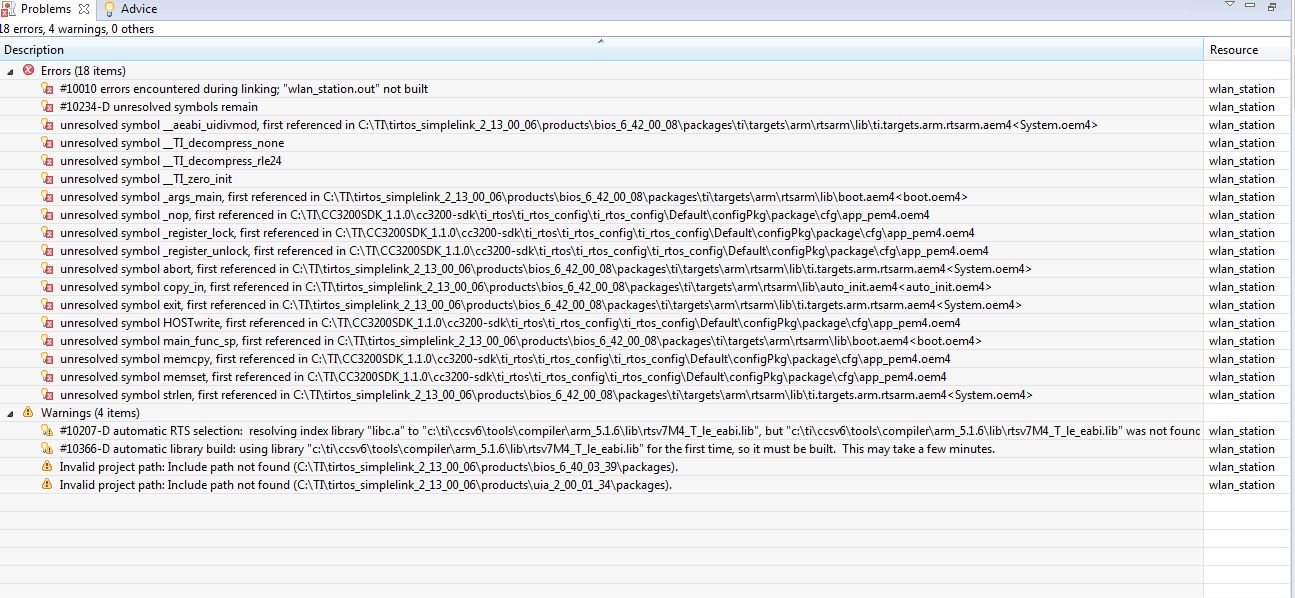
  • I reinstalled CCS and set the ti_rtos_config properties appropriately.  After following the specified compile order, I was able to get successful builds on everything except for wlan_station, which gave a slew of error and warning messages regarding unresolved symbols as follows (see below).  It seems as though a critical library is not being properly referenced.  I would appreciate any suggestions


    unresolved symbol memset, first referenced in C:\ti\CC3200SDK_1.0.0\cc3200-sdk\ti_rtos\ti_rtos_config\ccs\Default\configPkg\package\cfg\app_pem4.oem4 wlan_station    C/C++ Problem
    unresolved symbol memcpy, first referenced in C:\ti\CC3200SDK_1.0.0\cc3200-sdk\ti_rtos\ti_rtos_config\ccs\Default\configPkg\package\cfg\app_pem4.oem4 wlan_station    C/C++ Problem
    unresolved symbol main_func_sp, first referenced in C:\ti\tirtos_simplelink_2_01_00_03\products\bios_6_40_03_39\packages\ti\targets\arm\rtsarm\lib\boot.aem4<boot.oem4> wlan_station    C/C++ Problem
    unresolved symbol exit, first referenced in C:\ti\tirtos_simplelink_2_01_00_03\products\bios_6_40_03_39\packages\ti\targets\arm\rtsarm\lib\ti.targets.arm.rtsarm.aem4<System.oem4> wlan_station    C/C++ Problem
    unresolved symbol copy_in, first referenced in C:\ti\tirtos_simplelink_2_01_00_03\products\bios_6_40_03_39\packages\ti\targets\arm\rtsarm\lib\auto_init.aem4<auto_init.oem4> wlan_station    C/C++ Problem
    unresolved symbol abort, first referenced in C:\ti\tirtos_simplelink_2_01_00_03\products\bios_6_40_03_39\packages\ti\targets\arm\rtsarm\lib\ti.targets.arm.rtsarm.aem4<System.oem4> wlan_station    C/C++ Problem
    unresolved symbol _register_unlock, first referenced in C:\ti\CC3200SDK_1.0.0\cc3200-sdk\ti_rtos\ti_rtos_config\ccs\Default\configPkg\package\cfg\app_pem4.oem4 wlan_station    C/C++ Problem
    unresolved symbol _register_lock, first referenced in C:\ti\CC3200SDK_1.0.0\cc3200-sdk\ti_rtos\ti_rtos_config\ccs\Default\configPkg\package\cfg\app_pem4.oem4 wlan_station    C/C++ Problem
    #10010 errors encountered during linking; "wlan_station.out" not built wlan_station    C/C++ Problem
    <a href="file:/c:/ti/ccsv6/tools/compiler/dmed/HTML/10234.html">#10234-D</a>  unresolved symbols remain wlan_station    C/C++ Problem
    unresolved symbol strlen, first referenced in C:\ti\tirtos_simplelink_2_01_00_03\products\bios_6_40_03_39\packages\ti\targets\arm\rtsarm\lib\ti.targets.arm.rtsarm.aem4<System.oem4> wlan_station    C/C++ Problem
    #10366-D automatic library build: using library "c:\ti\ccsv6\tools\compiler\arm_5.1.8\lib\rtsv7M4_T_le_eabi.lib" for the first time, so it must be built.  This may take a few minutes. wlan_station    C/C++ Problem
    unresolved symbol _args_main, first referenced in C:\ti\tirtos_simplelink_2_01_00_03\products\bios_6_40_03_39\packages\ti\targets\arm\rtsarm\lib\boot.aem4<boot.oem4> wlan_station    C/C++ Problem
    unresolved symbol _nop, first referenced in C:\ti\CC3200SDK_1.0.0\cc3200-sdk\ti_rtos\ti_rtos_config\ccs\Default\configPkg\package\cfg\app_pem4.oem4 wlan_station    C/C++ Problem
    unresolved symbol __TI_zero_init wlan_station    C/C++ Problem
    unresolved symbol __aeabi_uidivmod, first referenced in C:\ti\tirtos_simplelink_2_01_00_03\products\bios_6_40_03_39\packages\ti\targets\arm\rtsarm\lib\ti.targets.arm.rtsarm.aem4<System.oem4> wlan_station    C/C++ Problem
    unresolved symbol __TI_decompress_none wlan_station    C/C++ Problem
    unresolved symbol __TI_decompress_rle24 wlan_station    C/C++ Problem
    #10207-D automatic RTS selection:  resolving index library "libc.a" to "c:\ti\ccsv6\tools\compiler\arm_5.1.8\lib\rtsv7M4_T_le_eabi.lib", but "c:\ti\ccsv6\tools\compiler\arm_5.1.8\lib\rtsv7M4_T_le_eabi.lib" was not found wlan_station    C/C++ Problem
    unresolved symbol HOSTwrite, first referenced in C:\ti\CC3200SDK_1.0.0\cc3200-sdk\ti_rtos\ti_rtos_config\ccs\Default\configPkg\package\cfg\app_pem4.oem4 wlan_station    C/C++ Problem

  • Hi Mike,

        Are you installing at Windows 7 PC. Try delete all the imported projects at workspace and import the projects again as mentioned at the getting started guide.

    - kel

  •  Hi Kel,


    I'm working on cc3200 launch pad. When I compiled oslib project, I'm seeing same errors (which is mentioned by Mike). I have deleted all the imported projects at workspace, Also created newly, still getting same errors. Please suggest if any other problem solving methods.


    Rajesh


  • Hi Rajesh,

    Did you follow the CC3200 Getting Started Guide?

    At oslib project properties->General, set configuration to ti_rtos, after that build oslib.

    - kel
  • Hi Kel,

    Yes, with reference to  the guide, I configured the project.

    Yes, I tried the oslib processor.

    Rajesh

  • I solved this issue by removing all the files and folders related to previous installations of CCS. I went into C:\users\<username>\Appdata\Local. There are three folders named Local, Local Low and Roaming. I removed all the folders in those names folders under Local. Then I ran a cleanup through CCleaner. Please be advised, clearing the folders Local, Local Low and Roaming means that you clean all the cache that is stored. Then try compiling the rtos configuration files and it should work fine. I did this a windows 10 laptop.