This thread has been locked.

If you have a related question, please click the "Ask a related question" button in the top right corner. The newly created question will be automatically linked to this question.

CCS v6, Memory Browser does not show Q values


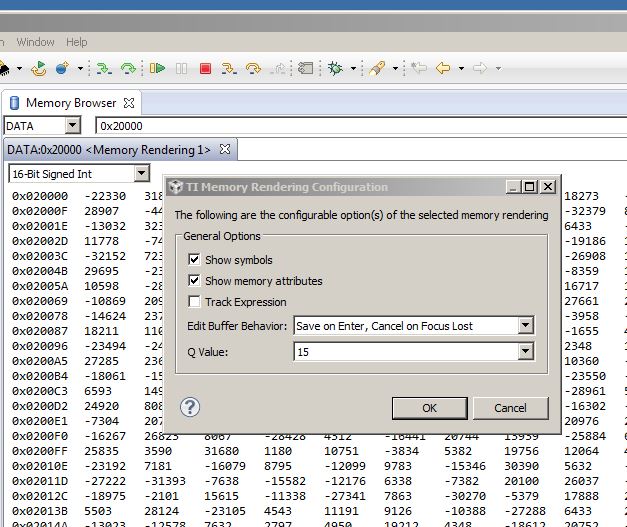
Is it just me who has this problem with CCS v6? Going to context menu "Configure..." within Memory Browser and selecting a Q Value does not change the display format to be in fractional integer. Is this a bug or am I doing something wrong?

All I want is to see my memory displayed in a selected fractional integer format.

Thanks,

Roland

  • Roland,

    Please see this related thread. Try using the Expressions view instead to display the Q values.

  • Thanks AartiG.

    OK, I can enter something like *0x20000 as expression in the Expressions window and then I can select the Q represenation of the data at address 0x20000. Yes, this works. But what if want to see the contents of a memory range from, lets say, 0x20000 to 0x20100, as Q-Values?

    The Memory Browser offers the selection for displaying its data in Q-Values. Why doesn't it work?

    Regards,

    Roland

  • Roland Welte said:

    The Memory Browser offers the selection for displaying its data in Q-Values. Why doesn't it work?

    Could you attach a screenshot of this, as I don't see that selection in my CCS?

    Maybe the memory browser doesn't support displaying the data in Q-values, in which case I could file an enhancement to see if it can be implemented for a future release.

  • AartG,

    You can select 'Q Value' in the context menu 'Configure...' of the Memory Browser. But setting it does not show any effect in the Memory Browser.

    The display of integers in a fractional integer format is like bread and butter when developing fixed-point algorithms. TI is a DSP company, or is it not anymore? I don't understand how such a basic functionality could be dropped from the memory window in CCS after version 3.3.

    Many thanks for your attempts for correcting this,

    Roland

  • AartG,

    Just an addition to my previous post. For the Q Value selection to show up in the context menu of the Memory Browser its display format needs to be set to a 16 or 32 bit integer format first. This does make sense.

  • I entered this in our bug tracking system. The tracking # is SDSCM00051007, and you may track its status using the SDOWP link in my signature.