This thread has been locked.

If you have a related question, please click the "Ask a related question" button in the top right corner. The newly created question will be automatically linked to this question.

CCS v3.3 versus CCS v6

Other Parts Discussed in Thread: TIGER, CC3200

OK, guys, I'm writing this post in order to let some steam off, because I'm utterly upset about how we DSP developers have been forced by TI to work with mediocre CCS versions beyond legacy CCS v3.3 and beyond Windows XP.

I have been working with TI digital signal processors since 1989, starting with the C25. Initially I have developed under DOS, followed with the IDE from GO DSP and eventually have worked with every version of Code Composer Studio. I believe that my work history qualifes me enough to judge the quality of the Eclipse based IDEs as compared to v3.3. I have reached the following conclusions after I have spent quite some time evaluating CCS v6 by working with a C55x project that was originally developped under CCS v3.3. So I was able to compare CCS v3.3 side by side with CCS v6.

It's unbelievable, that 5 years after TI has abandoned CCS v3.3 and has released CCS v4, v5 and v6, we still have to work with an IDE that doesn't even come close to CCS v3.3. Normally, as versions of an IDE evolve they get better, offer more functionality and contain less bugs. At least, this was the case with each new version of CCS, up to v3.3. But with the release of v4 it took a turn for the worse. I can only assume the reasons for this sad situation. TI probably had to cut costs and outsourced their IDE department somewhere offshore. They may indeed save some costs now but it appears that all their knowhow for a great IDE for DSP development has been lost. It looks as if the new guys had to start with a clean sheet and that their expertise is not DSP.

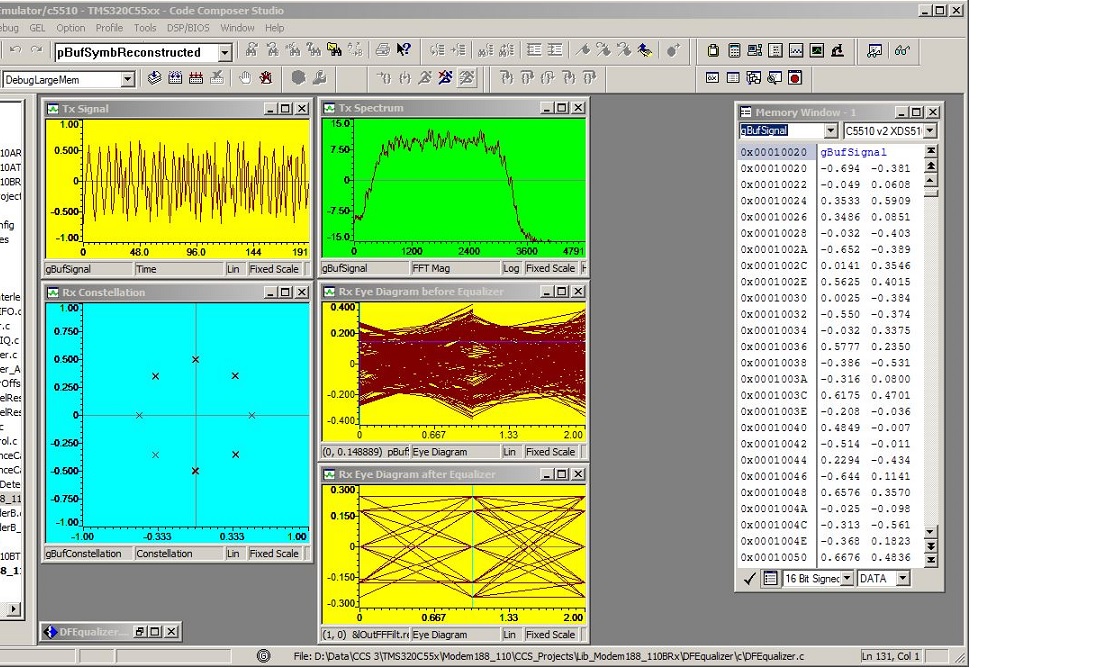
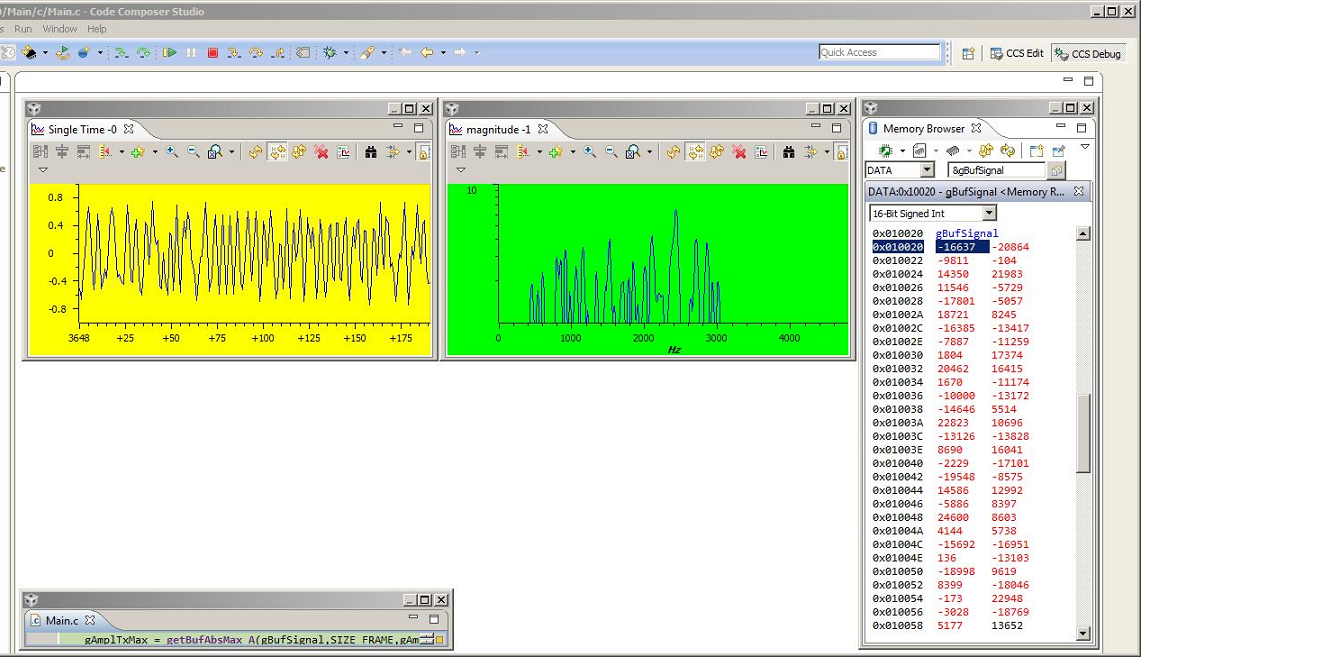
Naturally, the basic operations like creation and building of projects (TI still writes the tool set, I guess) work fine but when it comes to debugging and analysis then it turns into a total disaster. I can live with the nuisance of having different sessions for edit and debug. But looking at the two screen shots below from debugging sessions in CCS v3.3 and v6 for the exact same project tells everything that's wrong with Eclipse based CCSs. One might think that v6 is a much earlier version than v3.3. Visualisation in CCS v6 is about as crude as it can get. Why not just duplicate all graphs and their properties as they were available in CCS v3.3? Why start from scratch and make so many mistakes?

The Time Graph is the only graph that works about right. The FFT Magnitude graph is unusable. Scaling and windowing does not work properly, there is no peak-and-hold feature (very important), a logarithmic vertical axis does not show in dB. There is no Constallation graph and no Eye Diagram graph available at all. What are these people thinking? All this has been available for years and was working beautifully before CCS v4. Do we really have to reinvent the wheel?

The contents of a memory window can not be displayed in fractional integer format (has now been filed as a bug). Considering that this format is the mostly used format when developing fixed-point algorithms and assuming that this bug has been in there since v4 one can only wonder.Looking at the Memory Browser in the picture below, one also sees that the last location shown in the window does not change to red color after its value has changed.

If I have a legacy project that depends on DSP/BIOS then there is no CPU load graph and no user message log available in CCS v6 anymore. Simulators are also gone in CCS v6. So when I'm working during a flight on a plane I will need to connect an evaluation board to my notebook to be able to work? Give me a break.

A major drawback that started with CCS v4 is the fact that RTDX is not supported anymore. With RTDX one could develop and debug DSP code for systems with a host processor without actually having the host processor working. All communication through the host port of the DSP could be relayed via RTDX through the JTAG interface over to a host processor simulation running on the PC and written, for instance, in Visual C++. This feature was invaluable, in particular, when there was no other interface free to be used on the DSP. I do know that GUI Composer does replace RTDX in some way but it does not come close to a RTDX capable UI written in Visual C++.

Having said all the above I realize that my writing may offend a few people. I do apologize for this but I just had to voice my total disappointment with the Eclipse based CCS versions. They can not be used for any serious DSP development.

For TI, I suggest to make CCS v3.3 completely compatible with Windows 6 and beyond and to keep supporting it. We DSP developers will then be more than happy staying with v3.3.

For the development team in charge of Eclipse based CCS versions, I strongly recommend that you check out how CCS v3.3 works, especially with regards to visualizations. You can simply copy from there and it will be fine.

.All the best,

Roland

Screen shot of CCS v3.3:
Screen shot of the same debugging session on CCS v6:
  • Roland,

    Nothing wrong with a little venting.  Current CCS and Vintage CCS are really like two separate environments.  Back in the Vintage CCS days our primary focus was really on hard core DSP developers like yourself, we had support for TI automotive MCUs but the bread and butter was DSP.  After 3.x the focus switched to MCU with more and more MCU users coming on board to the point where they make up the bulk of users today.  The needs of those users has very much been driving things and their needs have been different.  I don't think I could give CCSv3.3 to a new MCU user today and have them up and running without a huge deal of hand holding.  Whereas with CCSv6 they can get up and running with everything need to get started very quickly.  Conversely we have DSP users like yourself that we will have to pry CCSv3.x from their cold dead fingers.  It was a specialized environment that did what was needed and people are comfortable with it.

    CPU load, execution graphs... are still available but not when using RTDX based transport.  In newer versions of BIOS (TI-RTOS) there are alternative transports (real-time mode, UART, TCP/IP).  Unfortunately in the case of C55x support for that family is not present in the newer releases.  Support for C64x+ and C66 is there but not C55x.

    As far as the graphs you are correct that current CCS is lacking when compared to vintage CCS.  There have been some efforts to improve them but they do still fall well short.  I hope that we can make some improvements to close the gap more but I also don't want to over promise.

    As far as running CCSv3.x on newer OSs, in general this is possible.  A number of us in Apps have it running on Windows 7 machines.  The install complains a lot due to the 32 bit drivers but after installation you can get the 64bit drivers from Spectrum or Blackhawk (depending on your vendor) and once you get the drivers installed for your emulator things generally work fine.  I try to avoid changing my target configuration a lot as Windows 7 does some funny things with virtualizing the registry.  Windows 7 will never truly like CCSv3.x due to the extended use of the Registry but they can get along enough to function.

    Regards,

    John

  • Hi John

    Many thanks for your reply. At least someone is listening. The lack of support from fellow DSP users is rather troubling. I guess they are just sticking to their beloved CCS v3.3 and do not frequent this forum. Why should they anyhow - they are working with a mature IDE? Yes, it indeed looks as if you will have to pry that CCS v3.3 from my cold dead fingers ;-). Unless you guys can deliver something good enough that can really replace it. But that may take another 5 years and by that time I will be retired.

    I do, of course, run my CCS v3.3 under Windows 7, but one needs to run it with Administrator privileges, something that is normally against my company's policy. And when I do a 'Find in Files ...' search it freezes CCS most of the time indefinitely. Maybe you can give me a tip on how to solve that particular problem? Otherwise it does run fairly stable.

    BTW, do you know of any plan by TI to also abandon the C55x family in the near future?

    Wishing you a great weekend,

    Roland


  • Roland,

    I just checked one of our lab machines and we have 3.3 setup to run as admin and it is also running in compatibility mode for XP SP3.  If you are not switching targets you should be able to get away without running in admin mode.  Admin mode is needed when changing targets and loading a different set of plug-ins (3.3 is made up of a pile of COM plug-ins).  Those actions require changes to the registry.  

    It has been a long time since I have done this but I remember going through it with a number of universities where students couldn't run as admin.  Basically you had to install as admin.  Setup your target once in cc_setup as admin and then run once as admin.  After that you could run as a normal user.

    If you have to change targets then running as user is more challenging as you essentially have to go and make a couple of sections of the registry modifiable by your user account.  You IT dept likely won't go for that.

    I am not having any trouble with find in files.  Try un-checking the box to search in subfolders.  The max path length allowed in windows has increased over the years.   Maybe something in CCSv3.3 is choking when it encounters a path that is too long?

    As far as the C55x roadmap I don't have much insight into that.  The team in the C55x forum could provide more info.  I believe we just released a couple new devices this past year.

    Regards,

    John

  • My sentiment is the same. I have been using CCS since 1999. After trying out CCS4 I decided to go back to CCS3.3. Then CCS5 came out. Once again I tried to use the latest CCS, and again I went back to CCS 3.3. RTDX is something I use all the time. WIthout RTDX or anything equivalent to it I cannot migrate from CCS3.3. I do hope TI decides to abandon the new CCS and proceed with CCS3.3 back again.

    I am currently running CCS3.3 inside WinXP which is inside a Virtual Machine. I managed to get everything working including RTDX with Blackhawk XDS560 emulator. Have not been able to do the same with Spectrum Digital XDS510USB.

    TI has taken 10 steps backward with the new Eclipse based CCS. WIth CCS 4,5,6, XDS560 class emulator is just an expensive equivalent of XDS510. Without RTDX there is no point of using a high speed emulator. You don't need high speed emulator for functional stop mode debugging. Manufacturers like Spectrum Digital and Blackhawk should just stop selling XDS560.


    Whenever somebody requested for training I have to base the training on CCS3.3. The new CCS is not a fitting tool for real-time DSP development. I wonder if TI still sell license for CCS3.3?

    My problem now is with new processors, especially the DM series. Since there are no DSP/BIOS for them(the new one is SYS/BIOS), hence no RTDX, there is no way to do development on them except by using the dumb down tool CCS 4,5,6. Or am I wrong? Is there a way to port the SYS/BIOS to old CCS 3.3?

  • Hi Eruan,

    Thanks for adding your input regarding the sad situation when it comes to comparing CCS v3,3 against its successor versions. But the fact that you are the only one besides me who is complaining in this thread just shows that there is no reason for TI for changing anything. The Problem will be that most of the new developers who work with CCS 4 and beyond have no clue how good an IDE really could be. They do not know what they are missing. They grew up with Eclipse based environments and feel comfortable with them despite the fact that the built-in analysis features are total crap.

    But you will eventually have to migrate if you want to work with the new chips. TI gives you no other choice. I also depend completely on RTDX (such a cool feature) with all my DSP developments since it allows me to be completely independent of any host processor that controls the DSP chip in the system. Thanks to it, I never had to debug my DSP code in a common debugging session together with a host processor.

    I run CCS v3.3 under Windows 7 64-bit Enterprise Edition pretty much successfully. There are a few quirks (crashes on search over files, can not disconnect and reconnect with the target) but I can live with them. I work it with XDS510USB and LAN560 emulators.

  • Hi Roland,
    Do you have any experience with Visual DSP from Analog Devices? I wonder if it is comparable to CCS 3.3? I think Tiger SHARC family of processors are comparable to TI' DSP.
  • No, sorry, I do not. Besides TI DSPs I have only worked with 24-bit DSPs from Motorola (long, long time ago). The amount of signal processing power that one can put into the low power C55xx architecture when utilizing all its available hardware features (Assembly required, not accessible from C) is astounding. I do not know how Analog Devices compares to this.
  • I have a very similar story to those above, I only found this thread whilst looking for answers on how to make CCS 6 work.  At least I have an answer now, but not what I wanted to hear, it'll never work!!

    I have been using CCS 3.3 for 9 years now and have tried newer versions but had to go back to 3.3 to get work done.  The CPU load and logs missing in new CCS is a huge issue for me.  We are now moving to a new DSP and so have to go with the new toolset.  Despite hours trying I can't get the F2812 working with TI-RTOS (bugs in the target config tools) so in CCS 6 I have to use legacy BIOS 5.4, which would be fine if the debug worked, but it doesn't.  It's really disappointing that TI don't support the older processors and removed the debug tools we relied on.  

    Simon

  • I just started using CC3.3 with a blackhawk emulator.  That is what the company I am working for now uses because of the same issues I see above.  However I also am having issues with the Find in Files feature hanging the software. Does anyone have a solution?

    Gerald

  • Hi Roland

    I agree 100%. I have also been programming DSP's for over 10 years. The fact that the Execution Graph is still not supported for the C5000 devices is no very nice. I prefer the old CCS 3.3 to get work done!

  • Gerald:

    I have not discovered a direct solution for the Find In Files problem. I get by with using an external file search application (FileLocater Pro).

    Roland
  • Simon, Maarten:

    Many thanks for also voicing your disappointment. At least, there seem to be a few more TI DSP developers out there who also feel that CCS versions after CCS 3.3 are not suitable for doing any serious work. As JohnS has said above, he will need to pry CCSv3.x from our cold dead fingers ;-).

    Roland
  • That is what I ended up doing as well. I set up a dummy project in visual stuidio.  As long as I don't forget which window I am in I am fine.

  • Hi Roland,

    I found the solution to use "Find in Files" is in "Search" dialog. Open the Search window, click on the "Customise..." button, only keep "File search" checked. If you keep "C/C++ search" checked then CCS won't keep on using "File search". Btw, the files to search only applied to opened projects. So, if any file inside a project's folder but is not added to the project then it won't be searched.

    I know, it sucks.

    So, to search for all files, I use a shell script in Linux/Mac to search text in files.
  • Hi rcfocus,

    Many thanks for your comments. However, I don't quite understand what you are saying. Is your solution really referring to CCS v3.3? What do you mean with "Search Window" and "Customise..." button. Unless I'm totally clueless, there is no such thing in v3.3 like a "Customise..." button in a "Search Window". There is a "Customise..." submenu under menu "Option" but that does not apply to your suggestion.

    Please clarify.

    Roland
  • Hello,

    Given the recent activity on this issue, can I ask if any of you have managed to get CCS v3.3 running under windows 10?  Like the other posters here I need to stick with CCS v3.3 and couldn't get it working in windows 10.  It's hard to get legal win7 licences now for a new PC.  I ended up getting a windows 10 pro OEM licence so could downgrade to win7 pro, but this isn't ideal and made PC choice limited.

    Any help would be appreciated.

    Simon

  • I came across this looking for a solution to the CCS 3.3 bug that causes it to crash during "Find in Files"...a big nuisance, cause it can mess up a complex debugging session..It has a lot of other pesky bugs (not saving watch window display types with IQ variables), etc.  But still like it for a lot of the reasons mentioned above.  Seeing that in lots of applications it is irreplaceable, I add my vote that TI would fix some of the more egregious bugs for those that still need it...

  • I an going to throw in my support of the horrible CCSv6 as well.

    As Roland Welte wrote, (and I think i agree with this) "I can only assume the reasons for this sad situation. TI probably had to cut costs and outsourced their IDE department somewhere offshore."

    So, now a bunch of Indians are getting rich (at least as far as they are concerned,) American programmers are looking for jobs, and CCS totally sucks.

    I started with CCSDSK, then moved to v3.3, and it was the best thing since sliced bread.

    When TI make the jump to using eclipse, CCS went dead, as far as I am concerned.

    Using an environment, like eclipse, that is designed to 'do all things for all people'  was a horrible decision. It can do Java programming, Android programming, C to z80's FORTRAN, and a host of other things.

    It is a Jack of all trades, Master of none.

    Except for the actual compiling of the code, CCSv4+ does almost nothing right.

    One can't set colors easily, it is a nightmare trying to figure out what part of the settings to go to (no less then 5 different places,) or what labels mean what things, and some things override others.

    When changing from development to debug, all the window positions I carefully set up get changed to something completely different.

    Editor files do not get saved automatically before compilation. I can go on and on...

    I will be installing CCS3.3 again (I may leave CCSv6 so I can use some of the advanced features, Oh wait, there are no advanced features that 3.3 doesn't have.)

    So, bottom line, My vote CCSv4+ totally sucks, 3.3 is great.

    Mark.

  • Many thanks, Mark, for also voicing your disappointment with CCS beyond v3.3.

    According to JohnS you also belong to the group of DSP developers from whom he will have to pry CCSv3.x from their cold dead fingers. Problem is that all these new DSP users who are working with CCSv4+ cannot realize how bad the eclipse based environments really are because they never had the chance to work with CCSv3.x.
  • I have a similar story -- I've been working on TI DSPs since 2000.  In about 2009, I started working on OnSemi's BS300 on Eclipse, Pic micros on MPLAB, and most recently Analog Devices SHARC processors on Visual DSP.  Then this year I returned to TI to develop on the CC3200 using CCS 6.2 and now 7.x.  

    I have been very disappointed (really) at how buggy and poorly integrated Code Composer Studio has become.  It is challenging even to get it to install correctly.  I am looking to alternatives to CCS that I might recommend to my team.  I understand Keil is *not* an alternative at this time for the CC3200.  It looks like IAR may be the only alternative.  Has anyone worked on the CC3200 using IAR (Embedded Workbench)?  If so, I would appreciate your guidance.  

    For now, we are locked in to the CC3200, but the Nordic offerings look very interesting.  They seem to have support from both Keil and IAR on their nRF52x.  

  • Count my voice too.

    Let me say again: without constellation graph digital engineer is just handicapped.

    I am in business since 2004, used 3.1 and 3.3. Now have to work with Eclipse because of C6670. Support of that processor is another sad story, as e2e support in general (yes, I remember the times when support manager contacted me whether I was satisfied with my support experience). The only positive thing about Eclipse is richer editor. However, I would trade that for RTDX and XY plot.
  • JohnS said:
    As far as running CCSv3.x on newer OSs, in general this is possible.  A number of us in Apps have it running on Windows 7 machines.  

    Sure, that might save legacy design development on newer machine. However, consider C6670, which is wireless & telecom SoC. It is not supported in v3.3, so one have to work in Eclipse. Without constellation graphs, without Q-format. So the possibility to run v.3.3 does not relieve necessity to fix v.4+.