This thread has been locked.

If you have a related question, please click the "Ask a related question" button in the top right corner. The newly created question will be automatically linked to this question.

CCS v6 does not see installed ARM compiler


I am running CCS v6.0.1.00040 under Windows 7 Home Premium. I have successfully built and debugged C55x projects with it.

I have now downloaded various ARM compiler versions but CCS v6 does not show any of them unter Window->Preferences->Code Composer Studio->Build->Compilers, even though these compilers are installed in the correct directory (see pictures below). When I create a new project for a Sitara device, I can only select the PRU compiler not an ARM compiler.

Many thanks for helping.

Roland

  • Hello,

    I'm wondering if you have the proper components installed for ARM. When you installed CCS, I assume you did a custom install. What device families did you install?

    Thanks

    ki

  • Hi Ki,

    You are correct, when I originally installed CCS v6 I installed for device families C55xx and MSP430. Just now I added device famililes Sitara, C6xxx and OMAP. They all show up for selection when creating a new CCS project. But I can only select the PRU compiler for the Sitara devices, there is no ARM compiler to select, even though I see all compiler versions of ARM from TI and GCC in the compiler directory of CCS.

    So there is still something missing for ARM. How do I fix this? If at all possible I do not want to do a reinstallation of CCS:

    Thanks,

    Roland

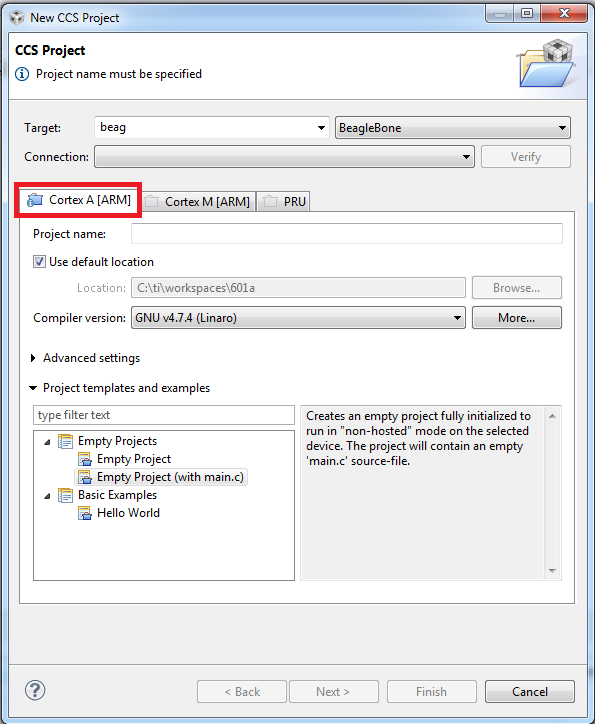
  • What device are you selecting in the new project wizard? If it is a device that has a programmable ARM, you should see a tab for it:

    If it is missing, can you show me a screenshot?

    Thanks

    ki

  • Hi Ki,

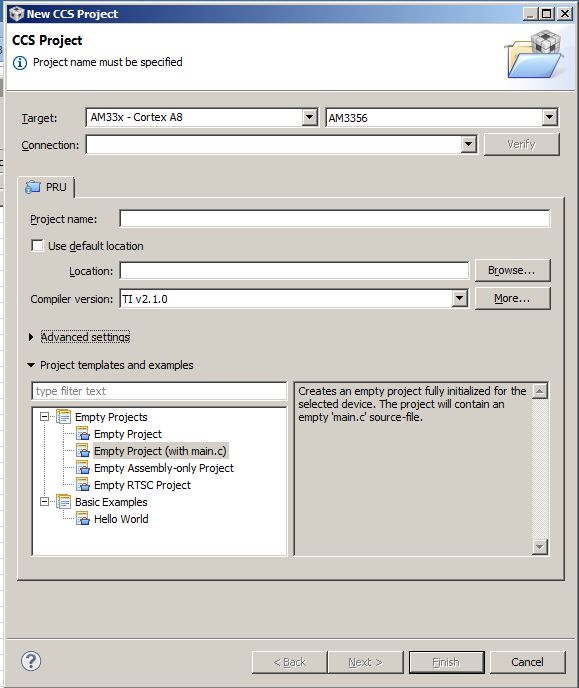
    This is how it looks on my side. I have only a PRU tab. I can select AM33x and AM473x targets and it looks the same for all of them..

  • It does look like you are missing the Sitara components... except you said you installed them.

    If you re-ran the installer and added the option I highlighted below, you should have it...

  • Thanks Ki, I'll do this.

    Although I believe that selecting Help->Install New Software...  and then choose Device Support should have done the job. After all, I'm able to select Sitara devices when creating a new project which indicates that adding new devices partially did work, but obviously not completely.

    Best Regards,

    Roland

  • Roland Welte said:
    Although I believe that selecting Help->Install New Software...  and then choose Device Support

    ah. I was wondering if that is what you originally tried. No, that is not enough. That will add additional device support for device families that are already installed. It doesn't install all the dependent components to use them. You need to rerun the installer for that.

    But you raise a good point regarding how the update name "Device Support" is misleading. We need to clean that up.

    Thanks

    ki